Low End Mac Reader Specials
TypeStyler For Mac OS X is Now Shipping! Download The Free Fully Functional 60 Day Tryout at www.typestyler.com
OWC: Mercury On-The-Go FW800+USB2 up to 1.0TB. Bus Powered, no external power supply needed. Macworld Editors Choice, CNET Very Good Starting from $99.97, 500GB $159.99. Click here
Don't install Parallels to play poker online! Poker Mac will show you how
to download and install a native Mac poker application such as Full
Tilt Poker Mac.
Laptop Hardware Provided by TechRestore - Overnight Mac & iPod Repairs.
Compare products like desktop computers, apple laptops, apple macs, and LCD Monitors side by side! All the information and reviews to make the best purchasing decision for new mobile phones, sat nav systems, or MP3 players. The Ciao online shopping community makes searching products easy for you.
Mac Daniel's Advice
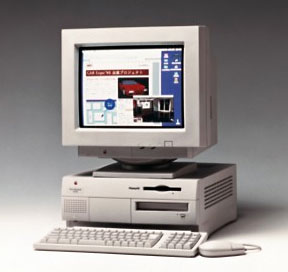
Upgrading a Power Mac 7200 or 7500
Dan Knight - 1998.10.24
Can I upgrade my 7200/75 to a G3?
TJ sent this letter: I thought I'd ask you for advice regarding whether or not it would be worth it to upgrade my Power Mac 7200/75 to a G3.
I know it probably sounds crazy, but I don't see the use in spending $1,400 on a new G3 with a new hard drive and brand new memory when I can get a 7500 motherboard for $450 and drop in a G3 card into it for another $400. I already have 2.5 GB of storage (which I haven't filled up yet) and 32 MB of RAM, which is fine for me.
So, what do you think? When I bought my Mac three years ago, it was the most Mac I could afford at the time (on a student budget). The price difference between my 7200 and a 7500 was on the order of $500, and I couldn't afford that at the time. Anyway, I knew that the processor wasn't upgradable, but I needed a Mac.
The question is, should I do the motherboard transplant or not, or wait until January when the new Macs come out?
Mac Daniel writes: Your 7200 was a nice computer in its day, but a limited one. To keep it from competing with the 7500, Apple intentionally designed it so you couldn't upgrade the CPU.
Prices on used Power Macs are a moving target, but one generally moving downward. As Mac OS X approaches, I expect prices for pre-G3 models to continue dropping.
A look in the back of Macworld shows one dealer selling a used 7500/100 with 16 MB RAM, 1 GB hard drive, and CD-ROM for $695. The same dealer is selling a 7200/75 8/500/CD for $499.
In light of that, I wouldn't recommend a motherboard transplant at $450, then another $400 for a G3 card. Instead, find a nice used 7500, drop your hard drive and memory into it, put the drive you remove from the 7500 into your old 7200, and then sell your 7200 for $400-500. Net cost: $200-300 depending on shipping and exactly what you buy and sell the computers for.
Now, instead of budgeting $400 for a slow G3 card, budget $600 for one with a faster CPU and larger and/or faster level 2 cache. Spend the rest of your savings on memory to reach 48-64 MB total. (For more details on G3 upgrades, see our Guide to G3 Daughter Cards.)
Not only is this a good value for you, but it will give you the opportunity to help someone step up to a Power Mac with your old 7200.
Upgrading a 7500 for graphic work
RB sent this letter: Got a user who has a Power Mac 7500 and says its running too slow for his graphics intensive applications development (Photoshop, Illustrator, Web stuff). He suggests a daughterboard and L2 cache additions vs. a new motherboard.
How about a whole new computer?
What do you think?
P.S. I'm not a Mac person, (PC) so I need all the help I can get to make an intelligent decision
Mac Daniel writes: The 7500 was a very nice computer, albeit slow. The original came with a 100 MHz PowerPC 601. It was a decent performer, but not a high end machine. (I know, I used to have one on my desk.)
The 7500's saving grace is the CPU slot that allows you to pull that ancient 100 MHz 601 and replace it with a 604, 604e, or G3. It can make a world of difference.
For instance, I'm using a 7600 at work. It came from the factory with a 256 KB L2 cache and 132 MHz 604 processor. This was a big improvement after my 7500 and made a much better design computer (FrameMaker, Freehand, Photoshop).
We have a bunch of Power Macs in our design department - all but the newest with CPU slots. At this point, we've upgraded four of them with G3 cards. Two have Newer Technology 250 MHz G3 cards with 512 KB backside cache, which cost use about $1,200 when we bought them. Two more were just upgraded with 300 MHz Newer Tech cards with 1 MB backside caches.
The improvement is incredible, even for users who had 180 MHz and 200 MHz 604e cards.
Even though I'm not a power user (I'm an information systems manager and part-time graphic designer), I've managed to upgrade my 7600 with the castoffs from these older computers. For quite a while I had a 180 MHz 604e card, but now I have a 200 MHz card and a 1 MB L2 cache. Subjectively, this seems a lot more than 10-15% faster than the old 180 MHz setup.
What it boils down to is this: Your user is right, it makes more sense to put a faster CPU daughter card in the old 7500 than replace it with a whole new computer. Whether you drop in a $200 200 MHz 604e card or $2,000 400 MHz G3 card, you'll see a huge and immediate jump in performance. And the G3 upgrades come with an onboard L2 cache, so you don't have to make a separate investment. (For more details on G3 upgrades, see our Guide to G3 Daughter Cards.)
Best of all, you can invest some of the savings in other things that can increase productivity, like more memory and/or a larger, faster hard drive.
If the budget's a bit tight, there is an active market in used CPU cards pulled during upgrades. Even a 132 MHz 604 (maybe $50) offers roughly double the throughput of the 100 MHz 601. (On the other hand, you'll hear upgrade rumblings a lot sooner if you don't at least triple performance.)
Not sure if you should upgrade your old Mac or replace it? Check the Mac Daniel index to see if we've already addressed your problem.
Recent Mac Daniel columns
- WiFi Hardware Compatible with Desktop Macs Running OS X, MetaPhyzx, 03.11. USB, ethernet, PCI, and other wireless hardware compatible with Mac OS X.
- WiFi CardBus Adapters Compatible with PowerBooks, MetaPhyzx, 03.11. CardBus hardware and drivers compatible with PowerBooks running Mac OS X.
- WiFi PC Cards Compatible with PowerBooks Running OS X, MetaPhyzx, 03.11. PCMCIA/PC Card hardware and drivers compatible with PowerBooks running Mac OS X.
- WiFi PC Cards for PowerBooks Running Mac OS 9, MetaPhyzx, 03.10. PCMCIA cards and drivers reported to be compatible with PowerBook running the Classic Mac OS.
- More in the Mac Daniel index.
Links for the Day
- Mac of the Day: 17" iMac G4/800 MHz, July 2002 - The iMac 'grows up' with a 17" 1440 x 900 display.
- Group of the Day: LisaList supports Lisa users.
- November 8 in LEM history: 99: OS 9: I think I like it - 01: The simplified Mac life - Soured on Windows - Flea market Mac - 02: Little room for improvement in new 'Books - Combo drive upgrade for iceBooks - 04: Re-Porter - 05: Fix the old iMac or buy a Mac mini? - Apple's Copland project - 06: MacBook Core 2 - MacBook value equation - Cheap is as cheap does - 07: Problems with Classic mode in Tiger - The G4 Power Mac that won't run Leopard
- Support Low End Mac
Recent Content on Low End Mac
- Quad-Core CPU Makes Sense in MacBook Pro, OS X 10.6 Causing Overheating, Overseas Power, and More, The 'Book Review, 11.06. Also Late 2009 MacBook reviewed, how to add RAM to new MacBook, 18.4in Acer notebook used Intel i7, and SanDisk SSD chosen for Sony VAIO X.
- Dumping Macs for Google Apps, SSD in iMac, Late 2009 iMac Performance Problems, and More, Mac News Review, 11.06. /newsrev/09mnr/1106.html
- WiFi Paranoia, iMac-O-Lantern, Magic Mouse Does Click, Free Clipboard Managers, and More, Charles W. Moore, Miscellaneous Ramblings, 11.05. Also strange time stamps, problem with ColorIt on Intel Mac, and the story behind OS X 10.5.4 install discs.
- IDE Is Dead; Long Live SATA!, Dan Knight, Mac Musings, 11.04. SATA has displaced parallel ATA. While IDE hard drives haven't disappeared, the best deals are in SATA hard drives.
- QuickTime X in Snow Leopard Imports, Trims, and Publishes Video Quickly and Easily, Alan Zisman, Zis Mac, 11.04. The long, slow process of importing video into iMovie to edit it, then render it to another format, is history as QuickTime X does that much more quickly.
- More links in our archive.
Recent Deals
- Best Mac Pro Deals, 11.03. Used 2.66 GHz 4-core, $1,300; 3.0 8-core. $2,299; refurb 2.66 4-core Nehalem, $2,149; 2.93, $2,549; 2.26 8-core, $2,799; 2.93, $4,999.
- Best iPhone Deals, 11.03. New 8 GB iPhone 3G, $$99; refurb 16 GB 3GS, $149; new, $199; 32 GB, $299.
- Best 12" PowerBook G4 Deals, 11.03. Used 867 MHz SperDrive, $348; 1 GHz, $499; 1.33 Combo, $298; SD, $559; 1.5 Combo, $448; SuperDrive, $589.
- Best Power Mac G3 and PCI Video Card Deals, 11.02. Used beige 300 MHz, $25; G4/366, $49; blue & white 350, $80; 400, $90; 450, $105; PCI video cards from $15; shipping additional.
- Best Power Mac G4 and AGP Video Card Deals, 11.02. Used 400 MHz, $50; 733 MHz, $69; 933 MHz, $209; 1.25 GHz dual, $299.
- Best 15" MacBook Pro Deals, 11.02. Used 2.0 GHz, $800; 2.2, $900; 2.4, $1,000; refurb 2.53, $1,449; 2.66, $1,699; 2.8, $1,949; 3.06, $2,169; new 2.53, $1,579; 2.66, $1,799; more.
- Best Mac mini Deals, 10.30. Used 1.33 GHz G4 mini, $379; 1.42, $389; 1.5, $419; 1.83 GHz Core Duo, $350; Core 2, $439; new 2.26 GHz nVidia, $580; 2.53 GHz, $770; Server, $990.
- Best G4 iBook Deals, 10.30. Used 12" 1.07 GHz Combo, $225; 1.33 GHz, $298; 14" 1 GHz, $349; 1.33 GHz, $398; 1.42 GHz SuperDrive, $498.
- Best Classic Mac OS Deals, 10.30. System 6.0.8 floppies, $10; 7.1, $12; 7.5, $20; 7.5 CD, $4; 7.6 $13; 8.1, $11; 8.5, $20; 8.6, $90; 9.0, $20; 9.2.2, $30.
- More deals in our archive.
About LEM | Support | Usage | Privacy | Contacts
Navigation
Used Mac Dealers
Apple History
Video Cards
Email Lists
Favorite Sites
MacSurfer
MacMinute
MacInTouch
MyAppleMenu
InfoMac
Macs Only!
The Mac Observer
Accelerate Your Mac
RetroMacCast
PB Central
MacWindows
The Vintage Mac
Museum
DealMac
DealsOnTheWeb
Mac2Sell
ramseeker
Mac Driver Museum
JAG's House
System
6 Heaven
System 7 Today
the pickle's Low-End
Mac FAQ
Abandonware
Petition
Mac vs. PC Info
Affiliates
The Apple
Store
Mac
Connection
B&H
MacMall
TechRestore
ExperCom
Crucial
Memory
batteries.com
Advertise
MacMinute
MacInTouch
MyAppleMenu
InfoMac
Macs Only!
The Mac Observer
Accelerate Your Mac
RetroMacCast
PB Central
MacWindows
The Vintage Mac
Museum
DealMac
DealsOnTheWeb
Mac2Sell
ramseeker
Mac Driver Museum
JAG's House
System 6 Heaven
System 7 Today
the pickle's Low-End
Mac FAQ
Abandonware
Petition
Mac vs. PC Info
Mac Connection
B&H
MacMall
TechRestore
ExperCom
Crucial Memory
batteries.com