
1998 – Today’s MacDaniel column answers questions from two different readers asking about upgrading their Power Mac 7100s.
How Can I Speed Up My 7100/80?
SM writes: I have a Power Mac 7100/80, with 48 MB of RAM and an 800 MB hard drive, which I use for Web surfing and occasional word processing only. The one thing I could use is some improvement in speed, so I’m tempted to get a Mac with a faster chip speed, but my temptation is held in check by the state of my bank account.
Any suggestions?
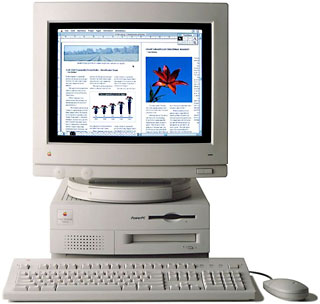 Mac Daniel writes: Your 7100 runs a PowerPC 601 at 80 MHz, which was pretty fast back in 1995. If you’re happy with everything else, it doesn’t make much sense to switch computers when inexpensive accelerators are available.
There are variable speed accelerators for the 7100 that let you boost the speed of your current CPU. However, they’ll only add about 10% more speed, so they probably aren’t worth the time or effort. (On a 7100/66, they could be.) Also see Overclocking First Generation Power Macs for hands-on overclocking information.
I don’t have any hands on experience with 7100 upgrades, but I see that Sonnet is selling a Crescendo 604e accelerator for $199 these days [1998].* The 604e is about 50% more powerful than the 601 at the same clock speed – but this runs at 200-220 MHz! You wouldn’t just be seeing “some” improvement in speed, but a huge one, probably on the order of 4-5 times what you have now.
For the price, I’d say it’s definitely worth looking into.
* I’ve since learned that although Sonnet is still advertising the 604e card, supplies seem to have vanished.
Upgrading a 7100 Until I Go G3
EB wrote: I wanted to get your feedback on a Power Mac 7100/66. I know I want to run Mac OS X Server, so I’ll need new hardware soon. But until then what can I do with my 7100/66 (250 MB hard drive, 24 MB RAM, CD, external Jaz)?
It certainly does seem that it has been getting slower but I’m not sure if it is me or the OS upgrades I have been feeding it. I was wondering if there are any comparisons of the speed of a 7100 with the various operating systems. Currently I am running Mac OS 8.1.
I use the computer for email (Eudora), connecting to Unix machines (Better Telnet), and page layout (FrameMaker)
Thank you for your input.
Mac Daniel writes: If performance is an issue, see my response to SM (above). Dropping a relatively inexpensive 604e card into your 7100 will make a world of difference.
But you haven’t really identified a bottleneck. If you’ve gone through several system updates, something as easy as running diagnostics (Norton Utilities, TechTool Pro) and optimizing the hard drive will improve performance. This is especially true if your drive is fairly fragmented and you’re using Virtual Memory.
Your 250 MB hard drive is getting old and probably nearly full. Clearing out old files will help a little, but you should be able to drop in a 1 GB or larger drive for under $125. Not only will this give you more room for your files, but newer drives are faster than older ones, so you’ll see an improvement there as well.
I haven’t experimented with this, but I’ve heard that setting Virtual Memory to twice physical RAM (in your case, 96 MB) offers the best performance. You probably can’t even try that on a 250 MB drive, but if you do buy a larger drive, give it a try. Compare this with performance at 1 MB over physical RAM (virtual set to 49 MB) and with virtual off. [I have since experimented on many different Macs and versions of the Mac OS, and in general Virtual Memory off provides the highest CPU score, followed closely by Virtual Memory set at 1 MB above physical RAM. Higher amounts of Virtual Memory generally result in slightly poorer CPU scores.]
Another way to tweak drive performance is by using a large disk cache (2-4 MB works nicely). In addition, Speed Doubler offers a more intelligent caching scheme than Apple does, so you can see further improvements in disk performance with Speed Doubler (about $55).
If your CD player is sluggish, look into the CyberDrive 24x and 32x drives, two models I know are bootable with the Macintosh. Prices start at about $100 for the 24x internal drive.
BTW, I’m a fellow FrameMaker user. I learned it on a IIci, later used it on a Centris and a Quadra, but I couldn’t believe how much faster it became on the Power Mac. It’s a very powerful program that really impresses me.
Reader Feedback
AS writes: I have been upgrading my 7100/80AV over the past several months, I thought I’d add my thoughts to your recent column. I replaced the original hard drive with a bigger and faster (7200 RPM) drive, increased the RAM, installed a Newer Tech G3 (240 MHz/1 MB) board, and just installed Mac OS 8.5. I keep the drive in shape by running Norton Speed Disk every couple of months and Disk Doctor somewhat more frequently, when I have time. The machine sings. The upgrade cost a little less than an iMac . . . the benefits, keep peripherals as they are, superb office productivity (Office 98 and ClarisWorks 5.0), vastly improved image processing and video editing/production (with Photoshop 5.0 and Premier 5.0), and Sherlock, which is mind boggling even over a modem connection.
Incidentally, the install of Mac OS 8.5 with the Newer Tech board was almost too easy. (1) Ambrosia’s SnapZPro got bombed, but I was able to reinstall it and it works flawlessly, and (2) I had QuickTime 3.0 Pro installed with 8.1, and after it got reinstalled with 8.5, I got warning on reboot that QT could not be properly installed. I had to turn off the old QT in Extensions Manager and reboot for the machine to be happy again.
JL writes: I enjoyed your article today on Speeding up a Power Mac 7100 – the letter from SM fits my 7100 config and bank account situation exactly. I was very interested in your comment that “Sonnet is selling a Crescendo 604e accelerator for $199,” but I can’t seem to find any mention of a 604e accelerator at Sonnet’s website or in any of the online catalogs. All I can find is the Crescendo G3 in various speeds, with prices starting at $499. If you could point me to some info on the 604e card or to an online reseller with prices and info, I would really appreciate it.
Mac Daniel responds: I’ve received several emails like yours. Although Sonnet is still listing the 604e card in its ads, it seems that upgrade is out of production and sold out everywhere.
Darn – it offered a lot of value! I’m emailing Sonnet to see if they know of any remaining inventory, or even might consider another production run.
GY writes: I wish that I could drop a 604e into my 7100, but that isn’t the case. The only option is one of the G3 cards, remove the L2 cache, hope it works, and there are issues with G3 cards and 8.5 on some systems.
I did most of the same things with my 7100 as I did with its predecessor, a Centris 650 (I almost let Shreve Systems do a logic board upgrade). Put in a 7200 rpm Barracuda, 88 MB RAM, 24X CyberDrive (nice!) and a VillageTronic Sonata Pro 24 video card with QD/MPEG acceleration and 24-bit 4 MB VRAM.
And though I thought I would need or want a G3, now I feel satisfied and am running 8.5. But I did find that adding the LibMoto extension from Motorola really did make a noticeable difference and one everyone should be using (you would think 8.5 wouldn’t need it and have the code installed right?).
When I look at what I spent, $200 Sonata Pro, $250 Barracuda, memory prices are going up, $130 for CD (front panel and overnight shipping), and that one could do it gradually, I almost could have bought something with all that in there, like an iMac or something (refurb) after selling the 7100 ($400?).
But I enjoyed the learning experience and wanted to stay with SCSI.
One odd thing was that with 8.5 the new QuickDraw routines interfere with the MacPicasso extensions installed for the Sonata Pro that caused the system to fight and take an extra 2-3 minutes at the end of startup. Weird stuff that. Glad got it cleared up.
But my video still isn’t as fast as it could be. the PDS HPV card maybe is faster than NuBus and the AV is faster yet? But the LibMoto, which affects FPU, enhances video graphics.
And it seems that the Newer G3 is more reliable, fewer problems, etc. When I read the tech support notes on the Sonnet G3 and possible problems and workarounds, remove the G3, install 8.5, then put back in, and some software has to be reinstalled after installing the G3 PDS card, building a video adapter for your PDS HPV card to use with G3 . . . messy.
JE writes: I saw you’re article on some speed improvements for 7100’s. I have a few more suggestions.
- Check the memory control panel. If you have enough RAM, turn Virtual Memory off – it really does run slower with VM, in my opinion.
- Check the memory cache. Every time you reinstall the OS or zap PRAM, the RAM cache gets reset to 96K – a very small amount. I normally use 512K or 1024K RAM cache – this can make a real difference.
- I also installed Sonnet’s 240 MHz G3 upgrade. Stock 7100s need the $99 video adapter (total cost was $748 – very worth it). I’ve been running over a week with no real problems, and much faster scrolling and application launching. In general everything is faster. I highly recommend it. For a cheaper G3 option, the 210 MHz version + video adapter will run you about $550. I consider both to be well worth the money.
Mac Daniel responds: Good points – especially the first two, which can apply to any Power Mac. Rule of thumb is to set cache to 1 MB for every 16 MB of RAM in the system. It’s not a hard-and-fast rule, but it tends to provide a nice boost in system performance.
Keywords: #powermac7100
Short link: http://goo.gl/6SgIeK
