
This was the first Mac Daniel column published – way back in October 1998.
RH writes: The Color Classic is hands down the coolest of the integrated “classic” Macs. The styling and color made the compromises I’ve read about trivial in comparison. So it might be a “tad” slower than some of the other Macs – it looks cool, right?
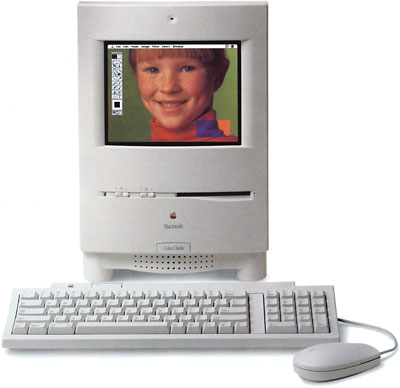 Then I inherited one of them. Wow. Talk about slow. If you have one of these systems and are used to even the oldest of the Power Macs, this machine will severely test your patience. So what could I do to make this good looking, but mechanically flawed, computer work better?
First things first, max out the RAM. It cost $32 to upgrade to 10 MB. While that’s the maximum, it’s also the bare minimum for a usable computer (despite what those die-hard Mac 512K users say). The store I bought it from installed it for me and showed me how easy it was to pull the motherboard on this machine. Wow! Nice touch Apple! Wish they were all that easy.
The next step was a bigger hard drive. I quickly hit the ceiling on the 80 MB hard drive, and it was awfully slow. So I ran out and plopped down $80 on a 1 GB hard drive. It not only gave me more free drive space than I will ever need on this machine, it also perceptibly increased the speed of the system.
Now I was able to surf the web using Netscape 2.02 or IE 3.02 (barely) without it disconnecting or freezing routinely. Yee Haw!
Next, the screen size wouldn’t let me do a lot of things, so I sent it off to MicroMac and had them do the screen upgrade for $100. This increases your display to a standard 640 x 480. And again, on it’s own seemed well worth the investment. The fonts were a little smaller, but it’s not that much different from using a Duo 2300c.
So far I’d spent $212 on the machine (plus shipping and install costs). It was closer to almost great than insanely great though. It was still slow as molasses. There are three viable upgrade cards on the market:
Motherboard Swap with Performa 575
- Finding a motherboard was hopeless. The cheapest was $350, and if I hadn’t had the screen fix done, I’d either have to or get some hard to find system enabler for it to run on the 512 x 384 screen. Not to mention that the motherboard had better have its own memory and VRAM, because you can’t exchange the memory on your Color Classic with that on the 575. So really, the cost to anyone else would be at least $450, more if your exchange didn’t have adequate memory.
MicroMac ThunderCachePro
- The other option was the 50 MHz 608030 from MicroMac. The ThunderCachePro sells for $300. It will let you upgrade to 32 MB of RAM (roughly another $64), and won’t let you run OS 8.1. *note that the web site says prices start at $199, but all the prices start at $249.* Sure it’s cheaper than a motherboard swap, but it can’t run OS 8.1, and including memory it would cost $363.
Sonnet Tech Presto Plus
- The final hope I had was the Sonnet Tech Presto Plus. Ethernet? I don’t need it. Won’t. But it’s a nicety for their intended market. Built-in memory? That’s a savings of $64 from the other machines, and the way their literature reads, that’s on top of the 10 MB I already have, giving me a huge 42 megs of RAM. But it’s not for sale yet, and when it is, the press release quotes it at $299 without FPU and $399 with FPU.
So the cheapest upgrade was $300. Is it worth it? No way. Used Color Classic’s sell for $250 regularly on eBay. So really I’ve got about $550 to spend. If I really wanted more power, the best choice would be to sell it, and buy a Quadra 700, a nice 15″ monitor, and load it to the gills, I could probably even squeeze in a QuadDoubler ($199) at the prices I’ve seen lately. It would probably be faster than the 50 MHz 68030 and allow you to run OS 8.1
For less than $200 more (notice this is still less than the cost of the most expensive upgrade option listed above) I could find an 8100/80 Power Mac. It may be slow by 1998 standards, but it’s blisteringly fast compared to the Color Classic.
So what’s a person to do? Esoteric do-it-yourself PowerPC upgrades aside, not much. Until the price of the ThunderPowerPro goes down to $199 (I’m not counting on Sonnet Tech to reduce the price of a new item anytime soon), I’m sticking with this setup just as it is. Spending more than $200 on this machine is silly when you can get a Quadra for the cost of selling it and an upgrade. And even then I’m not likely to ever recoup my investment.
Were the upgrades I did worthwhile? Absolutely, I’d label them essential, in fact. Would I do more upgrades if they hit a $200 price point? You bet. Why? Even though it’s not “economically viable, and I’ll never recoup my investment, the Color Classic is still the coolest looking compact Mac out there. But is it rational to upgrade beyond where it is? Probably not.
Mac Daniel writes: There’s something very special about the Color Classic – and it certainly isn’t the specs, which leave a bit to be desired. No, it’s that tiny case with the beautiful color screen, a huge step up from the 1-bit black-and-white compact Macs.
Users the world over love to modify the Color Classic, especially the Japanese, who even have even managed to squeeze in a G3!
The Color Classic is a sweetheart – but crippled. I officially rate it a Road Apple because of the 10 MB memory ceiling and the 16-bit data bus (the 68030 is a 32-bit processor). Although users said the Color Classic was what the Classic should have been, I believe the Color Classic II (alas, never sold in the US home market) was what the Color Classic should have been. With the same case and screen, the CC-2 has a 33 MHz CPU on a 32-bit bus and supports up to 36 MB of memory.
But the Color Classic II is rare, even in Asia.
Of course, you have a modified Color Classic that’s gone as far as it can without a CPU upgrade. And that 10 MB memory limitation means a CPU upgrade that doesn’t support more RAM is a poor investment.
Of the options you list (and I know of no others), I’d lean strongly toward the Sonnet Presto Plus. With 32 MB of memory on top of the 10 MB you already have, you’ll have breathing space for your programs. Since the Color Classic doesn’t include an FPU, my advice would be to buy the less expensive Presto Plus, the one with a 68LC040. You’ll have a huge performance increase and save $100.
As for ethernet, you may want it sooner than you think. With ethernet, you can network with an iMac or attach a cable modem, which should be the hot connection option for the next several years.
Best of all, you get to keep that sweet little computer instead of upgrading to a pedestrian box with a separate screen.
The only drawback is that at this point the Presto Plus is an unknown quantity. Production has already been delayed once or twice, so nobody has actually used it. But based on personal experience with Sonnet accelerators, I expect it will ship when everything works as expected – and not a day sooner.
So for $300 more than you’ve already invested, you’d have Quadra 650 performance in a compact Mac.
I wouldn’t recommend a Quadra 700 unless you’re getting an incredible deal on it. At the very least, look at the similarly priced Centris 650 (same 25 MHz 68040, but expandable to 132 MB and with room for an internal CD-ROM drive) or the slightly faster (33 MHz) Quadra 650. Both are similar in size to the Q 700, but support twice the RAM, have three NuBus slots, and are 1-2 years newer.
And once you’ve purchased the new computer, you’ll still need to add a monitor and may also need to boost memory beyond the 8-16 MB they commonly have.
You’ve mentioned that your Color Classic is worth about $250 – but would you part with it so you could buy a more powerful Mac? Seeing the investment you’ve already made, I doubt it. (But if you are, I have a son who would love to find one. I think he wants to start his own Mac collection to rival mine.)
I hope you find this feedback helpful. Let me know what you decide.
RH wrote back to let me know he’s waiting for the Sonnet Presto Plus to ship to make a final decision, but is strongly leaning in that direction.
Keywords: #colorclassic #colourclassic #colorclassicupgrade
Short link: http://goo.gl/xG4k2d
searchword: colorclassicupgrade
