
1999 – How did System 6 and its features work with 2-8 MB “high end” Macs like the Mac II?
With the introduction of the Mac Plus in 1986, it became both possible and economical for people to buy and use Macs running 1 MB of RAM or more. MultiFinder, introduced with System 5.0 (System 4.2, Finder 6.0) in October 1987, allowed one to run more than one application at a time. This is known as multitasking. MultiFinder effectively replaced the original Mac Finder, because the Finder did not support multitasking.
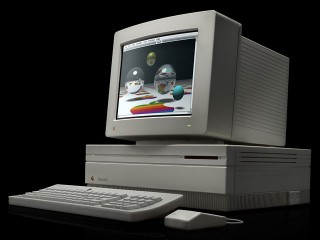 With the extra memory installed, applications and files that were 1 MB or larger in and of themselves could be used. Among these programs were color painting and desktop publishing. To better accommodate these tasks, the 16 MHz 68020-based Mac II was created offering about 3x the processing power of the Mac Plus.
The Mac II was revolutionary in that one could use a video board that could support either black-and-white or color monitors. Typical color boards gave the Mac the ability to view images in 16 or 256 colors. The former is useful to those creating items like 11″ by 17″ posters, while the latter was useful for viewing and modifying color photographs.
To accommodate the Mac II, Apple created a succession of Systems from 2.0 to 5.0 within about a year’s time. By the time System 6 was created, all of the key features that were required had been perfected. System 6 could be run on just about any Mac from the Mac Plus with just a single floppy to the Mac II series that had one or two floppy drives and a hard drive.
Software developers who were into gaming (such as Cassady and Green) also took advantage of the Mac II and created arcade programs like Crystal Quest, Spaceway 2000, and Glider. Others created games like Patriot Command and Space Junkie. In order to run some of these games, an additional part of the operating system called 32-bit QuickDraw was needed.
32-bit QuickDraw seems to be more of an item needed for games and some graphic programs. Workhorse programs like Canvas and UltraPaint ran quite nicely without it. The same applied to the generic word processor. 32-bit QuickDraw is the one System 6 accessory that is optional. This is especially true for Macs that were limited to black and white screens. The main reason for this is that System 6 with QuickDraw requires as much as 800-1,000 KB to run. System 6 without QuickDraw is about half that size.
In 1991, Apple issued System 7. The big features that System 7 has over System 6 are:
- MultiFinder runs continuously
- Virtual memory (requires a 68020 with PMMU or 68030)
- Access to more than 8 MB of RAM using 32-bit addressing
- Color icons. One could alter the shape and color of folders with simple cut and paste procedures.
Given the recent release of Mac OS 9, System 6 seems to be a quaint antique. However, there are many antique Macs out there, and for especially for the 16 MHz ones, System 6 is the OS of choice.
Keywords: #system6 #macii #maciix #maciicx #maciici #maciifx
Short link: http://goo.gl/rb7jYH
