
1999 – I have been hearing a lot about USB products lately. I do not have a Mac with built-in USB and was wondering if I should upgrade to take advantage of this new technology?
Before looking into USB, make sure you have the minimum requirements to run it. You will need a PCI Power Mac (or a Mac clone) with at least OS 8 installed. Next, look at the reason you want USB. Is it for input devices (joysticks, keyboards, and mice), or is it for data input and output (video capture, hard drives, and modems)?
Once you have determined this, you can sort out what you should get.
If you are looking for data input and output, you should ask yourself if you really need another port on your computer. Macs that do not have built-in USB will have SCSI or IDE built in. Both of these will offer much faster transfer speeds than USB can provide and would be better suited for hard drives, CD-ROM, CD-R drives, or similar devices.
If you are looking for a modem, you should stick with a serial modem – the cost of a USB card plus a USB modem will be higher than for a standard external serial modem.
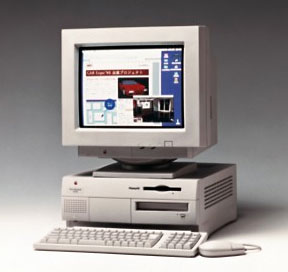 Before buying a USB card so that you can then get a USB video capture device, look at your Mac and make sure it doesn’t already have video capture built in. Many Macs either came with video capture or had it as an option. The Power Mac 7500 is one computer that came standard with video capture capabilities. Even the recently retired Beige Power Mac G3s had it as an option.
Just make sure that you look into the computer’s alternatives your Mac already has before purchasing a USB card.
If you are looking to get a USB card so you can use some of the new USB input devices, that’s a different story. There are far more devices out there for USB then for the old Mac’s ADB. If you have a PCI slot to spare, then it may be a good idea to take the plunge because of how cheap USB cards are.
Picking a USB Card
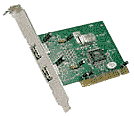 You do not need to get a Mac specific USB card – most PC PCI USB cards work fine in a Mac. I bought an Entrega USB card for $34.99 at Best Buy. I purchased the card so I could use the Cyborg 3D joystick from Saitek, which only comes in USB.
There are many other USB-only input devices out there, with more to come. These new devices give you more buttons, more control in your (input sprocket) games, and more selection of styles so you can choose exactly what you want – or what you think feels best. There is even a USB controller that looks and acts just like the PlayStation Dual Shock controller and will give you a very similar gaming experience to that of a real PlayStation.
Bottom line: Do not buy a USB card if all you want is a new keyboard and one button mouse. Do not buy a USB card if you are looking for some sort of USB media storage device – chances are your Mac already has a faster alternative. Definitely buy a USB card if you are looking for new USB joysticks or mice. The low price for the USB cards, plus the ease of use and higher bandwidth of the USB standard compared to ADB make it a good deal.
Further Reading
Keywords: #usbcard
Short link: http://goo.gl/f5SjNW
