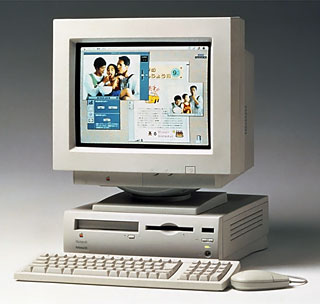
Mac Daniel's Advice

Upgrades for a Centris 610, Performa 630

Dan Knight - 1999.01.06

What Upgrades Are Viable for My Centris 610?

ME writes: So, my Centris 610 . . . (I can hear you already. Hopelessly outdated; buy a 7500.)

Okay, fine. Anyway, my Centris 610 cost me $30. (University surplus store; it's raining G3 towers on campus right now, so they're dumping these things like mad.)

What would you do with the thing? Not necessarily upgrade advice; what would you do to bring it into the late 90s in terms of add-ons. It's stock with ethernet. What's the most I can expect it to do without replacing the motherboard (which I am more likely to do than buy an accelerator card; I hate "Frankensteining" machines. That eventually leads to the computer's vapor lock and subsequent death.)

Be advised, incidentally, that some of the most prominent sources of those $550 7500s seem to be practicing a bait-and-switch. One of my coworkers went through an endless dance with a vendor advertising that unit at that price, only to have him eventually quit answering her phone calls.

Mac Daniel responds: C'mon, I'm not going to look down on someone who uses a Centris 610. Shoot, I was using one myself until last June.

What you can do to update the 610 just a bit:

  • Increase VRAM to 1 MB for higher bit-depth.
  • Increase RAM to at least 20 MB - more if you can afford it.
  • Consider a newer, faster (and larger) hard drive. Lots of dealers are selling Apple 1.2 GB drives for US$99 these days.
  • If you can find it, consider a 128 KB level 2 cache, which improves performance 15-30%.

I would be hard pressed to recommend an accelerator, since they cost more than the entire computer is worth these days.

As for the $550 Power Mac 7500s, I only know one dealer with that price (no, I'm not naming names here - email me privately if you want that information). They tend to be sold out of a lot of computers, at least that's what I see comparing their Web listings to their Macworld adds.

But that's not necessarily bait-and-switch. Magazine ads are usually due two months before publication, making it impossible to know what inventory will be when the magazine appears. I have purchased from this dealer, as have several others I know. Service has been prompt, prices have been as published, and sometimes the used Mac has more equipment than quoted (I got lucky with a slightly larger hard drive and a bit more memory).

As for the phone calls, they can cut deeply into the profits of a small operation, particularly one with a very low margin. It's possible the dealer your coworker is having problems with decided it couldn't make money due to the phone calls and decided to cut its losses. Still, that's no excuse for leaving people hanging - integrity says you at least explain why you're not calling back.

Pros and Cons of Performa 630 Upgrades

ABV writes: Please give pros and cons for the upgrading my current Performa 630 CD. I have System 7.5, 8 MB of RAM plus RAM Doubler, the TV and video tuner, a 250 MB internal hard drive, a 500 MB external drive, and an HP DeskWriter 550C. I'm trying to upgrade the system to run programs such as Photoshop, Avid, ClarisWorks, and surfing the Net (I'm using Global Village 14.4k modem).

Mac Daniel responds: To turn your Performa 630 CD into a Photoshop, video, and Web surfing machine, you need lots of memory - real RAM, not virtual memory or "doubled" memory. (Besides, Photoshop doesn't like RAM Doubler or virtual memory.)

Apple only designed the 630 to take a 32 MB SIMM, so you're limited to 36 MB. That's plenty for the Internet or ClarisWorks. It may be adequate for Photoshop and Avid, but it may also be less than you want. That depends on your work.

Now that 56k modems have come down in price, you should seriously consider one. (See my No Hype 56k Modem Page for more modem information.) Between the modem and memory, you're probably looking at around US$125.

For serious video work, you may want a larger hard drive. Go external. You can pick up a nice 4 GB SCSI drive for under $300. And that about takes you to the end of the line without the expense of a new motherboard.

The only real downside of all these upgrades is that not a single one of them makes your 33 MHz processor run any faster. That will remain a bottleneck.

Reader Feedback

Mitch Planck writes:

Centris 610

BS writes: I have a Centris 610 that I bought about 7 months ago as my first computer and my first Mac. I bought it solely for use on the Internet. I started off using Netscape Navigator 4.0, but an unfortunate accident while trying to upgrade it forced me to replace it with whatever I could find. What I could find was Netscape Gold 3.0, a prerelease beta, I believe. It was the best thing I could have done. It takes up less hard drive space than Navigator 4.0, plus I get the features of Communicator like email and news. Oh, and it does Java, too. Not well, but much better than Navigator 4.0 would (which is not at all with a 68040)

Performa 630

MP writes: I've got a Performa 637CD, which is still my main computer, although I will probably be buying a new G3 sometime this year because it is so slow, but I have done a bit up updating along the way. I started with System 7.5, 8 MB RAM, and a 350 MB hard drive. I now have System 8.1, 36 MB of RAM, and a 6.4 GB internal IDE hard drive. I have the hard drive partitioned into two parts, a 1 GB HFS partition and a 5.4 GB HFS+ partition. It boots off of the small partition because of the limitation that the 68040 chip has with HFS+.

For many of my CDs that I use frequently, I have used Disk Copy to make images of the CDs on the large partition and created AppleScripts to mount the image and then run the application and put an alias of the script on my launcher for one click mounting and running. This allows me to run my CD applications at hard drive speed since I haven't gotten a faster CD-ROM drive - it's still the old 2x one. For Internet access I use a 28.8 modem, since I don't know how much it will matter if I upgrade it to the 56k because of the serial port limitation. It's a bit slow, but very adequate.

For expandability options that I haven't done and have thought about, I have seen 64 MB and 128 MB RAM chips that will work on this computer - they are a special high-rise version, but I don't remember where I saw these offered. They were a bit to pricey for me, I'm thinking maybe $2/MB. As for other upgrades, you can swap out the motherboard and put in a motherboard from a 6300 series Performa, which is G3 upgradable. The 6360 is the best of this series. I've seen the motherboards for sale at some online shops and at auctions, ranging from $300-500. You can also find the 601/60 card that fits in these computers sometimes, usually for around $300 or so used.

Join us on Facebook!, follow us on Twitter, use our Google+ page, or read our RSS news feed

Not sure if you should upgrade your old Mac or replace it? Check the Mac Daniel index to see if we've already addressed your problem.

Recent Mac Daniel columns

Links for the Day

Recent Content on Low End Mac

Recent Deals

About LEM Support Usage Privacy Contact

Custom Search

Share

Follow Low End Mac on Twitter
Join Low End Mac on Facebook

Low End Mac Reader Specials

Quantcast

Quantcast

Quantcast

Quantcast

Mac Poker Online Don't install Parallels to play poker online! Macpokeronline.com will show you how to download and play Poker on a Mac natively on your Mac in just minutes.

Quantcast

Quantcast

Quantcast

Quantcast

Favorite Sites

MacSurfer
Cult of Mac
Shrine of Apple
MacInTouch
MyAppleMenu
InfoMac
The Mac Observer
Accelerate Your Mac
RetroMacCast
PB Central
MacWindows
The Vintage Mac Museum
Deal Brothers
DealMac
Mac2Sell
Mac Driver Museum
JAG's House
System 6 Heaven
System 7 Today
the pickle's Low-End Mac FAQ

Affiliates

Amazon.com
The iTunes Store
PC Connection Express
Parallels Desktop for Mac
eBay

Low End Mac's Amazon.com store

Advertise

Open Link