Mac Daniel's Advice
Online with a Performa 636
- 2000.02.22
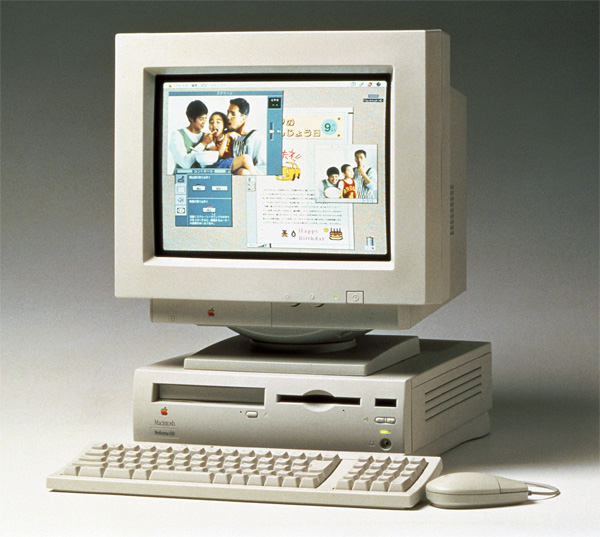
Q: I'd like to get on the Internet with my Macintosh Performa 636. Is that possible? Can I buy a modem for it, or would it be useless? What kind of modem? What do I need to get on-line?
A: It is possible, and it is definitely not useless! Without
knowing more about your Performa, I will make my recommendations with
the most cost-effective solutions in mind.
- Upgrade your RAM. I'm going to recommend at least 32 MB in addition to the 4 MB on the system board, but if you don't have a lot of cash lying around, go with at least 16 MB SIMM for a total of 20 MB. I've said it before: there is no such thing as too much RAM. Buy as much as your budget will allow.
- Upgrade to System 7.5.5. This is a free upgrade and will make getting on the Internet a lot easier for you. If you have some money to spend on an upgrade (and you have at least 20 MB of RAM, and preferably 32 MB), you can pick up a copy of Mac OS 8.1 from eBay for around $20-$30.
- Decide how you want to connect to the Internet. Depending on what
is available in your area, this could be via a regular old modem, a DSL
connection, or a cable modem.
- Regular old modem. This modem dials over the phone lines and connects to a modem bank at your ISP. I wouldn't buy anything slower than a 33.6 modem - if you're like me, you'll get mighty tired of waiting for things to download, web pages to view, etc. Cost: $0-$19.95/month.
- DSL connection. If it's available, it will be taken care of through your phone company and ISP. In my area, it costs $49 per month - not cheap, especially for the casual Internet user. Availability can also be dicey, depending on how up-to-date the phone system in your area is. You'll also need to purchase an LC PDS ethernet card for your Performa 636.
- Cable modem. Again, this depends on how up-to-date your local TV cable system is. For my local cable provider, it runs around $30/month, and they provide email services. It's nice and fast, and the cost isn't prohibitive. Once again, you'll need an LC PDS ethernet card in your 636 for this option. Most cable providers will provide some setup help and some even will sell you the ethernet card and install it for a fee.
From the three options, the cable modem is my favorite solution for getting on the Internet. It costs slightly more than a regular dial-in ISP, but it is much faster and it doesn't tie up your phone line. It is my opinion that when putting these older Macintoshes on the web, the fewer speed bottlenecks on the connection, the better. My LC 580 really flies when I have the occasion to put it on a high speed network - your 636 will, too.
If you're operating on a tight budget and want to stick with a regular dial-in ISP, though, remember a few things: make sure they're Mac friendly. It's not worth your time to deal with ignorant or intolerant techs if you call up with a question about your connection. Also look for an ISP with a low user to modem ratio. They really should go any higher than eight users for every one of their modems - you shouldn't have to deal with busy signals.
Putting older Macs on the Internet is anything but a hopeless
endeavor. With a little bit of time and not a lot of money, they can
remain very useful machines for years to come.
Julie Fugett is a network administrator for an almost 100% Mac department at a large Midwestern university. Her favorite movie of all time is Tron, and she still can't come up with a decent name or theme for her personal website.
Join us on Facebook. Follow us on Twitter.
Not sure if you should upgrade your old Mac or replace it? Check the Mac Daniel index to see if we've already addressed your problem.
Recent Mac Daniel columns
- OWC Legacy SSD Tested in Mystic Power Mac G4, Dan Knight, 2011.07.15. G4 Power Macs don't have built-in SATA support, and most SSDs are SATA devices. OWC's legacy SSDs work on the older Mac's IDE bus.
- OWC Mercury Extreme Pro SSD Legacy Edition Tested in Blue & White Power Mac G3, Dan Knight, 2011.06.24. The Blue & White G3 has a slow ATA/33 data bus. Will OWC's Legacy SSD outperform a fast hard drive with that bottleneck?
- OWC's Legacy SSD Tested in Mirrored Drive Door Power Mac G4, Dan Knight, 2011.05.18. G4 Power Macs don't have built-in SATA support, and most SSDs are SATA devices. OWC's legacy SSDs work on the older Mac's IDE bus.
- More in the Mac Daniel index.
Links for the Day
- Mac of the Day: Mac IIfx, introduced 1990.03.19. This 'wicked fast' 40 MHz Mac trumped the 33 MHz DOS world.
- February 14 in LEM history: 98: A perfect compact Mac - 00: Extended computer warranties worth the cost? - Making your PC work with your Mac - 01: Customize Microsoft Word - 02: Quadra revives a passion for computing - 03: Real world performance - DIY Pismo screen replacement - Best Mac for writing - 03: Fastest browser on the Mac - 06: 15" MacBook Pro - Impressions of a newly acquired Lisa - Finding and using free WiFi - Apple should liberate OS 9 - 07: New Mac mini cheaper than upgrading a Power Mac - 08: Falling in love with OS X
- Support Low End Mac
Recent Content on Low End Mac
- Fix Home Button Delay, Tablet the Ultimate Mobile PC, iPad Notebook a Possibility, and More, iOS News Review, 2012.02.10. Also using your iPad at work, two photo editors, a new iPad text editor, Macally's magnetic iPad 2 stand, and more.
- White MacBook Goes End-of-Life, Logitech Touch Mouse Supports Gestures, Firmware Updates, and More, The 'Book Review, 2012.02.10. Also MacBook Air better than any Ultrabook, docks for MacBook Pro models, Intel offers improved SSDs, and more.
- Mac and iOS Browsers: Options Galore, Freeware Forum, 2012.02.10. Safari is adequate on Mac and great on iOS, but the range of good alternatives is stunning. LEM writers share their favorites.
- Apple's Support Lead Shipping, Smartphones Outsell PCs, OS X Ported to ARM by Intern, and More, Mac News Review, 2012.02.10. Also the power of Tex-Edit Plus, Google and Twitter are already censoring the Web, Snow Leopard Security Update, and more.
- LogMeIn: Remote Screen Sharing for the Rest of Us, Alan Zisman, Zis Mac, 2012.02.09. Configuring the Mac's built-in screen sharing to work over the Internet can be difficult or impossible. LogMeIn makes it easy.
- 15 Years Ago Motorola Unveiled the PowerPC G3, Low End Mac Round Table, 2012.02.06. The G3 processor was optimized for real world Mac software and made a big leap forward in efficiency.
- Don't Kill Caps Lock, Learning to Love the iOS Keyboard, and an Adaptive iPad Keyboard, Charles W. Moore, Miscellaneous Ramblings, 2012.02.06. The Caps Lock key has a useful function, the iPad's keyboard really is useful, and checking out an adaptive keyboard for the iPad.
- More links in our archive.
Recent Deals
- Best 17" MacBook Pro Deals
- Best iPod classic Deals
- Best eMac Deals
- Best MacBook Air Deals
- Best iBook G4 Deals
- Best iPad Deals
- Best Classic Mac OS Deals
- Best Apple TV Deals
- More deals in our archive.
About LEM Support Usage Privacy Contact
Follow
Low End Mac on Twitter
Join Low End Mac
on Facebook
Low End Mac Reader Specials
TypeStyler 11 is now in the Mac App Store!! -- Special Introductory Price of $59.95!! -- To Buy From The Mac App Store Click Here Now!! Or buy direct
from Strider Software.
Don't install Parallels to play poker online! Poker Mac will show you how to download and install a native Mac poker and Mac Casino applications in minutes.
Favorite Sites
MacSurfer
Cult of Mac
Shrine of Apple
MacInTouch
MyAppleMenu
InfoMac
The Mac Observer
Accelerate Your Mac
RetroMacCast
PB Central
MacWindows
The Vintage Mac Museum
DealMac
Deal Brothers
Mac2Sell
Mac Driver Museum
JAG's House
System 6 Heaven
System 7 Today
the pickle's Low-End Mac FAQ
Affiliates
Amazon.com
The Apple Store
The iTunes Store
PC Connection Express
GainSaver
Parallels Desktop for Mac
eBay