
Mac Daniel's Advice
Control 2 or More Computers with One Mac, One Mouse, One Keyboard, and No KVM Switch
- 2006.02.23
If you're a new Mac convert and you've gone and bought yourself a Mac mini, you've probably been thrilled at the versatility, delighted at the simplicity, and darned near ecstatic about working on the computer and listening to birds chirping outside.
Yes, that's right. It's so quiet - especially compared to that old (or even new) PC - that I can hear the birds chirping while tapping away on my Bluetooth Apple keyboard (clearly an amazing feel in a keyboard!).
When it came time for me to expand my desktop with another monitor, I found myself short on cash and physical desktop real estate. I simply had to find a way to use a second monitor with my mini. I came up with a few ideas: The KVM tangle was overpriced, and no USB-to-SVGA solution yet exists for the Mac.
You can't tell me that Apple, a company that's thought of nearly everything, forgot about a dual monitor solution for the mini!
As it turns out, OS X Macs have a Unix underlayer called Darwin. Stemming from Unix, you can only guess how many thousands of programs now run on Macs. Many of these programs and utilities have been released under a BSD, GNU, or GPL license. This translates into free use (for us non-developer, noncommercial, non-profiteering types), and some of these programs are categorized as freeware, shareware, or careware.
All of this starts with a free download (which discloses the apropos license) and ends with a very stable and thoroughly developed product. Without drowning in the politics, I'll refer you to the Wikipedia and the respective project pages for details on those licenses and their uses.
To complete my project, I started with RealVNC (Virtual Network Computing). It's simple to use, includes a server and viewer, runs on any platform, and functions across platforms.
I then downloaded OSX2X, which runs on my mini and is touted as an "excess keyboard remover". It basically allows you to control a computer running VNC or X11 servers with one keyboard and mouse. Very handy.
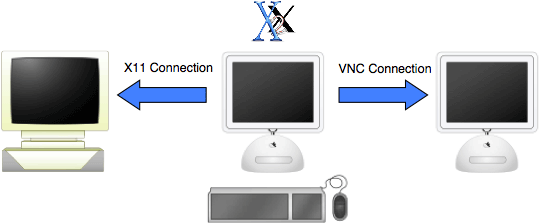
The only thing I needed was another (cheap and readily available) monitor for my PC and a crossover ethernet cable. I scrounged for some parts to make a functioning, minimal installation of Windows XP and set that computer next to my desk with the monitor on a two-drawer file cabinet. I ran a crossover ethernet cable to my mini, which was to act as a firewall, router, and the brains behind this operation.
- Editor's note: If you already have an ethernet hub or switch, there's no need for the crossover cable. Regular cables will do. Also, if you're linking two Macs, you might try FireWire networking for top speed. dk
Sharing the Internet connection is a breeze with OS X, and, thanks to Samba (another Unix thing), sharing files is easier than eating lettuce!
OSX2X is easily configured so you can run your mouse off one edge of the monitor with the Mac desktop on it, and it appears immediately on the corresponding edge of the monitor with the PC desktop (or whatever your second computer is running) on it.
I use my Mac mini with one monitor and have a second monitor hooked up to my old PC on the side - it looks and works like an extended desktop with dual screens, even though each screen belongs to a separate computer. I can even cut and paste between the two platforms.
This turns out to be really useful for doing processor intensive tasks that you don't want to have tie up your Mac. Say I wanted to uncompress video or compress video. If I had the software to do it on the PC, I could grab the file from the Mac, copy it over via the crossover ethernet cable, and then set the PC to work - for days if necessary - and still enjoy playing with my Mac.
I'm sure you'll find lots of useful things to do with this setup, and I'd enjoy hearing all the great uses for it, too. Remember, this will work across any platform. Two Macs, a Linux box, and more. You can designate which direction the other monitor is in, too, and OSX2X supports multiple connections. The one drawback is that each computer needs its own display, but that may cost you less than a KVM switch.
The only thing I regret is not hearing the birds chirp anymore,
as that old PC fan is still as loud as ever. Maybe if I smothered
it with this pillow.... 
Further Reading
Teleport is a freeware Mac-only solution that works with two or more OS X Macs. We're currently using it with three G4 Power Macs running Leopard and Tiger at Low End Mac headquarters. See 2 Macs, 2 Operating Systems, 1 Mouse, 1 Keyboard for more information on Teleport.
Join us on Facebook, follow us on Twitter or Google+, or subscribe to our RSS news feed
Not sure if you should upgrade your old Mac or replace it? Check the Mac Daniel index to see if we've already addressed your problem.
Today's Links
- Mac of the Day: Motorola StarMax 3000, introduced 1999.09.07. This inexpensive clone used lots of off-the-shelf parts.
- Support Low End Mac
Recent Content
About LEM Support Usage Privacy Contact
Follow Low End Mac on Twitter
Join Low End Mac on Facebook
Favorite Sites
MacSurfer
Cult of Mac
Shrine of Apple
MacInTouch
MyAppleMenu
InfoMac
The Mac Observer
Accelerate Your Mac
RetroMacCast
The Vintage Mac Museum
Deal Brothers
DealMac
Mac2Sell
Mac Driver Museum
JAG's House
System 6 Heaven
System 7 Today
the pickle's Low-End Mac FAQ
Affiliates
Amazon.com
The iTunes Store
PC Connection Express
Macgo Blu-ray Player
Parallels Desktop for Mac
eBay

