
Mac Daniel's Advice
Getting iSync to Work with an Unsupported Cell Phone
Dan Knight - 2005.08.01
I added a bunch of new phone numbers to my Mac's Address Book over the weekend and ran into problems when I tried to upload them to my cell phone.
That had never happened before. iSync had worked with my old Motorola cell phone via USB, and also with the newer V262. Now iSync couldn't see the phone at all
What had changed?
Tiger. I'd upgraded to Mac OS X 10.4 shortly after it was released, and the new version of iSync couldn't see my phone at all.
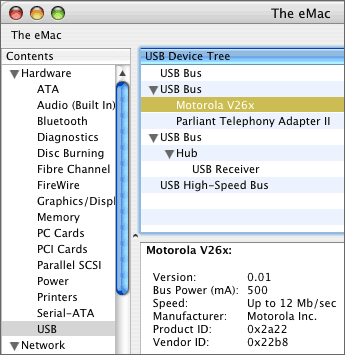
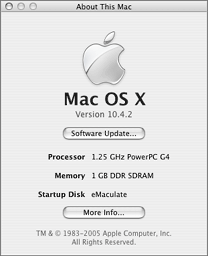 Oddly enough, the computer
could. To determine that the USB cable hadn't gone bad, I went to
the Apple menu and selected About This Mac. Then I clicked on the
More Info... button, selected USB in the box on the left, and then
selected Motorola V26x - all the information about my cell phone
showed up.
Oddly enough, the computer
could. To determine that the USB cable hadn't gone bad, I went to
the Apple menu and selected About This Mac. Then I clicked on the
More Info... button, selected USB in the box on the left, and then
selected Motorola V26x - all the information about my cell phone
showed up.
I did some Googling and discovered that the Motorola V265 was supported. That's the same phone, but with a camera. I couldn't see any reason for iSync not to work with my V262.
 More research brought me to the
data inside the iSync program itself. By left-clicking
(command-clicking for those who still use one-button Apple mice), I
was able to examine the contents of the iSync package. Going down
several levels, I found the file I needed.
More research brought me to the
data inside the iSync program itself. By left-clicking
(command-clicking for those who still use one-button Apple mice), I
was able to examine the contents of the iSync package. Going down
several levels, I found the file I needed.
Contents / PlugIns / ApplePhoneConduit.syncdevice / Contents / PlugIns / PhoneModelsSync.phoneplugin / Contents / Resources / MetaClasses.plist
I opened the MetaClasses.plist file in TextWrangler, found the section with data about the Motorola V265, and saw that the vendor ID and product ID were identical for the V265 and V262. Then copied the data, pasted in a second copy, and replaced the three instances of V265 with V262 in the first listing so it looked like this:
<key>com.motorola.V262</key>
    <dict>
        <key>Identification</key>
        <dict>
            <key>com.apple.gmi+gmm</key>
            <string>Motorola CE, Copyright 2000+Motorola V262 Phone</string>
        </dict>
        <key>InheritsFrom</key>
        <array>
            <string>com.motorola.usb.0x22B8/0x2A22</string>
        </array>
        <key>Services</key>
        <array>
            <dict>
                <key>ServiceName</key>
                <string>com.apple.model</string>
                <key>ServiceProperties</key>
                <dict>
                    <key>ModelName</key>
                    <string>V262</string>
                    <key>PhoneIcon</key>
                    <string>MOTV710.tiff</string>
                </dict>
            </dict>
        </array>
    </dict>
And then I could finally synchronize the phone numbers I'd added to Address Book with the ones stored in my cell phone.
If you have a cell phone that isn't officially supported by iSync (and you're far from alone if that's the case), you may be able to make it work. First, determine the vendor ID and product ID of your phone, and then do some research. Maybe there's already another phone in MetaClasses.plist with the same identifiers. If so, you can do what I did.
If not, you'll need to do some more research and identify cell phones that are nearly identical to yours. If it works, cool. If not, you're no further behind than when you started.
Happy hacking! 
Join us on Facebook, follow us on Twitter or Google+, or subscribe to our RSS news feed
Not sure if you should upgrade your old Mac or replace it? Check the Mac Daniel index to see if we've already addressed your problem.
Today's Links
- Mac of the Day: Motorola StarMax 3000, introduced 1999.09.07. This inexpensive clone used lots of off-the-shelf parts.
- Support Low End Mac
Recent Content
About LEM Support Usage Privacy Contact
Follow Low End Mac on Twitter
Join Low End Mac on Facebook
Favorite Sites
MacSurfer
Cult of Mac
Shrine of Apple
MacInTouch
MyAppleMenu
InfoMac
The Mac Observer
Accelerate Your Mac
RetroMacCast
The Vintage Mac Museum
Deal Brothers
DealMac
Mac2Sell
Mac Driver Museum
JAG's House
System 6 Heaven
System 7 Today
the pickle's Low-End Mac FAQ
Affiliates
Amazon.com
The iTunes Store
PC Connection Express
Macgo Blu-ray Player
Parallels Desktop for Mac
eBay

