
What’s the fastest Mac browser? And how do Mac browsers compare to those on Windows and Linux, the other leading operating systems?
That’s the question answered in Browser Speed Comparisons, published on the How To Create website last week.
Speed isn’t the only important factor when choosing a browser. Page rendering counts for a lot, as does standards compliance. So do ease of use and features. (My personal favorite feature right now is Firefox’s search bar at the bottom of the browser window instead of in a floating window.)
That said, it’s nice to know you’re not using the slowest browser out there – and to answer the perennial question, “Are Macs slower on the Web than Windows machines?”
This study compared Linux and Windows browsers on an 800 MHz Pentium III machine with a 400 MHz G4 Mac running OS 9.x and OS X 10.3.7. Tests of Safari 2.0 were also performed under a prerelease build of OS X 10.4 Tiger.
The Fastest Mac OS X Browser
Under OS X, Opera 8.0 was the fastest in four of seven benchmarks: rendering a table, script speed, displaying multiple images, and “history” (using the Back button to scroll through the last 25 pages displayed).
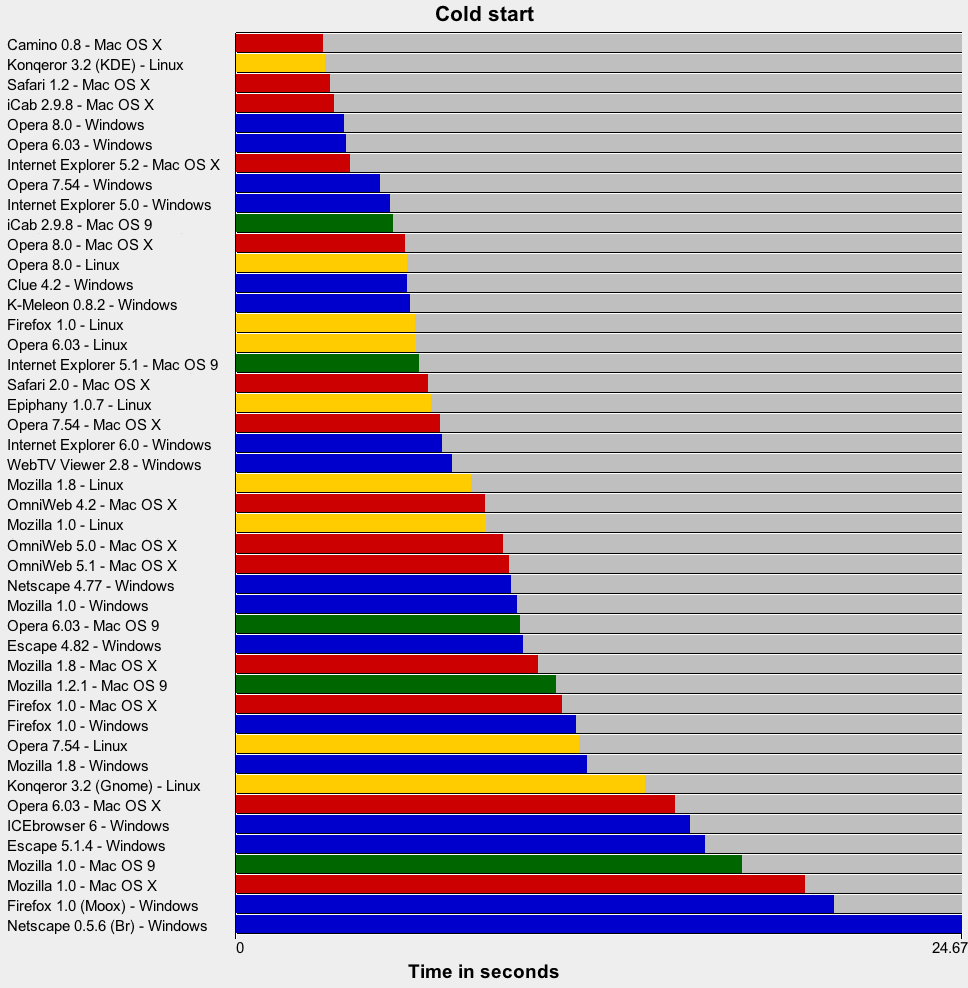
Camino 0.8 was the quickest to launch (2.95 sec.), and iCab 2.9.8 was faster on a relaunch (2.61 sec.). And Safari 2.0 smoked the competition on the CSS rendering test at 0.35 seconds. (Second place went to Safari 1.2 at 1.33 seconds – quite a difference.)
The slowest launching browser (looking only at latest releases) was Firefox 1.0 at 11.07 sec., followed by Mozilla 1.8 at 10.26. When relaunching, Mozilla 1.8 was the slowest at 6.55 sec.
Internet Explorer 5.2 was the slowest at rendering CSS, taking 6.12 sec. to complete the test. Firefox was next slowest at 4.69 sec.
When rendering the table, IE 5.2 again took last place at 3.2 sec., followed by iCab 2.9.8 at 2.2.
The worst script speed by far was iCab 2.9.8, which finished the test in 1,906 seconds. Safari was the second-slowest here at 164 seconds.
When displaying multiple images, iCab lost again, benching at 3.11 sec., well behind Camino 0.8 at 2.54 sec.
When using the Back button, iCab again trails the pack at 214 sec. Next worst results were from OmniWeb 5.1 at 200 sec.
All things considered, Opera 8.0 seems to be the fastest browser for OS X at present.
The Fastest Mac OS 9 Browser
Although there’s less variety on the classic Mac OS, iCab 2.9.8, Internet Explorer 5.1, Mozilla 1.0, Mozilla 1.2.1, and Opera 6.03 were tested. Every browser won exactly one benchmark test – except for iCab, which won three.
iCab 2.9.8 was fastest at startup and relaunch. It also rendered the table faster than any of the other browsers.
Opera was fastest to render CSS, Internet Explorer fastest with scripts, Mozilla 1.0 fastest when displaying multiple images, and Mozilla 1.2.1 fastest on the history benchmark.
Unfortunately, iCab failed the script test and was disqualified from the CSS test because of incomplete CSS support. That said, iCab remains a work in progress – the only browser for the classic Mac OS still under development – and scripting and CSS may be improved in the future.
iCab may be the speed champion, but you have to put up with an incomplete browser to get that speed.
The Fastest Windows Browser
Opera is the clear winner in the Windows tests. Opera 8.0 wins three comparisons and ties with Opera 6.03 in a fourth. Opera 6.03 wins three as well.
Looking only at current browsers, Opera 8.0 is fastest at launch (3.66 sec.), script speed (.13 sec.), displaying images (1.78 sec.), and history (15 sec.). Internet Explorer 6.0 wins at relaunch (3.11 sec.), rendering CSS (0.81 sec.) and rendering a table (1.08 sec.).
The slowest launching well-known browsers are Mozilla 1.8 and Firefox 1.0 at 11.5-12 sec. They are also slowest to relaunch, at 2.5-2.8 sec., and slowest on the CSS rendering test (1.5-1.8 sec.). They also trail IE 6.0 slightly in the table benchmark (1.4-1.5 sec.).
Mozilla and Firefox show their stuff in the script speed test, taking second place behind Opera 8.0 at 23 sec., and Internet Explorer 6.0 is glacial at 60 seconds.
All of the current well-known browsers display images quickly. Internet Explorer 6.0 loses the test at 2.32 sec., but the fastest browser was only 0.44 sec. faster.
The history benchmark again has Mozilla 1.8 and Firefox 1.0 trailing the pack at 40-41 sec.
Based on these results, Mozilla and Firefox appear to be among the slowest browsers for Windows – a real surprise for a browser that claims to be “faster”.
The Fastest Linux Browser
Linux benchmarks were performed using SuSE Linux 9.1 and KDE (except for Epiphany, which was tested using Gnome).
The fastest launching and fastest relaunching browser is Konqueror 3.2 under KDE (it’s much slower under Gnome). Opera 6.0.3 takes the prize on the CSS and table rendering benchmarks, and Opera 8.0 wins the script speed, multiple images, and history benchmarks.
Ignoring Opera 6.03 and only looking at current browser builds, Konqueror 3.2 edges our Opera 8.0 on the CSS benchmark (0.80 vs. 0.86 sec.) while Opera 8.0 beats Konqueror 3.2 on the table test (1.32 vs. 1,52 sec.).
Ignoring launch time, Opera 8.0 takes the crown as the fastest browser on Linux.
Slowest to launch is Mozilla 1.8 (7.97 sec.), and Epiphany is the slowest to relaunch (5.82 sec.), with Opera 8.0 second-to-last (4.27 sec.). Epiphany is also the slowest to render CSS (2.42 sec.), and Firefox 1.0 is next slowest (1.8 sec.).
Epiphany also loses the script benchmark, with Firefox just edging ahead of it. Konqueror 3.2 flat out loses the script speed test at 111 sec., far behind Firefox’s 59 sec. (Opera 8.0 blew through this one in 10 sec.)
Epiphany is the slowest to display images, trailing the fastest browser (Opera 8.0) by over a second. And Firefox 1.0 loses the history benchmark, although Konqueror and Epiphany are close.
Across Platforms
Several browsers are available on two or more platforms. Here are the results:
Browser |
Launch |
Relaunch |
CSS |
Table |
Scripts |
Images |
History |
Mozilla 1.8 |
|||||||
| Linux | 7.97 | 2.88 | 1.63 | 1.74 | 26 | 2.37 | 47 |
| Mac OS 9* | 10.88 | 5.90 | 15.24 | 2.30 | 155 | 2.08 | 52 |
| Mac OS X | 10.26 | 6.55 | 2.88 | 2.01 | 48 | 1.68 | 48 |
| Windows XP | 11.94 | 2.48 | 1.49 | 1.39 | 23 | 2.00 | 58 |
| * Mac OS 9 tested with Mozilla 1.2.1 | |||||||
Firefox 1.0 |
|||||||
| Linux | 6.09 | 2.71 | 1.80 | 2.10 | 59 | 2.43 | 64 |
| Mac OS X | 11.07 | 5.84 | 4.69 | 1.83 | 72 | 1.83 | 51 |
| Windows XP | 11.54 | 2.52 | 1.81 | 1.48 | 23 | 2.05 | 41 |
Internet Explorer |
|||||||
| Mac OS 9 | 6.21 | 2.43 | 9.11 | 5.29 | 146 | 2.22 | 81 |
| Mac OS X | 3.87 | 3.65 | 6.12 | 3.20 | 128 | 1.96 | 73 |
| Windows XP | 6.99 | 1.77 | 1.32 | 1.33 | 60 | 2.32 | 32 |
Opera 8.0 |
|||||||
| Linux | 5.80 | 4.27 | 0.86 | 1.32 | 10 | 1.82 | 17 |
| Mac OS 9* | 9.66 | 3.56 | 3.90 | 2.21 | 64+ | 2.57 | 76 |
| Mac OS X | 5.75 | 5.47 | 1.71 | 1.31 | 22 | 1.33 | 16 |
| Windows XP | 3.66 | 2.38 | 0.92 | 1.17 | 13 | 1.78 | 15 |
| * Mac OS 9 tested with Opera 6.03, + unable to perform test properly | |||||||
Konqueror 3.2/KDE vs. Safari/OS X |
|||||||
| Linux | 3.02 | 0.55 | 0.80 | 1.51 | 111 | 2.34 | 60 |
| Safari 1.2 | 3.21 | 3.20 | 1.33 | 1.34 | 164 | 1.80 | 23 |
| Safari 2.0 | 6.51 | 3.33 | 0.35 | 1.65 | 27 | 1.67 | 38 |
iCab 2.9.8 |
|||||||
| Mac OS 9 | 5.33 | 1.46 | 1.39* | 1.99 | n/a | 2.91 | 164 |
| Mac OS X | 3.33 | 2.61 | 2.12 | 2.20 | 1906 | 3.11 | 73 |
| * unable to perform test properly | |||||||
There’s a lot of useful information in these numbers. For instance, you can see that a 400 MHz G4 is roughly comparable to an 800 MHz Pentium III computer. Performing the same task with the same browser, the seemingly slower (based on the assumption that MHz is the best indicator of CPU performance) G4 Macintosh wins against the Pentium III several times.
You can also see where Mac OS X is optimized. It wins the image display test in every single instance – and not much else. And it really trails in some areas, especially rendering CSS and running scripts.
Internet Explorer is definitely optimized for Windows, but Firefox and Mozilla run most benchmark faster under Windows than under Linux on the same hardware.
Mac OS X has some real advantages of OS 9, and it’s been getting faster with each major revision, but iCab does some things faster under OS 9 than under OS X.
And finally, Safari – which is based on Konqueror – demonstrates places where OS X and the G4 processor are superior to Linux on a twice-as-fast Pentium III.
Conclusion
Opera 8.0 lives up to its claim as the fastest browser on the planet regardless of platform, and – for the hardware tested – Windows XP seems to be the fastest (albeit least secure) browsing platform. Linux and OS X are less optimized, but the operating systems and browsers remain under ongoing development.
It would be nice to see comprehensive benchmarks using more modern hardware – single- and dual-processor computers, G5 and Pentium 4 CPUs, different hardware configurations (512 MB vs. 256 MB RAM, faster vs. slower hard drives, different video cards, etc.), and Linux on a Mac vs. Linux on Intel hardware.
That said, Browser Speed Comparisons takes a big step toward answering questions about which browser if fastest regardless of platform and operating system – and it covers a lot more browsers that I’ve mentioned in this article.
This article’s appendix contains reduced, recolored versions of the seven charts that accompany Browser Speed Comparisons. They are color coded by operating system and without the “supplementary” browsers included in that article.
Remember, speed isn’t everything, but a slow browser can make the browsing experience less pleasant. If you’re unhappy with the speed of your current browser, this research should give you a good idea which ones to look at and which ones to avoid.
Keywords: #fastestmacbrowser #fastestbrowser
Short link: http://goo.gl/31BD23
searchword: fastestmacbrowser
