
One of the most common complaints computer owners have is that their computer is too slow. Unless you own a shiny new G4, you have probably had this complaint in one form or another throughout daily use of your computer.
Most people know of all of the RAM upgrades and daughter cards, etc., that you can add inside your computer to speed it up a little – or a lot. But all these upgrades cost enough money to make even Bill Gates sick, so what is the person with a slow computer and not a lot of cash supposed to do?
Today I’ll tell you a about an almost free and rather easy option if you fit into this group – overclocking.
Overclocking is literally setting your processor, whether it is 45 MHz or 900 MHz, to a higher clock speed. Many Macs (as well as other computers) are able to be overclocked. However, some are easier to overclock than others – we’ll get to that later.
Basically, overclocking works by forcing the processor to use more power and operate at a higher frequency (or “clock setting”) thus the term, “overclocking.”
This seems good, but since the whole world isn’t overclocking, there has to be some risk involved – and there is. Since overclocking makes a processor designed to operate at 350 MHz, for example, run at 450 MHz, more power is consumed, and much more heat is generated. Many times people will need to add an additional fan or heat sink (the metal thingy usually sticking up inside your computer, on top of your processor) inside the computer. If the computer overheats, it will not function.
However, under most conditions, as long as you keep the overclocking to under a 15% boost, you won’t need to change anything else inside your computer. In some other cases, stability becomes a problem, but as long as you keep the boost low, you won’t have to worry about that either.
Now that I’ve probably bored you with this large introduction and warnings of great destruction of your computer, here’s the good part.
How Do You Overclock?
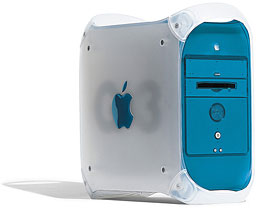 Overclocking can be done relatively easily in many computers (in fact, the Blue & White G3 actually has a box right next to the processor to adjust the processor settings). However, some computers aren’t adjusted as easily. All models are different, and some cannot be overclocked at all.
By now you’ve probably realized that overclocking isn’t for everyone, but if you’ve decided it’s for you, now it’s time to open it up and see what you can do!
Two great places to start are Accelerate Your Mac! and Bare Feats, not to mention Low End Mac’s Chipping the Mac index.
Now get out there and start overclocking!
Overclocking Guides, G3 and G4
- Overclocking the Beige Power Mac G3, 1997
- Overclocking the Blue and White G3, 2002
- Overclocking a Tray-loading iMac G3, 2009
- Overclocking a Slot-loading iMac G3, 2009
- Adding a DIP Switch and Overclocking Sawtooth’s Bus Speed, 2005
- Chronically Ailing Yikes! G4 Cured While Overclocking, 2006
Overclocking Guides, 680×0 and Older PowerPC
- Chipping the Centris
- Chipping the LC Series
- Chipping the Mac II Series
- Chipping the PowerBook
- Chipping the PowerBook Duo
- Chipping the Power Mac x100
- Chipping the PowerPro
- Chipping the Quadra
- Chipping the Sonnet QuadDoubler
Short link: http://goo.gl/d8yTb7
searchword: overclocking
