
This was the last of the 13″ MacBook Pro models with a 1280 x 800 pixel display. After this, Apple only made 13″ models with Retina Displays. This model was on the market from June 2012 until it was discontinued in October 2016, by which time its base price had dropped to $1,099. That is the longest any MacBook model has remained on the market.
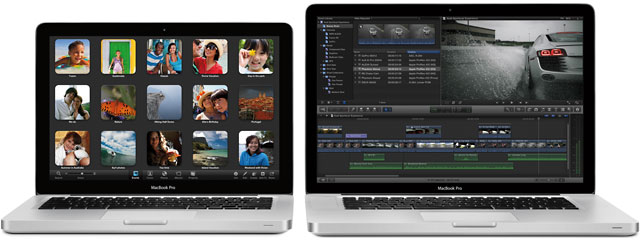
13″ and 15″ Mid 2012 MacBook Pros
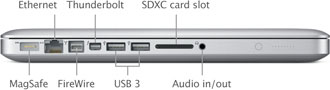
For the first time, Macs have built-in USB 3.0 support. The USB 3.0 specification is over 10x as fast as USB 2.0 and has half the bandwidth of Thunderbolt. There are a lot of USB 3.0 drives on the market, and they are far more affordable than Thunderbolt drives. Best of all, Apple uses the same port for USB 2.0 and 3.0, while the standard in the PC world is separate ports for each protocol.
There’s also an improved webcam, the 720p FaceTime HD camera with three times the resolution of previous MacBook FaceTime cameras. The new HD camera also supports today’s widescreen displays, and the native screen resolution of 1280 x 800 is the same as before.
The 2012 MacBook Pro adopts Intel’s newest, more efficient Ivy Bridge processor technology, which incorporates Intel HD Graphics 4000 (up to 60% faster, according to Apple) in the CPU. The base 13″ model now runs a 2.5 GHz dual-core Core i5 processor (with Turbo Boost to 3.1 GHz) and has 4 GB of system memory and a 500 GB hard drive with an $1,199 price tag, while the “better” version moves to a 2.9 GHz i7 CPU (3.6 GHz with Turbo Boost), doubles system memory to 8 GB, and includes a 750 GB hard drive.
Apple offers a few build-to-order options: Upgrade system memory from 4 GB to 8 GB for $100 on the base model, and/or choose a higher capacity or faster hard drive or an SSD.
This is one of the first Macs to use Intel HD 4000 Graphics, and the Intel GPU uses 384 MB of system memory.
The 13″ MBP design puts all the ports on the left side, leaving the right side for the SATA SuperDrive.
The new models are rated at 7 hours of battery power, and they use Bluetooth 4.0 along with 802.11n WiFi for wireless connectivity.
The MacBook Pro has an 18-bit glossy display (not the 24 bits you might expect). Like the iPad and iPhone, it does not have an easily replaceable battery. Cost to have Apple replace the 63.5 Watt-hour battery out of warranty is $129.
The new MacBook Pros ship with OS X 10.7 Lion and can be upgraded to OS X 10.9 Mavericks and later for free.
Caution: There is an issue with all 2011 and 2012 pre-Retina 13″ MacBook Pros – the hard drive cables are subject to failure due to the way they are routed. If you are replacing your hard drive with another hard drive or an SSD, it might be wise to replace the cable proactively.
Closed Lid Mode: All Intel ‘Books support “lid closed” (or clamshell) mode, which leaves the built-in display off and dedicates all video RAM to an external display. To used closed lid mode, your ‘Book must be plugged into the AC adapter and connected to an external display and a USB or Bluetooth mouse and keyboard (you might also want to consider external speakers). Power up your ‘Book until the desktop appears on the external display and then close the lid. Your ‘Book will go to sleep, but you can wake it by moving the mouse or using the keyboard. The built-in display will remain off, and the external monitor will become your only display. Since all video RAM is now dedicated to the external monitor, you may have more colors available at higher resolutions.
To resume use of the internal display, you need to disconnect the external display, put the computer to sleep, and then open the lid. This will wake up your ‘Book and restore use of the built-in display.
Intel-based Macs use a partitioning scheme known as GPT. Only Macintel models can boot from GPT hard drives. Both PowerPC and Intel Macs can boot from APM (Apple’s old partitioning scheme) hard drives, which is the format you must use to create a universal boot drive in Leopard. Power PC Macs running any version of the Mac OS prior to 10.4.2 cannot mount GPT volumes. PowerPC Macs won’t let you install OS X to a USB drive or choose it as your startup volume, although there is a work around for that.
Details
- introduced 2012.06.11 at US$1,199 (2.5 GHz dual-core i5, 500 GB hard drive, 4 GB RAM) and US$1,499 (2.9 GHz dual-core i7, 750 GB hard drive, 8 GB RAM); add $100 for 8 GB of RAM; discontinued October 2016
- Part no.:
Mac OS
- ships with Mac OS X 10.7.2 Lion
- Mac OS X 10.8 Mountain Lion compatibility
- AirPlay Mirroring is supported.
- AirDrop is supported.
- Power Nap is not supported.
Core System
- CPU: 2.5 GHz dual-core Intel Core i5 or 2.9 GHz dual-core Intel Core i7
- Level 3 cache: 3 MB shared cache in i5, 4 MB in i7
- Bus: 1066 MHz
- RAM: 4/8 GB, expandable to 16 GB using DDR3 SO-DIMMs
- Performance (2.5/2.9 GHz)
- 64-bit Geekbench: 6876/7882
- Speedmark 7: 161/189
Video
- GPU: Intel HD Graphics 4000
- VRAM: uses 384 MB of system RAM
- Video out: Thunderbolt port, which is backward compatible with Mini DisplayPort (VGA, DVI, HDMI, and DisplayPort supported with optional adapters)
- display: 13.3″ glossy 1280 x 800 18-bit 113 ppi color active matrix
- supports 1280 x 800, 1152 x 720, 1024 x 640, and 800 x 500 pixels at 16:10 aspect ratio; 1024 x 768, 800 x 600, and 640 x 480 pixels at 4:3 aspect ratio; 1024 x 768, 800 x 600, and 640 x 480 pixels at 4:3 aspect ratio (stretched); 720 x 480 pixels at 3:2 aspect ratio; 720 x 480 pixels at 3:2 aspect ratio (stretched); to 2560 x 1600 on an external display
- allows mirroring to external display or extended desktop mode
Drives
- Hard drive: 500/750 GB 5400 rpm SATA standard, 1 TB and solid state drive (SSD) options (128, 256, or 512 GB) on 6 Gbps SATA bus
- optical drive: 8x dual-layer SuperDrive writes DVD±R and DVD+R at up to 8x, DVD-RW at up to 4x; dual-layer DVD±RW at up to 4x; reads DVDs at 8x (double-layer at 6x), dual-layer and DVD-ROM at 6x; writes CD-R at 24x, writes CD-RW at 16x, reads CDs at 24x on 3 Gbps SATA bus
- drive bus: SATA 1 (1.5 Mbps)
Expansion
- Thunderbolt: 1 port
- USB: 2 USB 3.0 ports
- FireWire 400: none
- FireWire 800: 1 port, backward compatible with FireWire 400
- Ethernet: 10/100/gigabit
- WiFi: 802.11n AirPort Extreme built in, three antennas support up to 450 Mbps bandwidth
- Modem: No longer offered by Apple
- Bluetooth: BT 4.0 built in
- ExpressCard/34: none
- SD Card Slot: 1
- expansion bays: none
- webcam: FaceTime 720p HD camera
Power
- battery: 63.5 Watt-hour
- AC adapter: 60W MagSafe
Physical
- size: 8.94 x 12.78 x 0.95″ (227 x 325 x 24.1 mm)
- Weight: 4.5 pounds (2.04 kg)
Short link: http://goo.gl/pCpx8W
searchword: mbp13mid2012
Online Resources




