
The Late 2011 MacBook Pros represent a small step forward from the Early 2011 models introduced 8 months earlier. The 13″ model advances from 2.3 GHz to 2.4 GHz, a relatively insignificant 4.3% speed bump. The top-end version goes from 2.7 GHz to 2.8 GHz, an even less impressive 3.7% improvement.
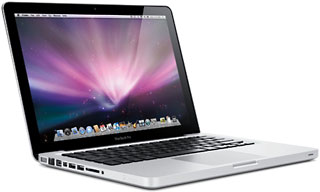 In addition to slightly faster CPUs, the Late 2011 model comes with 50% more spacious hard drives – 500 GB instead of 320 GB on the base model and 750 GB (up from 500 GB) on the i7 version.
There had been some speculation that the next MacBook Pro revision would include a higher resolution display (perhaps matching the 1440 x 900 of the 13″ MacBook Air) and the same Bluetooth 4.0 built into the iPhone 4S, but no such luck – we’re still living with a 1280 x 800 display and Bluetooth 2.1 + EDR.
The best news of all is that with faster CPUs and larger hard drives, there’s no change in price.
The Late 2011 MacBook Pros ship with OS X 10.7 Lion, but because this is a relatively minor revision, they should still be able to run Mac OS X 10.6 Snow Leopard.
This is the second MacBook Pro generation with Thunderbolt, a 10 Gbps data connection that uses the same connector as Mini DisplayPort. Thunderbolt is 12 times as fast as FireWire 800, over 20 times as fast as USB 2.0, and twice as fast as USB 3.0, which Apple seems in no hurry to adopt. Thunderbolt can be used for video, hard drives, and networking, and adapters let you connect FireWire and USB devices.
Apple has improved AirPort performance by building three WiFi antennas into the 2011 MacBook Pros, allowing three channels with 150 Mbps bandwidth for a maximum bandwidth of 450 Mbps.
The new models are rated at 7 hours of battery power, down from 10 for last year’s models, due to changes in the way Apple measures battery life.
The glass trackpad is the same one found in the previous generation of MacBook Pro models. It supports 1-, 2-, 3-, and 4-finger gestures. The entire trackpad functions as the mouse button.
The 13″ MBP uses the same keyboard as before, complete with backlighting. The black keys look sharp with the aluminum enclosure, and the 13″ MacBook Pro only comes with a glossy screen.
4 GB of RAM is standard, and it can be upgraded to 16 GB, although Apple officially says 8 GB is the maximum. 128, 256, and 512 GB SSDs are extra cost options.
Caution: There is an issue with all 2011 and 2012 pre-Retina 13″ MacBook Pros – the hard drive cables are subject to failure due to the way they are routed. If you are replacing your hard drive with another hard drive or an SSD, it might be wise to replace the cable proactively.
Editor’s note: The next two paragraphs are from the profile of the previous version of the MacBook Pro. At this time we do not know if they apply to the new model.
Note that the built-in display is only capable of 18-bit color, not the full 24-bit color you might expect.
Unlike early MacBooks, where every USB port could provide 500 mA of power, only one USB port provides full power – the port closer to the front.
The Apple Remote is a US$20 option.
Battery life is claimed to be 7 hours of wireless productivity.
Closed Lid Mode: All Intel ‘Books support “lid closed” (or clamshell) mode, which leaves the built-in display off and dedicates all video RAM to an external display. To used closed lid mode, your ‘Book must be plugged into the AC adapter and connected to an external display and a USB or Bluetooth mouse and keyboard (you might also want to consider external speakers). Power up your ‘Book until the desktop appears on the external display and then close the lid. Your ‘Book will go to sleep, but you can wake it by moving the mouse or using the keyboard. The built-in display will remain off, and the external monitor will become your only display. Since all video RAM is now dedicated to the external monitor, you may have more colors available at higher resolutions.
To resume use of the internal display, you need to disconnect the external display, put the computer to sleep, and then open the lid. This will wake up your ‘Book and restore use of the built-in display.
Intel-based Macs use a partitioning scheme known as GPT. Only Macintel models can boot from GPT hard drives. Both PowerPC and Intel Macs can boot from APM (Apple’s old partitioning scheme) hard drives, which is the format you must use to create a universal boot drive in Leopard. Power PC Macs running any version of the Mac OS prior to 10.4.2 cannot mount GPT volumes. PowerPC Macs won’t let you install OS X to a USB drive or choose it as your startup volume, although there is a work around for that.
Details
- introduced 2011.10.24 at US$1,199 (2.4 GHz dual-core i5, 500 GB hard drive, 4 GB RAM) and US$1,499 (2.8 GHz dual-core i7, 750 GB hard drive, 4 GB RAM)
- Part no.: MD313 (2.4 GHz), MD314 (2.8 GHz)
Mac OS
- ships with Mac OS X 10.7.2, does work with Mac OS X 10.6.6 and later. macOS 10.14 Mojave and later are not supported.
- Mac OS X 10.6 Snow Leopard compatibility
- Grand Central Dispatch is supported.
- 64-bit operation is supported.
- OpenCL is supported.
- OS X 10.8 Mountain Lion compatibility
- AirPlay Mirroring is supported.
- AirDrop is supported.
- Power Nap is not supported.
Core System
- CPU: 2.4 GHz dual-core Intel Core i5 or 2.8 GHz dual-core Intel Core i7
- Level 3 cache: 3 MB shared cache in i5, 4 MB in i7
- Bus: 1066 MHz
- RAM: 4 GB, expandable to 16 GB using DDR3 SO-DIMMs
- Performance (2.4/2.8 GHz)
- 64-bit Geekbench: 6047/6976
- Speedmark 7: 146/164
Video
- GPU: Intel HD Graphics 3000
- VRAM: uses 384 MB of system RAM
- Video out: Thunderbolt port, which is backward compatible with Mini DisplayPort (VGA, DVI, HDMI, and DisplayPort supported with optional adapters)
- display: 13.3″ glossy 1280 x 800 18-bit 113 ppi color active matrix
- supports 1280 x 800, 1152 x 720, 1024 x 640, and 800 x 500 pixels at 16:10 aspect ratio; 1024 x 768, 800 x 600, and 640 x 480 pixels at 4:3 aspect ratio; 1024 x 768, 800 x 600, and 640 x 480 pixels at 4:3 aspect ratio (stretched); 720 x 480 pixels at 3:2 aspect ratio; 720 x 480 pixels at 3:2 aspect ratio (stretched); to 2560 x 1600 on an external display
- allows mirroring to external display or extended desktop mode
Drives
- Hard drive: 320/500 GB 5400 rpm SATA standard, 750 GB and solid state drive (SSD) options (128, 256, or 512 GB) on 6 Gbps SATA bus
- optical drive: 8x dual-layer SuperDrive writes DVD±R and DVD+R at up to 8x, DVD-RW at up to 4x; dual-layer DVD±RW at up to 4x; reads DVDs at 8x (double-layer at 6x), dual-layer and DVD-ROM at 6x; writes CD-R at 24x, writes CD-RW at 16x, reads CDs at 24x on 3 Gbps SATA bus
- drive bus: SATA 1 (1.5 Mbps)
Expansion
- Thunderbolt: 1 port
- USB: 2 USB 2.0 ports
- FireWire 400: none
- FireWire 800: 1 port, backward compatible with FireWire 400
- Ethernet: 10/100/gigabit
- WiFi: 802.11n AirPort Extreme built in, three antennas support up to 450 Mbps bandwidth
- Modem: No longer offered by Apple
- Bluetooth: BT 2.1 built in
- ExpressCard/34: none
- SD Card Slot: 1
- expansion bays: none
Power
- battery: 63.5 Watt-hour
- AC adapter: 60W MagSafe
Physical
- size: 8.94 x 12.78 x 0.95″ (227 x 325 x 24.1 mm)
- Weight: 4.5 pounds (2.04 kg)
Online Resources
Keywords: #mbp13late2011 #late2011mbp13
Short link: http://goo.gl/u3lEL2
searchwords: mbp13late2011, late2011mbp13
Online Resources




