
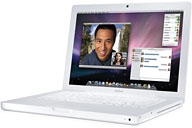
This is the first and only update to the white unibody MacBook. The CPU speed gets a bump from 2.26 GHz to 2.4 GHz, it now has the same Nvidia GeForce 320M GPU as the current 13″ MacBook Pro, and its rated battery life jumps from a very good 7 hours to an impressive 10 hours – all with no change in price.
 There’s still no FireWire port or built-in SD Card reader; you’ll need to go to the 13″ MacBook Pro model for those features at $200 more. A single audio port is used for both input and output, so you can’t plug in analog speakers or headphones and a microphone at the same time.
The Mid 2010 MacBook is officially rated as supporting up to 4 GB of RAM. However, OWC has determined that it will work with up to 16 GB, more than any other version of the consumer MacBook.
Unlike early MacBooks, where every USB port could provide 500 mA of power, only one USB port provides full power – the port closer to the front. Like the Late 2009 MacBook, there is no IR receiver for Apple’s remote.
Closed Lid Mode: All Intel ‘Books support “lid closed” (or clamshell) mode, which leaves the built-in display off and dedicates all video RAM to an external display. To used closed lid mode, your ‘Book must be plugged into the AC adapter and connected to an external display and a USB or Bluetooth mouse and keyboard (you might also want to consider external speakers). Power up your ‘Book until the desktop appears on the external display and then close the lid. Your ‘Book will go to sleep, but you can wake it by moving the mouse or using the keyboard. The built-in display will remain off, and the external monitor will become your only display. Since all video RAM is now dedicated to the external monitor, you may have more colors available at higher resolutions. The MacBook is designed to run safely in closed lid mode, but if yours runs hot (perhaps due to overclocking or high ambient temperatures), you may want to open the lid when in closed lid mode: The screen will remain off and the computer will more readily vent heat from the CPU. To resume use of the internal display, you need to disconnect the external display, put the computer to sleep, and then open the lid. This will wake up your ‘Book and restore use of the built-in display.
Intel-based Macs use a partitioning scheme known as GPT. Only Macintel models can boot from GPT hard drives. Both PowerPC and Intel Macs can boot from APM (Apple’s old partitioning scheme) hard drives, which is the format you must use to create a universal boot drive in Leopard. Power PC Macs running any version of the Mac OS prior to 10.4.2 cannot mount GPT volumes. PowerPC Macs won’t let you install OS X to a USB drive or choose it as your startup volume, although there is a work around for that.
Details
- introduced 2010.05.18 at US$999; discontinued 2011.07.20 in favor of the MacBook Air
- Part no.: A1342
- ID: MacBook7,1
Mac OS
- requires Mac OS X 10.6.3 Snow Leopard or later. macOS 10.4 Mojave and later are not supported.
- Mac OS X 10.6 Snow Leopard compatibility
- Grand Central Dispatch is supported.
- 32-bit booting only; cannot boot 64-bit OS.
- 64-bit software is supported.
- OpenCL is supported.
- Mac OS X 10.8 Mountain Lion compatibility
- AirPlay Mirroring is not supported.
- AirDrop is supported.
- Power Nap is not supported
Core System
- CPU: 2.4 GHz Intel Core 2 Duo, soldered in place, no upgrade options
- Level 2 cache: 3 MB shared cache
- Bus: 1066 MHz
- RAM: 2 GB (using matched modules), expandable to 16 GB using 1066 MHz DDR3 RAM
- Performance, Speedmark 6.5: 99
- Performance: Geekbench 3:
- 32-bit single core: 1311
- 32-bit multicore: 2261
- 64-bit single core: 1419
- 64-bit multicore: 2490
Graphics
- GPU: Nvidia GeForce 320M with resolution to 2560 x 1600 on external display (Mini DisplayPort), supports extended desktop.
- VRAM: uses 256 MB of system memory
- Video out: Mini DisplayPort; DVI, VGA, and S-video with optional adapter
- display: 13.3″ glossy 1280 x 800 18-bit 113 ppi LED backlit color active matrix
- supports 1280 x 800, 1152 x 720, 1024 x 768, 1024 x 640, and 800 x 500 pixels at 16:10 aspect ratio; 1024 x 768, 800 x 600, and 640 x 480
Drives
- Hard drive: 250 GB 5400 rpm SATA
- SuperDrive: writes DVD±R at up to 8x, DVD±RW and DVD+R DL at 4x, reads DVDs at 8x, writes CD-R at 24x, writes CD-RW at 10x, reads CDs at 24x
Expansion
- USB: 2 USB 2.0 ports, only 1 high-powered device device allowed
- FireWire 400: none
- FireWire 800: none
- Ethernet: 10/100/gigabit
- WiFi: 802.11n AirPort Extreme built in
- Bluetooth: BT 2.1+EDR
- IR receiver: none
- Modem: No longer offered by Apple
- ExpressCard/34 slots: 0
- SD Card slots: none
Physical
- size: 9.12 x 13.0 x 1.08″ (232 x 330 x 27.4 mm)
- Weight: 4.7 pounds (2.13 kg)
- battery: built-in 63.5 Watt-hour
- AC adapter: 60W MagSafe
Online Resources
- The Mid 2010 MacBook Value Equation, Dan Knight, Mac Musings, 2009.10.21. The redesigned consumer MacBook uses unibody construction, gains LED backlighting and battery life, but loses FireWire.
- Finding the Best Values in Apple’s MacBook Matrix, Charles W Moore, ‘Book Value, 2009.07.21. With prices ranging from $999 to $2,499, speeds from 1.86 to 2.8 GHz, and sized from 13 to 17 inches, what’s right for you?
- Mac Notebook Value for the College Student, Charles W Moore, ‘Book Value, 2009.08.20. “…Apple ‘Books represent the best long-term value for money spent, not to mention user experience….”
- Upgrades for new MacBook, quad-core MacBook Pro expected, new MacBook benchmarked, and more, The ‘Book Review, 2009.10.30. Also equivalent PC laptops nearly the same price as Apple’s MacBook, Mid 2010 MacBook reviewed, 8 GB memory upgrade for new MacBook, and more.
- MacBook best selling Mac ever, new MacBook disassembled and reviewed, new notebook cases, and more, The ‘Book Review, 2009.10.23. Also Apple ignores netbook market and thrives, resurrecting a dead ‘Book, seamless dual display from Samsung, new drives, bargain ‘Books from $179 to $2,294, and more.
- Thinking Different About the Next Consumer MacBook, Dan Knight, Mac Musings, 2009.10.05. The white MacBook design is old, and the market is clamoring for smaller, lighter, and more affordable. Here’s how Apple could provide it.
- The Best Sub-$1,000 Mac Notebooks for Gamers, Dan Bashur, Apple, Tech, and Gaming, 2009.09.25. We have a tie for the best Mac gaming notebook below $1,000, and also four ‘Books that almost made the cut.
- MacBook with ‘Snow Leopard’ trumps $1,000 Windows notebooks, Dan Bashur, Apple, Tech, and Gaming, 2009.08.28. If you’re on a $1,000 laptop budget, hunt up a MacBook. If you need 17 inches, hunt for a PowerBook or early MacBook Pro.
- Protect your notebook against loss, theft, data loss, and security breaches, Charles W Moore, ‘Book Value, 2009.08.25. 10 percent of laptops are lost or stolen every year. Tips on preventing theft, securing your data, and recovering from a lost, stolen, or broken notebook.
- Optimized Software Builds Bring Out the Best in Your Mac, Dan Knight, Low End Mac’s Online Tech Journal, 2009.06.30. Applications compiled for your Mac’s CPU can load more quickly and run faster than ones compiled for universal use.
- Intel’s promise fulfilled: More processing power per processor cycle, Dan Knight, Mac Musings, 2009.06.30. Apple promised improved CPU efficiencies when it announced the move to Intel in 2005. Three years of MacBooks show the progress.
- Low End Mac’s Safe Sleep FAQ, Dan Knight, Online Tech Journal, 2009.06.15. What is Safe Sleep mode? Which Macs support it? How can you enable or disable it? And more.
- The Safe Sleep Mailbag, Charles W Moore, Miscellaneous Ramblings, 2009.06.15. Safe Sleep mode is enabled by default on modern MacBooks. How it works, and how to change how it works.
- Mac ‘Book Power Management Adventures, Charles W Moore, ‘Book Value, 2009.05.19. If your ‘Book won’t power up, shuts down while your working, or has other power issues, resetting its internal power manager may clear things up.
- Making the switch from a G4 PowerBook to a Unibody MacBook, Charles W Moore, ‘Book Value, 2009.03.17. The transition to an Intel-based Mac hasn’t been without its problems – slow dialup performance, incompatibility with Eudora, and no real gain in speed with standby apps.
- Using new tech with old tech, John Hatchett, Recycled Computing, 2009.02.05. Yes, you can use a 2000 iMac, a Pismo, a G4 iBook, an iPod touch, and several new MacBooks together quite nicely.
- 2 compact portable USB 2.0 hubs, Charles W Moore, ‘Book Value, 2009.01.12. Compact hubs from Targus and Proporta make a great complement to your notebook computer. Each accepts a third-party AC adapter to provide bus power.
- MacBook keyboard among best ever, glass trackpad less than intuitive, TiBook desktop mod, and more, The ‘Book Review, 2009.01.09. Also $179 to change battery in 17in MacBook Pro, argument for an Apple netbook, MacBook Air SuperDrive hacked for any Mac, bargain ‘Books from $170 to $2,299, and more.
- Ubuntu Linux and Boot camp make it easy to create a triple boot Mac, Alan Zisman, Mac2Windows, 2008.12.24. Boot Camp makes it easy to install Windows on Intel Macs, and Ubuntu now makes it easy to install Linux to a virtual Windows drive.
- Notebooks and blackouts, Charles W Moore, ‘Book Value, 2008.12.23. When the power goes out, a notebook computer with long-lasting batteries lets you keep working for hours and hours.
- The ‘Better Safe Than Sorry’ Guide to Installing Mac OS X Updates, Charles W Moore, Miscellaneous Ramblings, 2008.12.16. Most users encounter no problems using Software Update, but some preflight work and using the Combo updater means far less chance of trouble.
- Why You Should Partition Your Mac’s Hard Drive, Dan Knight, Mac Musings, 2008.12.11. “At the very least, it makes sense to have a second partition with a bootable version of the Mac OS, so if you have problems with your work partition, you can boot from the ’emergency’ partition to run Disk Utility and other diagnostics.”
- Software to keep your MacBook cool, Phil Herlihy, The Usefulness Equation, 2008.11.25. Heat is the enemy of long hardware life. Two programs to keep your MacBook running cooler.
- Virtualization shootout: VMWare Fusion 2 vs. Parallels Desktop 4, Kev Kitchens, Kitchens Sync, 2008.11.20. Both programs do the same thing, but one runs Windows XP smoothly alongside Mac apps, while the other bogs down everything but Windows.
- Kensington Ci95m Wireless Mouse: Great battery life, smooth performance, Charles W Moore, ‘Book Value, 2008.11.13. Kensington’s slim wireless mouse is well built, works smoothly, has great battery life, and avoids Bluetooth pairing and wake-up issues.
- Debunking the Apple Tax, Frank Fox, Stop the Noiz, 2008.10.31. “…no one else is offering the quality of computer construction that Apple offers in the same price range.”
- One OS to rule them all, Frank Fox, Stop the Noiz, 2008.10.29. With Fusion or Parallels letting you run Windows at full speed, Mac OS X gives you the best of both worlds.
- How to clone Mac OS X to a new hard drive, Simon Royal, Tech Spectrum, 2008.10.07. Whether you want to put a bigger, faster drive in your Mac or clone OS X for use in another Mac, here’s the simple process.
- Apple Trumps Microsoft in Making the 64-bit Transition Transparent to Users, Frank Fox, Stop the Noiz, 2008.09.18. To use more than 4 GB of RAM under Windows, you need a 64-bit PC and the 64-bit version of Windows. On the Mac, OS X 10.4 and later already support it.
- Portable Mac as primary vs. secondary computer, looking at ThinkPad design, and more, Charles W Moore, Miscellaneous Ramblings, 2008.09.17. Also learning from the Mac Portable, upgrading a PowerBook 5300, another free app to assure maintenance routines are run, and more.
- SATA, SATA II, SATA 600, and Product Confusion Fatigue, Frank Fox, Stop the Noiz, 2008.09.08. In addition to the original SATA specification and the current 3 Gb/s specification, SATA revision 3.0 is just around the corner.
- Does running OS X system maintenance routines really do any good?, Charles W Moore, Miscellaneous Ramblings, 2008.08.26. Mac OS X is designed to run certain maintenance routines daily, weekly, and monthly – but can’t if your Mac is off or asleep.
- Simple Mac security in the age of malware, Kev Kitchens, Kitchens Sync, 2008.08.13. Unlike Windows PCs, at this point Macs can’t become infected simply from being on the Internet, but you still need to be careful about your downloads.
- Tricking out your notebook for superior desktop duty, Charles W Moore, ‘Book Value, 2008.07.29. For desktop use, you don’t need to be limited by the built-in trackpad, keyboard, and display or a notebook’s compromised ergonomics.
- Kensington Portable Power Outlet a great accessory for the road warrior, Charles W Moore, ‘Book Value, 2008.07.22. With three AC outlets and two USB charging ports, this compact device is a great way to have extra power outlets when you’re on the go.
- Free VirtualBox for Mac now a virtual contender, Alan Zisman, Mac2Windows, 2008.07.21. A year ago, the Mac version of VirtualBox lacked some essential features. Over the past year, it’s grown into a very useful tool.
- Macintosh reliability improving since the shift to Intel, Kev Kitchens, Kitchens Sync, 2008.07.07. For a while in the G3 and G4 era, Apple was plagued with logic board failures and analog board problems, but they seem to be a thing of the past.
- Laptop a better bet than desktop, MacBook vs. Pro, problems with 17″ MacBook Pro screen, and more, The ‘Book Review, 2008.06.26. Also making AppleCare worthwhile, Toshiba takes on Apple in the ‘thin laptop’ war, 200 GB 7200 rpm drive for $99.75, bargain ‘Books from $150 to $2,749, and more.
- Win the depreciation game by buying on the low end, Charles W Moore, ‘Book Value, 2008.06.24. The worst depreciation afflicts high-end models. By buying a less powerful version, choosing certified refurbished, or picking up a used computer, you’ll come out ahead.
- No widescreen display for me, accessing MacWrite files, Fedora Linux for G3 Macs, and more, Dan Knight, Low End Mac Mailbag, 2008.06.19. Why monitors need more height, not more width; using MacWrite files, unleashing old Macs with Linux, and using badram to work around bad RAM in LInux.
- 16:9 computer displays: Let’s not go there, Dan Knight, Mac Musings, 2008.06.17. “…there’s no reason our computer displays should match the proportions of our television displays.”
- 5 business essentials for ‘The Switch’, Jason Packer, Macs in the Enterprise, 2008.06.06. If you’re planning a migration from Windows to Macs, these five steps will help you succeed in making the switch.
- Mac value comes from productivity and MacBook integrated graphics debated, Frank Fox, Stop the Noiz, 2008.05.29. There are cheaper PC notebooks, but the Mac gains its value from increased productivity. Also whether onboard Intel graphics on the MacBook is inadequate.
- SheepShaver brings Classic Mac OS to Intel Macs and Leopard, Alan Zisman, Mac2Windows, 2008.05.20. Mac OS X 10.5 doesn’t support Classic Mode. Neither does Leopard. But SheepShaver lets you emulate a PowerPC Mac and run the Classic Mac OS.
- Limited USB bus power in Santa Rosa Macs, 1 TB in your ‘Book, MacBook cooler, and more, The ‘Book Review, 2008.05.16. Also Hitachi first to market with 320 GB 7200 rpm notebook drive, Apple to refund for sparking power adapters, interoffice style sleevecases, 10 hour external MacBook Air battery, bargain ‘Books from $150 to $2,699, and more.
- Windows on Macs: Three paths for integration, Jason Packer, Macs in the Enterprise, 2008.05.14. Mac users have three routes for running Windows apps: Run Windows using Boot Camp or virtualization, or use a compatibility layer such as WINE.
- Mac growth 4x PC rate, USB power famine, Montevina chips not in new iMacs, and more, Mac News Review, 2008.05.02. Also reducing energy waste from peripherals, fixing the Mac’s shortcomings, Open Computer shipping and reviewed, why Apple bought PA Semi, 5x the range for Time Capsule, Mac gaming mouse, and more.
- Mac again: Picking the right MacBook, Andrew J Fishkin, Best Tools for the Job, 2008.02.27. The 5-year-old PowerBook needed replacing, but is the MacBook Air or the regular MacBook the better choice?
- Too few USB ports in too many Macs, developer Leopard ran on Yikes, Mac IIfx RAM heaven, and more, Dan Knight, Low End Mac Mailbag, 2008.01.16. Also Macworld Expo disappoints, Pismo a great field computer, using flash memory in vintage Macs, and Word vs. Pages for academic writing.
- Restore stability to a troubled Mac with a clean system install, Keith Winston, Linux to Mac, 2008.01.15. If your Mac is misbehaving, the best fix just might be a fresh reinstallation of Mac OS X – don’t forget to backup first.
- We need more than 2 USB ports in MacBooks, Dan Knight, Mac Musings, 2008.01.14. There’s something wrong when you can’t plug a flash drive, mouse, and printer into a notebook computer at the same time.
- iPods, notebooks, and other modern electronics more readily replaced than repaired, Adam Robert Guha, Apple Archive, 2007.12.07. Whether it’s an intermittent failure or a broken display cable, more often than not it’s cheaper to replace a broken electronics device than repair it.
- Fast, compact, light, quiet, cool, long battery life, large screen, affordable: You can’t have it all, Andrew J Fishkin, Best Tools for the Job, 2007.12.05. Notebook design involves trade-offs. Small, light, and quiet means a smaller screen, lower capacity batteries, and a slower, cooler running CPU.
- Beyond Google, 10 years on the G3, the Cube is not a Road Apple, and more, Dan Knight, Low End Mac Mailbag, 2007.11.13. Also the 64-bit advantage of Core 2, OS 9 on a USB flash drive, sound problems since switching to Leopard, and 7200 rpm in an eMac.
- OS X MacBook ‘blows Vista out of the water’, PB 150 boots from Compact Flash, iDock laptop stands, and more, The ‘Book Review, 2007.10.12. Also Seagate Momentus hybrid hard drive speeds booting and extends battery life, Apple MagSafe airline adapter, calibrating your ‘Book’s battery, replacement batteries, bargain ‘Books from $200 to $2,688, and more.
- External $100 Sony DVD burner likes Macs, Brian Gray, Fruitful Editing, 2007.10.10. The box and manual say nothing about Mac compatibility, but this 18x USB 2.0 DVD burner is plug-and-play (at least with Tiger).
- FastMac 8x SuperDrive and BurnAgain DVD: Fast and easy multisession disc burning, Charles W Moore, Miscellaneous Ramblings, 2007.10.08. FastMac’s 8x SuperDrive upgrade is remarkably fast compared with older PowerBook burners, and BurnAgain DVD makes it easy to append files to a previously burned CD or DVD.
- Premature Momentus failure in MacBook, superfast ExpressCard Compact Flash adapter, the LED future, and more, The ‘Book Review, 2007.10.05. Also which MacBook to buy, Battery Update 1.3 for 15″ MacBook Pro, new bags, and bargain ‘Books from $170 to $2,688.
- How does the MacBook compare to Sony, HP, Toshiba, and Lenovo offerings?, Dan Knight, Mac Musings, 2007.09.18. Ars Technica compares four Windows notebooks in the same price range as Apple’s MacBook. How does the $1,299 MacBook hold up against them?
- Region free DVD viewing on Macs and Windows PCs, Andrew J Fishkin, Best Tools for the Job, 2007.09.07. There are three ways to get around region restrictions on your computer’s DVD player: software, hardware, and extraction.
- I love the Mac mini, no iPhone in court, no region-free DVDs on MacBooks, and more, Andrew J Fishkin, Best Tools for the Job, 2007.07.31. Also 15 years of ThinkPads, reliability and all-in-one devices, and thoughts on upgrading operating systems.
- Does a college freshman need to run Windows on a MacBook?, Al Poulin, My Turn, 2007.07.24. While you can run Windows on today’s Intel-based Macs, is there any reason most college students would want to or need to?
- Is more RAM more important than matched RAM in the MacBook?, Dan Knight, Mac Musings, 2007.05.25. Other World Computing has benchmarked 15 configurations with six programs and concluded that more memory is better than matched modules. Are they right?
- Ready to give the MacBook a second chance?, Andrew J Fishkin, Best Tools for the Job, 2007.05.14. After three bad experiences with the original MacBook and a subsequent switch back to Windows, this lawyer is considering the Core 2 Duo MacBook as his next computer.
- The MacBook is much more than just an iBook with ‘Intel inside’, Trevor Wale, One More Thing, 2007.05.10. With a bright widescreen display and the same dual-core CPU as the MacBook Pro, the MacBook is a nearly perfect notebook computer.
- 1 core, 2 cores, 4 cores, 8: How Much Difference Does It Make?, Dan Knight, Mac Musings, 2007.04.10. Geekbench scores make it possible to compare the newest 3 GHz 8-core Mac Pro with the 1.5 GHz Core Solo Mac mini – and all the models in between.
- Cracked MacBook photos, first 64 GB solid state drive, overheating problems, and more, The ‘Book Review, 2007.03.30. Also 8 laptop coolers reviewed and rated, upgrading a 12″ PowerBook, troubleshooting power adaptors, ThermographX goes universal, bargain ‘Books from $180 to $2,299, and more.
- CrossOver: Run Windows Apps on Intel Macs Without Windows, Alan Zisman, Mac2Windows, 2007.02.28. If you need to run Windows apps on your Intel Mac once in a while, CrossOver may be the least expensive way to do so since it eliminates the need to buy a copy of Windows.
- Simple ergonomics for the road warrior, Ed Eubanks Jr, The Efficient Mac User, 2007.01.16. The benefits of external keyboards and mice, laptop stands, typing gloves, and anti-RSI software for notebook users.
- Core 2 ‘Books more reliable, top 10 apps for ‘Book users, notebook security, and more, The ‘Book Review, 2006.12.22. Also using iSight to photograph failed logins, rent a MacBook in France, safer laptop batteries, Core 2 MacBook “best budget laptop”, MacBook handle, keyboard lockout, bargain ‘Books from $209 to $1,999, and more.
- 12″ MacBook Pro rumored, useful MacBook freeware, Core 2 provides ‘brisk improvements’, and more, The ‘Book Review, 2006.12.08. Also MacBook Pro production halted, Sony “should have been quicker” with battery investigation, Quicky WiFi transciever now supports iBook, bargain ‘Books from $209 to $2,199, and more.
- Getting notebook design ‘just right’, Andrew J Fishkin, The Mobile Mac, 2006.12.05. Some notebooks have just the right mix of design, quality, and features, while others fall short in one or more categories.
- Core 2 means cooler running MacBook, MacBook Core 2 ‘a powerhouse’, MacBook Pro Core 2 really faster, and more, The ‘Book Review, 2006.11.22. Also Al Jazeera chooses Apple, Quicky wireless antenna doubles range, battery recycling, high tech repairs, and bargain ‘Books from $200 to $750.
- Parallels Revisited: Release Version Far More Polished than Beta, Alan Zisman, Mac2Windows, 2006.11.21. Parallels lets you run Windows or Linux without rebooting your Intel-based Mac, and it’s made great strides since the beta came out earlier this year.
- To AppleCare or not to AppleCare?, Charles W Moore, Miscellaneous Ramblings, 2006.11.20. Consumer Reports, which generally recommends against extended warranties, says AppleCare makes sense. But does it?
- Core 2 boosts MacBook by 7%, undervolting ups battery life and drops heat, firmware update for MB and MBP, more, The ‘Book Review, 2006.11.17. Also 17″ MacBook Pro delays, extended warranties, making EVDO work with Parallels, MacBook Core 2 developer notes,$50 WiFi PC Card, bargain ‘Books from $275 to $2,199, and more.
- MacBook goes Core 2, Core vs. Core 2 benchmarks, MacBook Pro hard drive transplant, and more, The ‘Book Review, 2006.11.10. Also the MacBook Pro’s 3 GB memory limit explained, Apple’s 200 GB hard drive, Hitachi’s forthcoming 250 GB drive, a notebook stand with an integrated keyboard, bargain ‘Books from $199 to $2199, and more.
- Improving value: Cost cutting done right, Andrew J Fishkin, The Mobile Mac, 2006.11.10. Sometimes a lower price means a cheap product, but sometimes it’s the result of sensible cost cutting that increases product value.
- Pre-2006 Software: The Big Reason You Shouldn’t Buy an Intel Mac in 2006, Ted Hodges, Vintage Mac Living, 2006.11.09. If you work with software that predates the Intel transition, you may be better off sticking with PowerPC Macs. And if you use classic apps, you definitely want to avoid Intel.
- Better laptop performance: What’s the best upgrade?, Andrew J Fishkin, The Mobile Mac, 2006.10.09. Memory, CPU, bus speed, and hard drives all impact performance and battery life. Which upgrades will give you the most up time in the field?
- Icons, status symbols, and the MacBook, Andrew J Fishkin, The Mobile Mac, 2006.08.03. The MacBook combined the best of PowerBook and iBook designs in a fresh new way that’s nearly perfect.
- 7 tools for keeping your laptop (uh, notebook) cool, Charles W Moore, Miscellaneous Ramblings, 2006.07.24. A quick look at the Podium CoolPad, ChillMat, ChillHubs, Laptop Desk, Xpad, iLap, and iBreeze – seven stands designed to keep you ‘Books running cooler.
- Can Apple’s consumer MacBook really replace two PowerBooks and a ThinkPad?, Andrew J Fishkin, The Mobile Mac, 2006.07.06. One user’s experience replacing a 12″ PowerBook G4, 15″ PowerBook G4, and IBM ThinkPad X32 with a black MacBook.
- The Amazing Auto-muting Headphone Jack, Dan Moren, MacUser, 2006.07.01. If you have your MacBook’s volume muted and plug in headphones, it turns on the sound – and mutes it when you unplug the headphones.
- MacBook replaces Dell laptop, can outperform Power Mac G5/2.7 GHz dual, Adam Robert Guha, Apple Archive, 2006.06.30. After two years, the Dell was on its last legs, and Apple’s bundled apps made the MacBook a compelling choice. But what’s really impressive is the performance of universal apps.
- Drive matters, Dan Knight, Mac Musings, 2006.06.14. There’s more to picking the right hard drive than size, spindle speed, buffer size, and price. But how can a 5400 rpm drive ever outperform a 7200 rpm drive?
- Upgraded PowerBook vs. new MacBook: Which makes more sense?, Andrew J Fishkin, The Mobile Mac, 2006.06.12. Especially for serious gamers, the older PowerBooks with their graphics processors and dedicated memory run circles around the low-end Intel GMA950 graphics of the MacBook.
- Power strategies for using your ‘Book in the field: Batteries and AC adapters, Andrew J Fishkin, The Mobile Mac, 2006.06.05. One or two extra batteries and at least one spare AC adapter can be essential when you’re traveling and need to get hours and hours of use from your ‘Book.
- Matte vs. glossy screens, Charles W Moore, Miscellaneous Ramblings, 2006.06.05. Also how DiskWarrior can save the day even when it ‘fails’, thoughts on keyboards for those with neuropathy in their hands, Norton SystemWorks for Mac, and more on OS X browsers.
- Apple nailed it: All you need to know about the MacBook, The ‘Book Review, 2006.05.26. Reviewers find Apple’s new MacBook nearly perfect, the clever upgrade bay, a matte screen petition, and more.
- Smart design and easy drive replacement will make the MacBook a winner, Adam Robert Guha, Apple Archive, 2006.05.19. Although the graphics processor is far from state-of-the-art and the screen is very reflective, everything else about MacBook points to it becoming a huge success.
- And We All Shine On, John Siracusa, ars technica, 2006.05.16. “So, what’s the big deal? Consider some synonyms for the word “glossy.” Gleaming. Shiny. Reflective. Now you’re getting it.”
- Computer benchmarks and other baloney: Don’t expect 2-4x performance from Intel Macs, Alan Zisman, Mac2Windows, 2006.02.06. The Intel Macs are faster than the models they replace, but only with software written for them. With older software, they’re actually slower than last year’s Macs.
- Booting an Intel iMac from an external drive, Jonathan Rentzsch, TidBITS, 2006.01.30. Intel Macs use a different partitioning scheme (GPT) than older Macs (APM), so you can’t simply update an existing drive – your must repartition it with GPT.
- Comparing Apples to Apples: When is Macintel faster? When does PowerPC make more sense?, Dan Knight, Mac Musings, 2006.01.29. Benchmarks show the Intel Core Duo flies through native code but plods through PowerPC programs. Will PowerPC or Intel give you the more productive workflow?
- Macintel stumbling block: Sometimes you need Classic, Jeff Adkins, Mac Lab Report, 2006.01.25. As nice as the new Intel Macs seem to be, the lack of any Classic environment makes it impossible for some people to upgrade.
- MacBook (13-inch, Mid 2010) – Technical Specifications. Apple
Keywords: #macbookmid2010 #mid2010macbook Short link: http://goo.gl/COjt2F searchwords: mid2010macbook, macbookmid2010

Came here to get an answer to the question of whether this model would take a 12.5mm drive, but no joy here.
No, all unibodies need a 9.5mm slot loading drive.