
Mac2Windows
OS X on My Dell Mini 9: Success at Last!
- 2010.03.02 - Tip Jar
Follow Alan Zisman on Twitter.
Last April, I wrote about the Dell Mini 9 netbook I'd purchased (see In Praise of Netbooks), and how - despite Steve Job's put-downs of the entire netbook product category as "a piece of junk" - I found it a usable little computer, trading off screen, keyboard, and trackpad size against portability and low cost.
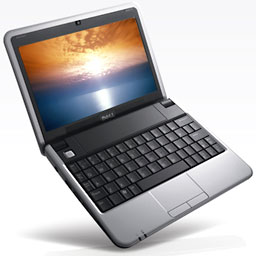
Dell Mini 9 netbook.
In that article, I concluded: "My next low-end Mac will be a Dell netbook!"
I didn't mention in that article one of my main reasons for choosing the Mini 9 - it was rated as one of the netbook models most suitable for being "hackintoshed" - a model that could, with some effort, have Mac OS X installed and boot into OS X with most of its hardware supported. (A netbook that can be forced to boot to OS X but ends up with nonfunctioning wireless and sound is interesting but not too practical.)
The result is a more-or-less Mac in a form factor - and at a price point - not offered by Apple. Dell is no longer selling the Mini 9, having replaced it with the somewhat larger, but less Mac-compatible, Mini 10.
A variety of step-by-step guides were available online along, with a number of utilities to help get users running OS X on their Dell Minis, including a Mac OS X forum on the mydellmini.com website.
I upgraded my Mini's memory from the standard 1 GB to 2 GB (another plus for the Dell Mini 9 - not all netbook models let you upgrade the RAM). And in order to be able to set it up for OS X without blowing away another working configuration (in my case, Ubuntu Linux), I purchased another 16 GB solid state memory drive (SSD); it only takes a moment or two to replace, letting me keep a working system in a desk drawer, just in case.
A good thing, too.
No Luck with OS X
Despite choosing the most hackintosh-able netbook, despite all my preparation, and despite - as far as I could tell - following instructions carefully, it didn't work.
I tried several different "recipes": I tried installing from an external optical drive (netbooks don't have built-in DVD drives). I tried making a bootable USB flash drive with the contents of my OS X install disc. I got another, more expensive SSD drive - a well-reviewed RunCore model with a mini-USB connector - so it could be set up as an external drive on my Mac. This let me install OS X onto it from my Mac, afterwards installing it into the netbook (along with a netbook-specific boot utility).
Each time, the same thing happened: The Dell Mini would start to boot OS X and then crash with a grey screen and a message saying (hopefully) that maybe pushing the power button to turn it off and then on again would help.
It didn't. I'd pretty much given up.
A Solution!
The other day, though, I found a reference to a new article on installing OS X onto Dell Minis. It made reference to a new-to-me helper utility: NetbookBootMaker. It's described as a generic tool to install Mac OS X "on numerous netbooks". Interestingly, it's hosted on a Google Code page.
Also interesting: The article (USB Installation via Mac) discussed installing "Snow Leopard" (Mac OS X 10.6) onto netbooks. I thought I'd heard that the latest versions of Apple's operating system no longer supported the Atom CPUs used in typical netbook models, including my Dell Mini 9.
And it just worked! Quickly and easily.
Briefly, here's what I did...
Needed:
- A retail OS X install disc - the versions that come with Apple hardware are not usable - for Leopard (OS X 10.5) or Snow Leopard. (Note - early versions of Leopard may not be usable, which might have been part of the problem I was having last year.)
- A working Mac.
- A USB flash drive large enough to hold the contents of the OS X installer. (I used an 8 GB flash drive).
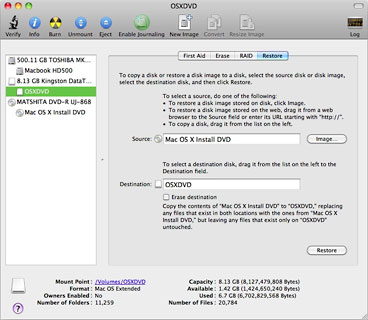 Insert the OS X install disc and the flash drive in
the "real" Mac and use Apple's Disk Utility to format the flash drive,
then use Disk Utility's Restore tab to clone the DVD's contents onto
the newly-formatted flash drive. Pay attention to the details in the
article linked above - it asks you to name the flash drive OSXDVD, and
the process may not work if you give it another name.
Insert the OS X install disc and the flash drive in
the "real" Mac and use Apple's Disk Utility to format the flash drive,
then use Disk Utility's Restore tab to clone the DVD's contents onto
the newly-formatted flash drive. Pay attention to the details in the
article linked above - it asks you to name the flash drive OSXDVD, and
the process may not work if you give it another name.
On the Mac, download a copy of NetbookBootMaker. Use it to "prepare" the OSXDVD flash drive. Afterwards, eject the flash drive, and plug it into the (shut down) netbook. Start up the netbook, setting it to boot from the flash drive.
Booting from the flash drive should load the OS X installer - but don't install it right away. Instead, from the installer's menu bar, click on Utilities, then Disk Utility. Use this to format the netbook's internal drive as Mac OS Extended (Journaled), setting it with GUID Partition Table in the options.
Proceed to install, but click the Customize button, turning off unneeded printer drivers and other options. (My netbook has a 16 GB solid state drive, so space is at a premium - other models may have more spacious standard hard drives, so this may be less necessary.)
 Let
the installation continue. Afterwards, the system should restart,
booting to the OS X welcome screen. At least mine did - unlike the
many times I'd tried other variations of this process in the past.
Let
the installation continue. Afterwards, the system should restart,
booting to the OS X welcome screen. At least mine did - unlike the
many times I'd tried other variations of this process in the past.
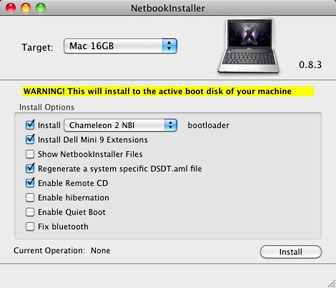
I updated the installation, using the OS X 10.6.2 Combo Updater from Apple, and restarted again. Finally, I ran a NetBookInstaller utility, which magically showed up in the Applications folder (one of several things resulting from preparing the flash drive with NetbookBootMaker). This let me install a custom boot loader and utilities specific for my model.
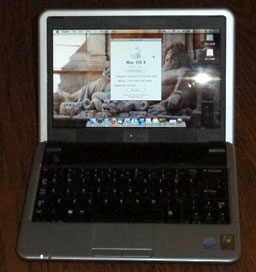 Another reboot, and I was in business.
I've been using it for a couple of days, and it's been working surprisingly well. The hardware all seems to be supported - WiFi worked from the beginning, along with sound, display, and trackpad. I've got a 16 GB SD card plugged into the Mini's SD port, using it to store documents, photos, music, ebooks, etc. That works fine - I've set it as the location for my iTunes library, for instance.
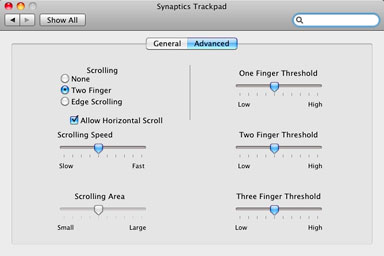 Another legacy of NetbookBootMaker is a Trackpad preference
pane. It offers several three finger gestures and let me add two-finger
scrolling, my favorite Mac trackpad option.
Another legacy of NetbookBootMaker is a Trackpad preference
pane. It offers several three finger gestures and let me add two-finger
scrolling, my favorite Mac trackpad option.
Suspend and resume, frequently a problem with Windows systems, works like a Mac - almost instantaneously.
It boots in under 45 seconds and seems reasonably perky - not bad for an underpowered single-core 1.6 GHz Intel Atom CPU. (The solid state drive probably helps, as does the memory upgrade to 2 GB.)
I've added a set of software - the new OpenOffice 3.2, Perian and Flip4Mac video add-ins, Cyberduck ftp, KompoZer HTML editor, Skype, Picasa photo album, SnapNDrag screen capture utility, ToyViewer lightweight image editor, Xmarks for Safari (to sync bookmarks with my other systems), and Xmenu.
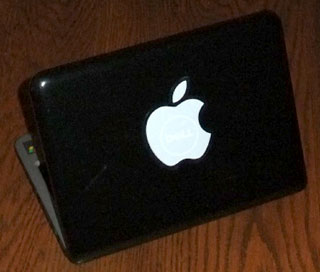
I stuck one of those white Apple decals on top of the Mini's Dell logo, though the word Dell shines through - perhaps a nice touch.
 Everything I said in last April's netbook article remains
true - the small screen, keyboard, and trackpad are noticeable, but so
are the light weight and portability - and the low hardware cost.
Everything I said in last April's netbook article remains
true - the small screen, keyboard, and trackpad are noticeable, but so
are the light weight and portability - and the low hardware cost.
Is It Legal?
But there is one thing....
I used a retail copy of Snow Leopard for this, but I know this isn't what Apple had in mind in at least a couple of ways. The Snow Leopard Software License Agreement (PDF) says that "you agree not to install, use or run the Apple Software on any non-Apple-branded computer...."
Moreover, the US$29 copy of Snow Leopard that I used is, according to the user agreement, limited to use on a computer that "has a properly licensed copy of Mac OS X Leopard already installed on it."
A Google search for "hackintosh" got me 1.3 million hits - clearly there's a lot of interest in this. Apple has, to date, not chosen to go after individuals installing OS X onto their personal "non-Apple-branded" computers, though it successfully stopped online computer retailer Psystar after it started openly marketing OS X clones.
Better than an iPad?
Running OS X, my Dell Mini isn't an iPad. In some ways, it's better than an iPad. Unlike an iPad, it runs "real" Mac OS X, not a souped-up iPhone OS. It can connect to USB devices, print, and run standard Mac applications. I suspect an iPad - when I get to see one - will be a better ebook reader, partly from being able to use the screen in portrait mode, unlike the horizontal (and relatively shallow) netbook display.
I understand Apple's decision to stay out of the cutthroat low
profit margin netbook market. But adding OS X to my Dell Mini
makes a surprisingly capable low-end Mac, of a sort that I wish Apple
would offer. 
Join us on Facebook, follow us on Twitter or Google+, or subscribe to our RSS news feed
Alan Zisman is Mac-using teacher and technology writer based in Vancouver, BC, Canada. Many of his articles are available on his website, www.zisman.ca. If you find Alan's articles helpful, please consider making a donation to his tip jar.
Today's Links
- Mac of the Day: Motorola StarMax 3000, introduced 1999.09.07. This inexpensive clone used lots of off-the-shelf parts.
- Support Low End Mac
Recent Content
About LEM Support Usage Privacy Contact
Follow Low End Mac on Twitter
Join Low End Mac on Facebook
Favorite Sites
MacSurfer
Cult of Mac
Shrine of Apple
MacInTouch
MyAppleMenu
InfoMac
The Mac Observer
Accelerate Your Mac
RetroMacCast
The Vintage Mac Museum
Deal Brothers
DealMac
Mac2Sell
Mac Driver Museum
JAG's House
System 6 Heaven
System 7 Today
the pickle's Low-End Mac FAQ
Affiliates
Amazon.com
The iTunes Store
PC Connection Express
Macgo Blu-ray Player
Parallels Desktop for Mac
eBay

