
Mac2Windows
Unbuntu Linux and Boot Camp Make It Easy to Create a Triple Boot Mac
- 2008.12.24 - Tip Jar
When Apple's Macintosh computers migrated from using PowerPC CPUs to using Intel chips, the hacker community took it as a challenge to find to a way to run standard PC operating systems - primarily Windows and Linux - on the new Macs. The ways they came up with worked - but as with so-called Hackintoshes (non-Apple PCs running Mac OS X), it wasn't pretty, and it wasn't something that most users wanted to try on their own. (See, for instance, my June 2006 column, Windows XP on Macintel a Reality.)
Apple forestalled all this by releasing Boot Camp - first as a beta that ran on then-current Mac OS X 10.4 and later as a Leopard-only official release. In typical Apple fashion, Boot Camp "just works", smoothly and easily - at least if you're prepared to accept the limitations hard-wired into it by Apple.
The major limitation, at least for me, is that Boot Camp lets users install any PC operating system they want, as long as it's Windows XP (SP2 or later) or Vista. (And note that upgrade versions of these are not supported, at least not easily.)
I can think of a couple of reasons for the limitations. First, unlike most PCs, the Intel Macs do not use old-style BIOS at startup; they use a newer EFI (Extensible Firmware Interface) that isn't supported by earlier versions of Windows or by many other PC operating systems.
Moreover, Apple supports Boot Camp users by including Windows drivers for the hardware built-into its Intel Macs. I doubt that Apple wants the responsibility for providing drivers for the wide range of PC operating systems. (These drivers are typically on the Disc 1 of the set that ships with compatible Macs, but Apple doesn't do a good enough job of letting users know about this as they're setting up Boot Camp. How about a mention of this in one of the dialogues as users are running the Boot Camp Assistant?)
I've wanted to be able to install Linux on my Mac. I can run Linux in a virtual session using my choice of Parallels Desktop, VMware Fusion, or the free VirtualBox, but I'd like the option of booting my system directly to a Linux installation.
Googling something like Mac Boot Camp Linux gets pages of links showing that it's possible . . . but the first hit - a 2007 article, Triple Boot via BootCamp Ubuntu - makes it seem more daunting that I want to get into. Early on, the user is guided through using the Terminal to repartition the hard drive, the first of a long list of command-line actions.
Sorry, I don't want to go there.
The 2008 versions (8.04 and 8.10) of the popular Ubuntu Linux distribution adds a feature that makes all this command-line stuff unnecessary. Those versions offer the option of installing Ubuntu Linux from within Windows and making use of the Windows file system - no repartitioning necessary.
It does this by using a feature called Wubi - but potential users don't need to know anything about that. It's simple to use. With Windows running, just insert a Ubuntu (8.04 or 8.10) install CD; the Wubi installer will auto-open, with an option to "Install inside Windows". (Alternatively, a user could choose the "Demo and full installation" option, which will reboot the system to the Ubuntu CD, allowing for a standard installation, complete with nondestructive repartitioning of the hard drive. Maybe that would work with a Boot Camp Windows installation - I didn't test it).
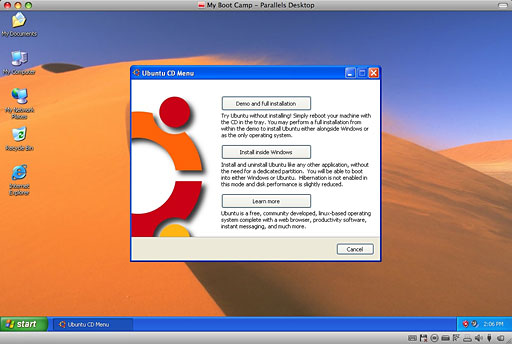
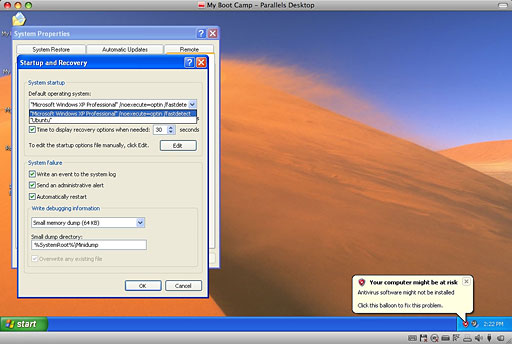
Installing inside Windows does not repartition the drive. Instead, Wubi creates Linux hard drive partitions living on files in the standard Windows Files folder structure. Rather than adding Ubuntu and Windows to the standard Linux GRUB boot loader, it adds Ubuntu as an option to the standard Windows boot menu. And it adds an item to uninstall Ubuntu to the Windows Add/Remove Programs control panel.
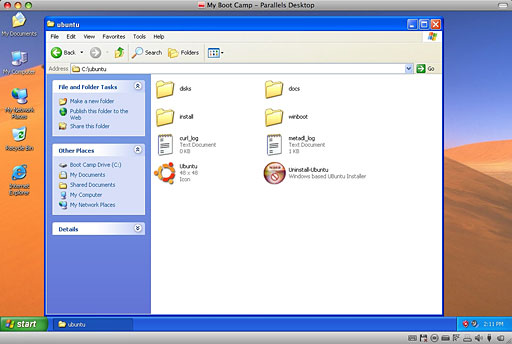
While convenient, there is a small performance penalty running Ubuntu from within the Windows file system rather than with a "real" Linux file system, although the penalty isn't noticeable in my tests.
It all works very cleanly and smoothly - I'd previously used it on several "real" PCs. Now I'm pleased to report that I set it up from a Windows XP Pro installation on my aluminum MacBook as well. As with the earlier installations, it was simple and straightforward: start up Windows, insert the Ubuntu CD, choose "Install inside Windows", fill in a few dialogue box choices - (virtual) hard drive size, desired user name and password - wait a few moments, then restart.
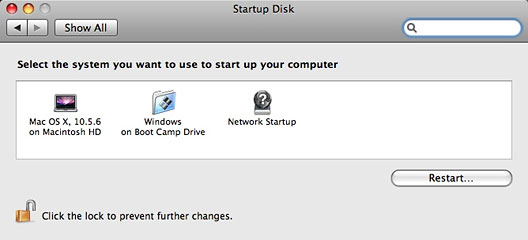
The trick is that when installed this way, Mac OS X doesn't know that Linux is installed. The Mac's Startup Disk system preference offers choices to boot to Mac OS X or Boot Camp.
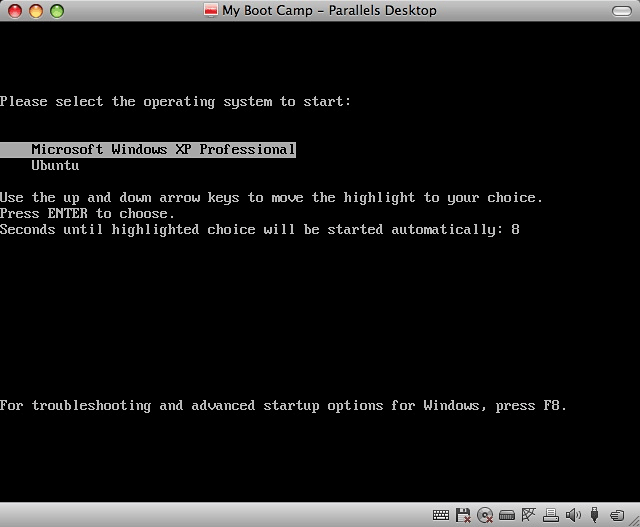
When you boot to the Boot Camp installation, you get the Windows boot menu. And this offers the choice to boot Windows or Ubuntu. (Windows is the default - this can be changed if desired.)
As I've mentioned, Apple offers drivers for Mac hardware to users booting into Windows via Boot Camp. Windows runs without these drivers. Apple doesn't offer Linux drivers, but Ubuntu runs on my MacBook nonetheless. When it started up, it noted that my MacBook has an Nvidia display adapter and offered to install "restricted proprietary" drivers for it, promising better 3D performance. That should also be available for Macs with ATI display adapters - as was the case on the Dell laptop on which I also have Ubuntu installed. A "restricted" driver was also available for my system's Broadcom WiFi hardware. (What? You thought Apple made its own AirPort WiFi chipset?)
WiFi, ethernet, sound, even Bluetooth work. I don't think the built-in iSight camera works (though I haven't checked), and my MacBook's trackpad doesn't have the right-click support that's an option in OS X. These are not show-stoppers - all the vital hardware is supported "out of the box".
Now my MacBook triple boots with no messy Terminal commands needed.
With Boot Camp, Apple made it easy for ordinary users to set up their
Macs to boot to Windows. By using Wubi, the Ubuntu folks made it just
as simple for Windows users- and Boot Camp-using Mac users to add
Ubuntu Linux to the mix. 
Join us on Facebook, follow us on Twitter or Google+, or subscribe to our RSS news feed
Alan Zisman is Mac-using teacher and technology writer based in Vancouver, BC, Canada. Many of his articles are available on his website, www.zisman.ca. If you find Alan's articles helpful, please consider making a donation to his tip jar.
Today's Links
- Mac of the Day: PowerBook 190cs, introduced 1995.08.28. The last 680x0-based PowerBook could take a PowerPC upgrade.
- Support Low End Mac
Recent Content
About LEM Support Usage Privacy Contact
Follow Low End Mac on Twitter
Join Low End Mac on Facebook
Favorite Sites
MacSurfer
Cult of Mac
Shrine of Apple
MacInTouch
MyAppleMenu
InfoMac
The Mac Observer
Accelerate Your Mac
RetroMacCast
The Vintage Mac Museum
Deal Brothers
DealMac
Mac2Sell
Mac Driver Museum
JAG's House
System 6 Heaven
System 7 Today
the pickle's Low-End Mac FAQ
Affiliates
Amazon.com
The iTunes Store
PC Connection Express
Macgo Blu-ray Player
Parallels Desktop for Mac
eBay

