
Mac2Windows
Guest PC: A More Affordable Way to Put Windows on Your Mac
- 2005.12.05 - Tip Jar
With Microsoft Windows 20 years old this past November, I guess it's time to admit that we'll probably have to deal with Windows for a while. And like many Mac users, I sometimes have to work with Windows applications or files that don't seem to have any usable Mac alternatives.
For some of us that may be a Windows-based accounting program. Or Microsoft Access database files. (Yes, there are Mac accounting programs and FileMaker Pro, but these are not always usable as alternatives).
My wife's workplace long ago standardized on the Quattro-Pro spreadsheet. She's not willing to save-as Excel, then import the modified Excel files back into Quattro-Pro when she brings files home from work.
My daughter can register for university online - but only using a Windows version of Internet Explorer.
In these cases and others, rather than fuss with file conversion (if possible, which isn't always the case), it's sometimes easiest to bow to the inevitable and run the Windows program. But you may not need (or want) to do so on an actual Windows PC; in many cases you can do what you need on an emulated Windows PC running in a window (note the small "w") on your Mac.
For a number of years the standard PC emulation software has been Virtual PC (VPC), originally developed by longtime Mac utility developer Connectix. It was purchased a few years ago by Microsoft, which now sells VPC on its own or as part of a bundle with the Mac version of Microsoft Office. (Microsoft was probably more interested in buying VPC for its PC version, which lets Windows users run multiple PC operating systems at once on a single system. They're busy integrating this capability into their Windows Server software).
But Virtual PC isn't the only way to emulate a PC (Windows or otherwise) on a Mac. Despite rumours of its revival, SoftPC seems to be gone for good. But a newcomer from Russia's Lismore Software Systems named Guest PC has taken up the challenge. Guest PC is available as a 3.8 MB download at a more attractive price than Virtual PC: US$69.99 buys a family license that's good for all the Macs in your household.
Unlike VPC, which is sold at a variety of prices bundled with a variety of Windows operating systems, you'll need access to your own copy of Windows for use with Guest PC. And where VPC bundles its various versions of Windows as preinstalled image files, with Guest PC you need to go through the time and effort of actually installing your desired Windows version from scratch.
A time saving tip: Use your Mac's Disk Utility to create an Image File from your Windows install CD onto your desktop. Guest PC will be able to install from the image file, and installation will be much quicker than installing from the physical CD.
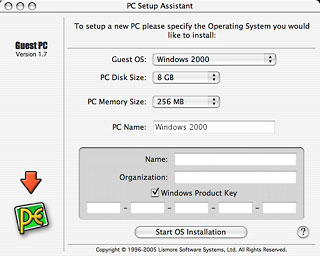
Guest PC does some cute tricks during the installation. When you choose a Guest OS version, it proposes a virtual disk size and memory size (you can change these defaults) and gives you the option to enter your name, organization, and Windows product key. These are entered into a setup script and are automatically entered during the Windows installation procedure.
Your Mac's default printer is emulated as an Apple LaserWriter that Windows thinks is connected to a nonexistent parallel port. The install script even sets your default Internet Explorer home page to Lismore System's website.
 Like Virtual PC, Guest PC users can install an optional set
of "Additions" after starting up Windows. These make it possible to
smoothly move back and forth between the Windows cursor and the Mac
cursor, to drag and drop and to copy and paste between the two
environments, and more.
Like Virtual PC, Guest PC users can install an optional set
of "Additions" after starting up Windows. These make it possible to
smoothly move back and forth between the Windows cursor and the Mac
cursor, to drag and drop and to copy and paste between the two
environments, and more.
I tested Guest PC version 1.7 on two Macs: a nearly current iMac 1.8 GHz G5 with 1.5 GB of RAM and a two year-old 800 MHz iBook G4 with 640 MB of RAM. The amount of RAM is crucial - you need enough physical memory installed on your Mac so that you can reserve a reasonable amount for your virtual PC while still leaving enough for your Mac to continue to function.
Even devoting a reasonable 512 MB of RAM to it, I found Windows XP too slow. This is not particularly a criticism of Guest PC; WinXP runs equally sluggishly under Virtual PC. Windows 2000 (with 256 MB of RAM) was much more usable, and Windows 98SE (with a humble 128 MB of RAM - up from Guest PC's suggested 64 MB) was perkier still.
My suggestion: Install the oldest Windows operating system that will work with your needed applications. Guest PC performance was comparable to Virtual PC performance (at least after the longer Windows installation process), but both are slower than having a real, physical PC.
Virtual PC offers limited USB support - and in some cases, but not all, you may be able to make use of USB devices plugged into your Mac. Lismore is working on USB support, but it's not available yet.
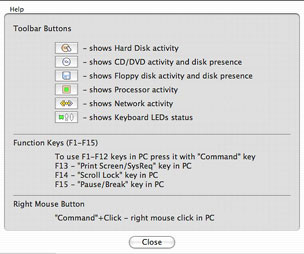
A set of toolbar buttons below the Guest PC window show disk, CPU, and network activity and allow access to keys and key combinations (like PRNTSCRN or Control - Alt - Del) that are hard to do on the Mac keyboard. Clicking the '?' toolbar icon shows the meaning of these buttons along with several other hints (such as holding down the Command key to right-click using a single-button mouse)
 Guest PC includes a minimalist DOS environment (using a
non-Microsoft version of DOS). It can be used with non-Windows PC
operating system, though these do not get the same level of
installation-script support and lack the post-installation
Additions. (Tip: Press Command - Option if needed to get your mouse
cursor back).
Guest PC includes a minimalist DOS environment (using a
non-Microsoft version of DOS). It can be used with non-Windows PC
operating system, though these do not get the same level of
installation-script support and lack the post-installation
Additions. (Tip: Press Command - Option if needed to get your mouse
cursor back).
I installed my current favourite Linux distribution, Ubuntu. It worked (though slowly) with Guest PC. I'd been unable to make it work at all with Virtual PC.
One nice feature of VPC that isn't in Guest PC (at least not yet): VPC lets you shut down the PC window, saving the current memory contents to a file on your hard drive. Restarting that saved PC simply opens that file, restoring it to its former state (along with its former time). That Fast Save can be a big time-saver over needing to reboot your emulated computer each time; hopefully Lismore will add this to an upcoming version.
In Guest PC's favour: Sound and video both seem smoother than in VPC systems.
Neither emulation supports 3D video acceleration, so if you're hoping to use one or the other to play high-end Windows games, don't bother.
But for a Mac user with a limited need for an individual Windows application - like my wife's need for Quattro Pro or my daughter's need to register for school using Internet Explorer, Guest PC works fine (particularly using Windows 98). And being able to purchase a single US$69 license for all of my family's Macs is much appreciated.
When Apple's new models running on Intel processors come on-stream in 2006, the task of running PC applications will change; it may be possible to setup these models to multi-boot between Mac OS X and other PC operating systems. In any event, it should be less of a challenge to "emulate" a PC on a system running on an Intel processor.
For users running a G3, G4, or G5 Mac but needing limited access
to a PC application, Guest PC does a good job - as long as you can
provide your own copy of a PC operating system. 
- Link: Guest PC
- Link: Virtual PC for Mac
Join us on Facebook, follow us on Twitter or Google+, or subscribe to our RSS news feed
Alan Zisman is Mac-using teacher and technology writer based in Vancouver, BC, Canada. Many of his articles are available on his website, www.zisman.ca. If you find Alan's articles helpful, please consider making a donation to his tip jar.
Today's Links
- Mac of the Day: PowerBook 190cs, introduced 1995.08.28. The last 680x0-based PowerBook could take a PowerPC upgrade.
- Support Low End Mac
Recent Content
About LEM Support Usage Privacy Contact
Follow Low End Mac on Twitter
Join Low End Mac on Facebook
Favorite Sites
MacSurfer
Cult of Mac
Shrine of Apple
MacInTouch
MyAppleMenu
InfoMac
The Mac Observer
Accelerate Your Mac
RetroMacCast
The Vintage Mac Museum
Deal Brothers
DealMac
Mac2Sell
Mac Driver Museum
JAG's House
System 6 Heaven
System 7 Today
the pickle's Low-End Mac FAQ
Affiliates
Amazon.com
The iTunes Store
PC Connection Express
Macgo Blu-ray Player
Parallels Desktop for Mac
eBay

