
Mac2Windows
Panther Lets Macs and Windows Work Together Better
- 2003.11.21 - Tip Jar
When you're the minority computing platform, you have to try harder to get along. As OS X has evolved, it's gotten better and better at working alongside Windows PCs, taking part in Windows networks to share files and printers.
The original OS X didn't do this, but the first major revision, 10.1, added SMB (a.k.a. Samba or CIFS), an open source clone of Microsoft's Windows networking that is widely used in Linux and other non-Microsoft operating systems. But making it work wasn't easy. Users could connect to Windows networks, but they had to know the IP address or network name of the server and had to enter it manually in the Finder's Go:Connect to Server menu.
Printing to a shared Windows printer in 10.1 presumably was possible, but it took more skills at the Terminal command line than I was capable of.
OS X 10.2 (Jaguar) made both of these easier. The Go:Connect to Server dialogue let users browse to Windows servers on the network, just as it did with Mac servers. It was also possible to connect to shared Windows printers using Jaguar's Print Center utility, but it still wasn't easy. You needed to use a "secret" - holding down the Option key while clicking the Add button in order to get the option to connect to a Windows printer at all. And you needed to manually enter the computer's network name and the printer's share name. And, finally, you needed a networkable printer driver; the Mac versions of the drivers for most Windows printers wouldn't let you print across a network.
The open-source Gimp-print provided network-friendly drivers for literally hundreds of printer models, but putting it all together was a process that sometimes worked and sometimes didn't.
OS X 10.3 (Panther) takes a number of steps towards closing the gaps. The Finder's Go:Connect starts up with a simpler dialogue box offering the ability to reconnect to the last-used server, and showing favorite servers:
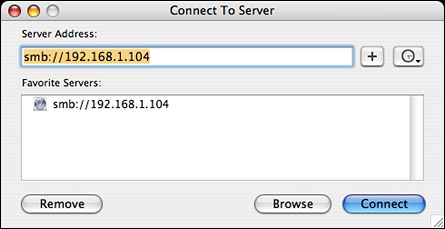
The button near the top right gives a dropdown list of recently used servers.
Clicking on the Browse button takes you to a Finder window, open to Panther's big networking usability improvement.
Panther's Finder includes a sidebar, with icons to frequently used folders and discs. As well, a Network item can be used to show aliases to accessible servers, whether they're Mac, Windows, or Unix servers. Double-clicking one may require a log-in name and password, but then will show available folders.
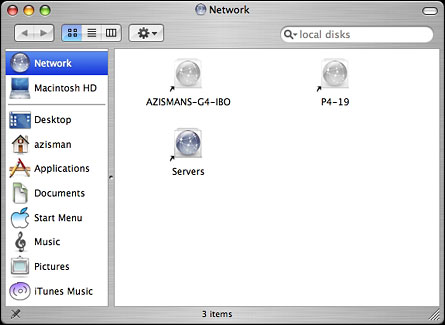
Integrating the network into the Finder makes it easier to treat shared folders and their contents like files and folders on local drives - and makes it easier to work with them in applications. The standard Panther open and save dialogue boxes also makes it easier to open networked files and to save to drives and folders across the network.
And Panther users don't need to know whether the server they're accessing is another Mac or a Unix or Windows box. In fact, they'll hardly know they're accessing the network at all!
Panther makes printing to shared Windows printers much easier as well. Jaguar's Print Center utility is gone (and not missed, as far as I'm concerned!). Instead, there's a new Print & Fax system preference.
Just as the new Finder integrates network access with accessing local drives, this item treats networked printers as normal members of the system - no more secret commands.
Clicking on the Set Up Printers button opens a Printer List dialogue box with a family resemblance to the old Print Center. This time, though clicking the Add button includes Windows Printing as an option; selecting it shows all the available Windows servers:
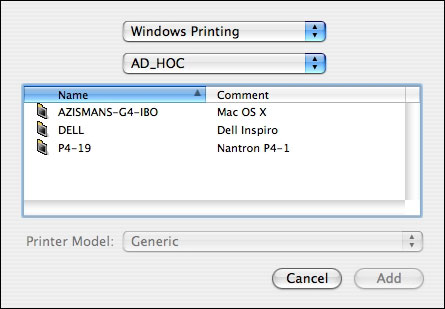
Double-click on a server's name, and you'll see any shared printers that are connected to it:
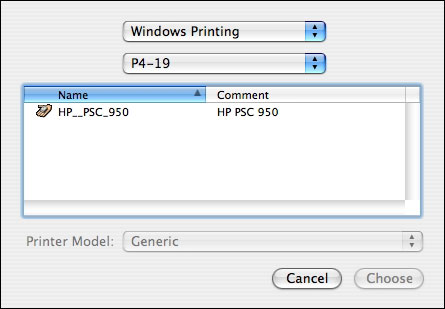
While this is much easier than in Jaguar, you're not out of the woods yet. You still have to select a printer model. And you'll still bump up against the same gotcha as before - few Mac printer drivers allow for printing across a network, whether the printer is connected to a Windows machine, another Mac, or connected directly to a network printer server.
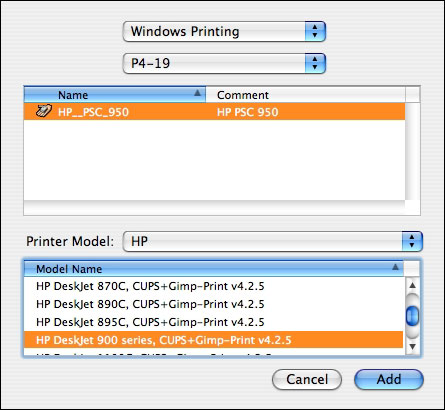
Take my HP PSC950 all-in-one. HP's drivers work fine when the printer is connected directly to my Mac, but they are useless when the same printer is accessed across the network. (This is one area where Windows does better: Windows doesn't care - if you have the right printer driver installed, it can print to that model printer no matter how it's connected. And in many cases, even if you don't have a driver installed, if you connect to a printer across a Windows network, the system will get the drivers from the remote computer).
As in Jaguar, the open source Gimp-Print project comes to the rescue. Even though its Mac OS X home page states: Gimp-Print for Mac OS X Jaguar, it works fine in Panther in my tests. You'll find a long list of models officially supported, and an even longer list of models "reported to work." My PSC950 falls in the latter category; as instructed, after downloading and installing the Gimp-Print drivers (and the Ghostscript download from the same site), I identify my printer model as an HP DeskJet 900 series:
(Afterwards, you may need to fiddle with the print options; the first time I went to print to my networked printer, I found the defaults were set for low-resolution line art. After resetting them, though I had quite acceptable text and graphics output. Reasonably speedy, too).
That same Print & Fax system preference includes a one-click option to share printers across the network. (I haven't tried it, and can't comment on how well Panther shares its printers with Windows systems).
Not much changed is Panther's ability to let your Mac share its files with Windows computers. As in Jaguar, the Sharing system preference offers a one-click option to turn on Windows Sharing. Turn it on, and your home folder is shared with your Mac set as a member of a workgroup named with the Windows default 'Workgroup'. If you need to share additional drives or folders, or change the workgroup name, I would recommend getting the free (donations requested) Sharepoints system preference:
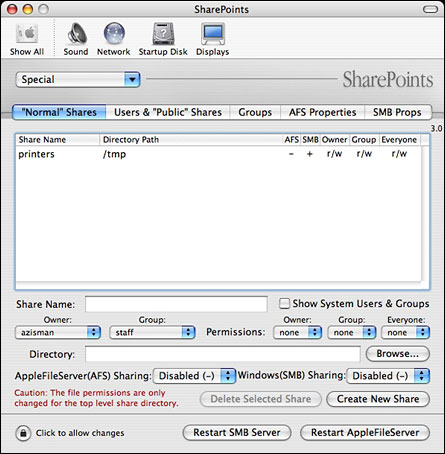
While it's not particularly easy to use, it does offer the power to customize the Mac OS's options to share folders and files across both Mac and Windows networks.
Panther is a big step forward to letting Mac and Windows work
seamlessly together. 
Join us on Facebook, follow us on Twitter or Google+, or subscribe to our RSS news feed
Alan Zisman is Mac-using teacher and technology writer based in Vancouver, BC, Canada. Many of his articles are available on his website, www.zisman.ca. If you find Alan's articles helpful, please consider making a donation to his tip jar.
Today's Links
- Mac of the Day: PowerBook 500 Series, introduced 1994.05.16. 'Blackbird' includes a 25 to 33 MHz 68040 along with smart batteries and grayscale or color displays.
- Support Low End Mac
Recent Content
About LEM Support Usage Privacy Contact
Follow Low End Mac on Twitter
Join Low End Mac on Facebook
Favorite Sites
MacSurfer
Cult of Mac
Shrine of Apple
MacInTouch
MyAppleMenu
InfoMac
The Mac Observer
Accelerate Your Mac
RetroMacCast
The Vintage Mac Museum
Deal Brothers
DealMac
Mac2Sell
Mac Driver Museum
JAG's House
System 6 Heaven
System 7 Today
the pickle's Low-End Mac FAQ
Affiliates
Amazon.com
The iTunes Store
PC Connection Express
Macgo Blu-ray Player
Parallels Desktop for Mac
eBay

