
Is it really fair to compare a three-year-old operating system to a three-month-old one? Maybe not (for the three-year-old), but it is interesting.
This is a casual comparison, not one loaded with benchmarks unless they’re especially relevant.
The Hardware
As expected, I’m using my 7-year-old 1.7 GHz IBM ThinkPad T42 (Model 2373-JXU, for those of you who are really spec-hungry) with a 120 GB Hitachi 5400 RPM hard drive and 1 GB of RAM (two 512 MB cards). CPU and GPU cooling is provided by your friendly neighborhood syringe of Arctic Silver 5, which I’ve written about previously.
The Behemoth: Windows 7
I’ve had prior experience with Windows 7, so when I shrank my Ubuntu 12.04 partition to make room for it, I was generous. Ubuntu has been relegated to a 43 GB chunk of my 120 GB drive, which is roughly twice as large as the data it is currently storing. On the other hand, Windows 7 has a much larger partition – 76 GB of breathing room. Given how Windows 7 is much more dependent on its large paging file than Ubuntu is on swap space – to say nothing of the expanse of space the various Windows components, drivers, etc. consume – I think that action was prudent.
Installation was fairly breezy, save for a little bootloader trouble that a Ubuntu LiveCD helped fix. I wouldn’t say installation took any longer than Ubuntu, although it seemed Ubuntu took less time doing the actual installation process than it did in getting my account, keyboard, and so on configured.

Windows 7 uses Aero on all fronts.
Eye-candy wise, Windows 7 is more glitzy, making heavy use of Aero on all fronts. This can be disabled, but Windows 7 without Aero effects isn’t nearly as pretty as Ubuntu with Unity 2D. Aero and Basic are both equally fast, but Aero seems to drain the battery a smidgen faster.
Where Windows 7 starts to look a little bloated is in its RAM usage. At the bare minimum, Windows was using a good 500-600 MB chunk of my precious 1 GB of RAM, and launching one or two programs, such as Chrome and Skype, quickly ate away the rest. With RAM to spare (2-3 GB), Windows 7 is a little snappier than Ubuntu 12.04, but when it has to really dig into that virtual memory, it slows down considerably and can start to feel jerky and buggy. (32-bit Windows 7 required 1 GB of RAM; 64-bit doubles that to 2 GB.)
On the drivers front, all of my hardware was very well supported out of the box, except for my Bluetooth/modem combo, which required a special driver from Lenovo. My ATI Radeon 9600 Mobility felt unshackled from some heavy bonds – it flew through YouTube videos it would have choked on in Ubuntu, and in Minecraft it averaged 30 fps at low settings compared to 10 fps in Ubuntu at equal settings. However, while those 10 fps in Ubuntu were fairly steady, the fps count in Windows bounced all over the place, dropping to 5 at times and climbing to 40 at others, often in a split second. Between the two, I prefer stability to random bursts of speed.
Power management in Windows was a little better than in Ubuntu, especially when it came to efficient heat management. Windows 7 has a nice option to put priority on passive cooling while on battery, which means that if at all possible Windows will try to throttle the CPU (and possibly the GPU, but I’m not certain) to keep temperatures down so the fan doesn’t have to kick in or spin very fast. When plugged in, the priority switches to active cooling with better performance. However, for all the sophistication of its power management, Windows 7 tied Ubuntu for battery life: roughly four to four-and-a-half hours.
Overall, Windows 7 Ultimate felt faster but heavier than Ubuntu, and while video and other graphics processes were improved considerably, web browsing felt slower, as did startup, suspend/wake, and shutdown.
Is Windows 7 worth $219? On a newer machine, maybe. On an older machine, if you’re just using it for basic tasks like web browsing and so forth, no way! Fortunately for me, I have a $10 student-licensed version.
The Lightweight: Ubuntu 12.04 Precise Pangolin
Pure and simple, Ubuntu 12.04 has one major advantage over Windows 7 right off the bat: It’s free. And if you’re short on hard drive space, don’t worry – it’s good at squeezing into tight spaces.
Installing Ubuntu 12.04 involves a few more clicks than Windows 7 (it’s nothing a newbie couldn’t handle), but at least it got my screen resolution right immediately. With Windows 7, I was stuck in 800 x 600 land until I finally got to the desktop, unlike in Ubuntu where my glorious 1400 x 1050 IPS display was immediately and effortlessly befriended by the OS.
Needless to say, Ubuntu makes a better impression on the nervous mind during the waiting process of installation.
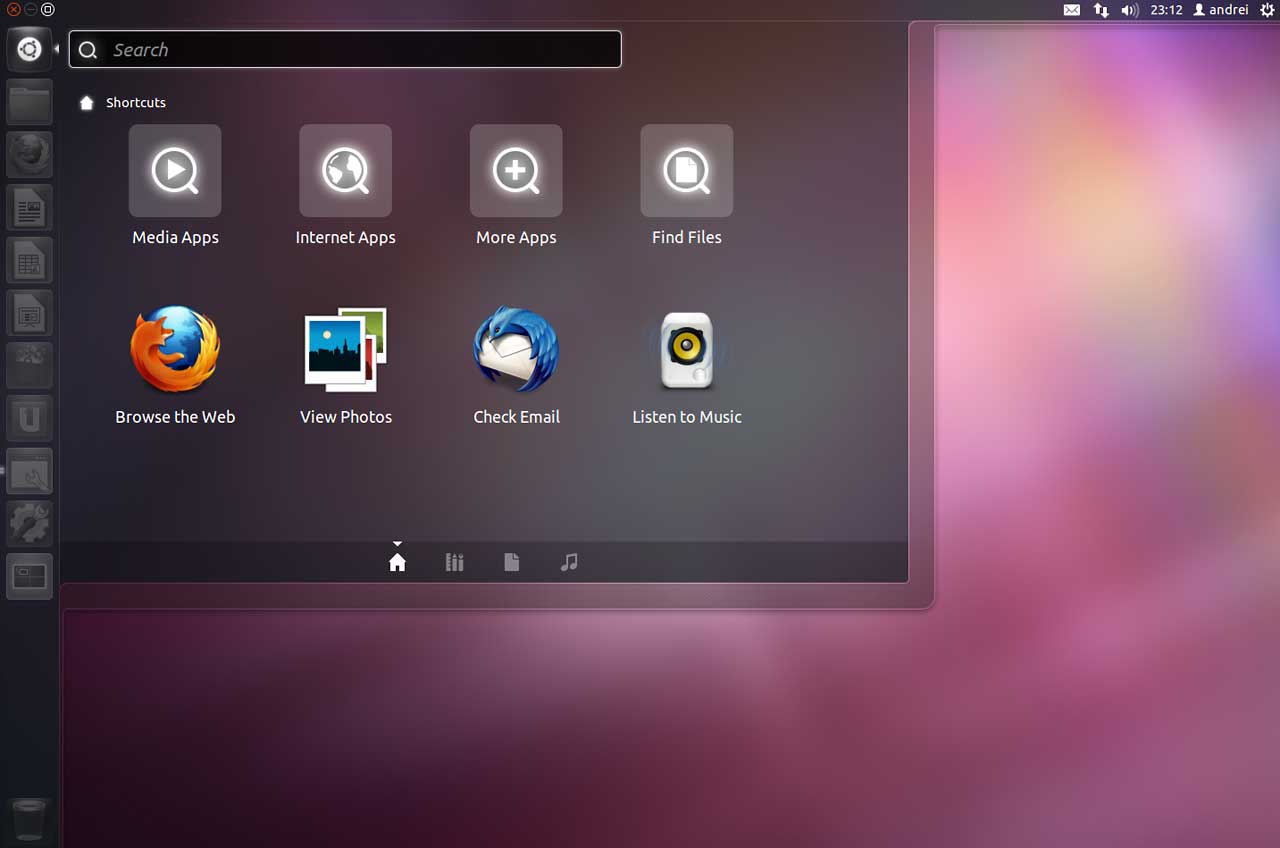
Ubuntu 12.04 Precise Pangolin screen shot.
Ubuntu is more subdued in its beauty than Windows 7, like an impressionist painting compared to a stained-glass window. Both are quite beautiful and appeal to different types of people. For me, the subdued approach seems to work better with the simple matte black of my ThinkPad.
Unity has been a source of ire to GNOME purists, but for Ubuntu newcomers, it is a welcome sight – nice, big, simple buttons to hit. Those who know Firefox should recognize its icon in the dash and start to understand the GUI right away. And for die-hards, GNOME is still in the Ubuntu repositories.
RAM usage on Ubuntu, at the bare minimum, tends to stay in the 300-400 MB range when idle, and with LibreOffice Writer and Chrome open (and Dropbox running in the background), my ThinkPad is currently using 750 MB of RAM with 2 MB of swap space in use. Plenty of breathing room for this machine. (32-bit Ubuntu 12.04 will run in as little as 384 MB of RAM, and 64-bit needs 512 MB.)
As stated in the Windows section, video just isn’t up to par. Whether it’s Adobe’s fault with Flash or some problems with the open-source Radeon driver, I’m not sure. Whatever it is, I hope it is resolved soon. I’d be inclined to put more of the blame on the Radeon driver, since our HP Pavilion a6400f with Intel G33/31 integrated graphics seems to have no trouble with video.
Power management in Ubuntu 12.04 is a feat compared to the last few versions. Battery life is up and is finally competing with Windows – favorably at times. However, my Radeon 9600 Mobility seems not to be taking advantage of some power management features and heats up quickly, causing the fan to kick in and audibly spin. Not a deal breaker, but it is annoying. Battery life, out of the box, is roughly 4:00 to 4:30, with 5:00 possible under the right conditions (namely, if the laptop is sitting on a table rather than my lap, where it tends to heat up).
Overall, Ubuntu is a formidable competitor to Windows 7 as far as basic features go, and while it might trail Windows in its selection of truly user-friendly software, the price is quite alluring.
The Takeaway
For older hardware, I can’t help but recommend Ubuntu 12.04 Precise Pangolin over Windows 7. Windows might be the industry-standard (for now), but if you’re trying to get an older PC running again, Ubuntu will be much less expensive and much friendlier to the limited hardware resources.
Keywords: #windows7 #ubuntu12.04
Short link: http://goo.gl/pFQX9O
searchword: windows7vsubuntu
