
What does thermal compound do, and why should you be concerned about it?
Call me simple, but I had no idea what thermal compound was until about a year ago when I decided to upgrade the factory-installed RAM on my iMac G4. Apparently there is a two-part heatsink in the good ol’ Luxo Mac that needs thermal compound at the joint to thermally bond the two parts.
What Is Thermal Compound
Thermal compound is, to put it shortly, a paste-like fluid used to fill the surface imperfections in CPUs, GPUs, and other chips in order to more effectively transfer their heat to a heatsink. In a perfect world, it wouldn’t be required, because perfect chips could have all their microscopic imperfections polished out, creating perfect contact (and thus heat transfer) to a heatsink.
We don’t live in a perfect world, so we’re stuck with these little syringes of goop.
Why It Matters
Thermal compound is essential to the healthy operation of most computers. Without it, components would heat up and wear out much faster than normal, if not fry altogether. Trouble is, thermal compound dries up and loses its thermal conductivity over time, so it must be replaced at intervals.
How Often Should You Replace It?
I’ve heard varying reports, ranging from every six months to “whenever it’s no longer doing its job”. Probably a good way to tell is if your PC seems to run its fans more often than it used to, or if your laptop seems especially toasty in your lap.
How Should You Replace It?
Many thermal compound manufacturers have instructions on how to replace thermal compound. For example, Arctic Cooling’s website has PDF instructions on how to replace the thermal compound on many different types of Intel and AMD processors, from the Pentium 4 and Pentium M all the way up to today’s Core i3/5/7 series.
What Kind of Thermal Paste Should You Buy?
That’s entirely up to you, but Hardware Secrets has a very informative comparison that it updates every year.
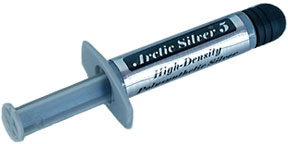 I used Arctic Silver 5, which, while not the best on that list, is a readily available thermal compound that has very good performance ($6.85 for 3.5g with free shipping at Amazon.com – and generally not much more at your friendly neighborhood computer store).
My Experience
Since most of the PCs and Macs around here are well over five years old, they’re running hotter than they were when new – especially the laptops. I bought a single syringe of Arctic Silver 5 from Radio Shack and went straight to work on two of my laptops: my workhorse IBM ThinkPad T42 (2373-JXU) and my 500 MHz Apple PowerBook G3 Pismo.
I had no reliable way to measure the 12-year-old Pismo’s temperature beforehand, but it was running its tiny fan quite often under load (it’s supposed to be a fanless design, but it has a fan for emergency thermal situations). After applying new Arctic Silver 5, it has been running considerably cooler to the touch, and the fan hasn’t kicked in unless it’s been under extreme loads for hours at a time (my brother uses it for PSOne, SNES, and NES gaming emulation).
The T42, on the other hand, did have accessible thermal sensors, but I forgot to check the CPU temperature ahead of time. However, I did measure the GPU temperature before replacing its thermal pad: at full load (Minecraft for Linux) it was running approximately 86° Celsius, but a thin layer of Arctic Silver 5 reduced the temperature to 64° Celsius – and the AS5 hasn’t even fully set yet! On average, the T42 tends to run at about 40-50° Celsius now (measured by the CPU, GPU, and motherboard sensors), and my thighs are quite thankful. In addition, with the fan running slower, I saw a 30 minute jump in battery life, from 4:00 to 4:30.
Hopefully this helps preserve my batteries too, since heat will negatively affect a battery’s lifespan. (My brother Cainon can attest to this, as his netbook’s fan jammed, and soaring temps essentially killed his battery, which quickly dropped from a 6 hour charge to a 10 minute charge in a matter of weeks. On a side note, he’s very much enjoying his new, quiet, cool, and long-running ThinkPad X120e with Ubuntu 12.04.)
I’ve also applied AS5 to my HP Compaq DC5100 tower (with a 3.4 GHz hyperthreading Pentium 4 Extreme Edition), which doesn’t climb over 60° Celsius while running Folding@Home.
The Takeaway
Don’t expect dramatic results, but if you’ve got a hot laptop, a can of compressed air and a syringe of thermal paste might be just what you need to stop burning your thighs and give your battery a little extra oomph.
Further Reading
- How to Correctly Apply Thermal Grease, Hardware Secrets
- What Is the Best Way to Apply Thermal Grease?, Hardware Secrets
- Thermal Paste and How to Use It, TechPowerUp
- How-To: Properly Apply Thermal Paste and Install a CPU, Maximum PC
- Instructions for Arctic Silver Products, Arctic Silver
Keywords: #thermalcompound
Short link: http://goo.gl/IznTLV
searchword: thermalcompound
