
The Royal Quiet De Luxe portable typewriter is about a ten pound machine capable of printing single page documents not wider than 9 inches and of indeterminate length. It was designed to allow the user to continue working while on board trains and in hotel rooms, but it was never practical for air travel, due to its size and loud tapping sounds.
Specifications
- RAM: Zero MB, zero KB, just plain zero bytes, nothing, nada, zippo
- ROM: One font in ROM
- Operating System: You
- Hard Drive: 0.5 KB cylindrical platen that only recorded data if you forgot to load paper
- Floppy, tape, or other storage: none
- Display: none other than printed output
- Fonts: One monospaced 12 point serif font
- Color output: Can be changed with special ribbons from black to black and red or black and white (correction ribbon)
- Power supply: none needed
- Sound card: none, but outputs a sound set that consists of “click,” “chunk,” and “ding,” also a ratcheting noise as carriage is returned to left position
- Up to 10 user-adjustable tab settings
- Line spacing: single or double spacing
- Margin controls: Left and right adjustable, with margin override (margin release) key
- Spell check: none
- Weight: about 10 pounds.
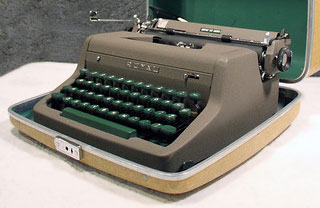 Twenty years ago, more or less, I was taught to type on a manual typewriter in a hot, steamy room in a small school (no longer in existence) in a small town in Kentucky. The fast students got to sit at the end of the room and use one of four electric typewriters; at 35 wpm, I was one of the fast ones. However, at home I had to settle for a small Royal portable, the kind you see in yard sales and flea markets for $10 these days.
A few days ago I was forced to sit down at my portable Royal once again to crank out some purchase orders in septuplicate (yeah, seven copies) on short notice. The school has an electric typewriter it keeps on hand for such purposes, but I had to have the forms done the next day, so I pulled out the old portable and tried to remember how to use it.
My current typewriter is not the same one I used back then; it’s actually an older model I picked up at a yard sale and is in excellent condition.
Having used the old beast one more time, I was reminded about how much things change and how much they stay the same.
Since my 14-year-old 9th grade students didn’t recognize a movie projector I had in the room the other day, it occurred to me that many younger readers would not know what it was like to type on an old manual typewriter (a cousin of mine once asked me how to turn it on). So, from us old fogies to you young’uns, here’s a little bit of nostalgia.
Comparison to a Computer
It uses a QWERTY-style keyboard layout, although some of the keys for symbols and characters are in different places. On my Mac keyboard, for example, the asterisk is a shifted-8 keystroke, while on my typewriter, the – (minus) and asterisk are on a separate key after the zero key.
Keystrokes are very long, nearly half an inch or more of travel before the key hits the platen (that’s the roller the paper is on). And to print well, you had to hit the key hard. If your finger slipped, you could wind up with a traffic jam of keys all attempting to print at one time.
Each key press moved a series of levers to swing a metal arm containing two letters – normal and shifted – to strike a cloth soaked in ink against the paper underneath.
There’s no “one” key; to type a “1” you had to remember to type a lower case “L.” Forgetting to shift down after typing a $ sign often left one with such gems as “$L50” for “$150.” [Editor’s note: if you read email or memos that use a lower-case L for a one, you can be pretty sure the sender learned to type on a typewriter without a separate “1” key.]
The Tab key – yes, it has tab settings – is on the upper right, about where the Delete key is on my keyboard. The backspace key, on the other hand, is on the other hand – roughly where I expect the Escape key or the tilde key to be on the computer.
The number keys on my keyboard also have symbols above them for the shifted position. Here is a table showing how the typewriter and the computer compare.
     shifted key  shifted key on
key  on a Mac     my typewriter
1       !         no 1 key; use lowercase L
2       @         "
3       #         #
4       $         $
5       %         %
6       ^         _
7       &         &
8       *         '
9       (         (
0       )         )
-       _         *
;       :         :
,       <         ,
.       >         .
/       ?         ?
On my Mac there is a single-quote/double-quote key in the same position that the manual typewriter has the cent symbol ¢ and the @ symbol. There is also a ½/¼ key to the right of the P, where the Mac has the left bracket [ key.
Ordinary Typing
Typing is pretty much the same once you get past the enormous keystrokes needed to make an impression (especially on seven copies). Tactile response is firm and accompanied by a comforting “clack” as the arm smacks the platen. However, my typing speed is definitely limited to 20 wpm or so. In some ways, that’s better; since becoming a typist on a computer I’ve become rather long-winded, sort of like Stephen King in the era of The Stand and beyond (Carrie was written on a typewriter).
At the end of a line, you hear a bell go “ding” when you are about 5 characters from the preset margin. This gives you enough warning to finish or hyphenate a word before you run out of space. If you run out of space but only need a character or two, there’s the handy-dandy margin override (margin release) key that lets you type right out to the edge of the page.
Computers Inherit the Line Feed
Once you finish a line, however, you must push the lever on the platen to move the carriage (carriage = platen, knobs, margin controls, paper – the part that slides back and forth) to the next line and to the left edge of the paper.
Early computers, emulating typewriters when printing with typewriter-like mechanisms called daisywheel printers, distinguished between a return to the beginning of the line and a carriage advance, called a Line Feed (LF) and a Carriage Return only (CR). ASCII numbers were assigned to these functions for early printers, and it has been an unending source of irritation that Mac files use one symbol to end a paragraph while PC files use the other. This is the cause of some of those odd emails you get from time to time that have excruciatingly long lines of text without a line wrap.
On an electric typewriter, the carriage return arm was superseded by a Return key (which is why it’s called Return and not Enter on the main keyboard) that used an electric motor to pull the carriage back to the left side of the paper.
I remember typing on an old TRS-80 and watching the text automatically wrap at the end of a line when a word didn’t fit. The machine was valuable for that feature alone.
In modern inkjet printers, the print head moves across the paper, as moving paper is the weak link in the design of printers. Just compare the number of paper jams you have had to the number of print head problems to see what I mean. On a typewriter, however, it was much easier and simpler to just move the paper instead of moving the entire typing mechanism of hundreds of little levers and keys.
Correcting Misteaks
The other principal advantage a computer has involves correcting errors. On a manual typewriter, there’s no spelling checker (just you), so you have to be a little more responsible when typing.
A small lever on the front shifted the ribbon I have from black to red. The ribbon is two-toned, and so just shifting the ribbon up presents a new color.
You could buy “correcting ribbon” that had a white powdery film instead of the red color, and by backspacing and typing the same letter again with the ribbon shifted, you could eradicate mistakes. Otherwise, it was Liquid Paper, which had to dry completely before typing could resume. There was also correcting paper, which was similar to the ribbon but came in little paper strips you held between the keys and paper when typing to erase mistakes.
I made the mistake of using some adhesive white tape, sold as an easy-fix solution, on an English paper in high school, and got a “C” on the paper because it “looked like it had the measles.”
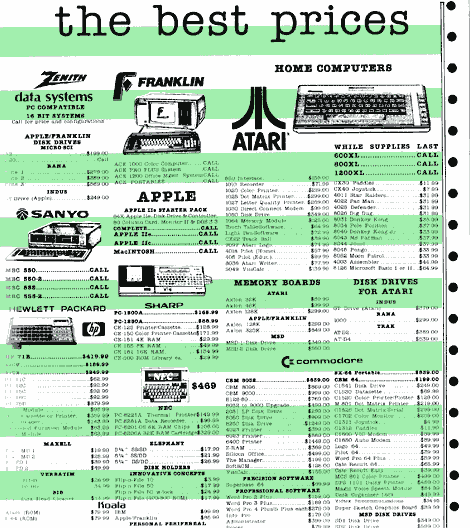
This 1984 ad simulates green bar computer paper.
My first computer-processed papers could only be printed on green and white paper with alternating color bands, which annoyed my college professors as well.
Imagine what it was like to type on a screen for the first time and be able to backspace over something you wrote, retype it, and even save it for later editing. Everyone who got a computer thought they would finally be able to write their novel (I’m still working on mine). The TRS-80 (we called ’em Trash 80’s back in the 70’s) didn’t support cut and paste as far as I recall (I remember that innovation appearing in AppleWorks – the original AppleWorks for the Apple II computers), so only strategic editing was possible.
One Last Use for Typewriters
Interesting, isn’t it, that there is still this one function that typewriters are better at than computers – filling out forms, especially multipart paper-only forms. If not for this fact, typewriters would have completely disappeared long ago.
Well, I finished my purchase orders and returned my loyal Royal to its display position on the bookcase. It was nice remembering the old days, and I hope you enjoyed the trip with me!
Short link: http://goo.gl/jAIt8w
