Low End Mac Reader Specials

TypeStyler For Mac OS X is Now Shipping! Download The Free Fully Functional 60 Day Tryout at www.typestyler.com

OWC: We Make DIY Upgrading Easy! Maximize your Apple MacBook / MacBook Pro. Up to 8.0GB Memory, up to 1.0TB HD & More. Easy Guide + Free, Detailed Installation Videos. Click here

Poker Mac Don't install Parallels to play poker online! Poker Mac will show you how to download and install a native Mac poker application such as Full Tilt Poker Mac.

Laptop Hardware Provided by TechRestore - Overnight Mac & iPod Repairs.

Compare products like desktop computers, apple laptops, apple macs, and LCD Monitors side by side! All the information and reviews to make the best purchasing decision for new mobile phones, sat nav systems, or MP3 players. The Ciao online shopping community makes searching products easy for you.

Mac Lab Report

Appendix 4

Starting a Presentation in AppleWorks

2001.01.04 -

This short appendix is not a tutorial on how to make presentations on the computer, but rather how to get one started in AppleWorks 5. AppleWorks 5 has the ability to take almost any document and turn it into a full-screen, menuless display, but the functions are hidden. There are also some built-in presentation templates and tutorials, but if you're like me (site license with no manual) they're kind of hard to find.

AppleWorks 6 solves most of these problems by making presentations one of the major document type choices when you begin using the program.

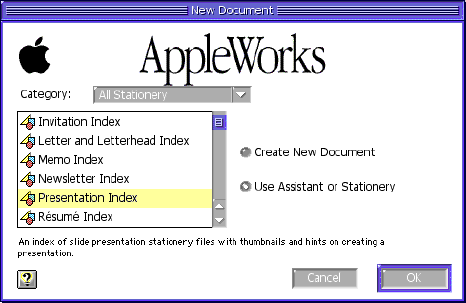
When you start AppleWorks, you get the usual splash screen. Instead of picking "Create New Document," pick the radio button for "Use Assistant or Stationery" instead.

To use Stationery pick "All Stationery" from the Category drop down menu, where you can find "Presentation Index" down the list as shown here.

Opening this gives you access to stationery templates for several kinds of presentations which you can then edit.

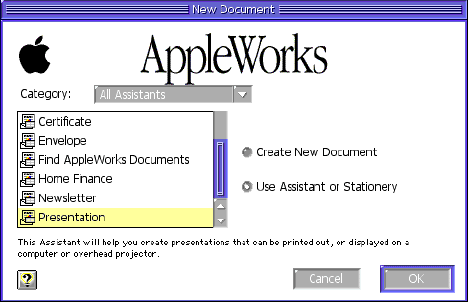
Alternatively, you could pick the presentation assistant from the Category drop down menu, which gives you a presentation assistant down towards the bottom of the list :

This option walks you through some basic choices about what you want the presentation to look like.

Both options leave you with a partially completed presentation which you must edit slide by slide. The display options for the slide show are limited compared to PowerPoint, and basically consist of Fade and Not Fading.
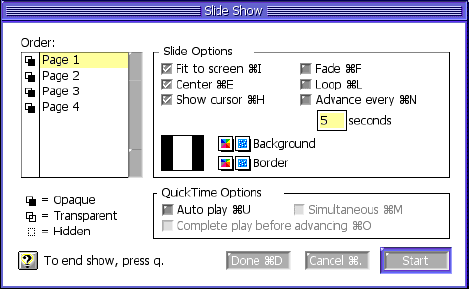
A couple of other points and then you're on your own. These are based on difficulties my own students have had using AppleWorks for presentations.

Remember, AppleWorks makes presentations by displaying other document types on the screen without a menu. So a database, word processor, drawing or painting can be a slide show.

If you want to make a database presentation, then insert fields on the screen, you can approximate PowerPoint's ability to type an outline and then let the screen layout handle the arrangement of the letters.

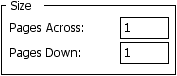
If you make a drawing a slide presentation, you will only be able to edit the number of pages using the Document command from the Format menu which includes the number of pages control shown here:
As for the content of the presentation, you're on your own. Happy Presenting! LEM

<go back to TV scan converters vs. projectors>

Jeff Adkins is a science teacher who isn't afraid to state his preferences in computing platforms. In his classroom he has everything from a beige All-in-One to a a G4 XServe, and they all work together nicely. He calls himself the "poster child for technology integration" in the classroom. He was the 2006 Outstanding Educator of the Year for the California Computer Using Educators (CUE) organization. He also maintains a site for astronomy teachers at www.AstronomyTeacher.com.

Recent Mac Lab Reports

Links for the Day

Recent Content on Low End Mac

Recent Deals

About LEM | Support | Usage | Privacy | Contacts

Custom Search

Amazon.com

Navigation

Used Mac Dealers
Apple History
Video Cards
Email Lists

Favorite Sites

MacSurfer
MacMinute
MacInTouch
MyAppleMenu
InfoMac
Macs Only!
The Mac Observer
Accelerate Your Mac
RetroMacCast
PB Central
MacWindows
The Vintage Mac
   Museum

DealMac
DealsOnTheWeb
Mac2Sell
ramseeker
Mac Driver Museum
JAG's House
System 6 Heaven
System 7 Today
the pickle's Low-End
   Mac FAQ

Abandonware
   Petition

Mac vs. PC Info

Affiliates

The Apple Store
Mac Connection
B&H
MacMall
TechRestore
ExperCom
Crucial Memory
batteries.com

Advertise

Open Link