
My first digital camera was a black and white QuickCam eyeball. The QuickCam was originally made by Connectix, but eventually the product was sold to Logitech. It has mostly survived the transition unscathed, and some models are still USB Mac compatible. However, the old style serial Mac version is no longer manufactured.
I did a lot of fun stuff with that camera, but after a few pointless CUseeMe conferences and the usual series of pictures of my room, my cat, my face, and the window, what else was there to do with it? I photographed a few relatives just for the novelty effect and recorded brief video clips of a number of people, archived the files somewhere, and finally stuck it in a drawer and forgot about it.
Acquisition of a color QuickCam temporarily revived my interest, but the larger file sizes also meant it was a bit more inconvenient to use.
My latest acquisition (it really belongs to my school) is a Videolabs FlexCam. The FlexCam is one of a large number of variants of small digital cameras that Videolabs manufactures for school and business use. It has composite video (using those fat audio-style jacks) and S-video output.
This camera has much higher resolution than the QuickCam and the ability to focus sharply from only a few centimeters away to infinity. The greater dynamic range of the camera makes it more versatile than the entry-level QuickCams – but it is of course more expensive.
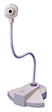 Since it does not connect directly to a standard Mac, I didn’t use it until I was given a 300 MHz Beige G3 tower with a video input-output card installed for my classroom. The FlexCam, which resembles a small cylindrical camera mounted on a flexible tube similar to those on old-fashioned flexible desk lamps, connects through the S-video or composite connections.
The S-video connection yields perceptibly better images than the composite connection, so if you can connect that way, I recommend it. The advantages of a more-or-less permanently attached camera is that it is always there for you to use at a moment’s notice, and it is much less expensive than, say, a digital video camera attached to a FireWire port of a newer machine.
Since the output is video suitable for a VCR or TV, the camera does not require software but works seamlessly with Apple’s Video Player program. You’ll need to switch the default input to S-video if you’re using that option. Now the signal runs from the FlexCam to my computer and on to the television set through the same video card. Anything on the FlexCam shows up on my computer screen and on the TV screen simultaneously.
 One of the things I learned along the way is that an ADB keyboard cable is exactly identical to the very expensive S-video cables you see in camera stores. So my S-video cable is just a spare 4′ cable I acquired from an otherwise useless hulk in my storeroom.
The first few months I had this thing on my desk, I didn’t use it. Since then, however, I’ve gradually figured out ways to use it on the spur of the moment. Now I’d like to share with you some of these unusual applications.
- Display sample student work: When explaining the scoring guide to an essay-type problem, I showed examples of what good, bad, and ugly student work looks like (without names attached, of course). It is important that students see that other students can actually do the work correctly as models for future problems. This has an advantage over using transparencies, because you don’t need extra pens for the students or extra transparencies. It also allows you to use work from, say, a test, for discussion – work that would not normally be done on a transparency.
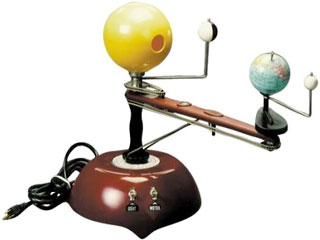 Display the viewpoint of a person in a model of the solar system. While struggling to explain the phases of the moon one day, it occurred to me to bend the FlexCam over onto our old Trippensee earth-moon gizmo that every school seems to have. I put the camera above the earth and pointed it at the moon, and suddenly everyone knew what I meant when I said, “If you were standing here, you’d see the phases of the moon as we do here in our sky.” It was displayed on the TV monitor.
- Show the results of a dice roll. I occasionally use dice to pick a random number, and the FlexCam keeps me honest.
- Photograph lab setups. Students sometimes want to include photographs in their lab reports. I help them as long as they can set up a lab station near my desk. Then I save the captured file on the server, and they can copy it into their report. Once I took a single photo for everyone but required them to label it.
- Use it as a substitute overhead projector. When my overhead blew a bulb the other day, I used the FlexCam as an emergency backup system while a TA went to the library to beg for another bulb. If you just write on white paper with plenty of light, it shows up passably well. The trick is to stay within the visible area, and to make the visible area large enough to display your writing. Since the TV is not as large as the overhead screen, I’m not quite ready to abandon my overhead yet.
- Make short QuickTime movies. Combined with the microphone I have plugged in, the camera makes a passable video camera that can record video, still pictures, and sound. Make sure the sound input is set to Sound In. Several of my students used the FlexCam to make their own digital movies. They recorded a QuickTime movie which I converted into digital video for use in iMovie. (P.S. Who else thinks it’s stupid that iMovie doesn’t automatically import QuickTime? Raise your hands.)
- Make lab videos to be measured later. I used the camera to record a short clip of an air track cart accelerating down a slightly tilted air track. Saving the resulting movie as a stationery file on the server, students were able to open a copy on the lab station computers and step through it, frame by frame. By marking the cart position on the monitor (with an overhead marker pen), they could measure or observe the acceleration of the cart. If the movie was recorded at 30 fps, every 6 frames is 0.2 seconds. The physics teacher and I plan to make several more of these kind of movies in the future and archive them.
- Show the view through a microscope. An adapter allows the FlexCam to display the view through a microscope. The applications are obvious for a biology teacher.
- Show how to do calculations on a calculator. Many of my students do not know how to operate the calculators they own (because they never read the manuals). So when showing them the key commands, I point the FlexCam at my calculator, removing the need to have a fancy transparent calculator for my overhead projector.
- Take a class picture. I’m going to take a class picture for every class this year and start printing them out and hanging them on the wall for all time. Then as the students get older, they can come by and say, “there’s me!”
Do you have other FlexCam ideas? If so, send them along. (I already know about videoconferencing, but hey, I already had ten things in my list. )
Next time, I’ll discuss TV vs. projectors for displaying computer screens in the classroom. See you then!
Keywords: #webcaminclassroom #maclabreport
Short link: http://goo.gl/nZb2fO
searchword: webcaminclassroom
