
This is the first of a series of support articles I am writing for some district professional development meetings I am conducting in the Spring of 2001. I’m posting them as Mac Lab Reports because I believe others can benefit from what I have learned.
Agenda
- Basics of computer based data gathering
- All computer data is digital
- Input-output ports
- Interface Boxes
- Sensors
- Example setup
Basics of computer based data gathering
In today’s highly digitized society, everyone is becoming acutely aware of the convergence of computer technology with other technological aspects of daily life. In its crudest sense, the general public understands this to mean that the networking and Internet resources first available to desktop computers are now being inserted into places you wouldn’t normally think of them: cars, TV sets, and even houses and appliances.
However, the real (and more significant) convergence has to do with how devices interact with their environment and with people. The ability of a computerized device to sense things in its environment – other than what a user types in a keyboard – and to react to that information is becoming more and more a part of our daily lives. This is more than being able to display web pages on the side of a toaster. It has to do with our perspective on the function of technology as a part of our lives.
The first part of understanding what convergence and the trends in technology really mean is to understand how a computer can sense its environment.
As educators, it is our responsibility not only to train students in the basic skills needed to interpret words, numbers, and ideas, but to also anticipate the future needs of society by giving our students a glimpse of what is possible.
This is a difficult challenge in a historically underfunded, understaffed, and underpaid profession. Yet many of us do what we can to see it happen. The purpose of this essay is to walk though the basics of computer sensing technology for science classrooms so that you, too, can give your students a glimpse of the future.
All computer data is digital
We hear a lot about the fact that computers are digital devices, and now many other devices, notably video and still cameras, have become digital devices. Ask a typical clerk what it means to be digital, and the response you’re likely to get is, “digital is better,” which is what they say about any feature and misses the point.
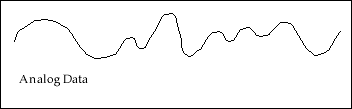
Analog data changes continuously, even at the smallest measurement interval. An analog audio signal from a record player, for example, has tiny variations over a one second interval; over a 1/100 of a second interval, and even over a 1/100,000 second interval. Measure carefully enough, and analog data always shows variation. And, as you replay a recording of analog data on a vinyl record or magnetic audio tape, the data is slightly degraded with each reading; so you never get the data precisely the same way twice.
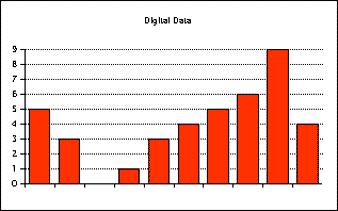
Digital data is measured, carefully, once. The data is converted into a numerical measurement that is recorded. In a digital recording of music, video, or hard drive information, the data itself is not recorded; rather, a series of specific measurements are recorded as numbers in a table. These numbers do not change over time. This means that digital information will always yield the same information when played back.
A computer senses data input through various circuits that bring information from the outside world into the computer. These are called input devices and can be anything from keyboards and mice to cameras and temperature probes. In each case, however, the data must be carefully converted to a number that the computer can understand and interpret. In the case of a mouse button, for example, the mouse is designed not to transmit the dozens of tiny impulses the internal switch makes as the contact scrapes together (that’s analog data) but to rather send a single clear impulse after a specified unit of time has passed (that’s digital data).
With digital data there is always a loss of information, but the information you do get is reliable and repeatable.
Input-Output Ports
Even your printer connection contains input lines. Normally, the printer connection (whether it is a printer port, modem port, USB port, or parallel port) sends data out to the printer to print, but the printer must also notify the computer if something is wrong: a paper out error, paper jam, or lack of printing ink or toner. There must be a way for the device to send data back to the computer (in digital form, of course), and the computer must be programmed to interpret it. Sometimes this is a single dedicated wire in the cable – such as in a parallel printer cable – and sometimes it is an agreed upon taking of turns (now I’m sending and you’re listening) controlled by what is called a handshake, as occurs in serial ports such as the Macintosh printer and modem ports.
Because of these different protocols for data, it is not possible to connect a parallel port device to a Mac with a simple adapter such as the type we use on our monitor port to connect a PC monitor (usually). That is why the newer Apple computers eliminated these ports and went with the more universal USB connection, and it is also the driving force behind the explosion in Mac peripherals since the newest generation of computers came out.
It is this function of computer input-output ports that computer sensing devices use in the science lab. By using the same protocols as a printer or modem for the exchange of data, the computer can accept information from the outside world measured through sensors. In a way, the computer believes the sensor is a printer or modem and is accepting input from them in exactly the same way.
However, most lab instruments are not by their nature digital devices. Thermometers, air pressure sensors, magnetic force detectors, and so on provide data over a wide range of values and in many cases the data is continuously variable. So, the data must be converted from an original value into a voltage, and the voltage must be converted from analog, continuously variable data to digital, numerical data.
Interface Boxes
This is the function of the interface box, more properly called an analog-to-digital converter. It serves as the liaison between the sensor and the computer, converting the sensor data into the digital format the computer can detect through its input-output port.
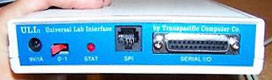
Different computer interfaces connect to the 25-pin serial port on the ULI’s back.
Thus, all computer sensor systems incorporate some sort of “interface box.” Vernier Software has at least three different interface boxes: A serial port interface for certain sensors, a Universal Lab Interface for almost anything they make, and a new USB interface that also doubles as a calculator interface and temporary storage device, enabling field measurements.
There are other manufacturers of such interface boxes and probe hardware and software (which the manufacturers collectively refer to as probeware) such as PASCO, but the underlying principles are the same for all of them.
Sensors
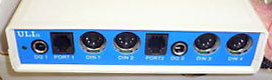
Front of Vernier ULI has lots of input ports for sensors.
Each sensor has a device that creates a varying voltage based on a change in the environment. The thermometer, for example, is a thermistor, a semiconducting device that changes its electrical resistance when the temperature changes. The light sensing probe (and the photogate) uses a transistor that is activated when light strikes it. As with all transistors, when the base is activated a sort of gate is opened allowing the current to flow; the wider you open the gate (by pushing on the base), the more current will flow.
Thus, by using an interface box, a manufacturer can create a large number of inexpensive sensor probes that all plug into the same box.
Here is an incomplete list of the kinds of sensors made by Vernier Software:
- accelerometers
- force sensors
- motion detectors (sonar)
- magnetometers
- air pressure sensors
- voltage meters
- ammeters
- blood pressure cuffs
- heart rate monitors
- colorimeters
And there are dozens more. There are sensors that will suit the needs for every class from biology through advanced physics. All that is required is your time and effort to set up and maintain the systems.
Example setup
Each sensor device comes with installation instructions and software to drive the probes. Installation hard drive space requirements can be small or large, mostly depending on the number of preset files you want to install for lab instructions.
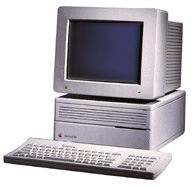 This example is for a Beige Power Mac computer and will work on anything from a Performa to a Beige Power Mac G3. Instructions are similar, but differ in detail, for an older Mac such as a IIci or even an SE/30. The hardware is different for iMac-era machines. Some probeware is still provided by Vernier for Apple II machines, which is where I first learned how to use sensor equipment.
Connecting the interface box
The ULI interface box comes with a cable for connecting it to the computer. In fact, the primary difference between the ULI product shipping from Vernier is the cable included with the box, because the interface box itself and the software installation CD (being cross platform) is identical. So if you have a mixed lab environment, having a few extra cables is not a bad idea.
The interface box cable for this example has a DB-25 serial port connector on one end, which fits into the only available port of this type on the ULI. The other end is a standard old-style Mac modem or printer port cable.
If the modem port is not in use, you definitely want to use the modem port.
When the Mac has a networking problem – or even if the network is simply down – the computer will revert to using the printer port as the primary network connection. In the AppleTalk control panel, the connection will switch from EtherTalk to LocalTalk. Upon booting, the computer will display a warning that the primary connection (ethernet) is not available and ask if you want to switch (default). So when an inexperienced user clicks on the button, the ethernet connection is now off until someone turns it back on via the AppleTalk control panel.
Since the port cannot be active for LocalTalk and act as an interface port at the same time, the wrong sort of signals will be sent to the interface box, and the driver software will report “port already in use” errors. This is a difficult problem for the novice to solve, but the solution is almost painfully easy: Turn AppleTalk off.
Or, even better, avoid the problem by using the modem port.
Software installation is a snap, but it takes several minutes for each machine. Once completed, you can start experimenting right away. Simply insert the CD and run the standard installer you see on most Mac software.
Logger Pro Stability
In my experience there are a few things that seem to make the Vernier software for Power Macs (called Logger Pro) a little unstable. Make sure the program has enough RAM allocated to it – it tends to be allocated a little low on installation. It is also sensitive to memory problems when many programs are running. On my 24 MB machines, I am experiencing some freezes and crashes when the user copies large graphs to the clipboard for pasting into the simultaneously running AppleWorks. There is also the potential for conflicts with Norton AntiVirus, which was suggested to me by Vernier when I was trying to track down the source of frequent freezes.
My operating theory at present is that the machines I have are just overwhelmed by the amount of things I am doing simultaneously. One thing I am experimenting with is downgrading from Mac OS 8.6 to 7.6 to see if the system responds any better to the older OS. So far, the results are encouraging.
Well, that’s about enough for this week – my hands and your eyes are probably tired. Next week, I’ll provide some examples of lab activities and discuss the use of the built-in calibration and settings files.
If you find this series of articles useful, or want more information, please email me. If you are located in the Bay Area and are willing to drive over, I can demonstrate the equipment for you as well. (And I have been known to conduct an inservice or two myself as the need arises.)
Keywords: #maclabreport #digitaldata #convergence
Short link: http://goo.gl/HBDOSV
searchword: digitaldatagathering
