
I recently (nearly) completed a novel that I started over the summer. If you check my publication history, you can see that the rate at which I have published columns on Low End Mac has dwindled to nearly zero. That’s because nearly all my free time for writing has been dedicated to writing a novel.
I’m not here to tell you about the novel (no publisher yet, so no details, sorry), but I can tell you about the experiences I have had writing two different books – the only books I have written in my life – one was written using Microsoft Word; the other with Apple’s Pages word processor.
To be fair, these were not scientifically controlled conditions. First, the book written in Word is a school workbook that’s full of illustrations and handouts and tables and charts. It is called Conceptual Astronomy I and is published by TeachingPoint. It was the first book I wrote, and that brings along all sorts of technical challenges. The second book is a novel, not nearly so technically challenging a document, and I had the experience of writing the first one behind me.
This article could still be potentially useful to a person contemplating starting a major writing project. The gist of the matter is that Pages is clean, nimble, quick to respond, and limited in functionality – whereas Word can do almost anything if you can just figure out where the command for what you want is hidden.
And Word 2004 for the Mac is slooooow as Christmas.
Here are some thoughts about my experiences.
Using Microsoft Word 2004
 I used Word because my publisher requires it. The primary cross-platform issue we kept running into at first was that the default font set for Macs didn’t precisely match the default font set on the PC. I had to install a company standard font, and it took forever to get those issues worked out and the documents appearing as they are supposed to in print.
The second issue was that certain embedded graphics, notably QuickTime-encoded TIFF files, did not translate well to a PC not equipped with QuickTime. Rather than install QuickTime on the publisher’s machine, my publisher insisted I screen every graphic on every page and send them JPEGs instead of QuickTime TIFFs.
Okay, the boss says jump, you say how high. I got that job done.
Using Word is primarily a function of filtering out which special trick it does that you can’t live without and ignoring the rest. In the case of large scale documents, perhaps it’s the fact you can shuffle whole sections of text in outline mode. Being able to add and track comments is nice, especially with multiple editors.
Word has powerful formatting functions that allow you to use style templates, but I found them extremely hard to control. Just learning how to use styles could be an entire class all by itself.
Perhaps your most valuable tool is the auto creation of tables of contents based on style-driven headings. Maybe it’s the ability to make a header continue using the style from the previous section (or not), or the fact that the search-and-replace function has a built-in tool to help you search for formatting and nonprinting characters and replace them as well.
For me the built-in equation editor was super-helpful, and in a technical document like an astronomy workbook, I used it pretty often.
People write books about how to use Word, and it’s clear they’re needed.
The primary gripes I had with Word are the same things everyone complains about. First, it tries to do too much for me. I want to stop fighting with the auto-spell check and the tendency of Word to launch into auto-numbering mode when you least expect it. You spend half your time telling Word to just stop already.
Second, because it is so feature-bloated, it is slooooow. Slow to launch. Slow to respond to keyboard commands. Slow, slow, slow. It also has an incredible urge to repaginate the entire document – which at 350+ pages takes something like, I don’t know, a week – every time you look sideways at it. Inserting a graphic in a large document triggers a repagination that might take fifteen or twenty seconds to clear; why does that take so long, I wonder?
Using Pages 1.0
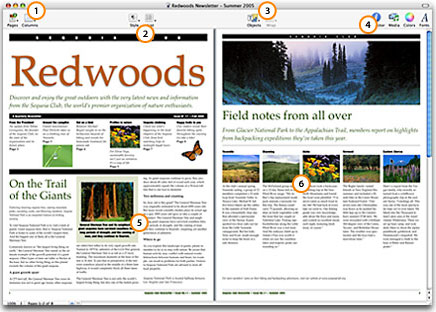
 In comparison, Pages is snappy, almost spry. I am using last year’s version; pretty soon I’m going to get updated versions of both Word and Pages, and we’ll see who comes out ahead. I have a ways to go before the novel is finished and another volume of the astronomy book to write (in my copious free time).
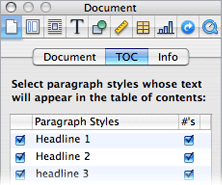 Pages uses styles to establish table of contents, which is good. It exports to Word, so I can communicate with the unenlightened. The exported documents, as you would expect, works better when the document has a simple structure.
There’s an odd glitch in Pages that could stand fixing. When I learned to type, my typing teacher told me to put two spaces after each period before beginning a new sentence. So I’ve done that ever since out of sheer habit. Apparently the new rule is one space.* When a two-space interval appears in the middle of a paragraph but also at the end of the current line, Pages sometimes wraps one of those spaces to the next paragraph. So in the middle of the paragraph there’s this annoying almost-indented line.
Of course, I could just stop using two spaces at the end of each sentence, but I am probably not the only one who has this problem.
The only other glitch I’ve encountered is when printing out draft copies of my novel – which I’ve had to do at an ink-suckingly frequent rate – Pages leaves blank a page in the center that uses a two-column table suddenly appearing the one and only time in the book. Oddly, when I just print that page alone instead of with all the other pages, it comes out fine. I suspect it might be an out-of memory error.
Conclusion
If you are writing a controlled-structure document like a textbook, Word might be the way to go because of its outline mode. Most textbooks (note that I said most and not all) are well organized, structured, and sequential. Word’s writing tools lend themselves to support that sort of writing pretty well. But for writing just for writing’s sake, bereft of all the bells and whistles of modern word processing and you just want to get the words on the dang page, Pages is hard to beat.
For purists, you might look at WriteRoom, a program that lets you type in full screen mode, using green letters as an old CRT would in the early days of personal computing.
I will return to this topic and be writing more Mac Lab Report and Lite Side columns as my schedule adjusts this spring . . . hope you missed me!
Publisher’s note: Word 2004 was the last PowerPC-only version and is thus incompatible with OS X 10.7 and later. The same most likely applies to Pages 05 (1.0) as well, as Pages 06 (2.0) was released in January 2006 with the first Intel-based Macs.
Keywords: #microsoftword #word2004 #pages1 #pages05
Short link: http://goo.gl/vzhxwU
searchword: wordvspages
