
Hands On: A New PowerBook with Tiger
Low End Mac Reader Specials
Download Typestyler, still the Ultimate Styling Tool for Internet, Print and Video
Graphics. Works great in Classic with a Native OS X Version on the way. Free
Tryout: www.typestyler.com
LA Computer Company: LA Computer Company: Specials on AppleCare, Apple Displays, MacBooks, iMac's, MacBook Pros, Laptop and iPod accessories and more. Apple A/C Adapters for laptops starting at $25.00 Call 1-800-941-7654 or Click Here.
OWC: Upgrade to a Larger Hard Drive, Add Additional Drives SATA for Mac Pro and G5s, up to 1.0TB in each Bay. 500GB from $90!
Mac users can finally play Party Poker for Mac. Not only that, they can also learn how to play PokerStars for Mac.
Laptop Hardware Provided by TechRestore - Overnight Mac & iPod Repairs.
Compare products like desktop computers, laptops, and LCD TVs side by side! All the information and reviews to make the best purchasing decision for a new cell phone GPS products or MP3 players. The Ciao network makes searching products easy for you.
MacPro Memory 667Mhz With Apple Spec Heat Sink 2GB $90 / 4GB $134 / 8GB $264. Click to Maximize your Macs...
- 2005.05.18
I am
typing this on a PowerBook G4
purchased with grant funds. This PowerBook replaces a damaged
TiBook I've been using for
some time.
The TiBook was dropped onto a floor - twice - and as a result it
had one hinge broken loose completely (except for a wire or cable
leading to the lid), internal breaks in its support frame in seven
places, cracks in the upper case where the keyboard and trackpad
are in three places (including a nice one right over the
SuperDrive), a backlight that would not wake up from sleep every
time, a useless trackpad and button, and the usual assortment of
scratches and worn out paint areas.
The poor TiBook still booted, though, and with an external mouse
I limped along until I was able to get a new PowerBook G4.
The new PowerBook has been reviewed elsewhere, I'm sure, but I
just thought I'd share some impressions of it as there are still
many TiBook users out there who may be interested in making the
switch.
First of all, the PowerBook has
a more iBook-like lid hinge, with the descending lid that sits
slightly behind the body of the computer when open. This
necessitated moving all the ports from the back - sans the annoying
little flip-lid to cover them - and here Apple has made some nice
choices, including having one USB port on either side. FireWire 800
is included, although I wish I had two FireWire 400 ports so I
could connect an iPod and an iSight simultaneously.
The power port is on the side, which I am not sure I like as
well, but it has to be somewhere. The drive still has the nice
right side front slot-loading design, which I have always
liked.
The keyboard has a nice crisp feel. The keyboard seems to be
recessed just slightly, perhaps to help prevent screen marks common
to TiBooks. The computer feels sturdier as well, and the finish
doesn't appear to attract scratches as much.
The speakers are nicer, as well. They are larger in area and
sound better than the TiBook's speakers.
This computer runs at 1.5 GHz, compared to my older 1 GHz,
and the difference in response is perceptible. Part of this may be
due to the Tiger operating system installed on delivery. Tiger
makes a bunch of improvements on the last version of Panther, and
if you have the hardware to support it, I recommend the
upgrade.
A new version of iWork, including an updated Keynote, was
included on a 30 day trial. The new version of Keynote solves every
major objection I had to the original, including timed transitions
sans mouse clicks, better integration with other iApps (really -
it's easier to select files than it was because the interface is
improved with better organization), and some new transitions to
play with.
Tiger's Spotlight is better than Sherlock ever was, but you have
to be careful to type quickly or you'll get bogged down in a search
of files that start with "an" (there are a lot) vs. the
phrase "ancillary data" (there are not nearly as many). Results are
automatically sorted by type. The search initiates as soon as you
start typing, so type quickly to avoid bogging down.
Also included in Tiger is the new Dashboard utility to run
mini-apps called widgets. The widgets do very focused
single-purpose functions such as the weather or stickies. There is
some sort of malicious exploit connected with Widgets making the
rounds on the Net, so maybe you want to leave Dashboard off until
Apple updates it. [Editor's note: Apple has just released the
OS X 10.4.1 update, which addresses the problem.]
I have to say that it is very handy to just pop up the weather,
AirPort base station list, and whatever else I've selected with
just the press of the f15 key, which I can find in the dark.
Speaking of the dark, I like the new backlit keyboard controls.
I do a lot of work in the dark, being an astronomer, and the
ability to see the keyboard - and more importantly, to turn it off
on demand - is important. I wish it were backlit in red, though,
but you can't have everything.
Obviously there are many many more features than I can cover in
a single article. Overall, though, I'm very very pleased with the
computer, the OS, and the new versions of iApps.
For the first time in a long time, the upgrade to a new machine
has left me with so many new features I haven't had time to try
them all yet. I haven't even launched Pages (part of iWork) yet,
for example.
Only a few things have broken in the upgrade - nothing really
critical. It took me a while to reset a certain FTP connection I
used for some reason, but it eventually worked. I had some trouble
figuring out how to move over and import my older Mail folders to
my new Mail application, but I got that working eventually as
well.
Mac OS 9 did not come preinstalled, but it is still available on
the installer discs included with the computer. This is the first
Mac I've ever owned or used that could not boot into OS 9;
that was one of the reasons I got the TiBook.
As it turned out, I rarely needed to boot into OS 9. The
last time I did it was some months ago because some old game I had
would only run in OS 9, and that seemed to be more a function
of my being unwilling to let go of the old OS than my real need for
it.
Low End Mac Reader Specials
Download Typestyler, still the Ultimate Styling Tool for Internet, Print and Video Graphics. Works great in Classic with a Native OS X Version on the way. Free Tryout: www.typestyler.com
LA Computer Company: LA Computer Company: Specials on AppleCare, Apple Displays, MacBooks, iMac's, MacBook Pros, Laptop and iPod accessories and more. Apple A/C Adapters for laptops starting at $25.00 Call 1-800-941-7654 or Click Here.
OWC: Upgrade to a Larger Hard Drive, Add Additional Drives SATA for Mac Pro and G5s, up to 1.0TB in each Bay. 500GB from $90!
Mac users can finally play Party Poker for Mac. Not only that, they can also learn how to play PokerStars for Mac.
Laptop Hardware Provided by TechRestore - Overnight Mac & iPod Repairs.
Compare products like desktop computers, laptops, and LCD TVs side by side! All the information and reviews to make the best purchasing decision for a new cell phone GPS products or MP3 players. The Ciao network makes searching products easy for you.
MacPro Memory 667Mhz With Apple Spec Heat Sink 2GB $90 / 4GB $134 / 8GB $264. Click to Maximize your Macs...
- 2005.05.18
I am typing this on a PowerBook G4 purchased with grant funds. This PowerBook replaces a damaged TiBook I've been using for some time.
The TiBook was dropped onto a floor - twice - and as a result it had one hinge broken loose completely (except for a wire or cable leading to the lid), internal breaks in its support frame in seven places, cracks in the upper case where the keyboard and trackpad are in three places (including a nice one right over the SuperDrive), a backlight that would not wake up from sleep every time, a useless trackpad and button, and the usual assortment of scratches and worn out paint areas.
The poor TiBook still booted, though, and with an external mouse I limped along until I was able to get a new PowerBook G4.
The new PowerBook has been reviewed elsewhere, I'm sure, but I just thought I'd share some impressions of it as there are still many TiBook users out there who may be interested in making the switch.
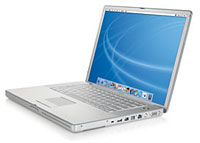
First of all, the PowerBook has
a more iBook-like lid hinge, with the descending lid that sits
slightly behind the body of the computer when open. This
necessitated moving all the ports from the back - sans the annoying
little flip-lid to cover them - and here Apple has made some nice
choices, including having one USB port on either side. FireWire 800
is included, although I wish I had two FireWire 400 ports so I
could connect an iPod and an iSight simultaneously.
The power port is on the side, which I am not sure I like as well, but it has to be somewhere. The drive still has the nice right side front slot-loading design, which I have always liked.
The keyboard has a nice crisp feel. The keyboard seems to be recessed just slightly, perhaps to help prevent screen marks common to TiBooks. The computer feels sturdier as well, and the finish doesn't appear to attract scratches as much.
The speakers are nicer, as well. They are larger in area and sound better than the TiBook's speakers.
This computer runs at 1.5 GHz, compared to my older 1 GHz, and the difference in response is perceptible. Part of this may be due to the Tiger operating system installed on delivery. Tiger makes a bunch of improvements on the last version of Panther, and if you have the hardware to support it, I recommend the upgrade.
A new version of iWork, including an updated Keynote, was included on a 30 day trial. The new version of Keynote solves every major objection I had to the original, including timed transitions sans mouse clicks, better integration with other iApps (really - it's easier to select files than it was because the interface is improved with better organization), and some new transitions to play with.
Tiger's Spotlight is better than Sherlock ever was, but you have to be careful to type quickly or you'll get bogged down in a search of files that start with "an" (there are a lot) vs. the phrase "ancillary data" (there are not nearly as many). Results are automatically sorted by type. The search initiates as soon as you start typing, so type quickly to avoid bogging down.
Also included in Tiger is the new Dashboard utility to run mini-apps called widgets. The widgets do very focused single-purpose functions such as the weather or stickies. There is some sort of malicious exploit connected with Widgets making the rounds on the Net, so maybe you want to leave Dashboard off until Apple updates it. [Editor's note: Apple has just released the OS X 10.4.1 update, which addresses the problem.]
I have to say that it is very handy to just pop up the weather, AirPort base station list, and whatever else I've selected with just the press of the f15 key, which I can find in the dark.
Speaking of the dark, I like the new backlit keyboard controls. I do a lot of work in the dark, being an astronomer, and the ability to see the keyboard - and more importantly, to turn it off on demand - is important. I wish it were backlit in red, though, but you can't have everything.
Obviously there are many many more features than I can cover in a single article. Overall, though, I'm very very pleased with the computer, the OS, and the new versions of iApps.
For the first time in a long time, the upgrade to a new machine has left me with so many new features I haven't had time to try them all yet. I haven't even launched Pages (part of iWork) yet, for example.
Only a few things have broken in the upgrade - nothing really critical. It took me a while to reset a certain FTP connection I used for some reason, but it eventually worked. I had some trouble figuring out how to move over and import my older Mail folders to my new Mail application, but I got that working eventually as well.
Mac OS 9 did not come preinstalled, but it is still available on the installer discs included with the computer. This is the first Mac I've ever owned or used that could not boot into OS 9; that was one of the reasons I got the TiBook.
As it turned out, I rarely needed to boot into OS 9. The
last time I did it was some months ago because some old game I had
would only run in OS 9, and that seemed to be more a function
of my being unwilling to let go of the old OS than my real need for
it.
Jeff Adkins is a science teacher who isn't afraid to state his preferences in computing platforms. In his classroom he has everything from a beige All-in-One to a a G4 XServe, and they all work together nicely. He calls himself the "poster child for technology integration" in the classroom. He was the 2006 Outstanding Educator of the Year for the California Computer Using Educators (CUE) organization. He also maintains a site for astronomy teachers at www.AstronomyTeacher.com.
Recent Mac Lab Reports
- Microsoft Word 2004 vs. iWork Pages 1.0 for writing a book, 01.10. Microsoft Word is great for technical writing, powerful yet slow, while Pages lets you concentrate on just writing, making it great for novels.
- iWeb a great tool for quickly creating an attractive website, 09.11. Apple's iWeb software isn't just easy to use, it also integrates nicely with .mac and other programs in the iLife bundle.
- Use your Bluetooth phone to control your Mac? Maybe, 02.27. Salling Clicker software turns many Bluetooth phones into remote controls for Bluetooth-equipped Macs.
- More in the Mac Lab Report index.
Recent Content on Low End Mac
- Mac Pro overclocking, Windependence with Darwine, Blu-ray for Macs, and more, Mac News Review, 07.04. Also more on running Leopard on non-Apple hardware, Ubuntu on a Mac mini, the first autofocus webcam with Zeiss optics for Macs, and more.
- Wouldn't life be great with an iSlate?, John Hatchett, Recycled Computing, 07.04. PDAs and smartphones are too small for some tasks, full-fledged Tablet PCs are overkill, and ebook readers are too limited. Apple has the tech to own this niche.
- Mac of the Day: Original iMac G3/233, Aug. 98 - The Bondi blue wonder that bounced Apple back to profitability and into the public eye.
- List of the Day: Mac Pro List is for those using a Mac Pro.
- July 5 in LEM history: 98: The iMac: First of a family? - iMac Perfect for schools - 00: Apple is not your friend - 01: 75 Mac Advantages - Do you trust me? - 02: The joy of X with Classic - The good, the bad, and the intrusive - 05: No Quartz Extreme for Pismo - A brief history of NeXT - 06: Education iMac - iTunes and the French interoperability law - TopXNotes - Apple's secret battery reset utility - Misleading hard drive capacity
- The Macintosh Portable started a notebook revolution, Carl Nygren, Classic Macs in the Intel Age, 07.03. Before Apple introduced the Mac Portable, notebook computers were text-based and ran MS-DOS. Ever since, graphical interfaces have been the norm for laptops.
- More links in our archive.
About LEM | Support | Usage | Privacy | Contacts



