
Mac Lab Report
A 3 Millisecond Lab Report
- 2002.04.25
With the advent of computers for data gathering in the classroom, the emphasis has shifted somewhat from the traditional model of filling the hours with tedious, repetitive data collection - such as we used to do by measuring dot positions on a piece of spark tape - only to conclude with a graph and a couple of questions near the end.
Data collection is often nearly instantaneous, or at least in real-time, and the bulk of the time needed to complete a lab report can be spent reflecting on what the activity actually is about rather than simply waiting to take the next data point.
A few days ago I had a case in point with Vernier's lab system for measuring the speed of sound. As I've mentioned several times before in this column, Vernier is the low-end Mac enthusiast's best friend. They continue to offer equipment compatible with every Mac ever made, including the Plus. Even better, they still offer the software and equipment needed to make those old Apple II computers perfectly legitimate lab data collection instruments.
If you're looking for a use for one of those old computers, consider equipping it with a Vernier serial port interface and a microphone. Vernier's software - which runs on Power Macs, 680x0 machines, and has just recently been adapted for OS X - will measure the pressure waves of a sound passing over a microphone and graph the result.
One of the labs in their manual goes like this: Put the microphone near the end of a long tube. Any time sound goes into a larger or smaller region, such as when it exits the tube, part of the sound will reflect. If you make a sharp sound such as snapping your fingers near the microphone, the computer can measure the initial sound plus several echoes. The entire experiment is over by the time you straighten your fingers. In fact, the data gathering portion of this lab lasts approximately 0.003 seconds, or three milliseconds.
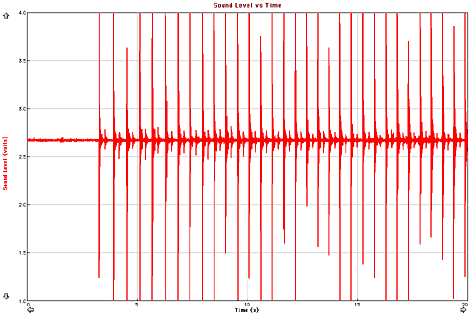
Can you tell how far the students were standing from the wall based on
this recording of the sound of them tapping a hammer and the resulting
echo from the wall?
With such technology available, I am able to tell my students (I swear I am not making this up), "Use this equipment to figure out the speed of sound. Report the value you get and write a paragraph about how you did it."
I don't tell them to measure the length of the tube or divide the length by the time measured by the sensor; they figured it out on their own from the context of the earlier discussion on sonar. A few had to be nudged to double the tube length because the sound echo makes a round trip; other than that, we got excellent data, the students learned how sonar works and what speed of light is, and we could spend several minutes just debriefing on the technique involved.
This model of student-generated methodology is considered high-powered stuff in science education and is much more memorable than a carefully written, step by step procedure that tells everything from how to hold the mike to which button to press and when. Vernier's own lab manuals are written in this excruciating detail - good for beginning teachers and students, but really overkill when you consider it takes several pages of button pushing instructions to get to the 3 millisecond measurement.
Many physics teachers already know the benefits of computer or calculator - or Palm-based data collection. I'm trying to encourage the rest of our staff to do one computer-based lab a semester, but it isn't easy. In general, my colleagues are not as comfortable with computers as I am, and despite several (maybe six?) workshops I have conducted for them, the most frequent request I get is, "When are we going to be trained on this?"
Anyway, if you're a physical science, general science, chemistry, or even a biology (especially physiology) teacher, give Vernier and their competitor, Pasco, a look. See if you can begin a gentle introduction into the world of computer-assisted data collection. You won't be disappointed.
P.S. There are several shareware programs available for turning your Mac's microphone into an oscilloscope probe and displaying your voiceprint on the computer in real time. I use one called Digital Oscilloscope. If your budget's tight, you can do a surprising number of measurements with this software.
Join us on Facebook, follow us on Twitter or Google+, or subscribe to our RSS news feed
is a longtime Mac user. He was using digital sensors on Apple II computers in the 1980's and has networked computers in his classroom since before the internet existed. In 2006 he was selected at the California Computer Using Educator's teacher of the year. His students have used NASA space probes and regularly participate in piloting new materials for NASA. He is the author of two books and numerous articles and scientific papers. He currently teaches astronomy and physics in California, where he lives with his twin sons, Jony and Ben.< And there's still a Mac G3 in his classroom which finds occasional use.
Today's Links
- Mac of the Day: PowerBook 500 Series, introduced 1994.05.16. 'Blackbird' includes a 25 to 33 MHz 68040 along with smart batteries and grayscale or color displays.
- Support Low End Mac
Recent Content
About LEM Support Usage Privacy Contact
Follow Low End Mac on Twitter
Join Low End Mac on Facebook
Favorite Sites
MacSurfer
Cult of Mac
Shrine of Apple
MacInTouch
MyAppleMenu
InfoMac
The Mac Observer
Accelerate Your Mac
RetroMacCast
The Vintage Mac Museum
Deal Brothers
DealMac
Mac2Sell
Mac Driver Museum
JAG's House
System 6 Heaven
System 7 Today
the pickle's Low-End Mac FAQ
Affiliates
Amazon.com
The iTunes Store
PC Connection Express
Macgo Blu-ray Player
Parallels Desktop for Mac
eBay

