
2002 – I’m sitting in one of the lobbies at San Francisco’s Moscone Center, having made a pass through the entire exhibit hall, up and down every aisle. This is my first Macworld, and I’ve learned a few things, seen some things, and talked to a bunch of people.
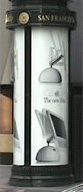 Everyone who writes about the Expo tells a story about how impressed they are with San Francisco, and even though I live in the Bay Area, I don’t get over to “The City” very often. San Francisco is a beautiful city, and the Expo is located at Moscone Center just three blocks from the BART (Bay Area Rapid Transit) Station. Walking in from BART, I saw the first sign of Apple’s presence here on the back of a newsstand kiosk.
Since I had registered in advance, I didn’t have to wait in line with the 300-400 people waiting outside; I just walked into Moscone North and went downstairs to the exhibit hall. Half an hour later, I was muttering to myself, “Gee, this seems like kind of a small exhibition – compared to the National Science Teacher’s Association Conventions I have attended in the past.”
Then I finally pulled out my Expo directory and discovered there was also a Moscone South, twice as big as the North side, which was also full of Mac Vendors. That’s more like it! (If you go after you read this, Moscone South has the new iMacs.) So “duh” for me. The directory would have only revealed where the conference sessions are; I don’t think you could have easily divined where the new iMacs were on display from the conference brochure or the news reports you’ve been reading.
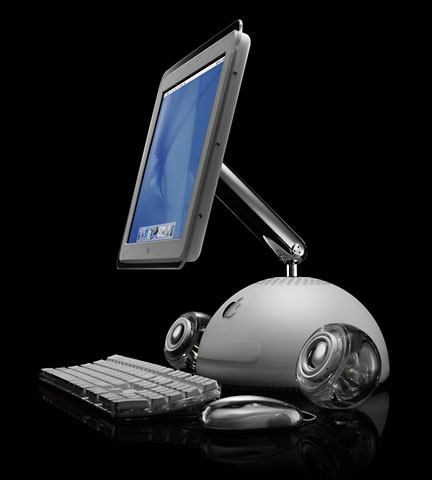
On to business: My first report is about the new iMac.
It does, at first glance, look sort of like a desk lamp. Certainly the arm mechanism is similar, and the round base is similar (although most desk lamp bases are flat disks or rectangles, aren’t they?). I found the finish to be identical to the iceBook, and it looks like it will scratch easily – though as a desktop machine it probably isn’t as much at risk as a laptop would be.
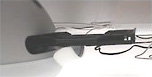 The size is both bigger than you might expect (compared to a lamp) and smaller than you’re used to. It’s much smaller than a gumdrop iMac, and smaller than most CRTs it would replace. The door mechanism on the drive opens more quietly and more smoothly than on my Blue and White Power Mac G3 tower, and the monitor is easy to move and stays where you put it.
The clear frame around the display is a fingerprint magnet, so if you eat at your desk (as I often do), keep some extra handi-wipes nearby. The response of the mouse, a white Apple ProMouse, was extremely smooth.
Mac OS X was on the machine, of course, and I flipped through the buttons on iPhoto to see how it works. It’s very similar to iMovie, naturally, but just like iMovie, things either work or they don’t. More on that in a later article.
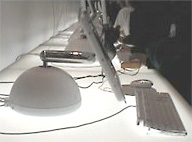
The arm as low as it can go, with the screen tilted back as far as it will go.
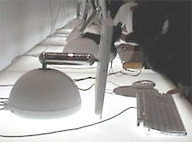
The arm as low as it will go with the screen tilted as far forward as it will go.
The screen has a considerable range of movement, but you can’t do things like make it stand up flat or set the base of it on the desk in front of you. The pictures to the left and right show the extreme range of movement for the screen (up and down for the arm and tilting the screen). Like a task light, the screen maintains the same angle with the desk when moved up and down. When you get it into the position you want you can then tilt the screen in place to the angle you want. That effect is more or less illustrated on the kiosk picture.
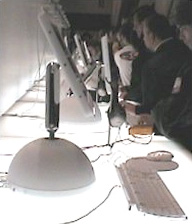
The arm as high as it will go, with the screen tilted forward as vertical as it can get in this position.
I decided that instead of the usual beauty shots everyone else is doing, I would put the arm through its paces and see what the maximum extension of the arm and monitor would be. This isn’t something I’ve seen addressed in any of the news reports so far. With the help of a puzzled Apple rep who didn’t realize his job was to keep the other people away, I got several pictures of the arm and screen in various positions as shown here.
For my own sake, I think I’d use it in the lower, tilted up position, since I wear bifocals. That would be as close to comfortable as I could get with it, which is a heck of a lot better than any CRT I’ve ever used.
What surprised me (and was a little disappointing) was the graininess of the display. My pictures don’t communicate it well, so I’ll have to just describe the effect. I’m writing this on a 12″ iBook, and the resolution is fine. Images are sharp, and one pixel blends into another, but it can still make sharp images. I’m not bothered by the text smoothing effects at lower resolutions as much as some people are.
On the new iMac, however, the larger 15″ screen (with identical resolution) yields larger pixels that are a little different. I wonder about the wisdom of using the bottom lighting on the counter for the demonstrations, because it seems to interfere. The display almost looks like it has thin gaps between individual pixels; the overall effect is like the sharpness on an analog TV has been turned up too far. I’ve seen (here at the Expo) Apple’s flat-panel ADC screens, and they don’t have this effect. I think I can get used to it, but I guess I expected a larger screen with more pixels than you can get on an iBook. Instead, the resolutions are identical; the pixels are simply larger.
Publisher’s note: The 12″ iBook screen has 106 pixels per inch (PPI), while the 15″ iMac G4 has 85 PPI, making it appear much more grainy.
The specifications for the new machine have already been logged here at Low End Mac (LM). The power button is on the left rear, but it doesn’t show well in my pictures. The speakers (which are not integrated as they are in the current iMac) do add to desktop clutter.
I was also surprised to learn (contrary to some media reports I’ve read) that the new iMac has a fan. I couldn’t hear it, but the Apple rep assured me it was there and ran at variable speed (based on what parameter he did not know.)
The rest of the booths (and there are a lot of them) contained a surprising amount of Mac OS X software. Older Mac peripherals such as SCSI drives, serial printers, and so on are truly dead; the only way I could connect anything offered at the Expo to my old Beige Power Mac G3 would be by adding a FireWire/USB card.
I think this reinforces the point that’s been made lately at LEM that for all intents and purposes, all pre-USB Macs are officially low-end to the rest of the world. Maybe there needs to be a site for 68K Macs called Really Low End Macs.
Another issue on which I am going to write more later is that the cameras Apple advocates for iMovie (Canon camcorders were connected to all the iMovie demo stations) can also take digital still pictures, but that function is incompatible with iPhoto.
I collected a stack of business cards and should be getting some hardware to test, so look for those articles in the coming days. (I have to say that Griffin technology was the friendliest booth I spoke to at the Expo. Thanks, guys.)
I have a lot of other piece of information to share, but I am going to save it for later.
One last point: If you go to the Expo with rechargeable devices (like I did), you should make sure that the batteries are fully charged. For an Expo centered on the digital lifestyle, it seems a little odd that I had to sit on the floor in a hallway to plug in and recharge my iBook and camera. None of the work tables or AirPort lobbies I visited provided electrical power supply outlets.
All in all, it was a fun day off from school.
They say you’re not a real Star Trek fan unless you’ve been to a Trek convention. The same thing is true for Mac fans going to Macworld, so now I’m official.
Keywords: #imacg4 #macworldexpo
Short link: http://goo.gl/q74go9
