
2002 – One of the difficulties of working in a lab full of Macs is that students sometimes wander off and do things they’re not supposed to do. Our district has filtering software, but as several news reports have recently pointed out, no filtering software is perfect. Teachers simply have to be aware of what students are doing with the machines.
With my desktop lab, that’s not too much of a problem. I have arranged the class so that all the screens face my desk. If students are surfing when they’re supposed to be typing, I can tell by looking. However, if students are using iBooks, the screens are oriented away from me. And, if the class is very busy – as is usually the case – I can’t observe everyone at once.
The obvious solution to this problem is to have remote control (and observation) software installed on my teacher computer. If you’ve never used software like this, you should check it out – it’s extremely handy and lots of fun. When I ask someone to stop checking email on Yahoo, it really brings home the point that what you do on the Internet can be observed by others. You can also put Johnny’s data on the projector to show the class how it works while Johnny is working on it.
The two main remote control products in the market are Netopia’s Timbuktu for the Mac and Apple’s Network Assistant. These products are aimed at different kinds of markets and have different feature sets, although the core functionality is very similar.
Both products allow you to remotely observe a user’s screen, remotely control the screen by using your mouse for their mouse, your keyboard for their keyboard, and so on. Both products allow you to chat with the remote user in a specialized chat window and do such things as restart or shut down workstations. Both products allow remote control over TCP/IP and AppleTalk, and as you might expect the TCP/IP connections tend to be a little snappier in use, while the AppleTalk connections are easier to set up.
I am in the fortunate position of having both of the major remote-control software packages for the Mac installed on a classroom set of Macs at the same time. I thought you might be interested in a comparison between the two.
The selection of functions shown in the menu below comes from Timbuktu Pro version 5.2.3, for which our district has a site license.
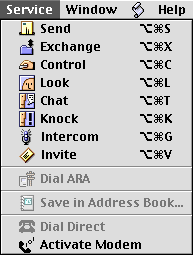
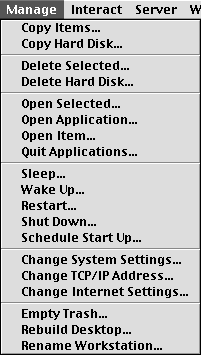
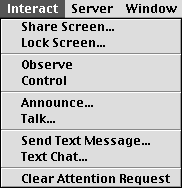
 If Timbuktu Pro has such a group control function, it’s not included in the core package to which we have access in our classrooms. Could be the district ordered some sort of “Enterprise Management Package” that I saw listed on Netopia’s site. However, not many classroom teachers connect “enterprise” to “big group” – to most of us it’s a really fast starship or an aircraft carrier.
Since Netopia, a network hardware company, acquired Timbuktu Pro, they haven’t adapted well to the education customer at the classroom level. This phenomenon is described well on The Cluetrain Manifesto, a diatribe against corporate websites missing the target of communication with customers. This document was written during the dot-com boom and holds up surprisingly well to events since then.
You can tell who Netopia’s customer base really is by looking at their website. The nice, big colorful buttons are all corporate-speak, and Timbuktu is a little tiny text link in the lower left hand corner. The word education doesn’t appear on the home page at all; instead you get “eBusiness infrastructure and enhanced VPN capabilities. The Timbuktu page has one education example in the midst of several corporate ones.
“Our education customers are very important to us,” I’m sure they’d say, in the same tone as, “Our copier service contract is very important to us.” At least Farallon, when they owned Timbuktu, seemed passionate about the Mac – and education as a side-effect. Maybe corporate-speak is what you have to do to get those big contracts; could be one of the things keeping the Mac hemmed in, maybe. This deserves more consideration, but not right now….
Here are the main advantages Network Assistant has over Timbuktu:
- Price. According to Apple’s site, Network Assistant is $15 per CPU for education customers in classroom-lab-sized numbers. Timbuktu Pro’s site says the basic package goes for $68 per CPU in quantities of 10; it’s $99 for an individual copy.
- Multiple machines can be managed simultaneously. Want to make all computers launch Netscape simultaneously? Network Assistant is your tool. Pretty much any menu-driven function, plus file transfers, installations, and so on, can be done from Network Assistant on all machines simultaneously.
- Network Assistant lists all machines in your local area, and if you have configured them properly, it will tell you what the frontmost application is for each. Thus, if everyone is using Microsoft Word except one machine, you can tell which student is wandering around on the Internet.
- Network Assistant refreshes the screen faster because, by default, it hides the desktop picture. Timbuktu can hide the desktop picture, too, but you have to tell it to.
- Network Assistant lets you copy an entire hard drive, useful for when you are preparing groups of machines.
- Network Assistant lets you put files on all machines simultaneously, such as a Web link you want to share, a template you want for the assignment of the day, and so on.
Given such advantages, why would anyone want to use Timbuktu? There are reasons, some of them very good reasons. Timbuktu’s advantages over Network Assistant include the following:
- Timbuktu is OS X compatible in its latest version (6.0.1); Apple has made no sign that they plan to port Network Assistant to OS X. Network Assistant was included in my AppleShare IP 6 box, but what I hear is that they have subsumed many of the functions in OS X Server. Timbuktu has been around a long time, since before there were Power Macs. It works best when all the machines have the same version, however. I have encountered the “the user is operating an incompatible version of Timbuktu” error more than a few times.
I do know that OS X Server includes Netboot, a utility that lets the server administrator control what the users can do at login by loading configuration files and access privileges at startup; however, it only works on G3 computers, which means for those of us who are cribbing together networks out of discards and leftovers (that would be me) it is not an effective solution to network management. - Timbuktu has a marvelous function (at least in version 4) that lets you shrink the remote administration screen, as shown below. Network Assistant just can’t compete with this feature – it just takes over your entire screen, and if the resolution doesn’t match, you have to scroll around to see the entire remote screen.
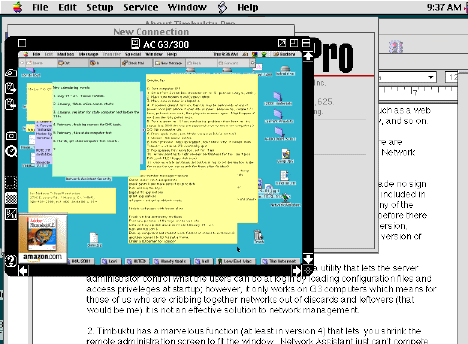
Timbuktu screen shot with reduced window.
- Timbuktu Pro lets you connect by Apple Remote Access. It even provides extra security by allowing the remote computer to dial back and connect to you. Network Assistant is strictly network oriented.
- Availability. Timbuktu Pro can be purchased by anyone, directly from their Web site, even if you do have to dig a bit to find out what it is (if you don’t already know). Apple’s Network Assistant isn’t listed as a product from the Apple Store; the only way an individual user can get it is to buy AppleShare IP, which is now an obsolete product. It isn’t even listed on the Apple Store for Education; you have to dig deeper, all the way into their “Price Lists for Government and Education” page (see link below) to get the price for it. It’s as if they don’t really want to sell it.
There are lots of other differences between the software products, such as the buttons you can see in the picture above that allow you to control exactly how Timbuktu scrolls around the screen or the ability that Network Assistant has to broadcast a popup message dialog box to all users simultaneously (“Time to save your work and log out”). The gist of the differences, however, is simple.
Network Assistant is for realtime group management of mixed networks including non-G3 machines. It’s less expensive – but only available to schools and government agencies as a stand alone product.
Timbuktu Pro is more suited to corporate networks (because of availability) and individual users connecting to (or within) the home. It also has a somewhat slicker interface for the remote screen (never thought I’d say some other product has a slicker interface than an Apple product).
The weird thing is, neither company seems all that anxious to sell the product to individual users or small networks such as classroom-sized LANs. That’s too bad; with home networks all the rage, I can see how a user trapped downstairs by having to keep watch over the little ones would really like to have access over the network to the computer upstairs.
Product Information
- Timbuktu Pro version 5.2.3 reviewed; current version is 6.0.1. Downloadable preview available.
- Network Assistant version 4.01 reviewed; price list is a PDF file. This document shows the basic price for institutions is $15 per CPU – or less for large volume purchases. That price does not include the manuals. Oddly, the price list shows an older version of Network Assistant even though the list has been updated to show OS 9.2.1.
Keywords: #timbuktu #applenetworkassistant #networkassistant #remotecontrol
Short link: http://goo.gl/l6Ooct
