
Low End Mac
Search LEM 
Donate · Amazon.com · MacResQ · Advertise
Other Cobweb sites: Low End Living · Reformed.net
Quicklinks: · Power Macs · 'Books · Early Macs · Week's Best Deals · Best Buys · OS Downloads

Mac Lab Report

Mac Advantages Feedback

Part 02. Feedback on Advantages 15, 20, and 22

- 2001.03.15

Low End Mac Reader Specials

Download Typestyler, still the Ultimate Styling Tool for Internet, Print and Video Graphics. Works great in Classic with a Native OS X Version on the way. Free Tryout: www.typestyler.com

LA Computer Company: LA Computer Company: Specials on AppleCare, Apple Displays, MacBooks, iMac's, MacBook Pros, Laptop and iPod accessories and more. Apple A/C Adapters for laptops starting at $25.00 Call 1-800-941-7654 or Click Here.

OWC: Burn DVDs, DVD-DL, CDs, DVD-Ram - FAST! Superdrive upgrades from OWC starting from $31.99 with options for nearly every Mac. Models with Lightscribe, Blu-Ray too!

Mac users can finally play Party Poker for Mac. Not only that, they can also learn how to play PokerStars for Mac.

Laptop Hardware Provided by TechRestore - Overnight Mac & iPod Repairs.

Compare products like desktop computers, laptops, and LCD TVs side by side! All the information and reviews to make the best purchasing decision for a new cell phone GPS products or MP3 players. The Ciao network makes searching products easy for you.

New MacPro Memory 800Mhz With Apple Spec Heat Sink 2GB $104 / 4GB $172 / 8GB $338. Click to Maximize your Macs...

Based on recent feedback from readers, I think the following points covered in our last article are worth noting.

15. DLL libraries on Windows cause problems.

Several readers, including Greg Weston, pointed out that my comparison of DLL problems to Mac OS extension conflicts was comparing apples to oranges. Extensions add functions to the system software, whereas DLL (dynamic link libraries) are resources shared between programs and the operating system. However, they also stated, my error did not negate the Mac advantage, as Greg Weston explains:

While this statement is true, it's not an analogous situation. Mac OS extensions - the troublesome ones - are patches to the OS. The talking point discusses some relative weaknesses in the Windows shared library mechanism. Apple's shared library mechanism is very robust. I wish other systems had the powerful versioning mechanism Apple offers.

Advantage: Macintosh.

20. Ease of adding peripherals.

Because of their experiences in attempting to add multiple USB devices to PCs, several readers said I was off the mark in neutralizing the Mac advantage here. Apparently PCs with multiple USB devices can still have major driver conflicts, and the inherent limit to multiple devices in the USB standard does not negate the problems Windows itself has handling multiple peripherals. Frankly, this has not been something I have observed in my limited experience adding USB peripherals to PCs, but lacking further data, it would seem reasonable to add that advantage back in - not because ADB was bad and good riddance, but because Apple's implementation of USB seems to be easier to use in practice.

As several readers, including John Balint and Donald Michael Kraig, pointed out, on a Mac you add a driver for the new device, reboot, and go. On a PC, you have to run an installer program, which may detect a conflict, and then the game's afoot and good luck. Often you can only use one USB input device at a time on a PC.

John Balint even reported that installing a Microsoft Intellimouse was easier on his G4 than on his PC!

Advantage: Macintosh.

22. Aliases work better on a Mac.

I must have been asleep at the wheel here, too, because my understanding of aliases was way off the mark. I tested many of the other items on the list before committing to a position, but I figured I understood how aliases worked on the Mac.

Well, they say it takes a big man to admit his mistakes, and so I'm living large these days.

François Lorrain writes:

I am not sure I understand what you mean here. Suppose you have an alias for an application. Suppose this application is on volume XXX. Then moving the application to any other place on the same volume XXX will not break the alias. Of course, if you copy the application anywhere and delete the original application, then the alias will be broken! So Mac aliases keep track of where the application is on one given volume, but not of where it is copied (whether on the same volume or on another). Of course you must know all this, but what you wrote did not make this clear.

A quick and simple experiment bears this out. Windows at first glance functions in much the same way. Moving the original application on the same hard drive to a different folder had the same effect as it did with Mac OS; Windows searched for and found the application and started it.

On the other hand, moving (not copying, but moving) an application to a shared folder on the network broke the alias.
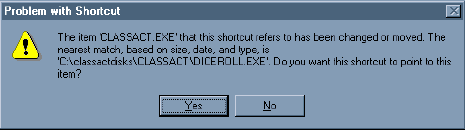
The advantage remains with Macintosh.

Jeff Adkins is a science teacher who isn't afraid to state his preferences in computing platforms. In his classroom he has everything from a beige All-in-One to a a G4 XServe, and they all work together nicely. He calls himself the "poster child for technology integration" in the classroom. He was the 2006 Outstanding Educator of the Year for the California Computer Using Educators (CUE) organization. He also maintains a site for astronomy teachers at www.AstronomyTeacher.com.

Recent Mac Lab Reports

Recent Content on Low End Mac

  • Mac Pro overclocking, Windependence with Darwine, Blu-ray for Macs, and more, Mac News Review, 07.04. Also more on running Leopard on non-Apple hardware, Ubuntu on a Mac mini, the first autofocus webcam with Zeiss optics for Macs, and more.
  • Wouldn't life be great with an iSlate?, John Hatchett, Recycled Computing, 07.04. PDAs and smartphones are too small for some tasks, full-fledged Tablet PCs are overkill, and ebook readers are too limited. Apple has the tech to own this niche.
  • Mac of the Day: Original iMac G3/233, Aug. 98 - The Bondi blue wonder that bounced Apple back to profitability and into the public eye.
  • List of the Day: Mac Pro List is for those using a Mac Pro.
  • July 5 in LEM history: 98: The iMac: First of a family? - iMac Perfect for schools - 00: Apple is not your friend - 01: 75 Mac Advantages - Do you trust me? - 02: The joy of X with Classic - The good, the bad, and the intrusive - 05: No Quartz Extreme for Pismo - A brief history of NeXT - 06: Education iMac - iTunes and the French interoperability law - TopXNotes - Apple's secret battery reset utility - Misleading hard drive capacity
  • The Macintosh Portable started a notebook revolution, Carl Nygren, Classic Macs in the Intel Age, 07.03. Before Apple introduced the Mac Portable, notebook computers were text-based and ran MS-DOS. Ever since, graphical interfaces have been the norm for laptops.
  • More links in our archive.

  • Mac of the Day: Original iMac G3/233, Aug. 98 - The Bondi blue wonder that bounced Apple back to profitability and into the public eye.
  • List of the Day: Mac Pro List is for those using a Mac Pro.
  • Channels
     Power Macs
     iMac Channel
     iBook/PowerBook
     MacInSchool
    Computer Profiles
     iMac
     Power Mac
     PowerBook/iBook
     Performas
     Mac Clones
     Older Macs
     LisaNeXT
    Editorial Archive
    Mac Daniel's Advice
    Email Lists
    LEMchat (uses AIM)
    Online Tech Journal
    Consumer
     advice, reviews
     guides, deals
    Software
    Apple History
    Best of the Web
     Best of the Mac Web surveys
    Miscellaneous Links
     Best Used Mac Buys
     Used Mac Dealers
     Video Cards
     Mac OS X
     Mac Linux
     Macspeak
     RAM Upgrades
    About Low End Mac
    Site Contacts

    Open Link

    Support LEM

    Affiliates

    The Apple Store
    .mac
    iTunes Store
    Club Mac
    MacMall
    MacResQ
    ExperCom
    eBay
    Amazon.com
    PayPal
    PCMall
    PC Zone
    Crucial Memory

    Our advertising is handled by BackBeat Media. For detailed price quotes and advertising information, please contactat BackBeat Media (646-546-5194). This number is for advertising only.
