
2001 – Based on reader feedback, I learned there are some advances in the latest version of Windows that negate some of the advantages I wrote about in Part 1. I bow to their superior knowledge of the Windows platform (I use both platforms but am a mere user, not a network administrator or suchlike) and so, I’ve asked Dan Knight to append comments on items 6, 7, and 12 that reflect the improvements made in recent versions of Windows.

The Future of This Series
If this series is going to be of any real use to anyone, it needs not only to make Mac-heads feel better, it also needs to persuade Windows users -and particularly Windows IT administrators and school board members. So, if errors are made, I pledge to correct them.
I don’t pledge to stop saying innovate without quotation marks, however. Forgive me for that.
I would like this series to be a useful tool to help users keep using Macs or to have the other folks switch to Our Favorite Platform. However, I am not a paid spokesperson for Apple computer (although I’ve done a few Demo Days for Marketsource from time to time), nor do I receive remuneration or discounts from Apple for writing this series. I’m not particularly enamored of all the decisions Apple has made in the recent past, nor do I think it is an inherently “nicer” company than the good folks up in Redmond. Apple certainly isn’t an illegal monopoly, however.
There is a real reason for my support for Apple, and it is above and beyond the 75 individual reasons I have been going over here. The reason is that competition in the marketplace makes us stronger, not weaker. Monopolies are bad because they stifle innovation, create a lack of options, and drive prices higher.
I don’t believe it would be in the best interests of computer users everywhere – including Windows users – if the Mac went away. In trying to keep up with the innovative designs from Cupertino, the Windows folks have made major, serious improvements to their OS design, look and feel, and user interface. It’s unfortunate that in many cases they didn’t find new and different solutions, but at least they’re better.
Without the Mac to drive these changes, what would Windows look like today? Would there even be a GUI if Bill Gates & Co. hadn’t “innovated” on the Mac interface? For that reason, unlike many Mac users who see Linux as a threat, I applaud the Linux crew and wish them the best. We’ll all benefit from their innovations.
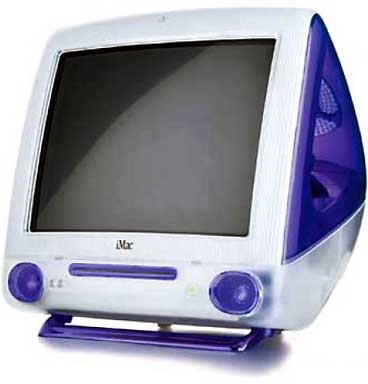 The iMac has been a huge success. However, for Apple to thrive and be taken seriously, its market share must increase beyond the 10% level. At current levels, we’re in a holding pattern. I’m not interested in taking over and eliminating Windows completely, but it’d be nice to see software at the local mall for the Mac and not have to have a knockdown, drag out fight to use my platform of choice to do my job. No one tells me what brand of telescope, what kind of electric circuit components, what kind of demo hardware to buy for my school. Why should they tell me what computer to use? Since when are Americans such raving conformists?
The fight isn’t over; it’s just begun. And it’s a necessary battle, even if Apple doesn’t – or can’t – admit it.
 Final thought: So many of the Mac Advantages have been weakened by Windows 98, and more so (I hear) by Windows CE, Me, 2000, and (in the future) XP that I wonder whether writing this series is a good idea after all – it sounds like the original booklet has served as a roadmap for improving Windows. [Insert standard denial from Redmond here. “A Microsoft spokesman denied using the original Apple 75 Macintosh Advantages brochure in developing any version of Windows today, and continued to argue for Microsoft’s right to innovate. The spokesperson also displayed his son’s yellow duck, source of the photo used in the Windows XP logon debacle…”]
With that pleasant thought, here are advantages 16-32:
Advantages 16-32
- Active Assistance
- Easier Troubleshooting
- Extensions Manager
- Easier to Add Resources
- Easier to Input Devices
- Apple System Profiler
- Easier Network File Management
- Fewer File Name Limits
- Alternate Character Sets
- Better Folder Management
- Better Window Management
- Easier File Disposal
- Advanced Industrial Design
- Better Floppy Disk Management
- Mouse Button Simplicity
- Applications Launching
- Security Customization
16. The Mac OS provides active assistance; Windows doesn’t.
The Mac OS includes Apple Guide, an innovative help system that not only tells you what to do, but also coaches you through the process by showing you exactly where to click the mouse and where to type. In fact, in many cases, you can simply ask Apple Guide to perform tasks for you. The help systems offered by both Windows 95 and Windows NT simply don’t offer the same level of active assistance.
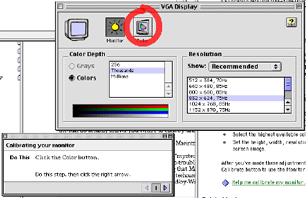
Update: This item refers to Help menu tasks, things you are attempting to find out how to do from within the operating system. In the Mac Help System, when you are prompted to click on a tab or button to activate a function, the Mac OS actually shows you where to click by drawing a red circle over the target area.
That is what this advantage describes. However, don’t read into it that Windows doesn’t allow you to activate control panels from within help screens; it’s been able to to that since Windows 95. I carefully searched in Windows 98’s help files and could find few control panel activators, and no “active assistance” as described here.
I did notice that the Windows 98 machine allowed me to move the control panel windows off of the instruction page windows in the help file; I have some vague memory of that being a problem in the past.
The advantage here still lies with Macintosh. Windows users will point out that the help files for Windows are generally much more extensive, better organized, and more detailed and thorough than they are for Mac users. I think we should concede that point. Don’t you?
Advantage: Macintosh, although it’s not a really earth shattering one.
17. It’s easier to troubleshoot problems on a Macintosh than on a PC.
We’ve already seen that a Macintosh has no “mystery” files and no Registry to contend with, so, by nature, the Macintosh is easier to troubleshoot. A study by Norris and Wong Associates substantiates this, showing that Macintosh maintenance requires less time, less knowledge of computers, and less technical support, and results in less user frustration than similar maintenance required by Windows 95.*
Macintosh users are also fortunate because one call to Apple provides both hardware and software support. Many Windows users have to call a different vendor for every card or piece of hardware installed in their PC.
* Norris and Wong Associates, “Maintenance Comparison: Macintosh vs. Windows 95,” November 1995. See www.apple.com/whymac.
Update: The reference to the Norris and Wong study is dated; I’d like to see a more modern version. As noted in the first article in this series, the 75 Mac Advantages document is no longer posted on Apple’s site because it, too, is dated. The link noted above leads to the Apple Hot News page.
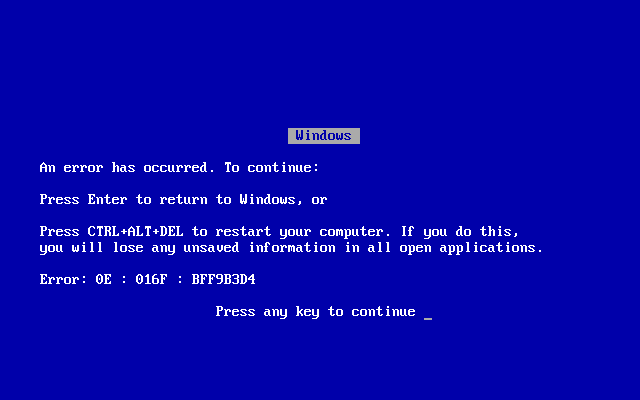
I think the advantage still lies with Macintosh: They are easy to fix. As Windows has become more stable in its later releases, though, many users report that Windows’ “Blue Screen of Death” has become more rare than in years past, perhaps even more rare than Macs that freeze up.
I have yet to see an objective, third party, scientifically controlled study that would convince me that one OS or the other is inherently more stable. Perhaps Consumer Reports should tackle it.
My own experience, ignoring the lack of objective data, is that I’ve never met a computer (Mac or PC) that I couldn’t crash. Sooner or later they all go down.
One PC enthusiast argued with me that his machine had run for years without a single crash and never froze despite upgrades, installing hardware and software, and so on. In the same breath he told me two other PC computers in the same location froze and crashed all the time despite numerous attempts to fix them.
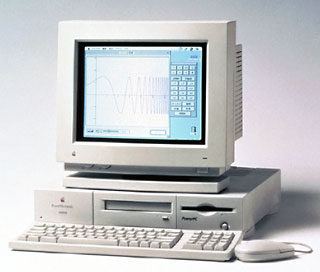 My classroom network consists of ten donated and abandoned machines, and only two are exactly alike. I have everything from a 6100/66 Workgroup Server to a Blue and White G3/300 – and everything in between.
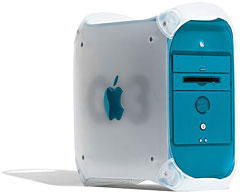 Do they freeze? Yes, enough to be frustrating. Do they crash so hard that they require a clean OS install? Not so far. I fix everything with one OS 8.6 disk and one OS 8.1 disk and no CD burner.
Could I do that with ten aging PCs from different vendors using network cards, video adapters, sound cards, and hard drives from a dozen different vendors? Unlikely.
Yes, later versions of Windows do a better job with plug and play than they used to. But as several readers have pointed out, there’s always that one device driver that Windows prompts you to insert a disk for – that you don’t have – that can totally ruin your day.
The advantage here is still with Macintosh, because if something does go wrong, it’s easier to fix on a Mac. Reinstalling the OS is rare; wiping the hard drive to fix a problem even more so.
Advantage: Macintosh
18. The Mac OS Extensions Manager offers capabilities unmatched by any Windows feature.
On a Macintosh, you have superior control of system level files: The Extensions Manager allows you to control them with ease by simply selecting items from a list. How do you turn individual drivers on and off on a PC? One at a time – and if you make a mistake, it may mean calling tech support, restoring your application, or even performing a complete reinstallation of Windows.
The Mac OS tells you which software extensions belong to which applications. The Extensions Manager in Mac OS 7.6 and later allows you to view extensions and control panel files by the applications to which they belong. Under Windows, however, you are left to guess which driver belongs to which program.
The Mac OS also gives you information about what each extension does. With Windows you are left to wonder what “3C5X9A.DLL” truly is, what it is supposed to do, and whether you really need it.
Update: The advantage lies with Macintosh. The ability to edit extensions and select extension sets during the boot process with the Extensions Manager is still a tremendous advantage. Just hold down the space bar (that’s only one button, kiddies) while booting. With exactly six clicks and no typing (I counted) you can set your Mac to use only OS supplied extensions, disabling all third party extensions at once, and get back to work -or begin trial-and-error troubleshooting.
For the record the clicks are:
- Click on the Apple menu, scroll down to Control Panels and slide over to Extensions Manager.
- Click on Extensions Manager.
- Click on dropdown menu at the top of the list and select Mac OS Base (or another desired option).
- Click in Application Menu or background to return to the Finder.
- Click the Special menu, drag to Restart, and release.
- Confirm Restart.
Compare that with what Windows 98 users are advised on the Windows help site:
WARNING: Using Registry Editor incorrectly can cause serious problems that may require you to reinstall your operating system. Microsoft cannot guarantee that problems resulting from the incorrect use of Registry Editor can be solved. Use Registry Editor at your own risk.
For information about how to edit the registry, view the “Changing Keys and Values” Help topic in Registry Editor (Regedit.exe) or the “Add and Delete Information in the Registry” and “Edit Registry Data” Help topics in Regedt32.exe. Note that you should back up the registry before you edit it. If you are running Windows NT or Windows 2000, you should also update your Emergency Repair Disk (ERD). [author’s note: that’s a floppy, not a CD.]
Clean-boot troubleshooting refers to methods of reducing behaviors that may occur because of your computer’s environment. Many behaviors that occur when you run Windows or programs occur because there are conflicting drivers, terminate-and-stay-resident programs (TSRs), and other settings that are loaded when your computer starts. Your computer’s environment includes settings from the following files:
Msdos.sys
Config.sys
Autoexec.bat
Winboot.ini
Windows\Winstart.bat
Windows\System.ini
Windows\Win.ini Windows\Wininit.ini
Windows\System.dat
Windows\User.dat
These files are loaded as part of the boot process when Windows starts, and the files help create the environment that is used by the operating system and programs. Extension Manager can be used “on the fly” during boot and is so handy that IT managers and consumers ought to jump on it.
I’m not sure I buy into the Mac Conspiracy Theorists’ point of view that most IT departments perpetuate Windows machines because it means larger budgets and bigger staffs for them. It seems to me that most IT managers are professionals and want to help their staffs work efficiently, just like the rest of us do. But this sure is a handy tool for fixing things quickly and efficiently. So I wonder why more folks don’t support the Mac for this reason alone.
Advantage: Macintosh.
19. It’s easier to add resources to a Macintosh.
When you add capabilities to your Macintosh, it anticipates what you’re doing. For example, to add fonts or desk accessories, all you have to do is drag them to the System Folder. The Mac OS places all of the items into the folders in which they belong; automatically. Windows users are often left to manually place each file where it is supposed to go; if they know where that is.
Update: The term “desk accessories” is a little dated, but it is still true that just dropping files on the System Folder automatically files them where they are supposed to go. I want a utility like that to drop documents on – “The file MyTaxes is a Spreadsheet file. Do you want it filed with your other Spreadsheet files?”
Anyway, I believe this is still an advantage for the Mac side. Adding extensions and control panels usually does not rewrite the system software. There are all sorts of pleasant side effects from that.
Advantage: Macintosh
20. The Macintosh makes it easy to add input devices.
 The Apple Desktop Bus (ADB) peripheral interface lets you easily connect multiple input devices such as a trackball, a keyboard, a mouse, a graphics tablet, a joystick, or a pen input device to a Macintosh. Because of the superior integration of the hardware and software on a Macintosh, the system will “know” which one is being used without requiring reconfiguration. Standard PCs have no such equivalent keyboard bus. To connect multiple input devices to a PC, a PC user would often face multiple card installations, as well as the conflicts that would result from having so many similar devices connected to the PC at once.
Update: Ah, the price of conformity. USB devices have reduced costs and opened up peripherals for us, but we have paid the price by requiring device drivers for most of them.
My Wacom tablet mouse will not function if the USB driver for it does not load: I can’t use it, for example, to manage my extensions in the extension manager. I couldn’t say if that is true for all USB peripherals; I suppose some of them must function properly, considering the Apple mouse is now USB and must perform that function.
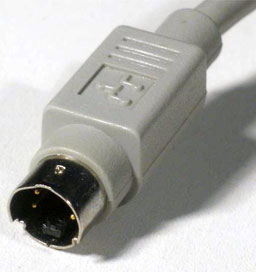
Anyway, ADB was probably the cleanest, most reliable port on pre-1998 Macs, and I am glad my Blue and White G3 still has one. However, it was slow and proprietary, and it’s gone because of it.
Did you know you could connect two keyboards on a single ADB bus for gaming, and as long as you didn’t use the same keys, two players could play at the same time?
Ah, well. The gains made in reduced expense and additional peripherals outweigh what was lost. So long, ADB.
Advantage: defunct due to discontinued ADB bus by Apple
21. The Apple System Profiler provides more complete and easier-to-understand information about your Macintosh.
Only Mac OS 7.6 and Mac OS 8 have the Apple System Profiler. Simply run it from your Apple menu and you can determine most Macintosh settings, such as microprocessor type and speed in megahertz, status of virtual memory, devices that are connected to the computer and their settings, and much more.
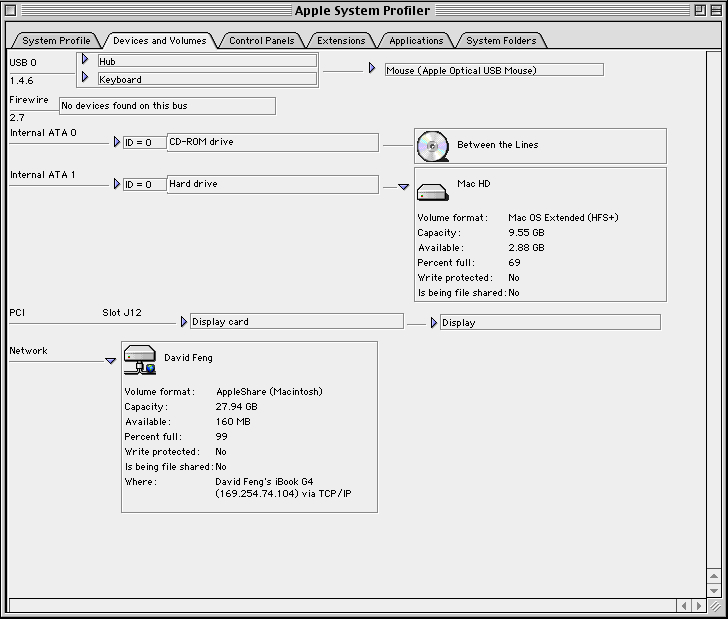
Windows makes it hard to find out exactly what is going on with a PC. To determine the status of various functions, you’d have to search through many panels of information to find what is needed. No one source of information is available for what you need to know. And some information can’t be determined on many systems, such as the processor’s exact speed.
Update: Investigating a copy of Windows 98, I find a utility called System Information, which seems to be a functional equivalent to the Mac System profiler. In Windows, it is located in:
Start > Accessories > System Tools > System Information
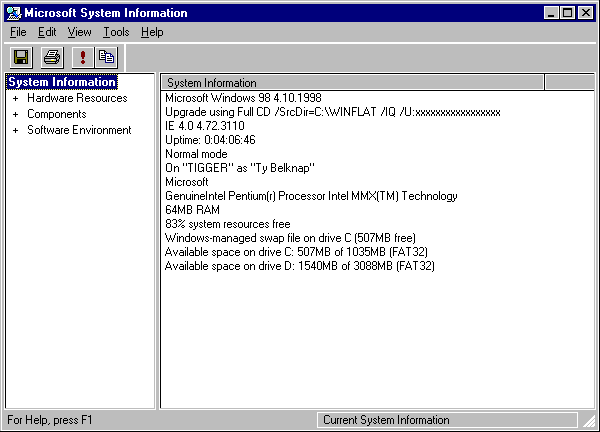
It seems to be a little less well organized and harder to read than the Profiler data, but it does report on more system level variables. It’s harder to locate than the Profiler, since the Profiler is one of the first items in the Apple menu. Overall, I’d say due to “innovations” in Windows, this advantage is neutralized.
Advantage: Neutralized
22. The Macintosh works better with files over a network.
Because Windows 95 is built on DOS, working with files over a network is a much more difficult process with a PC running Windows than with a Macintosh computer.
With a Macintosh, you can move documents and applications, and the Mac OS will keep track of where they are. So, for example, if someone on the network moves or renames the Microsoft Excel folder on your server, you can still double-click your Excel alias or an Excel spreadsheet file; the Mac OS will find and launch Excel. By comparison, Windows 95 will lose track of the application when copied to a server, so the links between your files and the application will be broken.
Update: Well, I don’t know what the original author was thinking when bragging about Mac OS aliases here: Moving the application anywhere, even when not on a network, will break the alias, although the OS will ask you to locate it so you can fix it yourself. However, it is true that moving the application in Mac OS, even to another server, will not prevent the OS from booting the application that is associated with a particular document.
Advantage: Macintosh
23. The Mac OS has few limits for filenames, as opposed to Windows.
The Mac OS has always allowed long filenames, so there are no complex filename issues. But the Windows world now has long filenames, and transitioning from the 8.3 character limit from DOS is a complex issue. First, PC users must buy new applications to use long filenames. Running older DOS and Windows 3.1 applications in Windows 95 or Windows NT still requires 8.3 character filenames.
And when a file with a long name is given to a user of Windows 3.1 or DOS, the file is renamed to an 8.3 format, causing much confusion to all users involved.
Update: Well, it’s been nearly six years since the Windows world converted to long filenames. They’ve even added the ability to hide or show the filename extender. You can’t really hold the old 8.3 format against them any longer. On a modern Windows machine, even some of the system files were using the new format (which wasn’t true of Win95). The majority of individual files still conform, but there were plenty that didn’t.
Anyway, check out this Windows 95 error message:
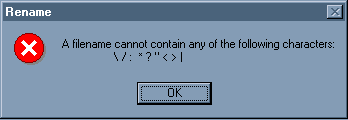
You can’t name any Windows file “What the hell is this?”
On the other hand, Windows filenames can now be very long – even longer than the Mac’s 31 character filenames – due to Microsoft’s innovation in discovering that file names should be longer. There is a limitation, however, described below in item 25.
Given the backwards compatibility and the halfhearted adoption of its own new standards on filename length – both admittedly minor points – plus the characters-not-allowed problem, Macintosh still holds the advantage although it’s not nearly as strong as it once was.
 Advantage: Macintosh – by about this much: |?*?<>|” Yes, I do know the Mac does not allow a colon in filenames; most Mac users don’t know the colon serves the same function as the backslash in Windows file directories – because they don’t have to know.
24. The Macintosh has easier access to alternate character sets.
Many users want easy access to characters that aren’t available on a standard keyboard, such as bullets and trademark symbols (®). It’s much easier to produce these characters on a Macintosh. You can type characters with accents, special symbols, and intelligent script in two key presses or less in most Mac OS based applications. Special characters are much less generally available across multiple fonts in Windows 95 than is the case with Macintosh. For example, nearly all Macintosh fonts include useful special characters that are likely to be found only in the Wingdings font on PCs running Windows 95.
Update: As a test to see if this is still true, I am going to tell how to type the following characters in Windows and in the Mac OS: trademark, copyright, bullet, and just for the heck of it, a heart and and the respective corporate logo. For both computers, I’ll choose Times as the font and see what I have to do to get the symbol. Before writing this paragraph, I didn’t really know what the keystrokes were, except for the bullet (Option-8 on the Mac).
| Symbol | Mac | Windows |
| trademark – ™ | option-2 | alt 0212 or ALT-CTRL-C |
| copyright – © | option-G | alt 0227 or ALT CTRL-T |
| bullet – • | option-8 | alt 0183 |
| heart | Symbol font: option-g | alt 0169 |
| corporate logo | shift-option-k | couldn’t find it in Times or Symbol |
In addition, the codes for the shortcuts seem to be font-dependent in Windows, whereas in over a dozen fonts (non-Symbol type) I checked on my Mac, the codes were always the same. Only a few special characters used the Alt-Ctrl combination in Windows, which seems constant over applications. The ones they picked were a good list, and the choice of “C” for copyright makes more sense than “2” for the Mac.
This advantage is still with Macintosh due to the shorter codes and consistency across fonts. While not a big difference between the two, it is an example of the kind of thing Mac users mean when they say using Windows is like a death by a thousand stings. It’s not the big stuff, it’s the accumulated little stuff.
Advantage: Macintosh
25. The Macintosh has superior folder management compared with Windows.
A Macintosh can tell you folder sizes within a window, while a Windows based PC cannot. A Macintosh will automatically calculate the sum of all the folder and file sizes contained within a folder and display that information in the window containing the folders and files. With Windows, you cannot at first glance determine the folder size, nor can you sort both folders and files by size, since folders will simply be listed alphabetically.
On a Macintosh, you can create as many folders within folders as you like, without ever having to worry about long pathnames. In Windows 95 and Windows NT, pathnames are limited to 260 characters, and since pathnames grow longer each time you add a folder to another folder, you might reach this limit sooner than expected.
And with Mac OS 8, a feature called spring loaded folders allows you to easily navigate through many levels of folders by simply dragging an item over a folder.
Update: On my Windows 98 test machine, this still seems to be completely true, untainted by Microsoft innovation. If I’m not seeing how to make Windows emulate the Macs’ behavior here, I’m sure someone will let me know. I created several nested folders and gave them nonsense names until I came up against the 260 character limit. While renaming the last level of folders, Windows didn’t even tell me why my keyboard ceased to function; it just stopped.
Advantage: Macintosh
26. The Mac OS provides superior onscreen window management.
When you add a new file to a Macintosh folder, the Mac OS automatically knows where to put the new file in the list. In Windows 95, however, the file is always dropped to the bottom of the list.
Another window management feature on the Macintosh is that you can close all open windows easily by pressing Command-Option-W. But in Windows, you must close every window manually.
Only the Mac OS allows you to print a window’s contents from the graphical user interface. The Print Window command prints a disk directory, while Windows users must return to the DOS level for this feature.
Mac OS 8 adds pop-up windows, allowing you convenient access to frequently used windows.
Update: My Windows 98 machine behaves like the Windows 95 machine described above in terms of adding new documents to folders. On a Mac, the window itself remembers how things are organized, and new items are fit into the hierarchy. In Windows, adding a new document to a list view automatically turns off the “sort by name” function you previously chose, and the new thing appears at the bottom of the list. In other words, the Windows don’t remember.
In Windows Me, you can close multiple items in the task bar by control clicking to select multiple items then right-clicking to close all of them at once.
I couldn’t find any improvement in Windows equivalent to the ability of the Mac to print a window’s contents as is, nor any functional equivalent to pop-up windows, although the task bar will call a window up if a folder is open and minimized. Task bar functions seem to be automatic and to always include whatever applications and documents are open, unlike the popup menu’s fixed location at the bottom of the screen – left where you put it.
The task bar itself remains one of the true Microsoft innovations, which the Dock in Mac OS X may copy in functionality if not in style. When I’m finished analyzing the 75 Mac Advantages, I’ll compile a list of Windows advantages over Mac, and the task bar will be listed there in comparison to the application manager of Mac OS. In the meantime, this advantage stands as written, still basically true.
Advantage: Macintosh
27. The Macintosh trash can is easier to use than the Windows recycle bin.
All Macintosh files stay in their correct folders when they’re placed in the trash can, making it easy to recover your data if required. When you put files or folders into the Windows 95 recycle bin, however, all the folders vanish, making it impossible to easily retrieve a folder of information.
When you work with floppy disk files, the Macintosh trash works better than the Windows recycle bin. If you drag items from a floppy disk to the Windows recycle bin, you’ll see them “flying” to the recycle bin. But they are actually being deleted, not moved to the bin. You will not be able to recover these items. The Macintosh, however, stores those files and does not delete them from the floppy disk until you select Empty Trash.
Update: This item is still true, even if it is also true that the floppy advantage is gone because there is no floppy on a modern Mac. Add one, or use an older machine (this is Low End Mac, after all), and the advantage is still true. This is from the Windows 98 product tips screen on the Microsoft web site:
Note: The Recycle Bin does not store files deleted from floppy disks or mapped network drives. There is no way to recover a deleted file in Windows 98 other than to restore it from a backup, so be careful when deleting files from these sources.
Advantage: Macintosh
28. An advanced industrial design makes Macintosh computers superior to PCs.
The award winning design of Macintosh desktop and portable computers provides a number of features that combine to enhance ease of use:
Easy-to-open cases. All Macintosh computers today provide easy access to components.
Multiple, multi-use ports and connections. Every Macintosh comes with enough connectors to hook up at least seven storage devices or scanners, ten input devices, two serial devices, a microphone, speakers, a monitor, and a network connection.
Automatic startup, operation, and shutdown. Many Macintosh computers can be easily set up to work remotely; turning on at a designated time, performing scripted functions, and then shutting down automatically; whereas “Shut Down” on Windows doesn’t turn the computer off.
Update: On the first item, the Mac wins today compared to almost any PC maker you care to name. There are some easy-open cases, some even mimicking the G3/G4 tower’s flip open side, but many- including my test machine, an HP Pavilion – require multiple screws and power supply disconnects to access the motherboard.
The second item refers to the SCSI port on older Macs, which has been superseded by USB and FireWire. Nearly every Mac comes with FireWire, which allows the addition of up to 63 peripherals (now that’d be something to see). Most PCs today come with USB connectors, but not many come with FireWire.
Windows advocates will be quick to point out there are plenty of vendors with a product that has built-in sound, built-in video support, and built-in ethernet cards, but there are plenty of examples where some component has been left out to save on costs. The Pavilion I mentioned did not have built-in ethernet, for example – that was an added expense, albeit a small one.
Due to the homogenization of input ports on typical machines (a fancy way to say we all got USB) and the dropping of audio input on G4 towers starting with the Digital Audio model, these advantages are greatly weakened. As far as I can tell, AppleScript’s ability to remotely control and script the behavior of Macs is still a great advantage over PCs. I can’t find any equivalent function (other than Energy Saver) which allows these functions on a PC.
Advantage: Macintosh, but weakened due to improvements in Windows and loss of ports on Macs
29. Floppy disk management is easier with Macintosh computers.
The Mac OS recognizes when a floppy disk has been inserted and automatically shows the disk’s icon on screen. When you eject the disk, the Mac OS indicates that it has been removed. But when you insert a floppy disk into a PC running Windows 95, nothing happens. To see the contents of the disk, you have to double-click “My Computer,” then double-click the correct disk drive icon. And if you eject the disk, Windows 95 leaves its window unchanged on the screen; even after you’ve placed a different disk in the floppy disk drive.
Also, a floppy disk left in a Macintosh is ejected automatically on startup, and the Macintosh will continue to boot. But not so on a PC; a floppy disk left in the PC usually generates an error message and stops the startup process.
Update: Many PC users, converting to Mac, are frustrated when pushing the CD-eject button doesn’t eject the CD, or they find the lack of a floppy eject button (if there is a floppy drive in the first place) mystifying. How do you get the thing out? They say that when they want their disk, they get it instantly, while Mac people have to wait for the OS to give it to them.
The reality is the Mac OS keeps track of where the disk is: Since the OS ejects the disk at user request, the OS knows where every removable disk – not just a floppy disk – is located. You never get “abort, retry, fail?” on a Mac, nor do you get “Error reading disk A” – even if it’s a PC disk in the Mac drive.
In my way of thinking, the Mac ought to have an eject button for CDs and floppies that operates by telling the OS to initiate a “Put Away” command, which ejects the disk. Nevertheless, as things stand today, the advantage is still with Macintosh – because it applies to all removable media, not just floppies.
Advantage: Macintosh
30. The two-button mouse used with Windows can cause confusion.
 The whole idea behind the use of a mouse in conjunction with a graphical user interface, as opposed to the keyboard and a command-line interface, centered around ease of use. This concept is fully realized on a Macintosh computer with its one-button mouse. But the PC’s two-button mouse often makes things nearly as complicated as DOS did: Right-click on mouse versus left-click; when to do which at what areas on the screen? This is particularly frustrating for novice users.
Update: This is still true, although 2-button mouse users will argue vehemently that the loss of the second button is not a Macintosh advantage. But remember, the functionality of a two-button mouse is still there; you just don’t have to learn about it on a Mac unless you want to.
Most pundits decry the option-click as a concession of the Mac OS to the superior design of Windows mice – and a poorly implemented one at that. However, I think it is at least equivalent to a two-button mouse for the following reason: If you are typing, and reach for the mouse, one-button or two-button, your hand is still off the keyboard, and so what does it matter if you right-click with the mouse hand or option-click with the hand that is sitting on the keyboard useless and idle waiting for your other hand to return.
Maybe the solution for everyone is to use one of those new one-handed keyboards that were advertised at the last Macworld Expo and thus never have to stop typing even as you can use the mouse – but I doubt I would ever be that coordinated.
Nevertheless, this item does boil down to user preference, and since you can operate the Mac with a two button mouse (albeit third party) if you want to, and program the second button to have the same type of functions as a single button, the advantage remains with Macintosh for one simple reason: A well designed piece of software ought to be so easy to use, so elegant in layout and design, that only one button is needed. Basic engineering rule #1: simpler is better.
Two-button people are sort of like people who drive stick-shifts. They sneer at people who drive automatics as lazy wimps and tout the efficiency of the clutch-and-shift controls over the lack of either in an automatic transmission. Nevertheless, the majority of people prefer automatics. Why? Because it is simpler. On a Windows machine you’re not allowed to have an automatic transmission.
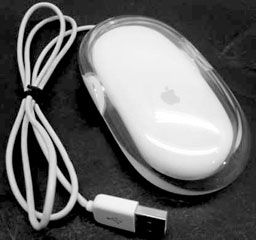 When Apple came up with its no-button mouse (right), was I the only one who got the joke? I thought it was just brilliant. In your face, two-buttoneers!
Advantage: Macintosh
31. Applications launch once on the Macintosh; with Windows 95, some applications may launch multiple times.
If you double-click an application on your Macintosh and that application is already open, the Finder will simply take you to the running application. Windows will often launch additional instances of the application each time you open it, which adds confusion and consumes memory. In addition, Windows allows you to load multiple versions of the same drivers, creating a potentially unstable system software situation.
Update: Still true as far as I can tell.
Advantage: Macintosh
32. The Macintosh provides easier security customization features.
Apple’s At Ease software is a security program that protects important applications and documents in a shared environment against unauthorized users and unauthorized configuration changes. And the Simple Finder option in Mac OS 8 lets novice users enjoy an even easier Macintosh user interface.
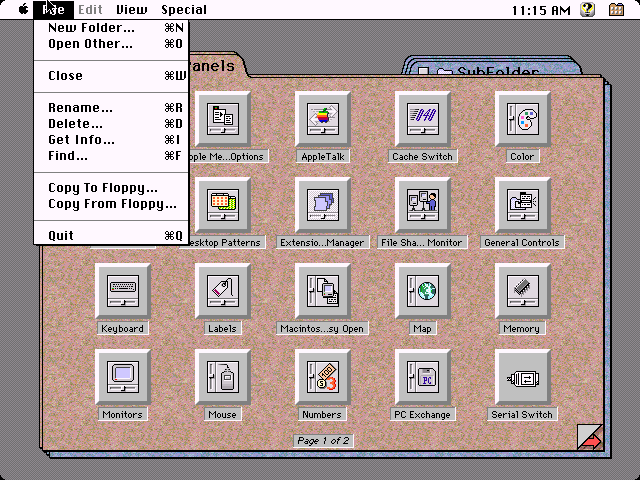
Unlike Windows 95, Macintosh lets you easily match the user interface to each person’s age and level of computer experience. Menus let you quickly designate which desktop each person will use. You can easily control each user’s ability to open, delete, copy, or rename specific files. You can also assign passwords to each user.
Update: At Ease has died a lingering death due to increasing incompatibilities with various changes in the Mac OS since OS 8.1. Some of the simplification functions in the General Controls control panel remain. However, with OS 9, the multiple users login has restored all the lost functionality from the loss of At Ease. Users can customize the desktop and interface settings for their individual tastes, and the desktop is remembered as different users log in.
Future versions of Windows XP include a login screen so much like the OS 9 login screen they even “innovated” the duck icon for users.
Nevertheless, Windows 98 does include a multiple-users function similar in scope to the Mac OS functions in the old At Ease program. By the way, at our school we use a program called FoolProof to remotely administer the login combinations for our students. Our students can login as an Internet user, if so authorized, or as a standalone computer user with a valid school ID, and the same machine is configured for teachers and technician use. The login names and definitions are stored on a central server and can be changed universally for all lab machines at once. A very handy program.
Advantage: Neutralized because of innovations to Windows 98.
Summary
We’ve moved the summary to a separate page, which also functions as an index to this series of articles.
Also see Feedback on 75 Mac Advantages, Part 2.
Keywords: #75macadvantages #macadvantages #extensionsmanager #bsod #bluescreenofdeath
Short link: http://goo.gl/QXoepz
searchword: 75macadvantages
