
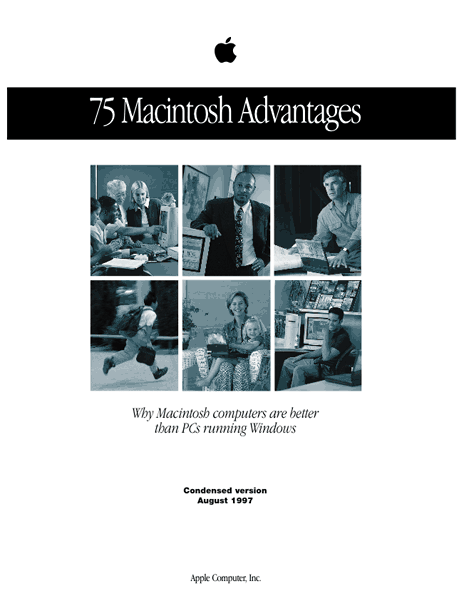
2001 – In this series of articles I will be taking a look at Apple’s venerable 75 Macintosh Advantages brochure issued a couple of years ago but mysteriously missing from its website today. Or perhaps not so mysteriously; after Mr. Jobs and Mr. Gates declared a truce to the Windows/Mac OS wars, many of the 75 Mac Advantages (which were, after all, advantages over Windows) were persona non grata at Apple Corporate Headquarters.
 However, the list still remains as a reference to Mac diehards, who bring it up now and then and wish that Apple would update it. That’s not going to happen, folks, but here at Low End Mac we’re going to make a stab at updating it for you over the next several weeks.
This survey of the current state of the 75 Mac Advantages will be comparing, for the most part, OS 8.6 through 9.1 to Windows 95 and 98, as this is what most users are still using.
I gently remind the reader that OS X is still officially in beta at this writing, although it will become available around the time I finish this series. After I get it and use it for a while, perhaps another update will be in order – if someone doesn’t beat me to it.
Also, if you have knowledge you want to pass along for future columns on this topic, drop me a note, and I’ll see if I can incorporate your suggestions. Please make an explicit statement in your email if you want me to publish your comments. And refer to the advantage number for ease of filing.
The original list, originally published by Apple, is no longer on Apple’s site, but several people have archived the PDF and HTML versions of the list, including Alex Paterson, upon which this particular analysis is based.
With that all said, here we go…

Contents
- Plug & Play
- Adding Peripherals
- Driver Management
- Integrated User Interface
- No ‘Mystery’ Files
- More Versatile Networking
- Flexible Monitor Support
- Better Telephony Support
- Easier Installation
- Ready for year 2000
- No Registries
- Boot from CD-ROM
- Dependable Aliases
- Easier OS Management
- No DLL Problems
1. The Macintosh computer’s true “Plug and Play” capabilities make adding hardware cards easy.
[Original material from the “75 Advantages” brochure is indented.]
Since 1987, Macintosh users have had the ability to install a hardware card and use it in minutes, not hours. Often referred to as “True Plug and Play,” this feature enables Macintosh users to avoid the tedious delays and configuration issues that often arise with the addition of new cards in PCs.
PC users, however, have long struggled with hardware/software integration. After spending large amounts of time and money upgrading their computers to use Plug and Play or, in many cases, buying new computers, many Windows 95 users have found that Plug and Play often does not work properly. And Windows NT 4.0 has no Plug-and-Play technology.
Update: With the adoption of many “industry standard” components such as IDE hard drives, which require attention to internal drive jumper connections before installation, the Mac OS has taken a half-step backwards from “True Plug and Play.” Dropping SCSI as an internal and external standard does remove the odious task of resolving SCSI ID conflicts, which is a point in the current Mac OS’s favor. And of course, hot-swappable USB and FireWire devices are great as long as your Apple-compatible USB and FireWire driver updates are in place. I define “True” Plug and Play as “Plug it in and use it” without needing to download a driver from anyone – and that has not been my recent experience with various cards and devices I have installed. I am installing mostly on Mac OS 8.6, and this may not be as big an issue in OS 9.1.
I have heard reports from PC owners that claim that their plug and play systems work fine, and the installers auto-detect, auto-download, and run without a hitch. It is true, however, that if something goes wrong on a PC install, it often goes horribly wrong, requiring manual jumper setting changes on the motherboard, wiping the drive, and reinstallation of everything from Windows to all device drivers and so on.
Updating a Mac hardly ever causes a problem requiring a hard drive wipe, and it is rare even to reinstall the OS. Usually installing the driver and updating the FireWire or USB components from Apple works the first time without problems.
I would say the advantage still lies with Macintosh, but the advantage is not a strong as it used to be.
2. The Macintosh computer’s built-in SCSI port makes it easy to add peripherals.
Today many users want to be able to quickly connect peripheral devices, such as scanners, external hard disk drives, and recordable CD-ROM drives. Macintosh computers allow access to such devices through the use of the built-in SCSI port, a standard feature on Macintosh computers for more than 10 years. The SCSI interface allows a user to simply connect a device such as a scanner to the Macintosh and use it within minutes.
The average PC does not come with a SCSI port, so the PC user is left to struggle to add devices by installing complex SCSI cards.
Update: Present day Macs o longer come with SCSI built in. Since a typical PC and Mac both have USB ports, they are more or less at a level of parity on this issue. However, all current Macs (except for the 350 MHz iMac) also come with FireWire, and most PC’s do not; this remains a point in the Mac’s favor not unlike the original citation for SCSI ports.
Of course, older Macs still have SCSI ports, but finding SCSI peripherals other than hard drives is becoming increasingly difficult.
This advantage, therefore, is more or less defunct. Perhaps a new advantage is needed for FireWire.
3. Windows has a plethora of drivers; 16-bit, 32-bit, and Windows 95 and NT specific drivers; making driver management difficult.
Macintosh users have never had to understand the complexities of hardware “drivers.” Macintosh users don’t need to spend their time and money worrying about what drivers they have on their computers.
On the other hand, Windows users cannot avoid having to know a lot about drivers; for example, what a “real mode” or a “protected mode” driver is. Finding the correct drivers, eliminating old drivers, avoiding driver conflicts, and finding hardware that will work with the right version of Windows is the bane of every Windows user. Even the Windows 95 version of Plug and Play isn’t always foolproof when it comes to drivers, sometimes leaving the choice of what to do with a cryptic driver up to the user. There are Windows 95 drivers that will not work with Windows NT, and vice versa.
Update: Mac users need to know just a little more than they used to about drivers, but usually a single USB or FireWire update from Apple fixes most issues. So even though the Mac does not protect the user quite as well as it used to, the advantage still lies directly with Macintosh here.
That last sentence, “There are Windows 95 drivers that will not work with Windows NT, and vice versa,” makes me nervous when contemplating OS X and OS 9.1. This bears investigating when I get OS X up and running.
Mac Advantage: Still true but slightly weakened.
4. DOS and its command-line interface still lurk in Windows, but the Mac OS has always had a graphical user interface.
Wasn’t DOS supposed to go away when Windows 95 was released? But text files such as SYSTEM.INI and WIN.INI still exist in Windows 95 and Windows NT in many cases. In addition to these complex files, Windows 95 and Windows NT now add two Registry files, SYSTEM.DAT and USER.DAT. If your PC is not running correctly, you might need to edit some or all of these files in a text editor or the special Registry editor. A mistake here could mean that these text based files might be irreparably damaged, making the PC unusable. Macintosh computers, on the other hand, have never had a command-line interface. Because of the Macintosh computer’s true graphical user interface, you will never have to type obscure system commands.
Update: Everything here is still true today. However, with OS X, will users be completely hidden from the command line interface or will sloppy programming occasionally force one into the arcane world of Unix commands? For those of us who did not try the beta, there’s no way to know yet. And even beta users can’t reliably tell us the answer, because, after all, it’s a beta.
It is true, however, that the Windows interface is improving. As Steve Wozniak is reported to have said, we won the war because all computers are turning into Macs.
Advantage: Macintosh still true up to Mac OS 9.1.
5. Windows is loaded with “mystery” files such as DLLs, INFs, and SYSs.
Even the latest Windows 95 or Windows NT systems are loaded with hundreds of mysterious files, with names such as: NDDEAPI.DLL, MSCDEX.EXE, BOOTSECT.DAT, CONFIG.SYS, AWUPD.INF, VFINTD.386, and ODBCINST.INI. Do these sound like files left over from DOS? Well, they are. Many users hoped (in vain) that Windows 95 and Windows NT would eliminate these kinds of files in the “8.3” name format in favor of names that are more recognizable, especially since the icons for these files do not always provide a clue as to where they might need to go or what they might do.
Since the Mac OS has always supported long filenames, there are no “ghosts” from the past; unlike Windows. A Mac OS system-level file has a more user-friendly name, such as “Startup Disk,” “Sound Manager,” or “Extensions Manager Preferences.”
Update: Still true today in OS 9.1, but less so than it used to be. In my system file right now there are the following:
- ATI MPP Mapper
- CarbonLib
- DNS Plugin
- NetSprocket Lib
and so on. Many of these do not provide additional information in the Extensions Manager either, so to an average user, they’re just as mysterious as BOOTSECT.DAT. Most extensions are decipherable; others are not.
For the record, the most mysterious extensions are the dozens of little trashy files any proper installation of a Microsoft product scatters throughout your hard drive, especially in the system folder. Memo to Microsoft: hardware in the system folder, software goes in the program folder.
I will say that the Extensions Manager makes the difference here still a strong Macintosh advantage. You can usually tell what is original and what has been added. Disabling an extension merely requires moving it, not rewriting a registry file or an INI or DAT table. You can reset to OS Base and resolve the extension conflict you have with little more sophistication than crude trial and error.
But that’s a long way from the ease of use of a toaster.
Advantage: still strongly Macintosh.
Author’s note: I just spell checked the document before sending it to Dan Knight, and the spell checker hit every extension and Windows file mentioned in this section. That’s a good criterion for this advantage: a spell checker shouldn’t hang on an extension name.
6. Macintosh computers offer easier, more versatile networking.
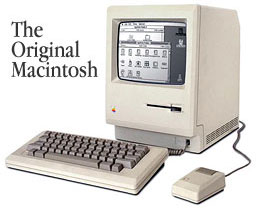 Every Macintosh since 1984 has included easy-to-use, built-in networking. The AppleTalk protocol allows you to connect a network of multiple Macintosh computers and printers together in just a few minutes. Every Macintosh includes simple and inexpensive LocalTalk networking, and most Macintosh computers also include industry standard Ethernet, a claim most PCs cannot make. And Macintosh computers can communicate with virtually any other computer, since TCP/IP is a standard protocol.
Networking in the Windows world, however, can be difficult and confusing. For example, in Windows 95, you might see the “Network Neighborhood” icon even if you aren’t connected to a network. And, though Windows 95 and Windows NT include networking capability, there is no guarantee that the computer has the hardware to support this, nor is it capable of being set up for networking as quickly as the Macintosh.
Update: Most PCs I see do include an add-on ethernet card (everything in a PC is add-on, isn’t it?), and LocalTalk connections are used only in legacy situations usually leading to an ethernet bridge, since modern Macs lack the ports for LocalTalk. However, networking Macs and providing file sharing services still requires many fewer steps than on a PC, and I’ve never had any trouble configuring a Mac on our local school LAN. I can still network my SE/30s with my G3s, providing I can find a LocalTalk bridge or ethernet card for the SE/30.
I still hear rumblings from IT about how chatty AppleTalk is and how they want to do away with it eventually in favor of pure IP addressing. I think that’s a mistake, because AppleTalk networking is so much easier, and a well-designed network should be able to handle the traffic of hundreds of Apple computers without any significant impact even on a 10Base-T network.
Advantage here still lies with Macintosh in terms of ease of configuration and ability to file share quickly.
7. Macintosh computers offer more flexible monitor support.
Connecting additional monitors to your Macintosh is easy. Because of the superior design of the Macintosh, the operating system will automatically treat the multiple displays as a single, contiguous workspace. All you have to do on the Macintosh is add a video card for each extra monitor. The Mac OS will automatically recognize the extra video cards.
Standard PCs aren’t designed to support more than one monitor at a time, so adding even a second monitor is much more expensive and complex. Windows users need to buy a special video card that typically costs hundreds of dollars more than standard cards. And since these PC cards may not support the monitor you already have, you might also have to buy two new monitors.
Update: This is still true today – and perhaps even more so since Apple started making monitor connections using VGA ports. The special ADC connectors needed for the Cinema Display concern me, though.
I would add that TV mirroring works flawlessly and consistently if you have a TV scan converter installed for displaying images on a projector or TV. My experience is, if you can plug it in, it will work with Apple’s built in software. On my G3/300 Beige MT, the built-in S-video out is always on. When I want it on the TV, I just tune the TV to Channel 0 (which is set up to be S-video input on the TV.)
Advantage here remains with Macintosh.
8. The GeoPort serial port included on Macintosh offers better integrated modem and telephony features than a PC modem.
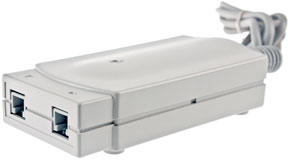 The Macintosh GeoPort is a sophisticated serial port that can be controlled by software for a variety of uses. When used in conjunction with the GeoPort Telecom Adapter, a GeoPort can become a software-upgradable modem. Instead of throwing away a modem every time a faster speed becomes available, GeoPort users can simply download the latest free upgrade software from Apple and be running at a faster speed in minutes.
A GeoPort can also be a digital answering machine, a fax machine, a full duplex speakerphone with audio recording capability, or a high-tech switchboard for incoming and outgoing calls, all on a single line. Unfortunately for PC users, no card that supports all the features of the GeoPort is available; at any cost.
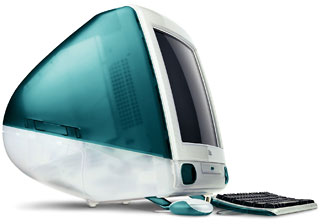 Update: The GeoPort died a quiet death starting with the first iMac in 1998, which phased out Mac serial ports and ADB and SCSI, and is eliminated from current Mac models. The concept was to replace the serial printer/modem ports with a generic GeoPort that did everything noted above and included an external modem gizmo that enabled the telecom functions listed above.
Since this device and the port is no longer supported by Apple, this advantage is defunct.
9. The Mac OS is easier to install than Windows.
Fewer steps are needed to install the Mac OS. One of the leading guides to Windows NT 4.0 lists more than 30 steps for installing the OS, in sharp contrast to the “single-button” installation of the Mac OS.
The Mac OS will make all the installation decisions for you. The Mac OS has a smart installer that will install only the files needed for your particular computer. In the case of Windows, particularly Windows NT, the installation process includes several steps involving dialog boxes that require you to make complex installation decisions. In each case, the wrong decision could be disastrous; requiring you to start the installation all over again or, in some cases, to reinstall all applications.
Update: Still true. Advantage, Macintosh.
I wish you could sort of preprogram the installer, though, to automatically accept the defaults after a time limit so you could set it up to upgrade a machine overnight, and it would actually finish by the time you return, instead of having to make decisions about older-newer versions and so on. But for a clean install, still true, still true.
And you get an unsecured copy of the OS with every Mac. Rumor is future copies of Windows will only allow you to install on two machines; the remote registration process will disable installations on more machines than you are registered for. Microsoft is also moving to a subscription system with Windows XP – you’ll have to pay a fee every year to keep using the OS. I guess Microsoft XP stands for XPensive!
And don’t forget, System 7.5.5 is still free. No version of Windows, not even 3.0, is free. If you install Windows without an original copy, that’s illegal. (Apple should make 8.1 free now, in my opinion.)
Update: With OS X 10.9 Mavericks, released in late 2013, the Mac OS once again became free. Here’s hoping that will apply to all future versions!
10. Macintosh computers are ready for the year 2000.
The problem with the year 2000 is that the BIOS in many of today’s PCs operates under a date format that uses two digits to represent and store the year, so they will falsely claim that the year 2000 (or “00”) falls before the year 1999 (or “99”). If a computer’s system clock reads the date incorrectly, then all mission-critical applications, all file time stamping, and even scheduled backups are predicted to fail.
But this problem will not afflict the Macintosh. Since its introduction, the Macintosh has had the ability to correctly handle the year 2000 and beyond. The Macintosh operating system uses a 32-bit value to store seconds, meaning that the Macintosh clock will work correctly until the year 2040.
Update: I don’t think you can claim this is an advantage, because it is after the year 2000. It was an advantage. I suppose it still is for older machines that you continue to use. I did have to do a Y2K update on my wife’s 486, but she no longer uses that machine.
The way some of my Macs keep plugging along, I may have to worry about 2040, though. [Although PowerPC Macs can handle dates through AD 29,940, earlier Macs run out of time at 6:28 a.m. on February 6, 2040 – and the Date & Time control panel itself only supports dates to 12/31/2019. Of course, the last 68040 Mac was discontinued in 1996, so very few of those are likely be in use by 2019.]
11. The complexity of the Windows 95 and Windows NT Registries is a disadvantage compared with the Mac OS.
Windows 95 and Windows NT both contain a Registry, a complex text file that keeps track of OS settings. A single character in the wrong place in the Registry file can render Windows unusable. Because of Registry incompatibilities, upgrading Windows is not as easy as upgrading the Mac OS. For instance, it is not possible to upgrade an existing hard disk from Windows 95 to Windows NT because of differences in the Registry file.
Resolving system-level problems on a Macintosh is easy when compared with editing the Windows Registry. End users calling for PC support are frequently directed to edit their system files to resolve problems, and any erroneous entries will often make the Windows based PC unusable.
Update: Still true. Advantage, Macintosh. No improvements on a fundamental level for Windows, that’s for sure.
12. Every Macintosh can start up from a bootable CD-ROM.
Starting up from a CD-ROM makes the software installation process easier. On a Macintosh, the computer can easily “boot” (start up) from the system software located on a CD-ROM. If the software on the hard disk becomes corrupted somehow, you can easily insert a CD-ROM and get going again.
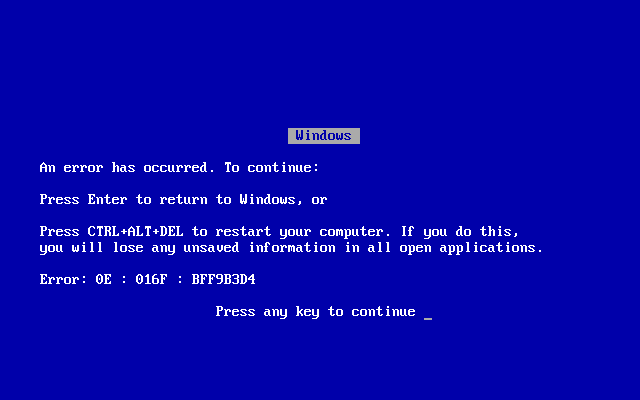
But this process is not nearly as simple on a Windows based PC. In most cases, PCs running Windows cannot boot from a CD-ROM; you need at least a version of DOS with appropriate CD-ROM drivers installed present on a floppy disk or the hard disk. Nothing is more frightening to Windows users than seeing the “Blue Screen of Death”; what appears on the screen when their PC can’t start up because of a corrupted system file on the hard disk. They know it will be a long day, because they can’t easily boot from a CD-ROM and get back to work.
NOTE: Macs will also bootup from ANYTHING that spins; be it Floppy Disk, any External Hard Disk, another Mac, a Zip Drive, a Syquest Drive, or a Magneto-Optical Drive. Windows based PCs do NOT have this ability.
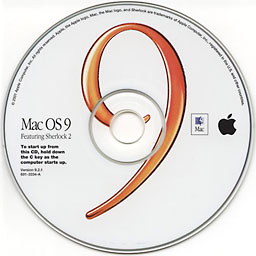 Update: This is still true, but I cannot vouch for the ability of a Mac to boot from a USB or FireWire drive, as I haven’t faced that situation.* I’m sure some of my readers can enlighten me. Theoretically, anything that shows up as a valid startup disk in the Startup Disk control panel should be able to boot your computer, including NetDrive volumes when using a remote server as your hard drive. The CD bootable option still exists. In extremis, put in a system CD and hold down the “C” key while booting to save your system.
When upgrading a trashed 486 Dell at school to Windows 95, I had to wipe the drive to install Windows 95 (because my Windows 95 installer disk would not update Windows 3.1; you need the Windows 95 Upgrade Disk for that – a distinction that Mac OS installers don’t make – hey, did I just find a new Advantage?).
Even though I had a Windows 95 disk, I couldn’t use it to install on the Dell until I found a functional PC, made a boot disk with it, downloaded a driver for the CD-ROM (with my Mac), added that to the floppy, and booted with that cribbed together floppy. Then I could use the CD to install the OS.
Some more recent Windows PCs do ship with bootable CDs, but they are specific to that line of computers. A bootable Mac CD will work with any Mac or clone that supports the version of the Mac OS on the CD.
* Editor’s update: Almost all Macs with USB can boot from a USB drive by holding down the Option key during startup and then choosing the USB volume, although this will be slow on USB 1.1 Macs. (USB 2.0 didn’t come to Macs until 2002.) All Macs with FireWire except for the Blue & White Power Mac G3 and Yikes Power Mac G4, both based on the same logic board, can boot from FireWire. Intel-based Macs can choose to boot from USB drives using the Startup Disk system preference in OS X.
Advantage: Macintosh.
13. Macintosh files stay linked to the applications that created them; with Windows, this isn’t always the case.
Double-clicking a Macintosh document icon automatically opens the application that created it – no matter where the application resides on your hard disk (or connected server) and no matter what the file is called. With Windows 95, it’s not that simple. The association between applications and files is still governed by pathnames and the three character filename extension. That means that double-clicking a document sometimes opens the application that created it and sometimes doesn’t.
Update: Still true in OS 9.1. Some email and FTP servers strip this information from Mac files, such as when using third party net disks such as NetDrive. You must then somehow add the file type and creator information back in, using ResEdit or MacLink Plus. But files that are compressed as Stuffit files seem to make the transition without problems.
When the Mac OS doesn’t know what application is associated with a file, it gives you a suggested list that usually includes the appropriate program you would pick anyway.
Also, since the three letter extension (including numbers 0-9) give 36 different possibilities per letter, there is a theoretical limit of 46,656 applications on Windows machines before the three-letter extensions run out. (That’s 36 raised to the 3rd power.)
On a Mac, the hidden creator ID is 4 characters – upper and lower case plus digits and many other characters – giving a theoretical limit of well over 30 million (75 to the 4th power) applications on a Macintosh without overlapping document-application maps. Hey, I found another Mac Advantage!
Advantage: Macintosh x 2
14. Utilities to uninstall applications are very popular for Windows. Macintosh users don’t really need them.
There is a reason why one of the most popular utilities on the Windows platform is uninstaller software. As it is installed, Windows software tends to scatter parts of itself all over a user’s hard disk. Those parts can have cryptic names, such as “DWSPTDLL.DLL” or “W3CTRS.INI,” making it impossible to determine whether a file is necessary. And while Windows 95 and Windows NT include an “Add/Remove Programs” feature, it doesn’t always work for every program or get rid of all the correct files, or it tries to eliminate files that shouldn’t be eliminated.
Macintosh users know that deleting most Macintosh applications is as easy as dragging the application or its folder to the Trash. If the application installed extensions or control panel files, the updated Extensions Manager in Mac OS 7.6 can locate them quickly, enabling you to easily disable and delete them.
Update: This is still true, but if you install Microsoft software, it’s still bad to get rid of it on a Mac. Not as bad as Windows. But bad.
Advantage: Macintosh.
15. Windows “DLL” files cause many problems.
The numerous “DLL” files that Windows applications install all over the hard disk drive can conflict with each other and cause serious system problems. In some cases, installing a new application installs new DLL files that overwrite DLL files installed by older applications, rendering the old applications unusable. Resolving such complex DLL conflicts are nightmares that Macintosh users never have to endure.
Well, we do have our own nightmares. Extension conflicts do exist on Macs. There is even a product called Conflict Catcher to look up common ones and warn you about them. However, most adept users know you can simply try the old-fashioned trial and error process of elimination testing to find the offending extension – and once found, just move it out of the Extensions folder to solve the problem. You don’t have to deal with registries or worry about one extension erasing another extension. So, we’re still very good here, just not as good as the original brochure implies.
Advantage: Macintosh
Summary
We’ve moved the summary to a separate page, which also functions as an index to this series of articles.
Keywords: #75macadvantages #plugandplay
Short link: http://goo.gl/oQOpmC
searchword: 75macadvantages
