
2001 – I recently purchased an OrangeLink FireWire 1394 + USB PCI combo card so I could begin to add some of those nifty new peripherals I’ve been reading about. I own a 300 MHz Beige Power Mac G3 desktop at home and had my eye on some USB peripherals for a while now.
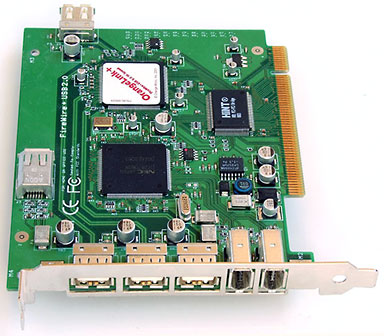 This card has two FireWire ports and two USB ports, making your beige Mac equivalent to an iMac DV+ in ports (if not in speed). It is part of a series of combo card offered by OrangeLink and other vendors hoping to take advantage of the typical Mac power user’s dearth of PCI slots. (Mine are all full now.)
I ordered the card directly from OrangeLink’s 1394 Firestation site hosted by shipitforyou.com. The card arrived in a couple of days in a display carton I wish I could have seen at CompUSA. Every time I ask about something like this at CompUSA, they tell me, “Well, we could order that for you.” If I wanted to order it, I wouldn’t bother trying to make an impulse buy in your store. (Sorry about the little rant there.)
The card installed quickly and simply in the available PCI slot. The box recommends installing it in the first slot (yes, the slots are numbered) for better performance. One review I read before buying the card noted there is a performance hit once the USB and FireWire ports become active. I have noticed a slight, but not burdensome, performance decrease, although I didn’t benchmark it.
Once installed, you have to download and install drivers for the card. I tried USB first. Connected to a cable modem, the download from Apple’s website only took a few seconds. The installer on the CD initiates a driver update from Apple’s website. It would probably be several minutes connected to a dial-up modem, however.
The installer ran without a hitch, and after a single restart I was USB ready. A quick test with a Wacom USB tablet showed that the USB connection worked fine.
The OrangeLink Installer CD also includes some third-party software, notably Adobe Premiere LE, a video- editing program for the Mac. The registration number was printed right on the CD label and also on the quick-install card. There is also a video editor program for PC on the disk, since the card is cross-platform. I didn’t test the card in a PC.
FireWire Requires Mac OS 9
Next, I ran the installer for the FireWire port. This immediately kicked me out, because it claims that Mac OS 9.0 or higher is required. However, nothing on the box or in the catalog that accompanied the order indicates that you must have OS 9.0 in order to use the FireWire port. Apparently, the FireWire driver update that the CD requires you to install calls up another Apple installer that I found, upon investigating, simply will not run even under a custom install for Mac OS 8.6.
This is my only complaint about the card so far, but it is pretty significant. I deliberately chose a card that did not require OS 9.0 because I like to run one operating system behind – when OS X debuts for real and OS 9 goes to 9.1 for real, then I’ll think about upgrading. “Never go with point-Oh” is my motto; I need my machine to work to support my various projects. It’s not a hobby machine.
If I had any FireWire capable devices, I wouldn’t be able to use them. I suppose I’ll just let the ports sit there unused until I upgrade the OS or get a digital camera. The school I work for has a FireWire capable digital camera; I guess I’ll just have to continue editing those movies at home.
Summary: If you have OS 9 and are in the market for USB and/or FireWire, this seems like a good product.
Good: Good USB card, easy install with a fast connection. A little pricey at $139 (not including shipping), but when you consider you’re saving a PCI slot and getting two cards in one, it’s not so bad.
Bad: Couldn’t test FireWire ports because of undocumented OS 9 requirement; installing drivers requires an active internet connection.
Feedback on Wacom Tablet Review
Last week I reviewed a Wacom Graphire drawing tablet and mouse, and in the article I complained about the unsymmetrical connections on the ends of a standard USB A-B cable.

Over time, we ended up with three sizes of USB Type A and Type B ports.
Reader Nick Matsakis politely pointed out to me the error in my thinking:
“The design of the USB cable is a feature, not a bug. In an architecture like USB, each device is connected to one ‘host’ device, namely your Mac. Because of this, there is no purpose to connecting USB devices together.
“Thus, all ‘downstream’ connections on a USB bus are of type A, and all upstream connections (if they exist) are of type B. Thus, a user cannot incorrectly plug things into the wrong port.”
Thanks for clarifying this for me, Nick. Though I have to admit the thought of some chucklehead connecting a keyboard to a display with an “illegal” A-A USB cable and no CPU – then calling tech support for assistance – does make me smile. ;-)
Nick correctly points out the current USB standard prevents short circuits, plugging devices into themselves, and suchlike.
Keywords: #firewirecard #usbcard #pcicard #firewireusbcard
Short link: http://goo.gl/AjE0x0
