
Rather than just buy a USB scroll wheel mouse, the author decides to give the Wacom Graphire USB graphics tablet a try.
Today’s Agenda
Obligatory Rant
My wife has a PC with a scroll mouse. After a couple of sessions with it, I decided to take the plunge and pick up one for my 300 MHz Beige Power Mac G3.
Of course, with an ADB machine I had to go ahead and spring for a USB card, so given the G3’s limited PCI slots – and the fact that I only had one free slot open – I decided to go with Orange Micro’s dual FireWire/USB card. Installing that card will be detailed in my next review.
I went to CompUSA to inspect USB scroll-wheel mice, and I found a few in the Apple section, but since CompUSA did not carry any USB cards for the Mac – and the guys at the nearby upgrade counter make a regular hobby of talking (loudly) about how the Mac is inferior and tries to copy Windows – I decided to buy online and get everything cheaper if I couldn’t have an impulse buy.
Of course, since all new Macs come with USB built-in, CompUSA can claim that the market’s too small to carry the cards. Nevertheless, I was in the market, I had money, and they didn’t (once again) supply what it was I was looking for. So I went elsewhere. End of rant.
Anyway, back to the Wacom story. I saw their ad on the back of Mac Addict‘s print magazine, so I decided to give it a try. I ordered directly from Wacom’s site, at the advertised price of $99.95. Including shipping and tax, the total bill came to $118.
The Tablet
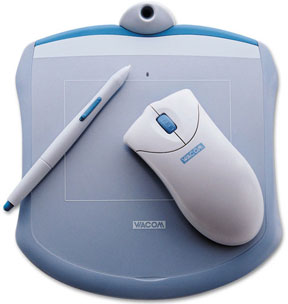 My order arrived in about three days, right around the new year, so I got it sooner than I probably would have had I talked CompUSA into ordering one for me.
The Wacom Graphire tablet is a pressure-sensitive drawing tablet with included pen and cordless mouse. The mouse is a two-button scroll mouse that must be used on the active surface of the tablet. The mouse has no moving parts other than the debounced micro switches under the buttons and the scroll wheel. The pen includes a two-position rocking switch about where the lead advance on a mechanical pencil will be, and the box claims the rounded top of the pen will act as an eraser with the right software and drivers in use. There’s a nice pen stand at the top of the tablet to hold the pen when not in use.
Software included with the tablet includes a copy of Painter Classic, the eraser driver for Photoshop, and a copy of Adobe Photoshop LE. Because the device is cross platform, it also includes Windows drivers and an annoying list of software that is PC-only including Pen Office, Sensiva, Adobe ActiveShare, and god knows what else.
The Good News
In general, the tablet worked as advertised. The pen and mouse can be used interchangeably, but the pen is not responsive if you leave the mouse on the pad. The pen was beautifully responsive to the pressure-sensitive pad when drawing with Painter. That is something I am going to spend some time with. The Painter Classic software sure leaves my AppleWorks paint mode in the dust. There are paint modes with patterns, special effects, and a neat scripted demo feature that shows you in accelerated form how some included sample art was painted.
The mouse tracks well, and the scroll wheel was immediately responsive. The default install leaves the right button as a control-click and a scroll wheel click as a double-click. I am just fine with these settings and will probably not change them. As a longtime one-button guy, I have found myself accidentally hitting right-click unintentionally, and that is somewhat annoying. If I can’t get used to it, I suppose I could reprogram both buttons to be a single-click.
Unlike a traditional mouse, the Graphire mouse is not sensitive to the angle you hold it at. It detects its position on the trackpad as a single point regardless of the orientation of the mouse. Overall, I think this is a good thing, because I had grown accustomed to having to reposition the traditional mouse all the time. I didn’t realize how much I was adapting to the hardware instead of the hardware adapting to me.
The Bad News
A potential problem is that the mouse does not respond until the USB driver loads; you will not be able to use this mouse to manipulate the Extensions Manager, for example. So keep that ADB mouse handy if you’re performing this installation on an older Mac.
There’s a nice little light on the tablet that lights up when the USB connection goes live. That’s a nice touch considering the problem stated above. I wish the light came on, however, when the driver is loaded instead.
The scroll wheel is digital, not continuous, and you can tell. It advances with a little thud for every notch in the wheel, which triggers a single up-or-down arrow click on the screen, typically one to three lines at a time, adjustable with a control panel. My wife’s HP mouse is more smooth and continuous, so the faster she moves it, the faster the screen scrolls. To maintain the precision of single-line scrolling with the Graphire, you have to keep the settings on one-click-at-a-time, and that means scrolling a long document takes many swipes at the wheel.
I am using the mouse now as I type this with AppleWorks, and the wheel settings feel pretty good for typing. In Netscape, however, I have two gripes (which cannot be addressed by the application-specific settings in the control panel). First, when multiple scrollable panels are open, the wheel apparently only affects the leftmost window and not the active window. This happens especially when I am reading email in Communicator with my folder, inbox, and current message panels open simultaneously. Second, on at least five or six occasions this morning, depressing the scroll wheel (theoretically a double-click) instantly crashed Netscape and once locked up the machine. Most of the crashes occurred as I was navigating secure pages. I have yet to diagnose the problem and tell if it is a conflict or a driver update or what. This is the only program with which I have experienced these problems. A brief test with Internet Explorer did not reveal any problems.
The pen is designed for drawing, not surfing. In its default configuration, tapping the pen lightly by accident is the same as clicking the mouse button, and the pen makes the mouse arrow or cursor start moving before the pen even reaches the slate. Clicking the button while holding the pen in midair is quite a feat.
The eraser feature would be nicer if it included drivers for other programs besides Photoshop. One nice program would be GraphicConverter, given its popularity on the Mac.
I’m used to it now, but the Teflon feet on the mouse scraping across the smooth plastic surface of the pad makes a sound like two sheets of paper rubbing together. My old ball-and-socket mouse on fabric mousepad was, well, quieter.
Finally, the cord on the Graphire is only 4′ long, and that was about 2′ short of what I needed, because my desk is not designed to hold a computer. So my total expense rose another $18 as I had to go to Sears to get a USB extender. The cord is permanently attached to the tablet, so I couldn’t simply get a longer cord and keep the shorter one for other purposes.
Micro-rant
I had to go to Sears because Staples’ USB shelf was completely bare except for two A-B cables. That makes about six times I’ve gone to Staples and not found what I wanted – coupled with the fact that MacInTax was priced at double the PC equivalent, I won’t be going back there for a while. Anyone want to recommend a good online office-supply vendor?

The different types of USB connectors.
By the way, if you aren’t USB-savvy you’ll need to know that the A-type cables are large rectangular metal tabs, and B-type connectors are square. Who else thinks that having two different end connectors for a single cable standard is stupid? Raise your hands.
At least ADB cables are reversible. This sort of negates the universally compatible aspect. More cables to keep on hand when you are diagnosing and repairing things. Odds are you’re going to need an A-A Male-to-Female USB extension cable with this puppy.
Summary
It’s a fun toy to play with, particularly if you like to draw. I seem to be doing slightly better playing Myth with the new mouse. It has limitations and may not be everything you expect.
Good: Price is reasonable for value received. Pen is great for programs designed to use it, particularly the touch-sensitive and eraser functions. Mouse is responsive and includes a scroll wheel and programmable buttons. Ordering from Wacom was relatively painless, and the product was delivered promptly. Bundled software is good quality software.
Bad: Scroll wheel “thuds” for each movement and triggers only arrow-key clicks, not continuous motion of the scroll button on the scroll bar. Cable is too short for graphics hobbyists or professionals to move the tablet around at will. PC users get more value for the same price in terms of bundled software. Apparently crashes Navigator 4.7 on scroll-wheel click when visiting secure sites.
Keywords: #wacomgraphire #graphiretablet
Short link: http://goo.gl/8J2Gqc
