
2001 – This week’s Mac Lab Report focuses on how you connect your computer to a large enough monitor so that students can see your display for presentations, demos, and so on.
Many of the things I listed in last week’s report about what you can use a webcam for are relevant only if you have a projected or displayed image large enough, detailed enough, and bright enough to see. This discussion is also relevant to using projectors for PowerPoint or AppleWorks presentations.
Update: This article is currently 15 years old, and TV technology has changed a lot since then. Big screen TVs almost always offer 1080p video, which is vastly superior to using a scan converter with an old fashioned analog CRT-based television. Not only that, but all modern computers have digital video output, so the only adapter you may need is from one output port to the HDMI that is standard on modern flat screen TVs.
Today’s Agenda
- Why Display?
- Scan Converters vs. Projectors vs. LCD panels: Tech Face Off
- Alternative Solution
- Ultimate Solution
- A Special Bonus for Educators
- Appendix 4: Starting a Presentation in AppleWorks 5
Why Display?
Why would you want to display what is on your computer screen for others – and in particular students – to see? The main reasons are to
- summarize information for notes and
- show things that can’t be seen from a student desk easily, such as a device, calculator, or microscope slide.
When I give PowerPoint or AppleWorks notes, students dutifully copy down everything I display on the screen, almost to a fault – they don’t listen to what I am saying. This means that what I display had better be visible. I have found students to be remarkably tolerant of systems that do not show letters large enough to see, because it gives them an excuse not to take notes. You have to try to see if this is useful for you and decide if using the technology is worth it. For more information about setting up an AppleWorks slide show, see the appendix Preparing a Presentation in AppleWorks 5.
Technology Face Off
When deciding whether to go with a scan converter, which connects your computer’s display to a television, or a projector, which shows a large screen on the wall or on a pull down screen, the main issues involved are:
- Cost – can you afford it?
- Size – is it big enough to be worth the effort?
- Brightness – can it show up in your classroom with the lights on? with the lights off?
Each of these devices has its advantages and disadvantages.
There are many vendors of these types of devices on the Web. InFocus manufactures scan converters and projectors. Averkey makes scan converters. There are many other vendors of this equipment, such as DuKane.
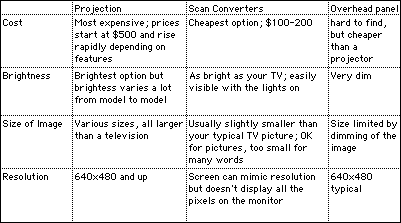
Overhead LCD projector panels, the kind that sit on top of your overhead projector, once common, are now difficult to find. The only one I could find was from Proxima. Despite their cheaper price, the projector panels require a very dark room and a very bright overhead projector to work properly.
This table summarizes the pros and cons of each system:
Other Issues
One thing is you really need to be able to make your room dark. Most of these devices – even some of the expensive ones – simply are not bright enough to be seen in a brightly lit room. In extremis this might even mean you need to hang curtains over the blinds to keep out stray light. Some of these devices require that you have a Mac-to-VGA adapter. Some machines, such as the Performa 5200, require a small video card and a port installed into an empty slot in the back.
Alternative Solution
An entirely different kind of solution presented itself when I discovered that Timbuktu, the remote control software used to administer networks for years on the Mac, was installed on all our district machines. I set myself up as a user on my teacher machine. This process is similar to giving yourself access to files with File Sharing on the Mac OS. Then I logged on as an observer from each student machine and enlarged (I can’t seem to wrap my brain around the word maximize, for some reason) the screen. Then, whatever was on my teacher machine was also displayed on two other student machines in the back of the room. Now no one can say they’re too far away!
The downside to this solution is that your computers must be networked and you must own individual copies or a site license for Timbuktu. Another problem is that if you intend to display video, this solution will not be able to keep up with the refresh screens. It works fairly well following a PowerPoint presentation.
All the copies of Timbuktu must be the exact same version, and you must have the screen resolution of your computers identical – which usually means 640 x 480 as the only common denominator.
Ultimate Solution
I’ve been collecting gear for years, so let me describe my “ultimate multimedia system” that lets me display almost anything for the entire room.
In the front of the room I have a 300 MHz Beige Power Mac G3 with a built-in AV card. The AV card input is connected to a webcam (see last week’s column) and the output of the card is connected to a 27″ television mounted on my wall. I can turn video mirroring on via the control strip to show this screen in just a few seconds.
 In the back of the room, I have a 233 MHz Beige Power Mac G3 All-In-One (AIO), networked, which can use Timbuktu to observe the screen of the computer and TV in the front of the room. The AIO’s screen is a little small, though, so I connected a (donated) projector to the video out port of the AIO and throw that image onto an empty space on the back wall. Due to the Timbuktu connection, this machine can’t display video, but it does well with presentations.
Then I wear a wireless microphone and run it through a karaoke receiver and amp in the back of the room, and I’m good to go.
So far, no one has pointed out that maybe, just maybe, I’m getting a little carried away with this gizmo stuff. But you know, the worst day I’ve had technology-wise was when I couldn’t get my stupid VCR to play a tape I wanted to show. Honest.
For Teachers
Here are some interesting things I found along the way: Timbuktu provides a demo version of their software if you fill out a form.
ProjectorCentral.com maintains a donation database for companies seeking to donate their old projectors to schools.
And finally, DuKane will (I kid you not) loan you a projector for 30 days to try it out. Maybe you can persuade the principal or librarian to spring for one when they see how well it works. Fill out this form and be willing to wait for an opening.
Good luck and happy computing!
Keywords: #videoprojector #scanconverter
Short link: http://goo.gl/it8WIe
