
2001 – This is the first Mac Lab Report I’ve submitted for a while, primarily because I was working on a grant proposal for my school, and it absorbed all of my time. It absorbed my time not just because it was a lengthy proposal (approximately 20 pages of text and charts) but because it was supposed to be submitted in a particular format. Templates were provided, using Microsoft Word, of course.
The grant instructions were written as a series of numbered questions, each requiring a response. I saved a spare copy of the original and began filling out the questions. There were strict limitations on spacing, format, font size, and page counts, but at first I simply typed the document without regard to length, intending to edit it later.
As regular readers of this column know, I tend to be a bit long-winded in print, and sure enough my 20-page submission turned into 35 pages. I asked the grant office via email if I could delete the question prompts, and they said yes.
That’s when I got Micro$hafted and evil things began to happen.
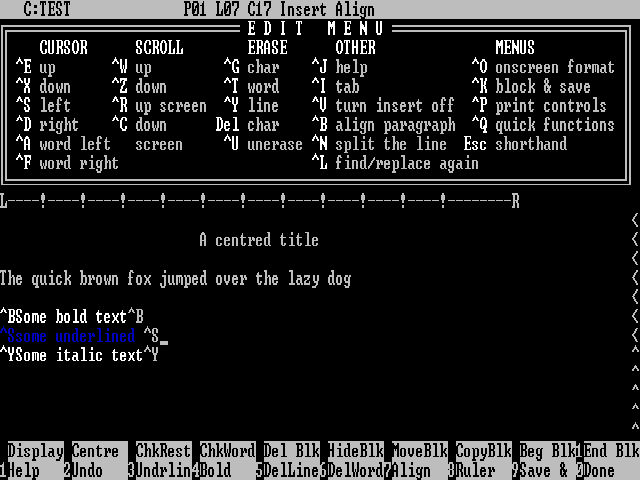
WordStar was a very popular early word processor with lots of commands and no italic or underlined text displayed on the screen. The Mac was a huge improvement after this!
Back in old days (I mean the early 80s), typing on a word processor was a little bit like typing HTML today. To make a sentence bold, you had to type a code in front of it like <B> and to make bold stop you had to turn it off </B>. The exact codes depended on the word processor.
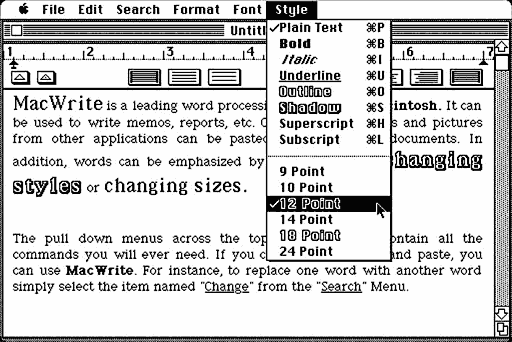
MacWrite 1.0 was a huge step forward!
Later on, when WSIWYG (What You See Is What You Get) word processors were popularized by the early Macs, these codes became hidden – you could see what the page was going to look like on the screen before you printed it. This mode of word processing became so commonplace that the older code-style word processing died out, and today my students don’t know what WSIWYG means, because that’s all they ever see.
While working on this grant, I became more familiar with Word 2001, which in general I tend to avoid unless some student needs to translate a document. I discovered several nice things: It has the smartest spelling checker I’ve ever used, suggesting a previous spelling I’d used in the same document for specialized terminology (even though I never added the word to the user dictionary!). It caught and corrected some errors on the fly, which is nice. It underlines run-on sentences and sentences with split infinitives, which is borderline annoying but probably something I should pay more attention to. Like ending sentences with prepositions and having fragments.
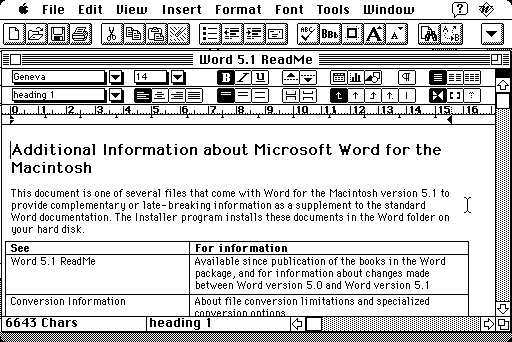
Microsoft Word 5.1 was long beloved by Mac users.
Anyway, I remember having to use Word 5.1 on early Power Macs and ‘040 Macs. That was probably the most-loved Mac word processor ever from Microsoft, and believe it or not there are still organizations that use it. It had it’s quirky problems, and chief among them was an independent-minded numbering feature that would sometimes get out of control and change your numbering scheme in long documents without warning.
I also discovered and reported an honest-to-god plain old bug in the software that would do the following: If you used the Make an index feature on a document and saved it, when launching Word by double-clicking on that document icon, it would crash and burn instantaneously. If you opened the same document from Word’s file menu, it worked fine.
Well, let me tell you that the same functions exist in Office 2001, and they do more things, and they’re even harder to control. There are numbering schemes that control formatting in different outline styles such as legal, Harvard, and so on. You can create a custom numbering scheme. You can relate the paragraph numbering to the outline styles. You can define styles with any text characteristic that you can control. Structurally Word 2001 is doing exactly what Word 5 did, with more options.
- What you can’t do is delete the questions from a template without destroying the numbering scheme.
You see, those hidden formatting codes are still there, hidden like HTML tags in the word processor document. And since you can’t see them, if you backspace over one, then all subsequent paragraphs that look at that reference suddenly change.
Late for a meeting, I promised myself I would print out a final, fresh copy just before departing school to go downtown to get that last set of signatures I needed. For some reason the application crashed my Mac when I opened the copy I emailed to myself through the Microsoft Outlook software at school, which won’t properly forward an attachment unless the three-letter DOS extender is on the file. I transferred the file from my iBook to my Desktop Printer via the AirPort connection in my room, then I printed the file, grabbed some copier paper (at our school, there’s no central supply of copier paper – you have to take your own), made the required two copies plus a backup, and ran for the meeting. If I didn’t have versatile Apple networking and file sharing to work around the problems with Outlook, I wouldn’t have solved the problem at all.
- Of course, I had broken the Main Rule Of Working With Microsoft Products: Nothing ever works twice.
When I brought my file from home, paragraph numbering was turned on. On the machine at school, paragraph numbering was turned off. Why this is not an attribute that is saved with the file, I don’t know. But what it cost me was two hours of wrestling with the numbering of a single paragraph, an hour and a half of a friendly administrative assistant’s time, untold wasted printer ink, the goodwill of half a dozen students waiting for me to run a study session after school for a final exam, and my patience.
We finally figured it out, fixed the errant paragraph, carefully scrutinized the remaining portions of the document, reapplied the (expletive deleted) style to the selection instead of redefining the style about a thousand times, and shipped the document. Eventually we figured out that it was because I had backspaced over an invisible formatting character that changed the numbers of all subsequent paragraphs.
How did we fix it? We copied a numbered question into the space and carefully backspaced over the question, letter by letter – but stopping before the tab following the number, just in case the invisible formatting characters were located there.
Microsoft Word is a powerful, good-looking application. It is ubiquitous. But my experience is that even the people who use it in offices don’t like it; they spend untold hours wrestling with documents to get the simplest formatting done, formatting changes mysteriously when files are moved from computer to computer or between versions of Word, and it takes fifteen button clicks (even now) to get to the submenu that triggers the dialog that has the tab for the thing you do all the time, and the functions for what you never use are thrust in your face by the annoying help feature.
I just want to type! And to put numbers on a document and paste in a graph from time to time. Stop bothering me! Just stop it! I’m like a new homeowner subjected to offers for refinancing my mortgage: Stop typing for me! Stop telling me about your new features! Stop it, stop it, stop it! Can’t I turn all the stuff off?
Actually, I can turn it off – I do it by using AppleWorks whenever possible. Even though our IT department has declared (without input from users, natch) that Word is now the “standard” application, I’m still using AppleWorks. Or Nisus Writer. Or Tex-Edit Plus. Or anything except that bloated piece of kludged-together Lincoln Logs from the Forests near Redmond, the Grendel of my Typing Kingdom, the Incredible Hulk that rears its ugly green squiggly-line shaped head every time I start to do something beyond putting letters on the screen.
 And don’t talk to me about Office X. They’ve made it prettier, sure, but they haven’t fixed any of these fundamental problems. I feel surrounded, trapped in a cul-de-sac by Micro$haft 2001 and its near-cousins both past and future and on other platforms both loved and despised. Word wants to be all things to all people, much like Windows and its program of Borg-like assimilation of all competition: comply or be destroyed, because Micro$haft Windows is the vision of Computing Perfection, and Word is the Borg Queen in control of it all.
And what is the result of its never ending quest to dominate the world like a game of Risk™ where Word owns everything but Australia and Madagascar and lets you own those just to keep the game running? The whole business is just, just – somebody help me here, my metaphor buffer is empty – it’s just too much to bear.
In case you’ve missed my point:
Microsoft Word has become too specialized, too difficult to control, too expensive, and too time consuming to operate to be the world’s standard word processing software.
If we could get rid of Word in offices, productivity would soar and the recession would end. The government would be able to give you a tax holiday for a day or two. The savings on license fees (particularly for those poor Windows-version folks) would be enough to end world hunger.
Sun thinks the solution is to make a Bizarro Word* that claims to be compatible but isn’t, is so radically different from everything else that you have to be from a foreign country (Elbonia?) to understand the iconography. But what do I know; they don’t even make Bizarro Word for Macs.
 * For those not familiar with Bizarro, he’s some sort of reversed, inverted, backwards, warped, twisted, anti-Superman Superman clone you’d only really understand if you read Superman comics regularly.
BBEdit and Nisus and AppleWorks, God Help Them, provide a powerful product for a reasonable price. Maybe we ought to all pull a Charles W. Moore and just purge our drives of Microsoft products. Maybe AppleWorks ought to change its name to ITWordMaster so tech directors wouldn’t sneer at you for saying you want to use AppleWorks.
From now on, I think I’ll use the printing service bureau method of controlling format: If they want your service bad enough, they’ll conform to your formats.
I’ll probably cave, though, the next time a kid brings a blank disk to school to turn in and says, “but I saved it . . . I hit Save . . .” and I have to show them (again) how to control where you save a file.
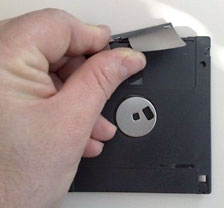 Or like the young lady who brought her PowerPoint presentation from home on a disk and informed me she wanted to use her (PC) laptop to present it because it wouldn’t work on a Mac. She had saved it on a floppy disk the day before, and my G3 wouldn’t open the file because the disk was bad. Of course, she thought (because daddy said so) it was because we had Macs at school, when the problem was an old worn out disk with a bent metal cover. Her new disk worked fine, and you never saw such an open-mouthed gasp of astonishment.
So I’ll keep the apps. I won’t use them, but that look is just too priceless to lose.
I think I’m done now.
Can I go home now?
I’m sure I want to quit.
Keywords: #microsoftword #word2001 #microsoftword2001
Short link: http://goo.gl/4PrIWv
