
Mimio is a whiteboard capture tool that allows a USB-equipped Mac to capture the user’s marks on a standard whiteboard and save or print the results as a handwritten document. I recently got to play with one purchased for our school.
Like any good Mac fan, I attempted to install Mimio without reading the directions first. You can be up and running moments after unpacking the equipment and installing the batteries. Save yourself some puzzling moments and glance at the very clear cartoon-style quickstart instructions before beginning.
With Mimio, you can also align the device with a projected computer screen and use the mouse pointer to control the computer. Both functions worked well when I tested them.
Mimio consists of four dry-erase markers and an eraser, which have battery-powered infrared transmitters; a capture arm that detect the location of the markers; a mouse insert for one of the marker holders; installation software; and a USB cable with a small adapter for the capture arm. Four really nice pens are included, too – better than the crappy little pens I buy at Staples. A small manual is included thatt deals with issues beyond the initial setup and configuration of the device.
The capture device essentially triangulates on the position of the pens by using two sensors, each of which can detect the direction of the pen. If you look into the sensor lenses, you can see a grid of squares that must be a set of sensors capable of determining the direction of a pen by comparing the relative signal strength from one sensor to the next.
The capture arm can be configured into a variety of sizes such as 2′ x 4′ and 4′ x 8′. You can also specify metric values, which is nice.
There is also a removable static-cling calculator that sticks to the whiteboard and functions like the basic Mac OS calculator (with extra buttons for calling up Mimio functions). If it weren’t for the fact that a basic calculator is next to useless in a physics and astronomy class, that would be a neat feature. If you use the Mac’s built in calculator on occasion, you might find that feature useful.
Whiteboard Use
Mimio calls a fresh blank writing surface a board, and as you write, it records what you do by triangulating on the pen position. I found that the accuracy decreased somewhat if the capture arm is not mounted on the same plane as the board (say, on the frame of the board), if the pens are at the extreme range limit of the capture arm (about 8 feet), or if you hold the pen at varying angles when writing. None of these problems are unexpected, and in actual use the arm performed admirably in keeping up with my fastest handwriting. It is possible to miss an occasional mark if you write too lightly and don’t engage the transmitter. That tends to make your pens wear out a little faster than perhaps you’re used to. When transmitting, the pens and eraser emit a ticking sound barely audible to the user.
Mouse Use
This function is a lot of fun, although it will be a while before I figure out exactly what advantage it has over just using the mouse at a station near the projector. Considering the fact that the students do not have touch screens, I’m not sure I get the advantage. Perhaps in combination with a screen marking tool that overlays the screen image, such as is bundled with AverKey video products, there is a possibility of capturing hand-drawn figures using object-oriented drawing tools. Besides, when you use it, your back is to the students, a position I don’t recommend for 6th-9th grade teachers. ;-)
What’s it good for? Good question. I showed it to a teacher who said two things: “That’s really neat!” and “What are you going to do with it?” As Arthur C. Clarke wrote, I replied, “I don’t know, but I’ll think of something.” Here are some ideas…
Capture notes for complex problems: The primary function of Mimio is to capture writing on the whiteboard. In a class, you could archive difficult drawings or problem solutions for posting on the bulletin board or a website; however, be cautioned that these are the equivalent of bit-mapped drawings and cannot be edited as easily as simply typing the words into a document. It is a heck of a lot more convenient than using something like Equation Editor to type equations, however.
Here’s a sample of a whiteboard capture:
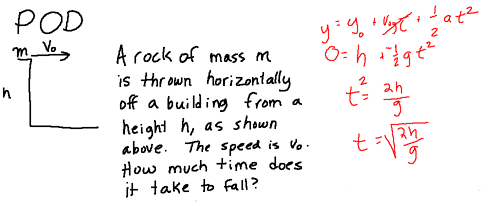
Mimio screen image, reduced 50%
The website www.mimio.com has an ongoing contest to see if educators can come up with new ideas for how to use Mimio. Most of the submissions deal with note taking or as an assistive technology for folks who have trouble seeing notes in class or keeping up or those sorts of things. If you come up with a good use for the capture arm, they might give you one of the devices.
Here are some of my other ideas:
Biology drawings: I think a biology teacher might get more out of this tool as a drawing tool than a physical science teacher. That is, if they still do drawings of cells and such in biology class.
Convert into a 2-D trajectory tool: With a little work, you could mount the transmitters on something like an air-hockey table with pucks that carry the transmitters, then use the capture arm to record the position and time data in two dimensions. Then you could do two dimensional collision problems. Just to let you know, I already submitted this one.
Artistic drawings: Okay, imagine this: You have a drawing of an object, a photo, a diagram, or something like this which you wish to draw. You could scan it and use a tablet or some such to trace it with any number of drawing tools. But imagine you take the mouse pen and trace or interpret the picture – right on top of the picture itself, with the altered version transmitted on top of the original. There are some interesting art possibilities. Also, it would make drawing on the screen more like painting than when using a mouse, or even when using a pen tablet, because you’re touching the image itself. I didn’t submit this one, but I realize there are usually several hundred to a few thousand people who read this column.
Play video games: The mouse pen keeps up pretty well with you, but there was a discernible delay on Mac OS 9.1 running on a 233 MHz Beige Power Mac G3 minitower; on a faster machine you might not see it as much. So I wouldn’t recommend it for games that require fast reaction times. Still, for something like chess or Shanghai or other thinking/strategy games, it could be pretty awesome.
Use with Interactive Physics: If you used the program with the physics simulation Interactive Physics, you could draw a physics problem and then animate it with force vectors and so on. As they currently exist, the two products are incompatible because Interactive Physics is object-oriented and Mimio is pixel-based, and with the mouse pointer you don’t get to capture the drawing data. But if we could get these two companies together for a day or two, that would be an awesome product no physics teacher could resist. I mean revolutionary.
Final Thoughts
Mimio for the PC comes with a couple of extra tools I’d like to see on the Mac: handwriting recognition software, for example, and a set of API notes for developing your own Mimio projects.
One kid I know has not missed a problem yet, but he writes so small the Mimeo would likely just show a smear across the screen. I could see handwriting recognition as a great tool for improving the atrocious handwriting of students. If the computer can’t read it, it ain’t good enough.
Aside from that, however, the product is identical for Macs and PCs. It’s a lot of fun, there are some intriguing possibilities, but if you’re not relying on note capture as a fundamental part of your curriculum, you may not need Mimio.
Hey – if you use any of these ideas and win a Mimio, don’t forget to tell them you were here first, okay?
Keywords: #whiteboard
Short link: http://goo.gl/tWG60I
