
2001 – There have been many excellent reviews of the new snow-white dual-USB iBook detailing such interesting features as the dropdown hinge, the integrated FireWire port, the keys that pop off too easily, the beautiful scratchable surface, the nice software included (such as iMovie2), and the bright high-resolution screen. This is not one of those reviews.
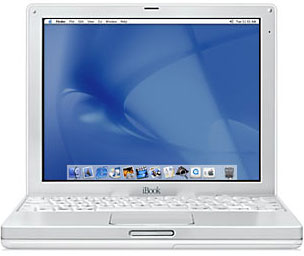 This is a look at some interesting and puzzling features of the iBook you may not have read about in those reviews.
iBook is not in the dictionary: iBook is not recognized by the spell checker in AppleWorks. Okay, Apple, fix that. It’s embarrassing. Probably a bunch of other Mac terms are not in there either. Somebody should write an article about all the terms not in the dictionary. Hmm….
Power indicator on the battery: Well, okay, some reviews might have mentioned this, but it was still a surprise for me. When I got to play with the iBook for the first time, I discovered that the battery has a small recessed button that, when pressed, displays a row of green LEDs that indicate the battery level. This button can sometimes be accidentally depressed on an uneven surface, creating a mysterious green glow from under the iBook. But anyway, the indicator’s a neat concept, especially when managing a large group of iBooks on a cart.
Sticker showing how to open drive: There’s a little peel-off sticker on the computer above the F12 key that says Hold to open disk drive. Unfortunately that doesn’t really help the second person to use the computer, because the first person removes the sticker. Very un-Maclike to require a sticker for something that should be intuitive, IMHO. Well, it does have the universal VCR/CD/DVD eject symbol on it, but all of my other media devices also write the word eject on the button.
Unusually long delay opening disk when Finder in background (OS 9): Speaking of the disk eject key, it seems to take an unusually long time to operate when the Finder is in the background, even when running something as harmless as AppleWorks. I’ve written before that even though it is an advantage of the Mac OS that the OS always knows if the disk is in the drive, it is an advantage of Windows that you can get your disk when you press the stupid button. Why can’t a Mac have an eject button – even F12 – that simply ejects a disk quickly even if it’s in use? And having the drive spin down is no excuse; if the OS knows the status of the disk, which is why we have to wait before the disk appears on the desktop, why not just eject the disk? Why spin it up, check it again, spin it down, and then finally eject it? Sorry, I’m ranting again.
fn key: This is something new to me, because the only other laptop I use is a PowerBook 145b, so don’t write 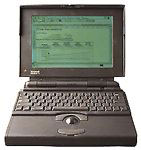 me lots of messages saying that the function key has been there since Lombard or WallStreet or whatever. The new function (fn) key, not available on desktop keyboards, gives extended keyboard functionality by having dual-purpose keys, which are marked with small, gray letters on the right or bottom of the applicable keys, such as Page Up instead of “arrow up” and Enter when you press Return. This key also activates the integrated numeric keypad keys. In addition, the fn key reactivates the normal “Function keys” F1-F11 when you press them – if you disable them in the function key control panel so you won’t accidentally press Num Lock and wonder what the heck “num lock” means.
num lock: As far as I ever knew, “num lock” was a key that made the middle LED light up on an extended keyboard. Turns out that if you press it on an iBook (num lock is F6), certain keys behave like a numeric keypad. The difference between “num lock” and “fn” is that “num lock” stays on until you turn it off. It has a little indicator light underneath, like the Caps Lock key. I suppose it’s useful if you’re doing long lists of numbers. I try my best to avoid typing long lists of numbers. In fact, the only time I have to type long lists of numbers is when we start the school year, and I enter student ID information in my grade book program because 1) the district provides it only in print form, 2) our online attendance program won’t export anything but names until the first grading period ends, and 3) it’s all part of the Desperate Search For A Networkable Program That Doesn’t Run Well On A Mac.
Mysterious hole in screen frame: Does anyone know what the little hole on the upper right of the screen frame is for? Looks like one of those paper clip holes Apple is so fond of. Nothing in the help files that I could find.
- Update: About 40 very patient readers tell me the little hole is (drum roll here) the microphone! All of you deserve a “Stump the Chump” award for giving me what my wife calls a BGO (Blinding Glimpse of the Obvious). Thanks!
Video out requires a special cable: There’s a video out port, but like many older PowerBook models, it requires a special cable to actually use it. Without the cable, you have a nice hole in the side of your computer.
Grease on iBook battery mounting tabs: Take the battery out and look at the little slots that help align it when inserting it. My iBook has a little tiny dab of white grease on it. That’s good to know if you’re throwing a spare battery in your bag while you wait at the airport. Given the new security measures, even iBook owners will need to carry a couple of spare batteries. Someone needs to make a strap-like thing that lets you work on your laptop while you wait in line at the airport.
Little plastic ring on computer power supply cable: I think this is for securing the cable in the winder so it won’t unwind itself, since the plug itself doesn’t have a little notch or pocket to reside in when the cord is wound.
There are probably some other neat and/or puzzling features, but I’ll leave them for you to find.
Is there anything quite so fun as playing with a new Mac?
Keywords: #icebook #dualusbibook
Short link: http://goo.gl/bKBIw7
