
2001 – Iomega has produced a new entry in its collection of Zip drives. There are now, what, seven or eight different Zip drives, from the VL-Series reviewed here to the Zip 250 FireWire drive – and that’s not counting drives made for internal installation.
There are small differences between the different models: the Zip 100 USB-powered drive has a sports-car-like enclosure, while the Zip 100 USB drive (it’s their naming convention, not mine) has a slimmer, flat enclosure. Iomega probably needs to reduce the number of drives to just three or four; they’re beginning to look like Apple did in the Performa days, when there were more models of Macs than types of Value Meals at McDonald’s.
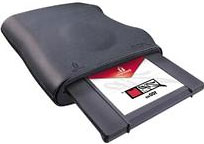 However, one of the drives they should keep is the VL-Series, the low-end drive I recently purchased. This plain black drive has the same shape enclosure as the blue-and-black “USB-powered” model, except the entire enclosure is plain black. The drive is otherwise a standard Zip 100 drive. The package arrived with a short black USB A/B cable, an IomegaWare installation CD, and the usual warranty cards and inserts. The drive gets power from the USB port, so no external power supply is needed. The package weighs in at less than 2 pounds, and the drive itself is less than 1 pound – so light that you’d better make sure there’s no tension on the cable or it’ll flip over when empty.
If you already have IomegaWare installed, as I did, you don’t need to run the installer. I tested the drive on a 500 MHz CD/R-CD/RW iMac and a Beige Power Mac G3 desktop with an OrangeLink USB/FireWire card installed. On the iMac, I used the installer disk to get a copy of IomegaWare on the drive. The installer, using a nonstandard interface (as is Iomega’s usual practice), was easy to use and installed quickly. One restart, and the drive worked perfectly, reading my disks without difficulty.
The Beige G3 recognized the drive without installing anything, as it already had Iomega drivers installed (including the USB driver) and has an internal ATA Zip drive. I took advantage of having two Zip drives to test the drive’s speed by copying a large (31 MB) file to each Zip drive from my computer’s hard drive. On the internal ATA drive, the transfer took 53 seconds; on the USB drive, it took 56 seconds under the same conditions. I don’t consider this a significant difference. If a Zip drive is fast enough for your needs in the first place, this small difference is not important. If it’s too slow, 3 seconds out of 56 doesn’t help much.
Using two drives at once reminded me of the old days when computers didn’t have hard drives, and you could use one floppy drive as a system/application disk and the other as a document disk. If you use a lot of Zip disks – or even two on a regular basis – you might consider a second drive just for the convenience.
The drive is noisier than any other Zip I’ve used, internal or external. It emits a high-pitched whine when ejecting disks, which it does enthusiastically (watch for disks spitting out and falling on the floor). When the drive spins down, there’s a raspy “clunk” noise, and when it spins up it goes “whoo-whaa-wheee-frip, frip, frip” before responding. (Now, wasn’t that description entertaining?)
If you need a Zip drive to complement one you have at home or use at work, I can recommend this economical alternative to the more expensive and stylish drives Iomega sells. Given the cheap enclosure, blister packaging, and the fact that the drive comes without a Zip disk, I think the price is a little steep. If it dipped much lower, it would begin scraping the high-end of eBay bids, so don’t expect a price drop soon.
If you are not willing to live with the noisier mechanism and feather-light enclosure, then go with one of the more substantial models.
System Requirements
- Apple iMac or PowerPC Mac with USB connection
- Mac OS 8.6 through OS X
- Must meet RAM requirements for your operating system
- 30 MB hard drive space recommended
- 2x CD-ROM drive or higher for software installation
- Price: $69.95
Summary
If you need a cheap Zip and want a new drive, this one’s for you. The enclosure is ugly, feather-light (almost too light), and plain. The drive is the noisiest Zip I’ve ever used. However, the drive performs adequately and does what it is supposed to do, which is move data onto and off of Zip Disks.
Keywords: #zipdrive #usbzipdrive #zipdrivevl
Short link: http://goo.gl/h6xqZK
