
I teach Astronomy and Space Science. Wishing to teach students about the difficulties of manned vs. robotic exploration, it occurred to me that it would be nice if I could simulate a deep-space rover. The basic idea is simple: Use a radio controlled car to drive around a video camera, which will transmit live video to a wireless receiver connected to a computer and VCR.
- What Is LEMMY
- Why Build LEMMY
- Gathering Parts
- Assembling LEMMY
- Video Hookup
- Tip 1: S-video and ADB
- Driving LEMMY
- Tip 2: Old and New QuickTime Players
- Supporting LEMMY
What Is LEMMY
This article is aimed at those who might need to be shown how to connect the wires. Not everyone is a tinkerer. However, this system is simple and reliable. It should work for you the first time with a minimum of adjustment.
Why Build LEMMY
With such a device, you could demonstrate that first-person maneuvering is not the same as third-person (the robot’s view is different than the view from an external source). Time delays would mean that careful planning of the excursion is necessary. The primary limitation of robotic explorers can be demonstrated (large power supply needs which are extremely time-limited).
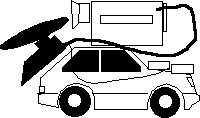
We did one main demonstration with LEMMY in the classroom. First, I had one student watch the video monitor while the other held the controls and looked out the window. This introduced a time delay not unlike the delay that would occur for real-time drivers of lunar rovers. Also, it soon became apparent that conventions for left, right, slow, and fast were needed.
Students complained of the narrow field of view, even though the camera was zoomed as wide as it would go. Also, the signal would intermittently fade in and out as the angle between the transmitter and receiver changed and metal table legs got in the way. Once, the camera shut itself off (it was in standby mode, not recording), and I noted the similarity between this and robotic probes tendency to go into safe mode when something goes wrong. One of the Russian probes to Mars was accidentally turned off when it arrived in orbit; without a safe mode to restart itself at a preset time, it was essentially lost.
Gathering Parts
Unlike the iBorg over at MacAddict, I never intended (read: didn’t know how) to make LEMMY web-accessible, so that gave me the added bonus of actually being able to get mine to work. Also, I used only parts on hand, so I didn’t invest in a LEGO Mindstorms kit, for example.
In time-honored Low End Mac and science teacher tradition, I started scrounging around to see what I could find to accomplish my mission. Here is what I eventually came up with. You don’t really need all this stuff; this is just how I chose to do it. It also includes the gear necessary to display the video on the classroom TV.
LEMMY parts
- 1 Radio Shack BlackHawk R/C car (a basic car with independent 4 wheel suspension, 2 channel R/C for drive and steering) + transmitter
- 1 Sony Hi-8 Video Camera
- 1 Recoton wireless TV remote extension (lets you transmit standard video over wireless connection) includes one transmit and one receive unit
- 3 9V batteries
- 8 AA batteries
- 1 6.3V Lithium battery + charger
- Sony battery for video camera
- 1 RCA type video patch cable
Video gear
- 1 Cable TV coaxial cable
- another RCA video patch cable
- 1 extra-long Mac keyboard cable
- cable-ready VCR
- 1 Beige Power Mac G3 with A/V card installed (input/output for video)
- TV with S-video input
Assembling LEMMY
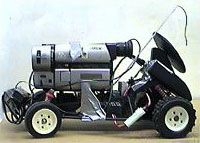 First, I removed the Radio Shack car’s stylish cover, because it wasn’t flat and didn’t look space-probish enough. Four Phillips screws later, I had a chassis that worked fine. (It occurs to me that Radio Shack probably has just a few chassis that they stick different covers on.)
Next, I duck-taped my Sony camcorder on top of the car.
I then attached the Recoton transmitter to the back of the car as shown in the photo. Since all this equipment is borrowed and not dedicated to the project, tape is best. This transmitter/receiver pair I picked up several years ago from Damark. Although there is still a page for it on Recoton’s Web site, it is apparently not in their current catalog. A modern alternative might be one of those secret X-10 “wireless spy cams” they advertise all over the Web. (Hey you guys, if you send me one, I’ll tell how it worked for LEMMY II).
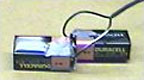 The Recoton transmitter requires 18 volts of electricity, but it would kind of ruin the effect to use an extension cord. Therefore I took two 9V batteries and connected the + terminal to the – terminal of the other; then I cut the power supply cord to the transmitter and attached one lead to each side of my battery.
Finally, I connected the video camera’s RCA video-out port to the RCA-in port of the transmitter.
After charging the car’s battery and replacing all the batteries in the transmitter and camera, LEMMY was complete.
Video Hookup
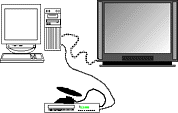 At the receiver end (“Mission Control”), I had the Recotron receiver connected to the VCR through a standard cable-TV coax cable. (Odd how the transmitter and receiver have different assumptions about how they connect to different devices.)
The VCR output was routed to the video-in card on the computer via another RCA cable.
The VCR could have been directly connected to the TV, of course, but that requires a manual switch to make the TV switch from the closed circuit in-house TV to the VCR, and to leave things connected simply, I chose to route the S-video output from the video card directly to the TV via an old Mac keyboard cable. This leaves the VCR connected to the TV through coax all the time, and no cable switching is necessary.
- TIP 1: In case you missed it, there’s a little tip buried in there: Mac keyboard cables are exactly the same thing as S-video cables, so they can be swapped one for the other. One of these days I’m going over to Fry’s to get a 20′ cable for my keyboard so I can run presentations from across the room. But I digress.
Driving LEMMY
The educational purpose for LEMMY was achieved by illustrating the frustrations involved in remote sensing with a time delay. A Martian rover could have a time delay of 10 minutes (minimum) for a signal to get to the rover and the return video to arrive back on Earth – and typically it would be longer, as much as 45 minutes or so. Thus, in one class period you could essentially send one command – “Turn Left” – and see the results if you were attempting to drive the car “live.” This makes the point that real-time remote exploration just isn’t going to happen on Mars.
On the moon, however, it might work if the drivers can learn to “look ahead” about a second and a half. To introduce this sort of a time delay, I asked one student to stand at a doorway and look out the window while another looked at the TV monitor. Neither student was allowed to look at the car itself. The observer then relayed instructions to the driver, who tried to execute them. The goal was to simply maneuver around the room and find a little rocket I put on the floor.
This allowed me to make the point that an autonomous, reprogrammable rover, such as was used for Pathfinder, is the best tool for this type of exploration, but even such a tool is extremely limited and slow compared to the admittedly more expensive human explorers.
I used Apple Video Player application to display the video. I powered everything up and immediately got a picture. This application also lets you capture the video signal to a QT file, so I did that and recorded a short driving session.
Finally, I turned video mirroring on via the control strip and tuned the TV to S-video input (which is a whole ‘nother story), and the class could finally see what LEMMY was up to.
The video shows a student driving the car for a couple of minutes after class has ended. [The video is not supported in Chrome.]
- TIP 2: Once the video was captured, I compressed and saved it using a copy of the QuickTime video player. Being a hoarder of old versions of software (who at LEM isn’t?), I have discovered Tip 2. Old versions (pre-Pro versions) of the QuickTime movie player can access the codecs and special effects installed for the new version. However, installing the new version of the player deletes the old one – unless you change the name of the older player to something different! Mine is called “QuickTime Player That Can Edit.” This tip enables you to avoid paying the QuickTime Pro fee. Thus I was able to load the original 120 MB file and trim it down to 286 KB.
Supporting LEMMY
LEMMY needs your help. First, the wife says the video camera cannot be zooming around on a R/C car driven by teenagers. I also need to learn more interfacing so I can have the car programmable instead of just remotely operated. So I’ve got to buy one of those wireless spy cam thingummies and a MindStorms set.
For LEMMY to grow, you have to support Low End Mac! Hop on over to Amazon.com and show your appreciation. Heck, the tips in this article alone could save you $30 or more – and you get the bonus of my entertaining writing style and effortless wit. ;-)
Keywords: #lemmy
Short link: http://goo.gl/gI05SM
