iNews Review
Free iPhone Unlock, Simple Music Streaming to iPhone, VOIP for the iPod touch, and More
This Week's iPhone, iPod, and Apple TV News
Compiled by Charles Moore and edited by Dan Knight - 2007.12.13
Mac notebook and other portable computing is covered in The 'Book Review, and general Mac news is in Mac News Review.
All prices are in US dollars unless otherwise noted.
iPhone News, Reviews, & Opinion
- Free Unlock GUI for the iPhone
- Simple Music Streaming from Mac or PC to iPhone
- Google Application for iPhone Points Toward Potent Alliance
- Google Unveils Application for iPhone
- Google Enables More Apps for iPhone
- Young, Poor Prefer Cell Phones to Landlines in US
- Has the iPhone Jumped the Shark?
- Using Safari on iPod touch and iPhone with Sites Containing Frames
- New Functions for the iPhone This Week?
iPod News, Reviews, & Opinion
- 'Eok' Developing VOIP for iPod touch
- VOIP Running on the iPod touch
- Add a Microphone to Your iPod touch for Audio-in Lovin'
- iPod touch 'Best Portable Media Player Ever Made'
- 80 GB Zune 'Trumps Apple's iPod classic'
- iPod classic and 3G iPod nano Continuously Rebooting after Updating to 1.0.2
iPhone/iPod Add-ons
- Portable EVDO HotSpot for iPhone or iPod touch
- File Download Plugin for MobileSafari
- ZappTek Updates iSpeak It
iPhone Add-ons
iPod Add-ons
iPod and iPhone Deals
iPhone News, Reviews, & Opinion
Free Unlock GUI for the iPhone
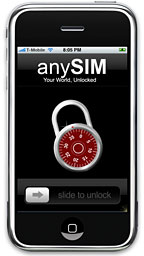 Hacintosh reports:
"Today is the day! We just fixed up our issues with the toolchain and are proud to announce the GUI version as the latest greatest opensource tool."
Download: http://www.deadbeef.cn/files/anySIM.zip
PXL Package: http://iphone.exploit.org/pxl/anySIM-1.01.pxl
Mirrors:
Just install this application on your phone and run it from Springboard. Enjoy!
Link: Free Unlock GUI - Now Finally Released!
Simple Music Streaming from Mac or PC to iPhone
iPhone Atlas says:
"Aptly named Simplify Media recently launched a native third-party iPhone application that can stream music from any enabled Mac or PC (also running the Simplify Media software) directly to the iPhone over a WiFi or EDGE connection. Once you've made your iPhone ready accept third-party applications, the process for setting up Simplify Media is, well, simple...."
Link: Simple Music Streaming from Mac or PC to iPhone
Google Application for iPhone Points Toward Potent Alliance
The Baltimore Sun's David Zeiler says:
"Almost lost in yesterday's tech news was Google's announcement that it has released an application for the iPhone that consolidates several of its Web services such as e-mail, search and calendar functions into a single interface.
"Owners of an iPhone (or an iPod touch) need only visit Google.com to access the new goodies; no download is required. A single Google software engineer, Steve Kanefsky, envisioned the feature after being impressed with the iPhone's large touch screen as well as the inclusion of the full Safari Web browser."
Link: Google Application for iPhone Points Toward Potent Alliance
Google Unveils Application for iPhone
Reuters reports on eWeek:
"The app makes it easier to use and switch between Google's e-mail, search and calendar services on the iPhone."
Link: Google Unveils Application for iPhone
Google Enables More Apps for iPhone
eWeek's Clint Boulton says:
"The optimization of Search, Gmail, Calendar and Reader for the iPhone is the latest step in Google's mobile march."
Link: Google Enables More Apps for iPhone
Young, Poor Prefer Cell Phones to Landlines in US
CTV reports:
"More than one in eight households have cell phones but lack traditional landline telephones, according to a federal study released Monday that tracks the country's growing dependence on wireless phones....
"The report released Monday showed that for the first half of 2007, 14 percent of households had cell phone service but no landline telephones. That was less than 1 percentage point over the second half of 2006 - not a statistically significant difference....
"The federal data showed once again that young, poor, male and Hispanic people are likelier to have only wireless telephone service....
"About one in five poor people have only cell phones, about double the percentage for those who are not poor."
Editor's note: I'm among the group that has only a landline, although I would expect that here in Canada, where cellphone service rates are punishingly high, the proportional size of that cohort is a lot higher than the 24 percent in the US. I resist any service commodity that keeps the meter running, although I do have a long distance plan that's so cheap that it's hardly an issue. cm
Other editor's note: Except for six months when I had no option but a land line for Internet access, I've been using a mobile phone exclusively for four years. It's not only convenient, it also avoids the setup fees the phone company charges for activating service at a new address. (I am neither young nor poor.) dk
Link: Young, Poor Prefer Cell Phones to Landlines in US
Has the iPhone Jumped the Shark?
InformationWeek's Stephen Wellman says:
"While Apple's iPhone this year captured the imagination of the US market and spurred a global diagoue about the future of smartphones, it's not taking Europe by fire in the sales department. In fact, if my colleague Eric Zeman is right, the iPhone could be a flop in Germany. What gives?
"At this point there are several good explanations for the iPhone's lack of luster on the other side of the pond....
"But, I wonder if the real reason the iPhone is flopping in Europe is that the iPhone has simply jumped the shark."
Link: Has the iPhone Jumped the Shark?
Using Safari on iPod touch and iPhone with Sites Containing Frames
A new Apple Knowledge Base article says:
"Some webpages are organized into frames, where each frame displays a different web document. You can use Safari to browse and scroll through web pages containing frames by using two fingers simultaneously. When you use one finger to flick or drag up or down, you are scrolling through the web page. When you use two fingers to flick or drag up or down, you are scrolling through the frame.
"Note: On a computer you will be able to scroll through such frames using a scroll bar."
Link: Using Safari on iPod touch and iPhone with Websites Containing Frames
New Functions for the iPhone This Week?
CNET France's Fabrice Auclert reports (AltaVista Babel Fish translation):
"According to various rumours, it is next Saturday which the new firmware should arrive for the iPhone. This version 1.1.3 would bring two great innovations: a dictaphone function and the possibility of using the APPLE telephone like a hard disk.
"The advertisement of the near release of a iPhone 3G made early adopters of the first version of the Apple telephone grimace. But they can be comforted by thinking that in a few days, their telephone will be enhanced by two new functions."
Link: De nouvelles fonctions pour l'iPhone dès cette semaine ?
iPod News, Reviews, & Opinion
'Eok' Developing VOIP for iPod touch
MacNN says:
"By using the SvSIP software for the Nintendo DS provided by Samuel Vinson, a developer identified as 'Eok' has created a semi-working VOIP client for the iPod touch...."
Link: 'Eok' Developing VOIP for iPod touch
VOIP Running on the iPod touch
touchmods blog says:
"Amazing news, guys! I have no words! We all knew it will come.
"So here it is: eok did manage to make the Nintendo DS-based SIP app from Samuel running on the iPod touch!!"
"Samuel's page here: svsip.free.fr"
Link: VOIP Confirmed!!!
Add a Microphone to Your iPod touch for Audio-in Lovin'
Ars Technica's Jacqui Cheng says:
"Since the debut of the iPod touch, we've all pretty much known that it's strikingly similar to the iPhone in more ways than Apple would like us to believe. For one, they can run the same apps (including iPhone-specific ones, like Mail, Weather, and Stocks). That list also includes recording audio-in. Yes, you read that right--the audio-in line, which is used for phone calls in the iPhone, is not disabled in the iPod touch, as several observant tinkerers have discovered."
Link: Add a Microphone to Your iPod touch for Audio-in Lovin'
iPod touch 'Best Portable Media Player Ever Made'
PC Magazine's Tim Gideon says:
"With an excellent interface and elegant design, the iPod touch is simply the best portable media player ever made."
Link: Apple iPod touch
80 GB Zune 'Trumps Apple's iPod classic'
PC Magazine's Tim Gideon says:
"The new Zune is trimmer, has a larger screen and increased capacity. Add its wireless abilities to the equation and you've got a player that (gasp!) trumps Apple's iPod classic."
Link: Microsoft Zune 80 GB Review
iPod classic and 3G iPod nano Continuously Rebooting after Updating to 1.0.2
A new Apple Knowledge Base article says:
After updating an iPod classic or an iPod nano (3rd generation) to iPod software 1.0.2, the device may continuously reboot after resyncing iTunes music library. If this occurs, the iPod will not be recognized or seen in iTunes.
Products affected
- iPod classic
- iPod nano (3rd generation)
Solution
To resolve this issue, place the device in Disk Mode and restore it. See this document for steps to put the iPod into Disk Mode. If you need assistance restoring the iPod, see this document.
To prevent this issue from recurring, recreate the iTunes music library prior to resyncing the iPod. See "How to re-create your iTunes Library" for information.
iPhone/iPod Add-ons
Portable EVDO HotSpot for iPhone or iPod touch
PR: Tired of how slow your iPhone connects to the internet? Wish you could blaze along at true 3G Speeds? Jump off the EDGE and easily connect to high speed EVDO networks by using the new CradlePoint PHS300 Portable HotSpot!
The PHS300 allows you to share the connection from an EVDO USB modem via WiFi, allowing your iPhone or iPod touch to connect to the internet at faster EVDO broadband speeds where coverage is available!
The PHS300 is also the first 3G router to have a built-in rechargeable battery, allowing freedom you've never experienced before.
Link: CradlePoint Personal Hot Spot - PHS300 Battery Powered EVDO Router Review
File Download Plugin for MobileSafari
"So, I got curious after work one day and decided to figure out how to write a simple MobileSafari plugin. This took me 3 days.
"This one lets you download most zip and tar files. I tried to make it download png, gif, and jpgs, but because Safari handles it already, I don't think I can ever make that work.
"This was developed targeting 1.0.2. I haven't tried it on 1.1.1 or 1.1.2.
"(Updated) XianLi says in this thread that it works fine for him on 1.1.2.
"No warranty or liability of any kind, of course. Don't blame me if it somehow messes up your data, though it isn't supposed to affect anything outside the Downloads folder it created.
"How to use:
"Copy the plugin bundle into '/System/Library/Internet Plug-Ins', and then reboot the phone.
"It will create a folder called Downloads next to Library and Media in your root home folder. It will only download there.
"When you click on a link that is downloadable, a large button will appear. Click on it to download. Click the normal page back button to not download, or to go back when it's complete."
http://www.badongo.com/file/5387192
Link: File Download Plugin for MobileSafari
ZappTek Updates iSpeak It
PR: iSpeak It is a file-to-audio converter that serves as a perfect companion to the iPod or iPhone. iSpeak It loads Word, PDF, Pages, RTF, AppleWorks, text and HTML documents. It downloads news, weather forecasts, driving directions, and arbitrary web pages as well as RSS feeds. iSpeak It then uses the Mac's text-to-speech engine and iTunes to convert the text into an MP3/AAC track. Version 3.3.3 fixes News and RSS downloading under Tiger and provides other minor bug fixes.
ZappTek announces its very popular file-to-audio tool, iSpeak It 3.3.3. Load Word, PDF, Pages 2, RTF, AppleWorks, Text, HTML documents or RSS feeds, and using the Mac's built-in text-to-speech capabilities, convert them into MP3/AAC tracks in iTunes. From there it's a quick sync to iPod or iPhone.
- Download RSS feeds and keep track of local weather with up-to-date forecasts.
- Download news articles from news.google.com and hear them on the way to/from work.
- Download driving directions and listen to them on iPod or iPhone.
Users may open any text document or select any text and load it via the Services menu. A toolbar provides easy access to all of the load menu options and the transferring of a document to iTunes.
iSpeak It 3.3.3 sports a number of important fixes:
- News downloading under Tiger.
- RSS downloading under Tiger.
- Improves replacement rule reliability.
Minimum Requirements:
- Mac OS X version 10.4 or higher.
- Web Services require an Internet connection
- PDF processing requires pdftotext (free download)
Getting Started:
To install iSpeak It, drag it to your Applications folder or wherever you'd like to keep it. Before transferring any text, use the Speech panel in the System Preferences to select the voice to use during conversion. iSpeak It uses the voice and defined settings for all of its processing. Experiment with the voices to see which sounds best.
iSpeak It also provides advanced text replacement capabilities. There are a number of phrases that Mac Voices will not convert properly. iSpeak It can define rules that identify problem words and an appropriate (phonetically correct) replacement for them. It will even automatically apply the rules before transferring a document to iTunes.
Purchasing iSpeak It:
iSpeak 3.3.3 remains priced at $19.95 with free update for existing users of version 3.x. The iSpeak It trial allows for converting the first 1000 characters of any text. Users may purchase the bundle, which includes iPresent It and iPDA, for $44.95 ; a $13 savings.
Users can purchase from within iSpeak It by selecting "Purchase iSpeak It..." in the application menu or visit the ZappTek website.
Link: iSpeak It
iPhone Add-ons
Voodoo Ergonomics Releases Mojotones 2.0 with iPhone Ringtone Support
PR: Voodoo Ergonomics Inc. announces the release of Mojotones 2.0 for Mac OS X. Mojotones is an easy-to-use utility for the creation of ringtones from audio files. Users may send the whole track - or a favorite part of it - to their phone. Mojotones is Universal Binary requiring Mac OS X 10.4.9 and a phone capable of playing MP3, AAC or WAV files.
Voodoo Ergonomics Inc. announces the release of version 2.0 of Mojotones, an easy-to-use solution to create ringtones from their tracks. Users may send the whole track - or their favorite part of it - to their phone.
With Mojotones, users may use the tracks in their iTunes library or anywhere else as ringtones on their phone as easily as choosing the song and clicking a button. Mojotones is a Universal Binary, so it works great on both Intel and PowerPC Macs, and can use Bluetooth to send the tracks directly to your phone. For those without a phone capable of Bluetooth transfers, Mojotones can save the ringtone to a file directly on the phone (via a USB cable or media reader). If you choose to create an iPhone ringtone, it's added to iTunes, ready for your next sync.
Just find the song you want and click the Send button. That kicks off a file transfer or save operation - no costly SMS messages or downloads from the phone company. Navigate through your phone's menus to set the ringtone.
Want only part of the song? Just click the Play button then drag the sliders around. Want finer control? Use the Control menu shortcut keys to nudge the ends of the range. When you have just the right part selected, send it to your phone. It's that simple.
Mojotones can generate ringtones in MP3, AAC or WAV formats. (MP3 support, is provided via a free, third-party open-source QuickTime component.)
New features in Version 2.0:
- Easy creation of iPhone ringtones.
- Range duration display in the player.
- Easier keyboard navigation.
- Streamlined menus and shortcuts.
- Various bug fixes.
Other features:
- Support for MP3, AAC and WAV ringtones.
- Ringtone transfer via Bluetooth or save to a file.
- The ability to open tracks in a folder on the file system.
- No costly SMS messages, or downloads from the phone service. * Pinpoint editing of music track selections.
- One-Button transfer.
- Universal Binary: Works great on both Intel and PowerPC computers running Mac OS X.
System Requirements:
- Mac running Mac OS X 10.4.9
- Phone capable of playing MP3, AAC or WAV ringtones
- iPhone ringtones require firmware 1.1.2 and iTunes 7.5.
Pricing and Availability:
Mojotones 2.0 can be purchased from the Voodoo Ergonomics' secure store for $19.95 per user. Demo is also available for download.
Link: Voodoo Ergonomics
iPod Add-ons
DLO TuneStik Wireless FM Transmitter with Remote
PR: Meet TuneStik - the most versatile iPod accessory in DLO history. TuneStik combines a wireless FM transmitter with a powerful RF remote control for iPod playback and control in the car, at home - anywhere there's an FM radio. What sets TuneStik apart from the pack of existing FM transmitters is the included remote control plus an integrated pass-through dock connector, which gives you the freedom to combine TuneStik with virtually any iPod accessory - adding an RF remote and an FM transmitter to nearly all your iPod gear.
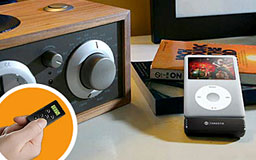 Keep your hands on the wheel
TuneStik includes a compact RF remote control and steering-wheel cradle, so you can put safety first as you control your iPod. The remote control pops out of its cradle in a snap, allowing you to pass music control to your back seat drivers. And with four programmable presets and digital display, setting and using your favorite frequencies is simple and safe.
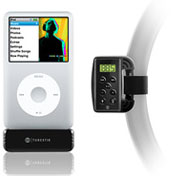 Control at your
fingertips
Control at your
fingertips
TuneStik isn't just an FM transmitter for the car - it also adds a strong RF remote control to your iPod - anywhere! With your TuneStik attached, simply connect your iPod to your home stereo system. Now you can use the compact TuneStik remote to control your iPod audio playback from across the room.
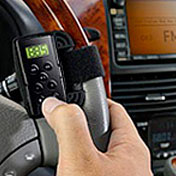 Plays well with others
With TuneStik's pass-through bottom dock connector, you can continue to use your existing Auto Charger, iPod dock, or any other 30-pin based accessory while still having the benefits of a powerful FM transmitter and remote control at your fingertips.
Quick Facts
- Wireless FM transmitter plus RF remote control in one package
- Transmit iPod audio to any nearby FM radio - in the car or at home
- Compact RF remote for easy iPod playback control from up to 25 ft.
- Remote features digital FM-frequency display and four programmable presets
- Steering-wheel cradle included for safe iPod control while you drive
- Pass-through iPod dock connector for use with other iPod accessories
- Fast, simple, versatile FM transmission
TuneStik is a complete kit that includes a powerful FM transmitter module, compact RF remote control with digital display, fully adjustable steering-wheel cradle, and a manual to get you going in five easy steps. Whenever there's a radio nearby, grab your iPod and be the DJ with the TuneStik with remote.
$59.99
Link: DLO TuneStik Wireless FM Transmitter with Remote
ZappTek Releases iPDA 4.0.2
PR: iPDA is the perfect companion to the iPod by serving as a replacement PDA. Word, PDF, Apple Pages, RTF or text documents may be easily transferred to iPod so data is available for quick access, any time. iPDA now supports Leopard specific synching for Mail, iCal and Address Book, including Mail Notes and To Do's, as well as a large number of changes to its feature set. Version 4.0.2 fixes News and RSS downloading under Tiger, Gmail password saving under Tiger, and Direction transfer problems.
iPDA is the perfect companion to the iPod by serving as a replacement PDA. Word, PDF, Apple Pages, RTF or text documents may be easily transferred to iPod so data is available for quick access, any time. Download RSS feeds, weather forecasts, driving directions and news headlines directly to the iPod. iPDA supports transferring information from Entourage, Stickies, Mail, Address Book and iCal, making it simple to put the information users need on their iPods.
Version 4.0.2 fixes News and RSS downloading under Tiger, Gmail password saving under Tiger, and fixes Direction transfer problems.
- Sync Mail Notes and To Do's directly to iPod.
- Download RSS feeds and keep track of local weather with up-to-date forecasts.
- Download news articles from news.google.com and read them on the way to/from work.
- Subscribe to published iCals and download them directly.
- Download driving directions directly to iPod.
- Perform a backup to iPod.
iPDA 4.0.2 sports a number of important fixes:
- News downloading under Tiger.
- RSS downloading under Tiger.
- Gmail password saving under Tiger.
- Direction transfer problems.
Minimum Requirements:
- Mac OS X version 10.3 or higher.
- An iPod.
- Microsoft Entourage for Entourage data synchronization.
- Web Services require an Internet connection.
Getting Started:
To install iPDA 4.0.2, drag it to your Applications folder or wherever you'd like to keep it. Clicking on a button will bring up a window to select the specific subset of information to export to your iPod; each window contains basic guides on its use. Determine the settings needed for synching and click OK.
Purchasing iPDA:
iPDA 4.0.2 remains priced at $19.95 with a $10 upgrade fee for current 3.x users (and a free update for version 4 users). The iPDA trial allows for 6 full synchs before requiring a purchase. Users may purchase the bundle, which includes iPresent It and iSpeak It, for $44.95 ; a $13 savings.
Users may purchase from within iPDA by selecting "Purchase iPDA..." in the application menu or visit the ZappTek website.
Link: iPDA
Join us on Facebook, follow us on Twitter or Google+, or subscribe to our RSS news feed
Links for the Day
- Mac of the Day: PowerBook 500 Series, introduced 1994.05.16. 'Blackbird' includes a 25 to 33 MHz 68040 along with smart batteries and grayscale or color displays.
- Support Low End Mac
Recent Content
About LEM Support Usage Privacy Contact
Follow Low End Mac on Twitter
Join Low End Mac on Facebook
Favorite Sites
MacSurfer
Cult of Mac
Shrine of Apple
MacInTouch
MyAppleMenu
InfoMac
The Mac Observer
Accelerate Your Mac
RetroMacCast
The Vintage Mac Museum
Deal Brothers
DealMac
Mac2Sell
Mac Driver Museum
JAG's House
System 6 Heaven
System 7 Today
the pickle's Low-End Mac FAQ
Affiliates
Amazon.com
The iTunes Store
PC Connection Express
Macgo Blu-ray Player
Parallels Desktop for Mac
eBay

