iNews Review
BlackBerry Gains Share While iPhone Loses, Free VoIP App, iPhone Replacement Battery, and More
This Week's iPhone, iPod, and Apple TV News
Compiled by Charles Moore and edited by Dan Knight - 2008.06.06
Mac notebook and other portable computing is covered in The 'Book Review, and general Mac news is in Mac News Review.
All prices are in US dollars unless otherwise noted.
News, Reviews, & Opinion
- RIM Gains US Market Share, Apple Loses
- Apple iPhone Loses Share, RIM Gains
- BlackBerry Widens Lead on iPhone in Business
- Free Legal Music for Your iPod and iPhone
- How Do I Connect an iPod to a Linux PC?
- iViewr's iPhone/iPod touch-based Guide for WWDC 2008
For iPods and iPhones
- Free Sipgate App Brings VoIP to Your iPhone
- Compact iPhone/iPod FM Transmitter Perfect for 3G iPod nano
- PowerDock Charging Base for Multiple iPods and iPhones
- podUp: Free iPod Music Transfer Software
- PhoneView: Use Your iPhone for File Storage
- Replace Your iPhone's Battery for $7.29
- The Bridge II: Harman Kardon's Docking Station for iPods
iPod and iPhone Deals
These price trackers are updated regularly.
- Best iPhone deals
- Best classic iPod deals
- Best iPod touch deals
- Best iPod nano deals
- Best iPod shuffle deals
News, Reviews, & Opinion
RIM Gains US Market Share, Apple Loses
Thomson Reuters reports:
"Research in Motion Ltd's BlackBerry increased its share of the US smartphone market in the first quarter while Apple Inc's iPhone lost ground, according to a report from IDC.
"According to the report Rim's share of the US market for advanced phones with computer like features such as email rose to 44.5 percent in the first quarter from 35.1 percent in the fourth quarter while iPhone's share fell to 19.2 percent from 26.7 percent in the fourth quarter."
Link: RIM gains US market share, Apple/Motorola lose: IDC
Apple iPhone Loses Share, RIM Gains
27/7 Wall Street's Douglas A. McIntyre reports:
"It may be the first bad news ever about the Apple iPhone, It is certainly good for RIM, the maker of the Blackberry, According to research firm IDC, the iPhone lost smartphone market share in the US during the first quarter.
"Reuters writes 'According to the report Rim's share of the US market for advanced phones with computer like features such as email rose to 44.5 percent in the first quarter from 35.1 percent in the fourth quarter while iPhone's share fell to 19.2 percent from 26.7 percent in the fourth quarter.'"
Link: Apple iPhone Loses Share, RIM Gains
BlackBerry Widens Lead on iPhone in Business
Electronista reports:
"Regardless of Apple's plans to add business features to the iPhone, Research in Motion is and will continue to extend its lead in business phones, according to a new ChangeWave study. An examination of more than 2,000 corporate IT spenders has about 76 percent of all businesses opting for BlackBerries in May, up three percent from the last time the study took place in February; Palm was second place at 17 percent with other competitors filing in the remaining seven percent."
Link: BlackBerry Widens Lead on iPhone in Business
Free Legal Music for Your iPod and iPhone
iLounge's Jesse David Hollington says:
"If you have an iPod and far fewer songs than the gigabytes of storage space you have available, then you've probably asked one of iLounge's most popular questions: "how can I load my iPod up with free music?"
"There are at least two answers to this question, one generally illegal, and one generally legal. You've probably already heard about the illegal free music options, but just in case you haven't, we'll run through the reasons you'll want to skip them and use the legal free music sites instead."
Link: Free (Legal) Music for Your iPod and iPhone
How Do I Connect an iPod to a Linux PC?
TechRepublic's Jack Wallen says:
"I just want to be able to put songs on my Apple iPod from my Ubuntu Linux machine. Fortunately, for all of us end-users, the open source community started taking seriously the call to make multimedia a priority for application development. Getting an iPod recognized and connected to a Linux machine is only slightly more difficult than it is with iTunes.
"Our environment
"What we are working with is the following:
- PC: 64-bit machine running 32-bit Ubuntu 8.04 Hardy Heron
- iPod: 5-gen 30 gig video iPod formatted in Windows format
- Software: gtkpod-aac....
"Take note that the only way you will be able to access your iPod for writing is if your iPod is formatted in the Windows format. The Apple formatted iPods can be recognized but writing to them is very difficult (and has, in my case, resulted in complete loss of data on the iPod.)"
Link: How Do I Connect an Apple iPod to an Ubuntu Linux PC?
iViewr's iPhone/iPod touch-based Guide for WWDC 2008
PR: iViewr announces iPhone and iPod touch-based guide for Apple's WWDC '08
iPhone and iPod touch-wielding visitors to next week's Apple Worldwide Developers Conference (WWDC) in San Francisco can enhance their visit to the show with a handy guide made available by iViewr.com.
A website for iPeople who are going places, iViewr.com, has introduced its latest event guide aimed at the legion of developers making the pilgrimage to the conference.
Completely free to access, this handy 'Pod SnapShot' has the look and feel of a native iPhone application and provides details of all aspects of the show - from Conference Schedules, Lab and Session details, Travel directions, Disabled access, Moscone Center facilities, after hours events and more.
"Like the previous event guides we've made available, iViewr provides visitors to the Conference with all of the important information especially formatted for display on their iPhones or iPods" said Rod Cambridge, founder of iViewr. "If you have one of these devices, there's simply no more need to be carrying around a jumble of papers, map and leaflets when a guide like ours is available."
To access the guide, simply browse to iviewr.com on an iPhone or iPod touch and click Our Choice.
Link: iViewr
For iPods and iPhones
Free Sipgate App Brings VoIP to Your iPhone
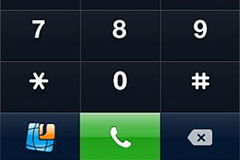
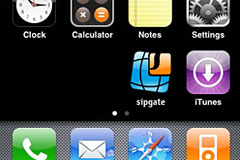 PR: sipgate Inc. announces the immediate availability of
a free application for the iPhone, which for the first time allows
consumers to natively use any VoIP service which uses the industry
standard SIP. Consumers can now use their iPhones to make and receive
VoIP calls from their devices over a WiFi Internet connection using a
wide variety of VoIP providers. The VoIP-enabling software is available
from sipgate's website.
PR: sipgate Inc. announces the immediate availability of
a free application for the iPhone, which for the first time allows
consumers to natively use any VoIP service which uses the industry
standard SIP. Consumers can now use their iPhones to make and receive
VoIP calls from their devices over a WiFi Internet connection using a
wide variety of VoIP providers. The VoIP-enabling software is available
from sipgate's website.
You can benefit from all the great features SIP brings into the game.
You can:
- save mobile minutes, whenever WiFi is available
- bypass roaming charges
- place calls at virtually no cost when travelling abroad, etc.
- free 111 minutes included
- free support for 3rd party VoIP services
- absolutely no charges for anything
Understand that none of these features are provided by sipgate. You need to purchase a SIP service and a WiFi connection from third parties in order to enjoy them. Just log in at sipgate.com and set up your account to forward calls to and from your favorite VoIP service.
With the sipgate service, users can dial any number without using minutes from a wireless plan. This is particularly useful when calling to or from other countries, as call costs can be as high as $3 per minute. However, when using a VoIP service, costs can be kept as low as $0.01 per minute. sipgate is giving new users 111 free minutes for domestic calls for users to test out VoIP usage on the device.
Another benefit of sipgate is that consumers can use any domestic or international number provided by their VoIP service on their iPhone. This means that they can make and receive calls from different domestic and international numbers, all on a single device.
 Thilo Salmon, CEO of sipgate
commented: "We love VoIP and we love the iPhone so we are giving people
like us who always wanted VoIP on the iPhone the ability to use any
SIP-based VoIP service they want. We are thrilled that Apple is opening
up the iPhone and we look forward to taking part in future application
development."
Thilo Salmon, CEO of sipgate
commented: "We love VoIP and we love the iPhone so we are giving people
like us who always wanted VoIP on the iPhone the ability to use any
SIP-based VoIP service they want. We are thrilled that Apple is opening
up the iPhone and we look forward to taking part in future application
development."
Salmon continued: "As a company we strive to make useful services accessible to everyone. There will be more innovation for businesses and consumers coming from sipgate this year, so keep your eyes open for more news."
System requirements:
- In order to use the sipgate iPhone client it's recommended that you update your iPhone's firmware to v1.1.4.
The software is 100% standard compliant and is not tied to any particular SIP service. You can use it with any SIP service you like. And it is 100% free.
Charges from third parties for WiFi or VoIP subscriptions may apply
Link: Sipgate
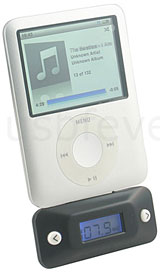 Compact iPhone/iPod FM Transmitter Perfect for
3G iPod nano
Compact iPhone/iPod FM Transmitter Perfect for
3G iPod nano
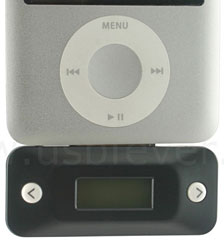
PR: Features:
- High fidelity, Stereo
- Digital PLL
- Full frequency range.
- Memory for last frequency
- LCD Screen with blue backlight
- Powered by iPhone / iPod directly, no extra power source needed
- available range: 10 meters approximately.
- Compact
- Lightweight
Specifications:
 Frequency response: 100 Hz~15000 Hz
- Separation: >= 30 dB
- Operating current: 20+/-3mA
- Transmission range: 87.9 MHz~107.9 MHz (interval 0.1 MHz)
- Dimensions: Product D53 x W28 x H9 (mm), Box D110 x W110 x H27 (mm)
- N.W.: 8.5g
- G.W.: 39.5g
Compatible with:
 iPhone
- iPod classic
- iPod touch (iTouch)
- iPod nano 3G
- iPod video
- iPod nano 2G.
- Physically perfectly fits for nano 3G
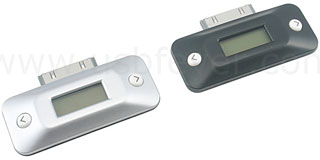
Options: Color
- Black (default color to be shipped)
- Silver
$19.99
Link: iPod FM Transmitter
PowerDock Charging Base for Multiple iPods and iPhones
 PR: Put an
end to family power struggles (literally) with PowerDock. Call a
cease-fire with PowerDock, a charging base where every iPod and iPhone
in the house can get together to charge its batteries.
PR: Put an
end to family power struggles (literally) with PowerDock. Call a
cease-fire with PowerDock, a charging base where every iPod and iPhone
in the house can get together to charge its batteries.
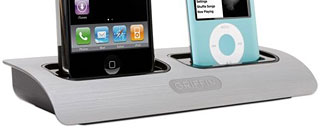
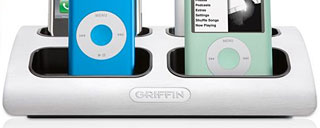
Does your family own a family of iPod or iPhone models? Can you only find one charger when all of you need to recharge? Call a cease-fire with PowerDock, a charging base where every iPod and iPhone in the house can get together to charge its batteries.
Just slip your iPod or iPhone into place to safely charge. Models available with two or four Apple Universal Docks built into a single charging base. Substantial brushed aluminum with a grippy rubber base stays put on countertops and desktops. Includes a collection of Universal Dock insert adapters to ensure that every iPod and iPhone in the house gets a place at the table.
 Features
- Charging base plugs into standard 120 VAC wall outlet
- Sturdy brushed metal base stays put on your desk
- Charges any combination of iPod models
- 8 Universal Dock inserts included to fit iPod models that charge by Dock Connector
- Certified by Apple as a "Works with iPhone" product
- Certified by Apple as a "Made for iPod" product
- Technical Specifications
- Power input: 110-240V AC @50-60 Hz
- Power output: 5V DV @ 1.2 Amps
- AC Power supply: 6' (1.8m)
- 8 Universal Dock inserts included to fit iPod models that charge by Dock Connector
$49.99 - $69.99
Link: PowerDock Multiple Charging Base for iPod and iPhone
podUp: Free iPod Music Transfer Software
 PR: podUp is
an application which copies all your music files from your iPod to a
folder of your choosing, without having anything to do with iTunes.
PR: podUp is
an application which copies all your music files from your iPod to a
folder of your choosing, without having anything to do with iTunes.
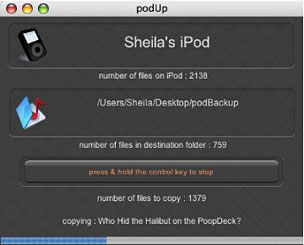
podUp is an application which copies all your music files from your iPod to a folder of your choosing, without having anything to do with iTunes.
It does not attempt to interfere with whatever copyright protection those files may have, it simply copies them, so files bought from the iTunes store will still be authorised only for the computer(s) you have authorised.
To copy the files from your iPod to a folder:
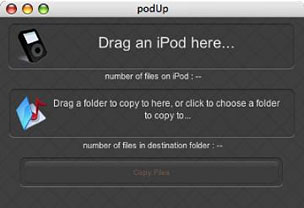 Drag an iPod from the desktop
to the podUp window.
Drag an iPod from the desktop
to the podUp window.- Either drag the destination folder to the podUp window, or click in the window and choose the destination.
- Click on the "Copy Files" button, and off it goes.
If your iPod is pretty full, it can take a long time, so you can stop it at anytime by pressing and holding the control key to the bottom left of your keyboard.
podUp remembers what it's already copied, so you can resume at anytime.
New in version 1.1.1:
- Internationalized, and can check for updates.
System requirements: Mac OS X 10.4 or later.
System Support: PPC/Intel
Free
Link: podUp
PhoneView: Use Your iPhone for File Storage
PR: The desktop companion for iPhone and iPod touch
PhoneView (formerly MegaPhone) is a Mac OS X application which lets you use your iPhone or iPod touch for file storage. It features drag and drop, making it fast and easy to move files back and forth between the Mac and iPhone. In addition, PhoneView provides note adding and editing, and easy access to your iTunes, iPhoto and notes, SMS, contacts and call history data. Convert your text, Word or PDF files into iPhone notes.
- Create iPhone Notes on your Mac.
- Store any type of data.
- Access your music, videos, podcasts and photos.
- Access notes, SMS, contacts and more...
With PhoneView on your Mac, you can:
- Use your iPhone as a Disk
- Access, Edit and Create Notes
- Access Music and Movies
- View and Export Call History
- View and Export SMS
- View Synched Photos
- Download Camera Photos
- Access Contacts
Just a few more things your iPhone does. Use your iPhone or iPod touch for file storage, ensuring that you always have your important data backed up.
Send text files, PDFs, or Word files to the iPhone Notes application for reading and editing on the go.
PhoneView also provides easy access to your iTunes media, photos, notes, SMS messages, call history and contacts. Drag and drop music, videos, notes and phone data from the iPhone to your desktop or just double-click to copy.
PhoneView's familiar Mac OS X interface makes it simple to transfer files between your Mac and your iPhone. Use your iPhone's unused storage space as a disk drive to backup data or transfer between Macs.
Note: Files stored on the iPhone using PhoneView cannot be viewed on the iPhone screen.
PhoneView is the easiest and quickest way to add, view and edit your iPhone's Notes on your Mac desktop. Simply connect any iPhone and view your existing notes, or drag new notes right onto your iPhone or iPod touch.
Export SMS Messages and Recent Calls
Need access to the call history or your SMS messages stored on your iPhone? Simply drag it from PhoneView to your desktop. The information can be viewed in your favorite text editor or spreadsheet program.
Recover from Disaster
In the event of a Mac disk crash, if your music, photos and contacts are safely stored on your phone, PhoneView is the easiest path to recovery.
Features:
- Simple interface.
- Store any type of files.
- Access music, videos, podcasts and photos.
- Instant access to Notes.
- Easily create new Notes.
- Export iPhone SMS and recent calls.
- Use your iPhone for backup.
- Bring your data between home and office.
- Try before you buy. Download the demo.
Price: $19.95
New in version 2.0.2:
- Fixes an issue that could cause Contacts mode not to function.
- Fixes an issue that could cause PhoneView to hang on quit.
- Corrects a problem with the Replace All function when copying items from the device.
- Fixes an issue where some notes may not be copied to the Mac.
- Fixes an issue that prevented SMS and Call History mode from working when the user directory is stored on a remote NFS file system.
- Fixes an issue with exporting album photos that do not have a file name stored on the device.
- Fixes an issue where an error message may not be displayed if saving changes fails.
- Fixes an issue where the Cancel button may not work properly during transfers.
- Other minor fixes and enhancements.
System requirements: iPhone or iPod touch, Mac OS X 10.4.11 or later, iTunes 7.3 or later
System support: PPC/Intel
$19.95 Demoware
Link: PhoneView
Replace Your iPhone's Battery for $7.29
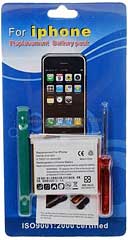 PR: DealExtreme offers a battery
replacement kit for iPhone for the extremely friendly price of $7.29,
free shipping included.
PR: DealExtreme offers a battery
replacement kit for iPhone for the extremely friendly price of $7.29,
free shipping included.
Of course the iPhone is not designed to be user-serviceable, so if the idea of prying your 'Phone's case open with a (provided) spudger tool makes you a bit queasy, then you might be well-advised to give this deal a pass. On the other hand, if you feel reasonably comfortable taking things apart, then this kit can save you a bunch.
I haven't done it, but my guess is that it's probably somewhat similar to replacing the battery in an iPod, which I have done, and was pleasantly surprised by how well that went for me.
 There is of course the question of
how good this battery can be at the price, as always, caveat emptor is
advised, but at the modest price you're not risking much in this roll
of the dice.
There is of course the question of
how good this battery can be at the price, as always, caveat emptor is
advised, but at the modest price you're not risking much in this roll
of the dice.
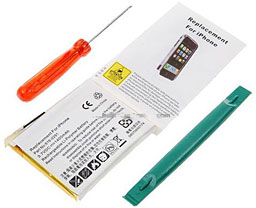
DealExtreme's Replacement Li-Polymer Battery with Toolkit for iPhone (3.7V 1400mAh) comes with everything you need for replacing your iPhone's battery at home, including a screwdriver, a case opener tool, and of course the iPhone compatible 3.7V 1400mAh Li-Polymer battery.
As noted, the price is $7.29, shipping included.
Link: Replacement Li-Polymer Battery with Toolkit for iPhone (3.7V 1400mAh)
The Bridge II: Harman Kardon's Docking Station for iPods
PR: Harman Kardon, Inc., has announced the introduction of The Bridge II docking station for iPod. The Bridge II connects a compatible iPod model* to a Harman Kardon The Bridge-ready** audio/video component, and enables expanded capabilities for iPod including audio/video playback through a home entertainment system, onscreen menu display for iPod, remote control operation, and charging.
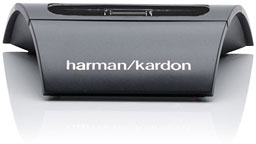 The Bridge II connects to the
Harman Kardon DMC 1000 digital media center, the new AVR 354
7.1-channel audio/video receiver and the HK 3490 stereo receiver, or to
other Harman Kardon The Bridge-ready receivers. It enables control of
music, and image and video playback (with the AVR 354), with menu
information for iPod visible on the user's TV and on the DMC 1000's, or
receiver's, front panel.
The Bridge II connects to the
Harman Kardon DMC 1000 digital media center, the new AVR 354
7.1-channel audio/video receiver and the HK 3490 stereo receiver, or to
other Harman Kardon The Bridge-ready receivers. It enables control of
music, and image and video playback (with the AVR 354), with menu
information for iPod visible on the user's TV and on the DMC 1000's, or
receiver's, front panel.
The Bridge II will be available in early summer 2008 at $129 suggested retail. It will also be included with the AVR 354 receiver.
*Compatible with iPod models with docking connector; including iPod touch, iPod nano and all Click Wheel models.
**The Bridge II is compatible with the following Harman Kardon components: DMC 1000, AVR 354, AVR 47 Series, AVR 146, AVR 45 Series, AVR 40 Series and HK 3490. Not compatible with other Harman Kardon products, or other audio/video equipment brands.
Link: The Bridge II
Join us on Facebook, follow us on Twitter or Google+, or subscribe to our RSS news feed
Links for the Day
- Mac of the Day: PowerBook 500 Series, introduced 1994.05.16. 'Blackbird' includes a 25 to 33 MHz 68040 along with smart batteries and grayscale or color displays.
- Support Low End Mac
Recent Content
About LEM Support Usage Privacy Contact
Follow Low End Mac on Twitter
Join Low End Mac on Facebook
Favorite Sites
MacSurfer
Cult of Mac
Shrine of Apple
MacInTouch
MyAppleMenu
InfoMac
The Mac Observer
Accelerate Your Mac
RetroMacCast
The Vintage Mac Museum
Deal Brothers
DealMac
Mac2Sell
Mac Driver Museum
JAG's House
System 6 Heaven
System 7 Today
the pickle's Low-End Mac FAQ
Affiliates
Amazon.com
The iTunes Store
PC Connection Express
Macgo Blu-ray Player
Parallels Desktop for Mac
eBay

