
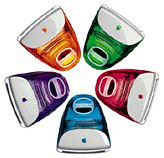
code name: Lifesavers
Skipping right past 300 MHz and coming on the market just three months after the 266 MHz Revision C iMac, the Revision D iMac runs at a speedy 333 MHz. In addition to a 25% faster CPU, the iMac 333 ships in the same five colors: tangerine, grape, lime, blueberry, and strawberry.
Except for the faster CPU, the iMac 333 matches the 266 feature for feature – right down to the $1,199 price. (There were rumors that tangerine and strawberry might be replaced with banana and cherry, but that never happened.)
- Got an iMac? Join our iMac Group or iMacs & eMacs Forum.
- Our Mac OS 9 Group is for those using Mac OS 9, either natively or in Classic Mode.
- Our Puma Group is for those using Mac OS X 10.1.
- Our Jaguar Group is for those using Mac OS X 10.2.
- Our Panther Group is for those using Mac OS X 10.3.
The iMac’s firmware is stored on the same card that holds the CPU and memory chips. If firmware hasn’t been updated and your iMac is acting up, swapping the CPU card from a known working iMac will usually fix things. Then update the firmware in the other iMac.
- iMac speed tip: If you have Virtual Memory on and only 32 MB RAM, set VM to 64 MB for faster performance.
- According to Apple, iMac Update 1.2 should be installed on all iMac computers used in NetBoot client environments.
- If you are running Mac OS 8.6, Mac OS ROM Update 1.0 should be installed. You must have 8.6 installed before running this update.
- For more information on firmware updates, see iMac: When to Install Available Updaters.
If you have a hard drive larger than 8 GB, you should partition it so that the first partition is under 8 GB in size (for simplicity, we suggest 7 GB). Failure to do this could eventually result in an unbootable computer, as all System files must be within the first 8 GB of drive space. These Macs can work successfully with larger drives for some time, but once a System files goes outside of the first 8 GB of space, you’ll have nothing but problems.
Mac OS X
If you have a hard drive over 8 GB in size, you must partition it or you will not be able to install Mac OS X. If you are creating the partition within OS X, it must be smaller than 7.4 GB as reported by Disk Utility (because sometimes a GB is billion bytes and sometimes it’s 1,073,741,824 bytes); we suggest simply setting it at 7 GB to avoid having to redo the whole installation if the partition ends up bigger than specified (it happens). Mac OS X must be completely within the first 8 GB of space on your hard drive or you will not be able to run OS X.
Tray-loading iMacs cannot boot from USB drives (see USB Info and Benefits of Dual-Channel USB).
Non-Apple upgrades and peripherals (such as unsupported USB devices, replacement drives, and third-party memory) may cause problems when installing or booting into Mac OS X.
Be sure that your iMac’s firmware is up to date before you install Mac OS X, and read and follow all of Apple’s “Read Before You Install” instructions to increase the likelihood of getting OS X installed and running on the first try.
The classic Mac OS identifies some 64 MB memory cards as only 32 MB, however OS X will correctly identify them and use all of their memory.
NOTE: The Sonnet HARMONi upgrade card, which includes a faster CPU and FireWire, was incompatible with early versions of Mac OS X 10.4. The FireWire port would tie up 100% of CPU resources. This problem was fixed in version 10.4.7 (if not earlier). If you have a HARMONi card that’s had this issue, be aware that updating to 10.4.7 or newer should fix it.
Details
- announced 1999.04.14 at US$1,199; replaced by iMac DV 1999.10.05
- Mac OS 8.5.1 or later officially supported, although 8.1 can be used, 10.3.x officially supported, 10.4.x can generally be installed using XpostFacto 4
- CPU: 333 MHz PPC 750
- Bus: 66 MHz
- Performance: 5.4 (estimated), relative to 7100/80; 11.1, BYTEmark; 948, MacBench 5 (about 15% faster than the Rev. C)
- RAM: 32 MB, expandable to 384 MB using SO-DIMM SDRAM (3.3V, unbuffered, 64-bit, 144-pin, 100 MHz or faster, 10ns) in two DIMM sockets (256 MB on top, 128 MB on bottom), top DIMM socket accepts 2″ DIMM, bottom socket takes 1.5″ DIMM
* The exact amount a Rev. A-D iMac can be upgraded varies from unit to unit. We have field reports of some models accepting 256 MB modules in both memory socket and reaching 512 MB – and other reports of early iMacs that won’t work at all with 256 MB modules. There appears to be no way to know in advance whether a particular iMac will work with a certain sized memory module. - VRAM: 6 MB SGRAM
- Video: supports resolutions of 640 x 480, 800 x 600, and 1024 x 768 using ATI Rage Pro Turbo chip set, will support resolutions to 1600 x 1200 on an external monitor
- Display: 15″ CRT (13.8″ viewable) multiscan to 1024 x 768
- L2 cache: 512 KB 133 MHz (5:2) backside cache
- Hard drive: 6 GB EIDE drive. Maximum IDE drive size is 128 GB without third-party support. See How Big a Hard Drive Can I Put in My iMac, eMac, Power Mac, PowerBook, or iBook? for your options.
- CD-ROM: 24x
- SCSI: none
- PCI slots: none
- Microphone: built in (above monitor), standard 3.5mm minijack compatible with line-level input including Apple’s PlainTalk microphone
- USB: 2 USB 1.1 ports on a single controller, require OCHI compatible devices (some early USB peripherals may not be compliant)
- Modem: built-in v.90 56k modem
- Ethernet: 10/100Base-T
- WiFi: AirPort not supported
- Power supply: 200W
- PRAM battery: 3.6V half-AA
- Height: 15.8 in/39.5 cm
- Width: 15.2 in/38.0 cm
- Depth: 17.6 in/44.0 cm
- Weight: 38.1 lb/17.3 kg
- part numbers: M7440 (blueberry), M7441 (strawberry), M7442 (grape), M7443 (tangerine), M7444 (lime)
- Model identifier: iMac,1
Online Resources
- See online resources for: 333 MHz iMac (Rev. D)
Suggested Accessories
- UniSwitch, iMacButton, and iSafe makes resetting much easier.
- A more conventionally shaped mouse. We’re huge fans of the Contour UniMouse.
Cautions
- You cannot plug the iPod shuffle directly into the iMac’s USB port – it will not fit. It will not charge if plugged into a keyboard USB port or an unpowered USB hub. To charge it while using it with your iMac, you must us a USB extension cable, powered USB hub, iPod shuffle dock, or a USB power adapter.
- You must have the keyboard plugged directly into an iMac USB port to boot with the power key; it will not work if the keyboard is attached to a hub.
- You cannot boot the iMac from an external USB drive.
- The iMac loads the MacOS Toolbox into RAM, unlike other Macs which use it from ROM. You lose the use of 3 MB of memory but gain faster performance.
Keywords: #imacrevd #8gbpartition #trayloadimac #imacg3
Short link: http://goo.gl/oaZS4K
searchword: imacrevd




