
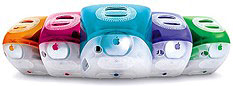
 Development of the slot loading “Kihei” iMac began the day after the first iMac shipped. The new model is an evolutionary development of Apple’s 2,000,000 unit best seller and requires Mac OS 8.5 or later.
The new iMac design boasts slot-loading CD-ROM and DVD-ROM drives, a 100 MHz system bus, RAGE 128 graphics on a 2x AGP bus, a Harmon Kardon sound system (with an optional subwoofer), and support for Apple’s 802.11b AirPort Card (optional adapter required). The new case design allows for air cooling (just like the old Mac Plus and Volkswagen Beetle), so there’s no cooling fan. The new model is a bit smaller and lighter than the tray-loading iMacs, and this was the first time the iMac was available in more than a single speed.
- Got an iMac? Join our iMac Group or iMacs & eMacs Forum.
- Our Mac OS 9 Group is for those using Mac OS 9, either natively or in Classic Mode.
- Our Puma Group is for those using Mac OS X 10.1.
- Our Jaguar Group is for those using Mac OS X 10.2.
- Our Panther Group is for those using Mac OS X 10.3.
- Our Tiger Group is for those using Mac OS X 10.4.
The 350 MHz entry-level model is available only in blueberry, has a CD-ROM drive and 6 GB hard drive, and is the only member of this family that doesn’t include a FireWire port. It shipped with 64 MB of RAM, expandable to 1 GB.
The 400 MHz iMac DV is available in the same five colors as the Revision C and Revision D iMacs. It includes a 10 GB hard drive, a DVD-ROM drive, and a FireWire port, which provided support for external hard drives, CD- and DVD-burners, Apple’s iSight webcam, and more.
At the top of the line is the 400 MHz iMac DV Special Edition, available exclusiverly in graphite. It is distinguished from the DV model by its color, a 13 GB hard drive, and the inclusion of 128 MB of RAM.
Mac OS 9
- If you are running Mac OS 9.1 or later, iMac Firmware Update 4.1.9 should be installed. If you are using Mac OS X, you must boot from a Mac OS 9.1-9.2.2 writeable partition (not a CD or network disk) prior to updating. You cannot update to OS X 10.3 or later unless you first install Firmware Update 4.1.9.
- For more information on firmware updates, see iMac: When to Install Available Updaters.
Mac OS X
Non-Apple upgrades and peripherals (such as unsupported USB devices, replacement drives, and third-party memory) may cause problems when installing or booting into Mac OS X.
Be sure to read and follow Apple’s “Read Before You Install” install instructions to increase the likelihood of getting OS X installed and running on the first try.
Details
- introduced 1999.10.05.
- Requires Mac OS 8.6 through OS X 10.4.x Tiger
- CPU: 350/400 MHz PPC 750
- Bus: 100 MHz
- RAM: 64/128 MB, expandable to 1 GB using two PC100 SDRAM (3.3 V, 64-bit, 168-pin, 100 MHz)
- VRAM: 8 MB SGRAM
- Video: supports resolutions of 640 x 480, 800 x 600, and 1024 x 768 using ATI RAGE 128 VR chip set and 2x AGP, has VGA port for external monitor, which can only display same resolutions as internal monitor
- Display: 15″ CRT (13.8″ viewable) multiscan to 1024 x 768
- L2 cache: 512 KB 160 MHz (5:2) backside cache
- Hard drive: 6/10/13 GB EIDE drive. Maximum IDE drive size is 128 GB without third-party support. See How Big a Hard Drive Can I Put in My iMac, eMac, Power Mac, PowerBook, or iBook? for your options.
- CD-ROM: 24x (350 MHz model)
- DVD-ROM: 4x (400 MHz models)
- SCSI: none
- PCI slots: none
- USB: 2 separate USB 1.1 ports and controllers
- FireWire 400: 2 ports
- Modem: built-in v.90 56k modem
- Ethernet: 10/100Base-T
- WiFi: 802.11b AirPort Card, requires AirPort Card Adapter
- Microphone: internal
- Power supply: 150W
- PRAM battery: 3.6V half-AA
- Height: 15.0 in/38.1 cm
- Width: 15.0 in/38.1 cm
- Depth: 17.1 in/43.5 cm
- Weight: 34.7 lb/15.8 kg
- family numbers: M5521
- Model identifier: PowerMac2,1
Online Resources
- Best iMac G3 deals.
- Best Classic Mac OS Deals. Best online prices for System 6, 7.1, 7.5.x, Mac OS 7.6, 8.0, 8.1, 8.5, 9.0, 9.2.2, and other versions.
- Best Mac OS X 10.0-10.3 Deals. Best online prices for Mac OS X 10.0, 10.1, 10.2, and 10.3.
- Best Mac OS X 10.4 Tiger Deals. Best online prices for Mac OS X 10.4.
- Which iMac is it? A quick guide to differentiating CRT G3 iMacs, Dan Knight, Mac Daniel, 2005.02.02. Two form factors, nine CPU speeds, and fifteen different colors. How can anyone keep this straight?
- What’s the Best Version of OS X for My Mac?, Ian R Campbell, The Sensible Mac, 2008.02.28. Which version of Mac OS X is best for your hardware depends on several factors.
- Low End Mac’s Compleat Guide to Mac OS 9, Charles W Moore, Miscellaneous Ramblings, 2008.05.12. Mac OS 9 remains fast and stable, but Classic software hasn’t kept up with the changing internet. Which Macs support OS 9, where to buy it, and how to update to 9.2.2.
- The iMac Legacy: The G3 Era, Dan Knight, Mac Musings, 2008.08.15. 10 years ago today, the original iMac went on sale. One of the most popular lines of computers ever, the G3 iMac would be Apple staples for nearly five years.
- Know Your Mac’s Upgrade Options, Phil Herlihy, The Usefulness Equation, 2008.08.26. Any Mac can be upgraded, but it’s a question of what can be upgraded – RAM, hard drive, video, CPU – and how far it can be upgraded.
- Overclocking a slot-loading iMac G3, Dan Knight, Mac Daniel, 2009.02.12. Instructions for overclocking a slot-loading iMac (350 MHz to 500 MHz). Proceed at your own risk.
- WiFi Hardware Compatible with Desktop Macs Running OS X, MetaPhyzx, Mac Daniel, 2009.03.11. USB, ethernet, PCI, and other wireless hardware compatible with Mac OS X.
- WiFi Adapters for Desktop Macs Running Mac OS 9, MetaPhyzx, Mac Daniel, 2009.02.10. USB, ethernet, PCI, and other wireless hardware compatible with the Classic Mac OS.
- Back to Pismo, Power Mac G4 CPU vs. video upgrades, faster YouTube with older Flash, and more, Charles W Moore, Miscellaneous Ramblings, 2010.01.20. Also still using an Apple IIGS, Delete vs. Backspace key, old iBook and PowerBook power consumption, iSlate speculation, and more.
- Teaching an old iMac some new tricks, Dan Bashur, Apple, Tech, and Gaming, 2009.10.02. Using a G3 iMac as part of your home entertainment center with remote control, audio out to your stereo, and video out to your TV.
- The Future of Up-to-Date Browsers for PowerPC Macs, Charles W Moore, Miscellaneous Ramblings, 2009.08.31. With Intel-only “Snow Leopard” shipping, software support for PPC Macs will continue its decline. Also, a look at SeaMonkey 2 and Camino 1.6.9.
- Optimized Software Builds Bring Out the Best in Your Mac, Dan Knight, Low End Mac’s Online Tech Journal, 2009.06.30. Applications compiled for your Mac’s CPU can load more quickly and run faster than ones compiled for universal use.
- Tips for Installing or Reinstalling Mac OS X 10.4 Tiger, Adam Rosen, Adam’s Apple, 2009.06.10. Mac OS X 10.4 uses less memory than Leopard, supports Classic Mode on PowerPC Macs, and, unlike Leopard, is supported on G3 Macs.
- Is It Worth Maxing the RAM in Old G3 and G4 Macs?, Simon Royal, Tech Spectrum, 2009.04.15. Increasing memory can make your old Mac faster and make you more productive, but it probably won’t improve resale value by the amount you spend.
- Overheating PowerBook, 7200 rpm in a G3 iMac, getting online during blackouts, and more, Charles W Moore, Miscellaneous Ramblings, 2009.01.14. PowerPC support in iLife 09 a pleasant surprise, no overheating issues with 7200 rpm drive in an iMac, and dialup access as a good backup plan for power failures.
- Blackouts and Web access, death of a Kanga, the future of PowerPC Macs, and more, Charles W Moore, Miscellaneous Ramblings, 2009.01.07. Also another email client suggestion and whether a G3 iMac can handle a 7200 rpm hard drive without overheating.
- Practical iMac G3 applications and upgrades, Dan Knight, Mac Musings, 2008.12.22. Used G3 iMacs are going for a song these days, but are they worth spending money on, let along upgrading?
- 4 GB RAM problem persists after firmware update, TriBook concept MacBook, DIY Mac netbook, and more, The ‘Book Review, 2008.12.19. Also using third-party monitors with ‘Late 2008’ MacBooks, MacMagSaver protects MagSafe cord, $25 802.11g USB adapter, bargain ‘Books from $500 to $2,299, and more.
- The ‘Better Safe Than Sorry’ Guide to Installing Mac OS X Updates, Charles W Moore, Miscellaneous Ramblings, 2008.12.16. Most users encounter no problems using Software Update, but some preflight work and using the Combo updater means far less chance of trouble.
- Why You Should Partition Your Mac’s Hard Drive, Dan Knight, Mac Musings, 2008.12.11. “At the very least, it makes sense to have a second partition with a bootable version of the Mac OS, so if you have problems with your work partition, you can boot from the ’emergency’ partition to run Disk Utility and other diagnostics.”
- Old Macs in the new economy, John Hatchett, Recycled Computing, 2008.11.25. “We are the kings of making our computers last, last, and last some more.”
- Every working computer is useful to someone, Allison Payne, The Budget Mac, 2008.11.19. Whether it’s a PowerBook 1400, G3 iMac, or Power Mac G4, it could be all the computer someone needs.
- How to clone Mac OS X to a new hard drive, Simon Royal, Tech Spectrum, 2008.10.07. Whether you want to put a bigger, faster drive in your Mac or clone OS X for use in another Mac, here’s the simple process.
- Getting the most from your G3 Mac, Simon Royal, Tech Spectrum, 2008.10.03. Most G3 Macs can be upgraded so they can run Mac OS X 10.4 ‘Tiger’ quite nicely. Here’s how.
- 9 browsers for G3 and older G4 Macs compared, Simon Royal, Tech Spectrum, 2008.09.26. The latest versions of Opera, Safari, Shiira, iCab, Radon, Firefox, Demeter, Sunrise, and Camino that run on Mac OS X 10.4 “Tiger”.
- There’s still a place for G3 Macs in the Age of Leopard, John Hatchett, Recycled Computing, 2008.09.09. Whether it’s a sage iMac or a Pismo PowerBook, G3 Macs can be very productive with Mac OS X 10.4 ‘Tiger’.
- Are G3 Macs still viable work machines?, Simon Royal, Tech Spectrum, 2008.09.08. For basic tasks – writing, email, and using the Web – a G3 Mac with Mac OS X 10.4 and sufficient memory provides plenty of power.
- Using low end Macs for Internet radio, Gordon R. Brown, My Turn, 2008.08.18. When the local public radio station moved classical music to HD radio, it was time to find another way to listen. An old iMac with iTunes solved the problem.
- How the G3 iMac crumbles, Tommy Thomas, Welcome to Macintosh, 2008.01.18. The green light of death, failing powerboards, and crumbling plastics are some of the problems old CRT iMacs face as they age.
- Hot so Reset the Cuda/PMU in a G3 iMac, How to Upgrade Your iMac
- Bringing G3 iMacs and other G3 Macs into the Tiger Age, Dan Knight, Mac Daniel, 2007.12.07. Tips on hard drives, memory, WiFi, and getting Mac OS X 10.4 installed on G3 iMacs and other older G3 Macs.
- Leopard on a G3 iMac (with a G4 upgrade), flashed video card problems, the cheapest G4 Mac, and More, Dan Knight, Low End Mac Mailbag, 2007.12.03. More unsupported Leopard reports point to the importance of a good video card, success on a CRT iMac with a G4/550 upgrade, and whether Sawtooth or Quicksilver is a better buy.
- Switching to Mac tripled my productivity, Ted Bragg, My First Mac, 2007.12.03. Tired of losing work and tech support, Bragg bought an iMac, switched to Mac versions of his apps, and tripled his output the first year.
- Road Apple nominations, OS X 10.5 on MDD Power Macs, UMPCs and Apple, and a broken power button, Dan Knight, Low End Mac Mailbag, 2007.10.12. Whether some additional Macs merit the ‘Road Apple’ label, Leopard on Mirrored Drive Doors Power Macs, the usefulness of ultrasmall computers, and dealing with an iMac with a broken power button.
- The future of G3 iMacs in the Age of Leopard, Dan Knight, Mac Musings, 2007.09.13. From August 1998 through December 2001, G3 iMacs were Apple’s hot consumer computers. Which ones are best for OS X, and which should be avoided?
- Tiger on a G3 iMac and Pismo, running OS 9 from a flash drive, 7200 rpm drive heat, and more, Dan Knight, Low End Mac Mailbag, 2007.09.13. Also iMac upgrade advice, iBook G3 video chip resoldering, and how to get your website indexed by Google.
- Choosing and upgrading a 12″ PowerBook, too much about Windows, the blue iMac blues, and more, Dan Knight, Low End Mac Mailbag, 2007.09.11. Also the pros and cons of running Mac OS X 10.4 ‘Tiger’ on a blue and white G3 and one more tip for burning CDs that will work on old Macs.
- iPhone cost, Low End Mac on the iPhone, using an LCD display with a G3 iMac, getting files off SCSI drives, and more, Dan Knight, Low End Mac Mailbag, 2007.07.26. Also sources for used Mac games and problems with Low End Mac’s home page in Safari.
- External video options for a G3 iMac, Dan Knight and Kris Finkenbinder, Low End Mac Mailbag, 2007.07.25. Many G3 iMacs are fuzzy at 1024 x 768. What are the options for connecting an external monitor and disabling the built-in display?
- Software to darken iMac display, columnist returns iPhone, Logitech introduces air mouse, and more, Mac News Review, 2007.07.20. Also a USB turntable for turning your record albums into MP3s, a retractable flash drive, iPhone: The Missing Manual, Parallels Desktop 3 a major update, and more.
- Even if Leopard leaves G3 behind, Tiger users will still be able to run up-to-date apps, Dan Knight, Mac Musings, 2007.06.18. While Apple may drop G3 support in OS X 10.5, there will continue to be plenty of options for 10.4 users who want to run up-to-date browsers, email clients, and instant messaging programs.
- Making new Mac users with old iMacs and Tiger, buying newer vs. upgrading, booting Compact Flash, and more, Dan Knight, Low End Mac Mailbag, 2007.05.29. Getting seniors online with old iMacs, buying a newer Mac rather than upgrading an old one, booting PowerBooks from Compact Flash, and questions about video conferencing.
- The Truth About CRTs and Shock Danger, Tom Lee, Online Tech Journal, 2007.05.22. You’ve been warned that CRT voltage can injure and even kill. The truth is that this danger is overstated – and takes attention away from a greater danger.
- Why Apple must continue G3 support in Mac OS X 10.5 ‘Leopard’, Dan Knight, Mac Musings, 2007.05.08. “We’re worried about what happens if Apple unchecks that box in Xcode to include the instructions necessary to run OS X on G3 processors at all.”
- Troubleshooting an iMac and possible Pismo overheating, Charles W Moore, Miscellaneous Ramblings, 2007.03.19. Figuring out what’s wrong with a G3 iMac that won’t boot properly and possily spurious temperature readings from Gauge Pro.
- How much Mac do you really need to run OS X?, Ted Hodges, Vintage Mac Living, 2006.11.16. You don’t need dual-core Intel processors to read email or use the Web. Here are some 1999-2001 Macs that could be all you need.
- Is the G3 still a practical choice?, Matthew Jay, Macs to the Max, 2006.08.10. Although the G3 is several generations old, it has enough horsepower for most of the things we do on our computers.
- Customizing Mac OS 9, Nathan Thompson, Embracing Obsolescence, 2006.08.01. Fiddling with themes, picking a browser, and making the Classic Mac OS work just the way you want it to.
- A $25 iMac! It’s a steal, but what to do with it?, Adam Robert Guha, Apple Archive, 2006.07.28. A $25 iMac (less mouse and keyboard) from the local thrift shop was a great find, but what would be the best way to put it to use?
- Panther on a G3 iMac, B&W G3 sold, and the state of my other Macs, Nathan Thompson, Embracing Obsolescence, 2006.07.18. Although running OS X 10.3.9 on a 6-year-old iMac, the author still maintains his stable of older Macs running the Classic Mac OS.
- More ways to add OS 9 features to OS X, modem problems with MacBook and USB modem, Opera problem, and more, Charles W Moore, Miscellaneous Ramblings, 2006.07.17. Also potential problems using Target Disk Mode to install the OS, using Classic on Intel Macs, value of Pismo G4 upgrades, “Tiger” on a G3 iMac, better laptop ergonomics, and more.
- ‘Argh’ moments switching to OS X, Mac OS 9 ‘amazingly fast’, make your own anti-spam machine, and more, Mac News Review, 2006.07.14. Also Mac OS X Routine Maintenance page updated, developer notes for education-only iMac, and a new SATA enclosure for the Mac.
- Installing OS X 10.4 ‘Tiger’ on DVD-challenged Macs using FireWire Target Disk Mode, Charles W Moore, Miscellaneous Ramblings, 2006.07.10. Mac OS X ships on a single install DVD, which Apple will exchange for CDs at $10. But if you have access to a DVD-equipped Mac and a FireWire cable, you’re good to go.
- Getting IE 4.5 to work with Low End Mac, 7200 rpm drive heat in an iMac, upgrading OS X on a white iBook, and more, Dan Knight, Low End Mac Mailbag, 2006.06.29. Configuring Internet Explorer 4.5 to work with CSS-based websites, overheating issues with iMacs, positive results with OS X upgrades, and problems getting an SD flash card to work in a PowerBook 1400.
- Making the move from Jaguar (OS X 10.2) to Panther (10.3), Ted Hodges, Vintage Mac Living, 2006.04.11. One advantage of Apple’s “no upgrades” policy for OS X – someone can give you their old copy after upgrading without worrying about violating their license.
- FastMac’s $190 8x dual-layer SuperDrive for PowerBooks and dual USB iBooks, Charles W Moore, Miscellaneous Ramblings, 2006.01.30. For US$190-250 you can replace the CD-ROM, CD-RW, Combo, or slow old SuperDrive in most PowerBooks, white iBooks, slot-loading iMacs, and Cubes with a faster, dual-layer drive.
- Web browser tips for the classic Mac OS, Nathan Thompson, Embracing Obsolescence, 2006.01.03. Tips on getting the most out of WaMCom, Mozilla, Internet Explorer, iCab, Opera, and WannaBe using the classic Mac OS.
- The best browsers for PowerPC Macs and the classic Mac OS, Nathan Thompson, Embracing Obsolescence, 2005.12.16. Two browsers stand out from the pack: iCab 3 is modern and remains under development, and WaMCom brings Mozilla to older Macs.
- How Big a Hard Drive Can I Put in My iMac, eMac, Power Mac, PowerBook, or iBook?, Dan Knight, Mac Daniel, 2005.10.24. A lot of older Macs don’t know how to deal with drives over 128 GB in size. We look at three options.
- Upgrading an old iMac to Mac OS X, William Porter, TidBITS, 2005.02.07. Preparing a pair of 2001 iMacs for OS X and then getting Jaguar up and running on them.
- Why the slot loading iMac Is a good choice for OS X, Dan Knight, Mac Daniel, 2004.09.10. With prices starting at just over US$200, a tray-loading iMac can be a great choice for running OS X.
- Upgrades for the slot-loading iMac, Dan Knight, iMac Channel, 2003.05.15. Overview of memory, hard drive, media drive, and CPU upgrade options for slot-loading iMacs.
- 500 MHz G4 upgrade for slot-loading iMacs, Insanely Great Mac, 2003.04.15. G4 power, a bigger level 2 cache, and 500 MHz speed. US$307 shipped.
- Upgrading your G3 iMac, Evan Kleiman, Mac Daniel, 2003.03.07. Three types of upgrades that can improve your old iMac for less than the cost of buying a new one.
- Shot in the foot again: Firmware update disables RAM, Dan Knight, Mac Musings, 3/25. “…we should not be at risk of losing some or all of the memory in our Macs because of a firmware update.”
- Macs and digital video, Charlie Ruggiero, Mac Daniel, 3/22. Starts out looking at video editing on Macs, then examines various video formats. A good read if you’re at all interested in video editing or buying a camcorder.
- The rack-mount iMac, Charles W Moore, Applelinks, 3/23. ISP repacks $1,000 iMac (less monitor) for a small, inexpensive, powerful server.
- Opinion: Apple storms Hollywood with new movie software, KMSP.com. “iMovie, in short, is probably one of the most compelling pieces of software available for the iMac. It’s also probably the most fun and one of the easiest multimedia titles.”
- Review: Apple’s iMovie software, MacWeek, 12/17/1999
- The iMac channel
- The iMac List, an email list iMac users
- The iMac NewsPage
- Apple Specs for iMac/iMac DV (Slot Loading CD-ROM)
Cautions
- You cannot plug the iPod shuffle directly into the iMac’s USB port – it will not fit. It will not charge if plugged into a keyboard USB port or an unpowered USB hub. To charge it while using it with your iMac, you must us a USB extension cable, powered USB hub, iPod shuffle dock, or a USB power adapter.
- Update Firmware Before Installing Jaguar!, Geoff Duncan, TidBITS, 2002.10.28. If your firmware isn’t at version 4.1.9, you need to boot into OS 9.1 and install it before attempting to install Jaguar (OS X 10.3) on your slot-loading CD-ROM or DVD iMac.
- You must have the keyboard plugged directly into an iMac USB port to boot with the power key; it will not work if the keyboard is attached to a hub.
- You cannot boot the iMac from an external USB drive.
- The iMac loads the MacOS Toolbox into RAM, unlike other Macs which use it from ROM. You lose the use of 3 MB of memory but gain faster performance.
