
The 500 MHz Early 2001 iMac is the middle member of the Early 2001 family. It is Apple’s least expensive computer with CD-RW capability and comes in indigo, flower power, and blue Dalmatian (really – see the picture!).
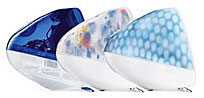 This model replaces the 450 MHz Mac DV+ at a $100 price reduction while adding CD-RW, improved video, and a faster CPU.
The North American edition differs from the international edition in the following ways:
- Uses newer PowerPC 750CXe processor, not older PPC 750
- 500 MHz 256 KB on-chip cache, not 200 MHz 512 KB backside cache
- ATI Rage 128 Ultra, not older Rage 128 Pro
- 16 MB video memory, not 8 MB
Community
- Got an iMac? Join our iMac Group or iMacs & eMacs Forum.
- Our Mac OS 9 Group is for those using Mac OS 9, either natively or in Classic Mode.
- Our Puma Group is for those using Mac OS X 10.1.
- Our Jaguar Group is for those using Mac OS X 10.2.
- Our Panther Group is for those using Mac OS X 10.3.
- Our Tiger Group is for those using Mac OS X 10.4.
Mac OS 9
- If you are running Mac OS 9.1 or later, iMac Firmware Update 4.1.9 should be installed. If you are using Mac OS X, you must boot from a Mac OS 9.1-9.2.2 writeable partition (not a CD or network disk) prior to updating. You cannot update to OS X 10.3 or later unless you first install Firmware Update 4.1.9.
- For more information on firmware updates, see iMac: When to Install Available Updaters.
Mac OS X
Non-Apple upgrades and peripherals (such as unsupported USB devices, replacement drives, and third-party memory) may cause problems when installing or booting into Mac OS X.
Be sure to read and follow Apple’s “Read Before You Install” install instructions to increase the likelihood of getting OS X installed and running on the first try.
Details
- introduced 2001.02.22 at US$1,199
- Requires Mac OS 9.1 through OS X 10.4.x Tiger
- CPU: 500 MHz PPC 750CXe (a.k.a. G3e)
- Bus: 100 MHz
- Performance:
- Geekbench 2 (Tiger): 266
- RAM: 64 MB, expandable to 1,024 MB using two PC100 SDRAM (3.3 V, 64-bit, 168-pin, 100 MHz)
- VRAM: 16 MB
- Video: supports resolutions of 640 x 480 at 117 Hz, 800 x 600 at 95 Hz, and 1024 x 768 at 75 Hz using ATI RAGE Ultra 128 chip set
- Display: 15″ CRT (13.8″ viewable) multiscan to 1024 x 768
- L2 cache: 256 KB on-chip cache running at full CPU speed
- Hard drive: 20 GB Ultra ATA drive. Maximum IDE drive size is 128 GB without third-party support. See How Big a Hard Drive Can I Put in My iMac, eMac, Power Mac, PowerBook, or iBook? for your options.
- CD-RW: 8x/4x/24x maximum throughput
- USB: 2 separate USB 1.1 ports and controllers
- FireWire 400: 2 ports
- Modem: built-in v.90 56k modem
- Ethernet: 10/100Base-T
- WiFi: 802.11b AirPort Card, requires AirPort Card Adapter
- Microphone: internal
- Power supply: 150W
- PRAM battery: 3.6V half-AA
- Height: 15.0 in/38.1 cm
- Width: 15.0 in/38.1 cm
- Depth: 17.1 in/43.5 cm
- Weight: 34.7 lb/15.8 kg
- part numbers: M7669 (indigo), M8347 (blue Dalmatian), M8348 (flower power)
- family numbers: M5521
- Model identifier: PowerMac4,1
Online Resources
Cautions
- You cannot plug the iPod shuffle directly into the iMac’s USB port – it will not fit. It will not charge if plugged into a keyboard USB port or an unpowered USB hub. To charge it while using it with your iMac, you must us a USB extension cable, powered USB hub, iPod shuffle dock, or a USB power adapter.
- iMacs released in February 2001 and July 2001 should have iMac Power Management Update 1.1 installed to solve a problem with losing PRAM settings when the computer is disconnected from power for an extended period of time. See Knowledge Base article 120048 for full details.
- OS X: Macworld UK noted on 2001.03.28 that the OS 9.1 CD included with OS X will not install on the PowerBook G4, Power Mac G4 (133 MHz bus), or 2001 iMacs. The solution is to use the Mac OS 9.1 CD that came with the computer.
- You must have the keyboard plugged directly into an iMac USB port to boot with the power key (Eject on the Apple Pro Keyboard); it will not work if the keyboard is attached to a hub.
- The iMac loads the MacOS Toolbox into RAM, unlike other Macs which use it from ROM. You lose the use of 3 MB of memory but gain faster performance.


