
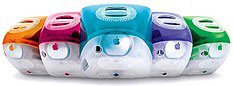
 Development of the “Kihei” iMac began the day after the first iMacshipped. The new model is an evolutionary development of Apple’s 2,000,000 unit seller.
The first iMacs with a DVD-ROM drive, the iMac DV and DV SE run a lightning fast 400 MHz G3 processor on a 100 MHz system bus and are the first iMacs with FireWire. The slot-loading drive protects the drive mechanism, while the new Harman Kardon sound system improves audio output. (HK released a complementary subwoofer in November.)
The RAGE 128 graphics and 2x AGP give it superior graphics performance, and the VGA port allows using an external monitor or LCD projector.
- Got an iMac? Join our iMac Group or iMacs & eMacs Forum.
- Our Mac OS 9 Group is for those using Mac OS 9, either natively or in Classic Mode.
- Our Puma Group is for those using Mac OS X 10.1.
- Our Jaguar Group is for those using Mac OS X 10.2.
- Our Panther Group is for those using Mac OS X 10.3.
- Our Tiger Group is for those using Mac OS X 10.4.
Available in the same five colors as the Revision C and Revision D iMacs, the DV is a bit smaller and has more transparent plastics. The new case allows the iMac to air cool (just like the old Volkswagen Beetle), eliminating the need for a cooling fan.
- If you are running Mac OS 9.1 or later, iMac Firmware Update 4.1.9 should be installed. If you are using Mac OS X, you must boot from a Mac OS 9.1-9.2.2 writeable partition (not a CD or network disk) prior to updating. You cannot update to OS X 10.3 or later unless you first install Firmware Update 4.1.9.
- For more information on firmware updates, see iMac: When to Install Available Updaters.
Mac OS X
Non-Apple upgrades and peripherals (such as unsupported USB devices, replacement drives, and third-party memory) may cause problems when installing or booting into Mac OS X.
Be sure to read and follow Apple’s “Read Before You Install” install instructions to increase the likelihood of getting OS X installed and running on the first try.
Details
- introduced 1999.10.05 at US$1,299; replaced by iMac DV and DV+ on 2000.07.19
- Requires Mac OS 8.6 through OS X 10.4.x Tiger
- CPU: 400 MHz PPC 750
- Bus: 100 MHz
- Performance:
- Geekbench 2 (Tiger): 177
- MacBench 5: CPU, 1139, FPU, 1296 (beige G3/300 = 1000)
- BYTEmark: 13.1
- RAM: 64 MB, expandable to 1 GB using two PC100 SDRAM (3.3 V, 64-bit, 168-pin, 100 MHz)
- VRAM: 8 MB SGRAM
- Video: supports resolutions of 640 x 480, 800 x 600, and 1024 x 768 using ATI RAGE 128 VR chip set and 2x AGP, has VGA port for external monitor, which can only display same resolutions as internal monitor
- Display: 15″ CRT (13.8″ viewable) multiscan to 1024 x 768
- L2 cache: 512 KB 160 MHz (5:2) backside cache
- Hard drive: 10 GB EIDE drive. Maximum IDE drive size is 128 GB without third-party support. See How Big a Hard Drive Can I Put in My iMac, eMac, Power Mac, PowerBook, or iBook? for your options.
- DVD-ROM: 4x
- SCSI: none
- PCI slots: none
- USB: 2 separate USB 1.1 ports and controllers
- FireWire 400: 2 ports
- Modem: built-in v.90 56k modem
- Ethernet: 10/100Base-T
- WiFi: 802.11b AirPort Card, requires AirPort Card Adapter
- Microphone: internal
- Power supply: 150W
- PRAM battery: 3.6V half-AA
- Height: 15.0 in/38.1 cm
- Width: 15.0 in/38.1 cm
- Depth: 17.1 in/43.5 cm
- Weight: 34.7 lb/15.8 kg
- part numbers: M7493 (blueberry), M7673 (strawberry), M7672 (grape), M7671 (tangerine), M7674 (lime)
- family numbers: M5521
- Model identifier: PowerMac2,1
Online Resources
- See online resources for: 400 MHz iMac DV (Late 1999)




