
1998.10: With USB, Apple is in the odd position of strongly promoting a technology invented on the Wintel side – but not yet embraced there.
Despite the pain of early adopters (iMac buyers), there are now USB printers, keyboards, mice, trackballs, and more.
Background
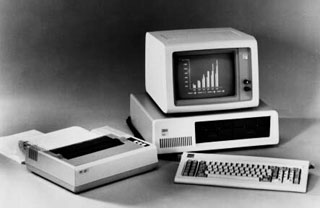 The first IBM PC came standard with two ports: one for the keyboard, the other for a cassette tape player that could be used to save and restore programs. Support for monitors, printers, modems, and other devices came through adding cards: video for the monitor, usually parallel for the printer, and either serial for the modem or an internal modem card. (And let’s not forget the floppy controller for those who wanted to use floppy disks instead of cassette tapes.)
Soon came the mouse, which used a serial port at first and later received a dedicated mouse port. Over time, it became common to see PCs with a multitude of I/O ports: keyboard, mouse, 1-2 parallel, 1-2 serial. Some had additional ports for networking, external tape drives, etc.
The parallel port was relatively fast. A bidirectional parallel port could function like a poor man’s SCSI port, but slower and with just one device. Serial ports often supported speeds to 38.4 kbps, slow compared with parallel ports or 56k modems. And keyboard ports were even slower.
Enter USB
The idea behind USB (Universal Serial Bus) was to replace a plethora of incompatible ports with one standard I/O port. USB is fast enough (10Base-T ethernet speed) for anything but hard drives and tape drives. It is hot swappable, which means a user can add and disconnect devices without shutting down the computer. And it can support up to 127 devices, so chaining a keyboard, mouse, printer, modem, joystick, game controller, sketch pad, digital camera, memory card reader, and more is possible, although you’ll need a hub to add more than two devices to your iMac. (Nice touch: several USB devices, including the iMac keyboard, act as a hub.)
USB should be a very big thing in the Wintel world, especially since most (maybe all) current Windows computers come with USB ports and Windows 98 includes full USB support.
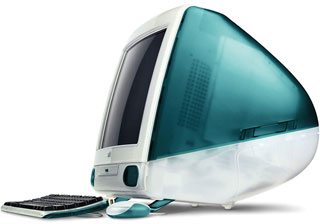 But it took Apple to jump start the USB peripheral market with the iMac.
It’s Good for Us
USB is good for the Apple community because, much as we hate to admit it, Mac market share took a real nose dive, not recovering until the iMac shipped in mid-August. With a market share below 10%, Apple was watching peripherals companies turn their efforts to the Windows platform, sometimes to the exclusion of the Macintosh.
In the peripheral market, this meant less choices in ergonomic keyboards, multi-button mice, printers, and game controllers. The Mac market has never had a strong selection of joysticks or printers, and the problem only got worse as market share dropped.
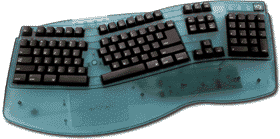
An ergonomic USB keyboard designed to match the iMac’s Bondi blue.
Now Epson, Gravis, Kensington, Hewlett-Packard, and a multitude of others can design one peripheral for both Mac and Windows markets. Instead of creating two separate pieces of hardware, each with its own drivers, USB means the same device can work on both platforms simply by creating drivers for each. (Some devices don’t even need drivers. Any USB mouse should work on the iMac, although all buttons will probably register as a simple click without a driver. And any USB keyboard should be plug-and-play on the iMac, including Microsoft’s ergonomic keyboard.)
Update: Multi-button mice were addressed in Mac OS X, which automatically recognizes the buttons and scroll wheel on most 3-button USB mice. Windows keyboards are mapped differently than Mac keyboards, but Apple finally added support for that with OS X 10.4 Tiger. Some vendors provided their own keyboard drivers to make their keyboards work better on Classic OS Macs.
Times of change aren’t easy. Fortunately, there are ways of attaching most old Mac hardware to the iMac, with the exception of SCSI drives, so we haven’t lost access to a lot of old Mac peripherals.
Better yet, the iMac and future Macs will give us access to a broad range of peripherals that never would have been available if Apple hadn’t embraced USB as the primary I/O port on the iMac.
Related Reading
- FireWire: Connection of the (Near) Future, MacTimes – no longer online
- Where No Mac Has Gone Before, iMac Channel
- USB, Good Enough for the Low End, Online Tech Journal
- USB and the OfficeJet, iMac Channel
keywords: #imac #usb
