
Sept. 1998: It’s a bit embarrassing to admit it, especially since I run one of the more successful iMac sites, but I don’t own an iMac, haven’t ordered an iMac, and doubt I’ll buy an iMac.
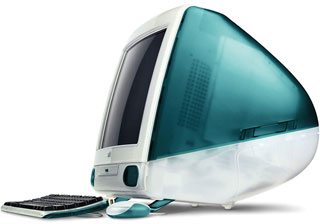 It’s not that I’m not enthusiastic about the iMac. It’s sleek, powerful, and pure Macintosh. In fact, in one of my earliest editorials, I called it “nearly perfect.”
And it is nearly perfect.
My two oldest sons are saving their paper route money for iMacs, so I have nothing against the computer – for most users. I think it represents an unprecedented value (the Color Classic cost $80 more than the iMac when it was introduced).
But it’s not right for everyone.
I work with computers for a living. Specifically, I’m the information systems manager for a network of 70-some Macs, ranging from a Mac IIsi to a 266 MHz Power Mac G3. In my spare time (they’re Macs, so they don’t require a whole lot of support), I design book interiors.
I’ve been using 20″ and 21″ monitors at work for six years. You quickly grow used to the extra real estate, which was a big improvement over the SE/30 I used when I worked at ComputerLand or the Mac Plus I had at home.
As noted in my article on the seduction of big monitors, Living Large, I’m running a Sony Multiscan 500PS 20″ screen at 1280 x 1024. It’s bright, sharp, and stable. Most of all, it lets me have my browser open and work in a window next to it – no overlap.
At home, I recently upgraded to a 17″ Nokia 447z, which is a very nice monitor in many ways. But it’s only sharp to 1024 x 768, which is where I run it. (My wife is getting used to it, but she often switches to 832 x 624 for the larger text.)
I find this pretty limiting. At 1024 x 768, the text is quite sharp, but windows are always overlapping. That means a redraw pause when I switch between programs, which I do a lot. I’m often running Netscape, Claris Emailer, and Claris Home Page at the same time, frequently with ClarisWorks or Photoshop alongside.
I’ve handled the iMac. I’d love to own one, but at this point, it couldn’t be my primary computer. Sure, it supports 1024 x 768, but the type is very small on its 15″ display and the pixels are a bit fuzzy. (Still, it’s remarkably sharp for that many dots on that small a screen.)
1024 x 768 really cries out for a 17″ monitor. 1152 x 870 works nicely on a 19″. But when you’re used to living large, you’d take more than 1280 x 1024 if you could, and that calls for a rock solid 20-21″ monitor.
Other than that, I’d be very interested in owning an iMac. If someone comes out with a video card for the mezzanine slot that supports my 17″ monitor at 1024 x 768 and a larger one at 1280 x 960 or 1280 x 1024, I’d seriously consider getting an iMac.
That’s me. I’ve been seduced by the large side of the monitor spectrum.
I’d network all my other Macs with ethernet and LocalTalk so I could print to my StyleWriter 4100 and do backup to my SCSI Zip drive. I’d let my wife use the 180 MHz SuperMac J700. I’d make changes in the way I work if I could put a bigger monitor on an iMac.
Why?
First, just because it’s an incredibly cool computer. The odd little round mouse is very responsive. The keyboard has a great feel, although the arrow keys are a bit close together. But there’s a mystique about the iMac that makes you either love it or loathe it.
Second, there’s the power, about twice what my SuperMac has.
Third, with a video card, I could run two monitors at once: the internal 15″ and the larger external monitor. With the Mac, it’s easy to drag things from one screen to the other.
That would definitely be living large!
Update: In 2017, I began using an iMac as a production machine. It’s a 20″ 2.4 GHz Core 2 Duo Early 2008 iMac with 6 GB RAM and a nice 1680 x 1050 pixel display. And in January 2018, I moved to a newer iMac, a 21.5″ 3.06 GHz Core i3 Mid 2010 iMac with 12 GB RAM and a wonderful 1980 x 1080 pixel display. I am living large and loving it!
Further Reading
keywords: #imac
