The iMac Channel
iMac's Keyboard: The Missing Keys
2 August 1998 - Dan Knight
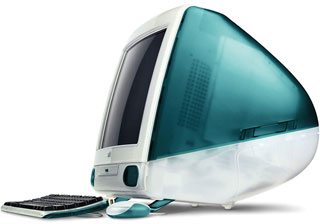
There's a lot to like about the iMac: styling, size, price, value, and a willingness to venture into new territory.
- Face it: no Wintel company has completely abandoned their traditional ports to go exclusively USB.
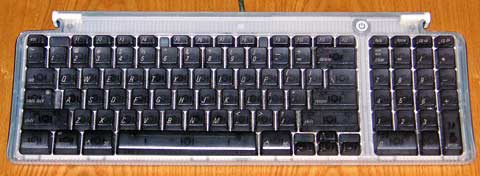
I really like the compact iMac keyboard. By moving the arrow keys over, it's probably 3-4" narrower than Apple's extended keyboard. And by putting half-width F-keys right next to the top row of regular keys, they could save 2" in that direction.
As the owner of a too-small computer table, that's attractive.
But Apple didn't just rearrange keys from the extended keyboard. This morning I noticed that some key are simply missing. (As always, this is based on photographs of prototypes. There is a chance Apple has made changes to the keyboard.)
- As with the PowerBooks and Wintel computers, F-keys are numbered 1 through 12. The Mac has had F13, F14, and F15 since the first extended keyboard shipped in 1987. I've been using F13 as a print key for years, and F15 as a catchall for special macros. (I hope QuicKeys will work with USB keyboards!)
- Help, Home, Page Up, and Page Down remain, but End is gone, as is the [forward] Del key. Again, these are keys I've grown used to. QuicKeys sets Home to bring you to the top of a document, End to bring you to the end. But End is gone.
- The loss of Ctrl and Option keys on the right side of the space bar isn't a big deal, but it may make some key combinations a bit more difficult.
None of these are reasons to dismiss the iMac, which may be
Apple's greatest computing value ever. But for the Mac user used to
these keys, especially the QuicKeys user, their loss will be an
adjustment.
- Dan Knight , webmaster, the iMac channel
Additional resource
- MacAlly has a full-sized 105-key USB keyboard - no missing keys
- Guide to USB Keyboards, MacUSB
Links for the Day
- Mac of the Day: Mac IIfx, introduced 1990.03.19. This 'wicked fast' 40 MHz Mac trumped the 33 MHz DOS world.
- Support Low End Mac
Recent Content
- Fix Home Button Delay, Tablet the Ultimate Mobile PC, iPad Notebook a Possibility, and More, iOS News Review, 2012.02.10. Also using your iPad at work, two photo editors, a new iPad text editor, Macally's magnetic iPad 2 stand, and more.
- White MacBook Goes End-of-Life, Logitech Touch Mouse Supports Gestures, Firmware Updates, and More, The 'Book Review, 2012.02.10. Also MacBook Air better than any Ultrabook, docks for MacBook Pro models, Intel offers improved SSDs, and more.
- Mac and iOS Browsers: Options Galore, Freeware Forum, 2012.02.10. Safari is adequate on Mac and great on iOS, but the range of good alternatives is stunning. LEM writers share their favorites.
- Apple's Support Lead Shipping, Smartphones Outsell PCs, OS X Ported to ARM by Intern, and More, Mac News Review, 2012.02.10. Also the power of Tex-Edit Plus, Google and Twitter are already censoring the Web, Snow Leopard Security Update, and more.
- LogMeIn: Remote Screen Sharing for the Rest of Us, Alan Zisman, Zis Mac, 2012.02.09. Configuring the Mac's built-in screen sharing to work over the Internet can be difficult or impossible. LogMeIn makes it easy.
- 15 Years Ago Motorola Unveiled the PowerPC G3, Low End Mac Round Table, 2012.02.06. The G3 processor was optimized for real world Mac software and made a big leap forward in efficiency.
- Don't Kill Caps Lock, Learning to Love the iOS Keyboard, and an Adaptive iPad Keyboard, Charles W. Moore, Miscellaneous Ramblings, 2012.02.06. The Caps Lock key has a useful function, the iPad's keyboard really is useful, and checking out an adaptive keyboard for the iPad.
- More links in our archive.
Recent Deals
- Best 17" MacBook Pro Deals
- Best iPod classic Deals
- Best eMac Deals
- Best MacBook Air Deals
- Best iBook G4 Deals
- Best iPad Deals
- Best Classic Mac OS Deals
- Best Apple TV Deals
- More deals in our archive.
About LEM Support Usage Privacy Contact
Follow
Low End Mac on Twitter
Join Low End Mac
on Facebook
Low End Mac Reader Specials
TypeStyler 11 is now in the Mac App Store!! -- Special Introductory Price of $59.95!! -- To Buy From The Mac App Store Click Here Now!! Or buy direct
from Strider Software.
Don't install Parallels to play poker online! Poker Mac will show you how to download and install a native Mac poker and Mac Casino applications in minutes.
Favorite Sites
MacSurfer
Cult of Mac
Shrine of Apple
MacInTouch
MyAppleMenu
InfoMac
The Mac Observer
Accelerate Your Mac
RetroMacCast
PB Central
MacWindows
The Vintage Mac Museum
DealMac
Deal Brothers
Mac2Sell
Mac Driver Museum
JAG's House
System 6 Heaven
System 7 Today
the pickle's Low-End Mac FAQ
Affiliates
Amazon.com
The Apple Store
The iTunes Store
PC Connection Express
GainSaver
Parallels Desktop for Mac
eBay