
May 1998: The iMac has one flaw: no removable media drive. That’s right, there’s no standard floppy drive, nor is there a SCSI port for adding a Zip drive, optical drive, CD-ROM burner, or other removable media drive.
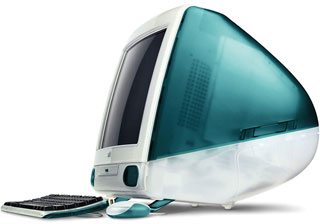 There is the USB port, but that’s relatively slow (compared with SCSI) and has to share bandwidth with the keyboard, mouse, and any other USB peripheral you may add.
A Tried and True Solution
Apple has already solved this problem with its PowerBooks. Several models let you pop out the CD-ROM drive and insert a floppy drive – without even powering down the computer.
Apple should apply the same technology to iMac. Need a floppy? Eject the CD-ROM player and insert the floppy drive module. Just put the necessary connectors in the back of the drive bay for an EDI hard drive, ATAPI CD-ROM, and a floppy drive. Third parties will undoubtedly provide Zip drives, optical drives, DVD-ROM drives, and other options for us.
- Microsoft and Intel, with support from Compaq, are already pushing Device Bay, a standard for removable drive mechanisms. By adopting the Device Bay standard, or at least a subset of it, Apple could simplify bringing popular devices to its next generation Macintosh. [Update: Device Bay was proposed in March 1997 and floundered, never becoming a standard, although HP did use the concept in its line of Media Center PCs.]
Not only would this solve the problem of moving data without a network or backing up crucial files, it would also provide a much faster interface than USB without adding an extra port on the back of the computer.
Other Benefits
Not only would adopting Device Bay show Apple to be a forward looking company (who can question that after iMac?), it could also be used to cut costs. Apple could approach the $1,000 mark by making the CD-ROM optional. Users could buy iMac with CD, DVD, floppy, Zip, or nothing at all in the bay.
Imagine the extra security for businesses and schools if there was no way for users to put their own software (let alone viruses) on iMac. A locking Device Bay insert could prevent users from using their own drives where security is important.
This could also save money on networks. One CD or DVD player, one Zip drive, and one floppy drive would let information services do work on any iMac.
And the iMac with an empty Device Bay becomes an instant network computer.
Further Reading
- iMac: a Second Look
- iMac: Nearly Perfect
- iMac Specifications, Low End Mac
- No $500 Mac This Year, Mac Musings
- A Perfect Compact Mac, Mac Musings
- USB and Other Mac Ports, Online Tech Journal
keywords: #imac #devicebay
